Repository navigation
project_files
QElectroTech saves a project in one of two kinds of file:
.qetz — zipped project |
.qet — project |
|
|---|---|---|
| What it is | a zip archive: one file per folio, the symbols, title blocks and pictures as files, and the engineering data in an SQLite database | one XML file holding everything |
| Default for saving | yes, since PR #1472 (merged 14 October 2026) | it was, before that |
| Opens in | QElectroTech 0.200.1 development builds since 14 October 2026 | every version |
| Size | small: compressed, each picture stored once as an image file | large: pictures are stored as base64 text |
Both hold the same project. Opening a .qetz and saving it as .qet gives
the same file a plain .qet save gives, and older .qet files keep opening
as they always did.
The format was added as a choice in PR #1462 and made the default in #1472; the discussion behind it is #1440.
| You… | QElectroTech… |
|---|---|
| save a new project | asks for a name in Save as, with the file type Zipped project QElectroTech (*.qetz) selected |
save a project opened from a .qetz
|
writes the .qetz again |
save a project opened from a .qet
|
writes name.qetz beside name.qet and leaves the .qet as it was. The project is then the .qetz
|
| choose File → Save as | lets you pick either file type |
| choose File → Save a copy for an older QElectroTech | writes a .qet copy; the project keeps its own file |
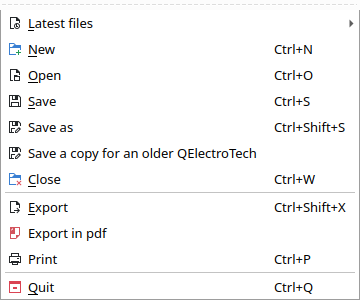
The first time you save a project opened from a .qet, a message titled
Save as a zipped project says what is happening:
This project was opened from name.qet. It is saved as name.qetz, beside it, in the zipped project format; name.qet stays as it is.
To write a file for a version of QElectroTech that cannot open name.qetz, use File > Save a copy for an older QElectroTech.
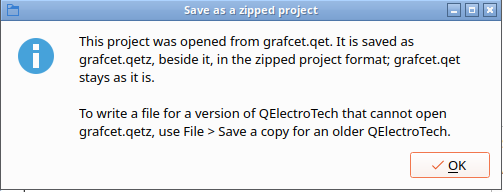
If name.qetz already exists there, the same message asks Replace it?
first; Cancel saves nothing.
The automatic backup (Automatic backup of projects in Settings →
Configure QElectroTech → General) saves the same way, without the message:
a project opened from a .qet gets its .qetz beside it.
If the .qetz cannot be written beside the .qet — the folder is read-only,
for example — the save fails with Cannot save and the file name, and the
project stays the .qet it was opened from. Use Save as to save it
somewhere else. Development builds from 14 October 2026, before
PR #1483,
showed only "Permission denied" and then named a .qetz that did not exist.
There is no setting that makes .qet the default again. Two ways to get a
.qet:
-
File → Save as, file type Project QElectroTech (*.qet). The project
is then that
.qet, and later saves write it. -
File → Save a copy for an older QElectroTech. It writes a
.qetand leaves the project on its own file, so later saves still write the.qetz. Use it to hand a project to someone on QElectroTech 0.200.0 or older.
Typing a name ending in .qetz in Save as saves a .qetz whichever file
type is selected.
File → Open lists both under QElectroTech project (*.qet *.qetz), and
a .qetz opens like any project: from the command line, the recent files
list, or a double-click once file types are registered (§7).
A .qetz from a later version. The file says which format it is and the
oldest format allowed to read it. If a later QElectroTech wrote it but allows
this one to read it, the project opens read-only, with the message This
project was saved by a later version of QElectroTech. It is opened
read-only, so that saving it cannot lose what this version does not know.
Use Save As to keep a copy in this version's format. If it does not allow
it, the file is refused with a message saying it was made by a later
QElectroTech.
A damaged or hand-edited .qetz is refused with a message saying what is
wrong: an unsafe or repeated name in the zip, a database whose rows do not
match the folio files, and so on. Nothing in the file is run.
A .qetz is an ordinary zip; any unzip tool opens it.
unzip -l project.qetz| Entry | Holds |
|---|---|
mimetype |
application/x-qet-project+zip |
manifest.xml |
the format number, the oldest format allowed to read the file, and the QElectroTech that wrote it |
project.xml |
the project's own settings (defaults for new folios, numbering, cables) and the list of its folios, symbols and title blocks, each pointing to its file |
project.sqlite |
the engineering data, see below |
folios/<uuid>.xml |
one file per folio: what is drawn on it and where |
elements/… |
the project's copy of each symbol it uses, as .elmt files |
titleblocks/<name>.titleblock |
the project's title block templates |
images/<sha256>.png |
each picture once, as an image file |
Each fact is kept once. The database holds what things are; the folio files hold where they are drawn:
in project.sqlite
|
in the folio file | |
|---|---|---|
| Symbol | its information (label, comment, manufacturer…), label prefix, cross-reference links | which symbol it is, position, rotation |
| Wire | its two ends, number, function, voltage, colour, section | its path, where its number is drawn |
| Folio | title block fields and custom variables | everything drawn on it |
| Terminal strip | its terminals, their order and bridges | the strip as drawn |
What QElectroTech works out again when it opens a folio — a symbol text that only shows the symbol's information, a wire's description of its ends — is not stored at all.
Saving twice gives the same bytes. Every entry is dated 1 January 1980, not with the save time, so a project saved again without changes is byte-for-byte the same file (PR #1467). Development builds from before that wrote dates that unzip tools showed as 1979 or 1901.
The full format — every table and column, how rows are keyed, the version
rules and what reading checks — is sources/container/QETZ-FORMAT.md in the
source tree.
| Table | One row per |
|---|---|
meta |
setting of the file, including format
|
project_property |
project-wide variable |
folio |
folio, in folio order (pos from 1), with its title block fields as columns |
folio_property |
custom title block variable of a folio |
element |
symbol placed on a folio: its label prefix and frozen-label flag |
element_info |
piece of symbol information (name, value, show) |
link |
cross-reference link of a symbol |
conductor |
wire: its two ends, number, formula, function, voltage, colour, section, cable |
terminal_strip, strip_terminal, strip_bridge, strip_bridge_terminal
|
terminal strip, terminal, bridge, bridged terminal |
Every row is keyed by its item's uuid — a folio, symbol or wire keeps its row
when folios are reordered (PR #1473).
True/false values are stored as 0/1. The format number is also in
PRAGMA user_version.
Unzip project.sqlite and open it with any SQLite tool — the sqlite3
command line, DB Browser for SQLite, Python, LibreOffice Base:
unzip -o project.qetz project.sqlite -d extracted
sqlite3 extracted/project.sqlite ".tables"
sqlite3 extracted/project.sqlite \
  "SELECT e.uuid, i.value FROM element e
     JOIN element_info i ON i.element_uuid = e.uuid
    WHERE i.name = 'label' ORDER BY i.value;"
Without unzipping, from Python:
import sqlite3, tempfile, zipfile

with tempfile.TemporaryDirectory() as tmp:
    zipfile.ZipFile("project.qetz").extract("project.sqlite", tmp)
    db = sqlite3.connect(f"{tmp}/project.sqlite")
    for folio, title in db.execute("SELECT pos, title FROM folio ORDER BY pos"):
        print(folio, title)
    db.close()
Two things to know:
- Read, do not edit. QElectroTech checks that the database and the folio files agree when it opens the file, and refuses it if they do not. Change a project in QElectroTech, or with a script.
-
This is not the database the parts list reads. The views behind parts
lists, the wiring list and summary tables (
element_nomenclature_view,wiring_list_view…) belong to the working database QElectroTech builds when a project opens; they are not in the file. See The project database.
Other tools that take a .qetz:
-
The command line: the exports and
--infotake a.qetzas they take a.qet, and--resavewrites a.qetzwhen the output name ends in.qetz, a.qetotherwise — a way to convert in either direction:qelectrotech --resave old.qet new.qetz qelectrotech --resave project.qetz for-older-versions.qet
See CLI Reference.
-
The MCP server reads and writes
.qetz(it converts through QElectroTech, so the first read of a big one takes as long as a save).
Building a folio — creating every symbol, wire and text on it — is most of the time a big project takes to open. Since PR #1468 (and by default since #1472), QElectroTech reads every folio's title block and data when a project opens, but builds a folio's drawing only when it is needed:
- opening shows the first folio and builds it;
- clicking a folio's tab builds that folio the first time, together with the symbols on other folios that its cross-references and folio reports point to;
- printing, exporting, and Search and replace build every folio first;
- numbering, the wiring list export, and changing a folio's title, author or revision work from the project database, without building folios.
This works for .qet and .qetz alike, but only for a file that gives
every folio, symbol and wire its own uuid — anything saved by a recent
version. An older file opens with every folio built, as before, and the log
says why, for example:
Project opened with every folio built: a folio has no saved uuid
Saving it once with this version adds the uuids (PR #1471).
To build every folio on opening anyway — to compare, or if something looks
wrong — start QElectroTech with the environment variable
QET_EAGER_FOLIOS=1:
QET_EAGER_FOLIOS=1 qelectrotech project.qetzThe variable QET_LAZY_FOLIOS=1, which switched this on before #1472, no
longer does anything.
Measured in PR #1472 on a 136-folio project:
.qet |
.qetz |
|
|---|---|---|
| Open | 23 s | 3.5 s |
| File size | 17 MB | 2.2 MB |
Saving a .qetz writes the folios you have not changed straight from the
file without building them. The first save of a .qet as a .qetz builds
every folio once.
- In a
.qetz, each picture is an image file handed straight to its folio (PR #1470): a project with 140 MB of pictures opened in 3.8 s instead of 11.8 s. A.qetwith pictures also opens faster: each picture is decoded once instead of twice. - The pictures of one folio are decoded at the same time, one per processor core (PR #1477). A folio with 22 photos opened in 12.5 s instead of 21.3 s. A folio with only one picture gains nothing.
- A project saved before project uuids were stored no longer copies the whole file twice in memory while opening (PR #1476).
See Pictures on a sheet for what pictures cost in the file.
| System | How .qetz is registered |
|---|---|
| Windows, installer | the installer associates .qetz with QElectroTech, like .qet
|
| Windows, portable archive |
register_filetypes.bat registers .qetz too — see Windows without admin rights
|
| Linux | MIME type application/x-qet-project+zip, in the shared MIME file and the AppStream data |
| macOS | declared in the application's Info.plist
|
Development builds from 13–14 October 2026 wrote the MIME type as
application/x-qelectrotech-project+zip
(PR #1483
renamed it); those files still open, and the Linux MIME file recognises both.
-
QElectroTech 0.200.0 and older cannot open a
.qetz. Hand them a copy from File → Save a copy for an older QElectroTech. -
A
.qetzis not one text file. To read or diff it by hand, unzip it: the folio files andproject.xmlare XML, the engineering data is in the database. For a single XML file, save a.qet. -
Do not edit the inside of a
.qetzby hand. A database row with no item, or an item with no row, makes the file refused. - The first save of a
.qetas.qetz, printing, exporting and Search and replace still build every folio.
- The project database — the working database built when a project opens, and what reads it
-
Project XML — the XML a
.qetholds, and a.qetzholds in parts -
CLI Reference —
--resave, exports,--info - Pictures on a sheet
- FAQ
