-
Notifications
You must be signed in to change notification settings - Fork 0
20239 September 2023
Article Type: Release Notes Audience: All Users Module: Platform Releases
Note: QA Release Date: September 5, 2023. Production Release Date: September 19, 2023.
Fall is kicking off with a release full of new features and enhancements - read on to find out more!
The September 2023 Fuuz release includes a new set of features for site administrators to more tightly manage permissions for users based on the IP addresses from which they're accessing Fuuz. These features add new rule types to the policy system which, combined with allow and deny effects, allow flexible whitelisting and blacklisting of IP addresses or CIDR ranges for specific or broad permissions in Fuuz. For more information on policies, check out our knowledge base article Getting Started With Visual Policy Editor.
The following policy explicitly denies access to query employee names or date of birth when the request IP is not in the provided CIDR range. This would be paired with a separate policy which grants access to those resources for administrative users, ensuring they're only allowed to access them when the request originates from your static IP range. This approach allows administrators to write policies which generally allow access, but selectively deny access to sensitive resources based on IP address.
{
"statements": [
{
"effect": "deny",
"actions": [
"graphql:*"
],
"resources": [
"graphql:humanCapitalManagement:employees:employee:firstName",
"graphql:humanCapitalManagement:employees:employee:lastName",
"graphql:humanCapitalManagement:employees:employee:dateOfBirth"
],
"rules": [
{
"ipNotInCidrList": [
"192.168.0.0/24"
],
"message": "Employee information must be accessed from the internal network."
}
]
}
]
}As another example, the following policy only allows access to query procurement resources when the request originates from the listed IP addresses. This approach is a standalone policy which allows administrators to bake IP address restrictions into broader policies directly, setting IP restricted access as the default rather than the exception. Note that if this policy is attached to a user with other policies which grant access without an IP rule applied, access will be granted regardless of the request IP.
{
"statements": [
{
"effect": "allow",
"actions": [
"graphql:query"
],
"resources": [
"graphql:supplyChainManagement:procurement:*"
],
"rules": [
{
"ipInCidrList": [
"192.168.0.4",
"192.168.0.5"
]
}
]
}
]
}The 2023.9 release includes a significant new feature for calendars - support for resources and a resource view! Calendar resources provide a way to allocate things - rooms, people, machinery, etc. - to a calendar event, and then view the utilization of those resources in a new resource view. Calendar resources help support a wide range of Fuuz-built or custom scheduling applications. To read more about the Calendar system in Fuuz, check out our Knowledge Base articles on Calendars and Calendar Resources.

The release also includes a wide variety of smaller changes to calendar event bindings and UI inputs to better handle issues like time zones, all-day events, and repeating events.
This month, we're also rolling out support for multi-factor authentication (MFA) using tokens generated from authenticator apps. This method provides a more convenient option than the existing emailed token method for many MFA users. Fuuz users can configure multi-factor authentication for their accounts, either email or token-based, on the My Profile page; administrators can configure MFA settings for other users via the Identity Provider or Enterprise User screens. For more information on configuring multi-factor authentication, see the Fuuz Knowledge Base article on how to Configure Single Sign-On.

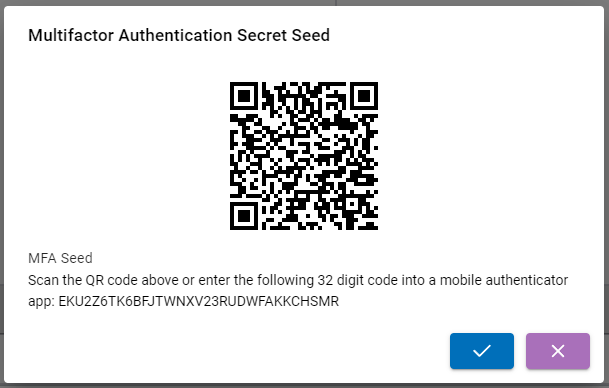
We have several more improvements to the MFA system in Fuuz on the way, including options for administrators to enforce MFA for their users; keep an eye out for those in future releases!
The September release includes an exciting new transform binding which brings our GraphQL API predicate syntax into scripts with support for filtering arbitrary JSON objects. This allows app designers to use a familiar syntax for filtering complex objects, and to use the same predicate objects for data retrieved from external APIs as are already used with the Fuuz API. You can see a few examples of how to use this new binding below, and you can read more about this new binding in the Fuuz Knowledge Base article Fuuz Bindings: $predicateFilter.
An equality comparison. Matches when the field value equals the provided input value.
$predicateFilter(
[
{ "id": 1, "label": "One" },
{ "id": 2, "label": "Two" },
{ "id": 3, "label": "Three" },
{ "id": 4, "label": "Four" }
],
{
"id": { "_eq": 1 }
}
)
Result:
[{ "id": 1, "label": "One" }]Performs an object contains comparison. The predicate matches when the JSON field contains the provided JSON path/value entries.
$predicateFilter(
[
{ "data": { "id": 1, "code": "A", "active": true } },
{ "data": { "id": 2, "code": "B", "active": true } },
{ "data": { "id": 3, "code": "A", "active": false } },
{ "data": { "id": 4, "code": "B", "active": false } },
{ "data": { "id": 5, "code": "A", "active": true } }
],
{
"data": {
"_containsObject": {
"path": [],
"value": { "code": "A", "active": true }
}
}
}
)
Result:
[
{ "data": { "id": 1, "code": "A", "active": true } },
{ "data": { "id": 5, "code": "A", "active": true } }
]Object payloads are filtered in a similar way as with the $sift function. Each property of the object is included in the result only if its value satisfies the provided predicate.
$predicateFilter(
{
"foo": { "id": 1, "code": "A" },
"bar": { "id": 2, "code": "B" },
"baz": { "id": 3, "code": "a" }
},
{ "code": { "_eq": "A" } }
)
Result:
{
"foo": { "id": 1, "code": "A" },
"baz": { "id": 3, "code": "a" }
}In coming releases, we'll add a data flow node for this new predicate binding to simplify using it in data flows, and we're already working on a visual designer for these predicates to allow users to build complex filter predicates with a few mouse clicks. Look out for those features!
- Added module field to data model record
- Added checks for user, tenant, and user tenant active status during API key verification
- Added support for app token multi-factor authentication
- Implemented a streamlined user profile screen
- Added validation to ensure administration tenant can't be deactivated
- Corrected
updateUserPasswordmutation to work with any provider of the "internal" type rather than just the default - Added support for IP address whitelisting and blacklisting in access control policies
- Added Query Builder button to API explorer
- Improved query relation errors to provide greater detail and to return partial data for invalid relations when possible
- Added custom scalar for dates without a time component
- Added configuration option for Edge Gateway log retention
- Added configuration for degree of parallelism to Plex Datasource node
- Implemented significant changes to improve ODBC connector stability
- Updated designer metadata to include flowId, versionId, version, and deploymentId
- Added Schedule Frequencies tab to data flow screens
- Updated to correctly order console output for breakpointed nodes
- Updated remaining services to use system schedule events generated by the scheduler service
- Added
$predicateFilterbinding to allow filtering any JSON data using GraphQL-style predicates
- Updated package installation to correctly handle platform version numbers from build environments
- Fixed an issue with flow buttons not evaluating dynamic payload
- Updated console UI to use in-house package for greater customizability
- Fixed an issue with time zone handling in date/time popups
- Added a "close" X to hide table and form indicators if they're in the way
- Added calendar resources schema and UI
- Applied several fixes to calendar input and binding functions to better handle time zones and edge cases
- 20238-August-2023
- 202310-October-2023
- Getting-Started-With-Visual-Policy-Editor
- Fuuz-Bindings-$predicateFilter
- Configuring-Single-Sign-On
Source: support.fuuz.com
Getting Started (14)
- Access Field Level Help within the Fuuz Platform
- Field-Level Help
- Fuuz Platform 101: Low/No-Code Technology in Manufacturing
- Fuuz Platform Architecture
- Getting to Know the Fuuz Platform
- Logging into Fuuz – Cloud Access
- Manage what displays in Field Level Help throughout Fuuz
- Recovering Your Fuuz Account
- Sharing A Page
- Switching Between Apps in Fuuz
- Switching between Fuuz Environments (Build, QA, Production)
- Trouble Logging Into Fuuz
- Unique Email Plus Addressing
- Welcome To Industry Accelerators!
Training Guides (52)
Applications
- Brand and Configure Your Application
- Create an Application
- Deactivate (Retire) an Application
- Find Pages Beyond the Left Menu
- Install a Fuuz Package
- Navigate the Application Designer
- Retire an Application
Access & Users
- Approve Access Requests
- Approve Application Access Requests
- Configure the Internal Password Policy
- Create a Role
- Create an API Key
- Deactivate and Reactivate a User
- Grant Permissions with Policies
- Investigate Login Activity
- Invite a User to an Application
- Manage App Users
- Request Access to an Application
- Switch Applications, Roles, and Environments
- Understand Developer Access
- Understand Web Access
- Use the User Menu (Profile, Theme, and More)
Data Models & Schema
- Add a Custom Field
- Create a Data Model
- Create a Sequence
- Design Model Fields in the Schema Designer
- Relate Two Data Models
Screens
Weather Lookup Series — guided 3-part build
- Part 1 · Build the Screen (Beginner)
- Part 2 · Store the Readings (Intermediate)
- Part 3 · Watched Locations & Scheduled Capture (Advanced)
Data Flows & Integrations
- Call an External API with a Flow
- Connect to External Systems
- Create a Data Flow
- Create a Notification Channel
- Create a Webhook
- Save Queries, Scripts, and Data Mappings
- Schedule a Data Flow
- Use the Script Editor
Data, Reporting & Monitoring
- Browse Data with Data Explorer
- Build a Document (Report or Label)
- Check Component References
- Create Configuration Records (Modules, Units, Calendars, and More)
- Explore the GraphQL API
- Export Data
- Import Data into an Application
- Investigate Application Logs
- Save an Export Configuration
- Trace a Data Change
Enterprise & Organizations
Platform Concepts & Architecture (10)
- Bridging the Red and Blue Data Divide - How Fuuz Became the First Industrial Platform to Merge Operational and Business Intelligence
- Claude AI Skills for the Fuuz Platform
- Cool Things we built with Fuuz Episode 1 12.5.2025 (Public)
- Differences between MES and ERP from an ERP Consultant Eric Kimberling
- Fuuz can be your "Connected Worker Platform"
- Listen and Learn what MES is and what makes it unique
- Manufacturers struggle with Build versus Buy for their MES and what are the Core 4 Elements
- Stock Price Application
- Why All Manufacturers Build their MES System Part 1
- Why All Manufacturers Build their MES System Part 2
Screens & Application Design (17)
- Application Designer Guide
- Array Input
- Combobox
- Dynamic Field Configurations
- Fuuz Deployment Methodologies
- Fuuz Form Detail Screen Specification
- Historical Data Table Screen Design Standard
- JSON
- JSON Form Fields in Action Steps
- JSON Schema Inputs
- Master Data Table Screen Design Standard
- Mobile Screen Design Standard
- Screen Context Container
- Screen Generation (AI) Flow Template V1.5.1
- Setup Data Table Screen Design Standard
- Table Column Conditional Formatting
- Transform Data in a Column
Data Models & Schema (8)
Data Flows & Scripting (51)
Designing Flows
- Data Flow Design Standards
- Data Flow Logs
- Debugging and Testing our Fuuz Data Flows
- Flow Schedules
- Fuuz Data Flows enable DataOps at Scale, ETL, iPaaS and more
- How to Create APIs Using Data Flows in Fuuz
- How To General E-Commerce Integrations using Data Flows in Fuuz iPaaS
- How to Setup a daily file import using Fuuz Data Flows
- Managing Large Datasets in Fuuz: Data Flow Engine Performance Optimization
- The Power of Data Flows - Unlocking Industrial Intelligence with Fuuz
- Using Fuuz with FTP integrations and Data Flows iPaaS
Data Flow Nodes
- Data Flow Nodes Reference
- Debugging & Context Nodes
- Flow Control Nodes
- Fuuz Platform Nodes
- IIoT & Gateway Nodes
- Integration Nodes
- Notification Nodes
- Source & Trigger Nodes
- Transform Nodes
JSONata Reference
- Aggregation Functions
- Array Functions
- Boolean Functions
- Boolean Operators
- Comparison Operators
- Composition
- Construction
- Constructs
- Custom Fuuz Only JSONata Library
- Date Time Functions
- Date Time Processing
- Expressions
- Fuuz Bindings: $predicateFilter
- Higher Order Functions
- Jsonata Tutorial
- Numeric Functions
- Numeric Operators
- Object Functions
- Other Operators
- Path Operators
- Predicate Expressions
- Processing Model
- Regex
- Simple Queries
- Slow Transform Performance: JSONata vs JavaScript Optimization Guide
- Sorting Grouping and Aggregation
- String Functions
Scripting
Integrations & Connectors (30)
General & iPaaS
- API Keys
- Cloud Connectors - Complete Reference Guide
- Connecting a CRM with your ERP using Fuuz
- Connecting a Vending Machine to your ERP system using Fuuz
- Creating a Scheduled Integration & Sending a CSV File in an Email
- Debug a NetSuite SOAP API integration
- Fuuz Connections help you integrate your Systems and Devices
- Fuuz has lists of Connectors and Drivers you can use
- Fuuz has pre-built integration Connectors
- How to create a check an ODBC connection with another system
- How to Create a RESTful API Using the Fuuz Platform
- How to create a simple Integration and Store data in Fuuz
- How To Design or Configure Policies and Policy Groups for my App in Fuuz
- How to Integrate Fuuz with another product or another API
- How to Integrate with an HR system like ADP using Fuuz iPaaS
- How to use API Explorer and GraphQL to Query Data in Fuuz for Beginners
- How you Integrate your ERP with your MES
- Industry 3 and Industry 4 differences in ERP and MES Integrations
- Integrated Carrier Package
- Make REST-Based Calls With An API Key
- Policy Groups
- System connectivity validation - testing a connection when your 3rd party moves its hosting
- Using Fuuz as an iPaaS to Connect - to an API, Collect - Data from the API, Store - that data in Fuuz tables
Plex
- How to connect using Plex UX datasources from Fuuz iPaaS
- How to integrate with Plex Classic using Fuuz iPaaS
- How to Setup and Connect to Plex APIs
EDI
IIoT & Edge Gateway (18)
- Edge Connections: Complete Industrial Integration Reference
- Edge Gateway Flows
- Edge Gateway Installation Step-by-Step
- Edge to Cloud Infrastructure
- Gateway Deployment & Architecture
- Gateway System Requirements
- How IIoT fits into the Industrial Data "Stack"
Physical Device Connectors
- Connecting To Kepware OPCUA Server
- Fanuc Robot Connectivity using Edge Gateway
- HMI Template Standard - ISA-101 Compliant
- How to connect OPC/UA simulator to the Edge Gateway
- Modbus TCP
- MQTT
- Omron PLC/HMI NX102 Connectivity with Edge Gateway
Edge Data Connectors
Reporting, Documents & Dashboards (8)
- Building a Non-Conformance Report (NCR) Application in Fuuz
- Create responsive structured dashboard layouts using the Grid Container and Grid Cell components
- How to add visualizations (charts and graphs) to reports in Fuuz for Beginners
- How to build real-time reports in Fuuz from scratch for Beginners
- How to modify existing reports in Fuuz for Beginners
- Non-Conformance Report Accelerator
- Printing Documents
- Printing Documents From Fuuz
Administration & Access Control (27)
- Access Control
- Access Requests
- Access Requests: Overview
- Access Type Overview
- Access Types
- Add Users to Fuuz Apps
- App Admin Access
- App Management
- App Users
- Applications (Tenants)
- Authentication Events
- Change a User's Access Type
- Configurations
- Create Users and Set Access Type
- Enterprise Admin Overview
- Enterprise Users
- Enterprise Users vs Access Requests
- How To Login to your Fuuz Enterprise - Non Single Sign On
- How To Login to your Fuuz Enterprise - Single Sign On
- Identity Providers
- Notifications
- Notifications
- Organizations
- Roles
- Settings
- Switching my active Role within Fuuz
- Troubleshooting User Login Errors Due to Identity Provider Misconfiguration
Data Management (8)
Accelerators, Templates & Packages (8)
- Create a Quality Batch Golden Record Analysis Tool in Fuuz
- Fuuz Developer 101 Bootcamp - 2026 Schedule & Enrollment
- Fuuz Developer 101 Bootcamp - Program Overview
- Fuuz Industry Accelerators - Installation & Best Practices
- Fuuz Industry Accelerators - Overview
- How-To: Managing Green/Blue Deployments with Fuuz Package Management Zero-Downtime
- Model Agnostic Scheduling System APS
- Setting up In-House Fuuz
Design Standards (1)
How-To Guides (8)
- Connecting to Fuuz from a remote system to execute a Fuuz API
- Connecting to Fuuz from a remote system to execute a Fuuz API - Extended Features Part 2
- Data Mapping
- Document your Application using Atlassian Confluence and our Pre-Built App
- Fuuz Platform Capabilities
- How to add multiple data records to the Fuuz database with a single API call
- How to on Best Practices for Designing Flows in Fuuz
- Using the Transformation Explorer
FAQ & Troubleshooting (1)
Release Notes (117)
2026
- 2026.1 (January 2026)
- 2026.2 (February 2026)
- 2026.3 (March 2026)
- 2026.4 (April 2026)
- 2026.5 (May 2026)
- 2026.6 (June 2026)
2025
- 2025.1 (January 2025)
- 2025.10 (October 2025)
- 2025.11 (November 2025)
- 2025.12 (December 2025)
- 2025.2 (February 2025)
- 2025.4 (April 2025)
- 2025.5 (May 2025)
- 2025.6 (June 2025)
- 2025.7 (July 2025)
- 2025.8 (August 2025)
- 2025.9 (September 2025)
2024
- 2024.1 (January 2024)
- 2024.10 (October 2024)
- 2024.11 (November 2024)
- 2024.12 (December 2024)
- 2024.2 (February 2024)
- 2024.3 (March 2024)
- 2024.4 (April 2024)
- 2024.5 (May 2024)
- 2024.6 (June 2024)
- 2024.7 (July 2024)
- 2024.8 (August 2024)
- 2024.9 (September 2024)
2023
- 2023.5 (May 2023)
- 2023.1 (January 2023)
- 2023.10 (October 2023)
- 2023.11 (November 2023)
- 2023.12 (December 2023)
- 2023.2 (February 2023)
- 2023.3 (March 2023)
- 2023.4 (April 2023)
- 2023.6 (June 2023)
- 2023.7 (July 2023)
- 2023.8 (August 2023)
- 2023.9 (September 2023)
2022
- 2022 Q1 Fuuz Package Updates (03/11/2022)
- 2022 Q1 Fuuz Release Notes v3.87.0 (03/17/2022)
- 2022 Q1 MFGx Release Notes v3.78.0 (01/06/2022)
- 2022 Q1 MFGx Release Notes v3.79.0 (01/13/2022)
- 2022 Q1 MFGx Release Notes v3.80.0 (01/20/2022)
- 2022 Q1 MFGx Release Notes v3.81.0 (01/27/2022)
- 2022 Q1 MFGx Release Notes v3.82.0 (02/03/2022)
- 2022 Q1 MFGx Release Notes v3.83.0 (02/10/2022)
- 2022 Q1 MFGx Release Notes v3.85.0 (02/28/2022)
- 2022 Q2 Fuuz Release Notes v3.90.0 (04/14/2022)
- 2022 Q2 Fuuz Release Notes v3.91.0 (04/21/2022)
- 2022 Q2 Fuuz Release Notes v3.92.0 (04/28/2022)
- 2022 Q2 Fuuz Release Notes v3.93.0 (05/06/2022)
- 2022 Q2 Fuuz Release Notes v3.94.0 - v3.97.0 (June 13, 2022)
- 2022 Q2 Fuuz Release Notes v3.98.0 (06/16/2022)
- 2022 Q2 Fuuz Release Notes v3.99.0 (06/30/2022)
- 2022 Q3 Fuuz Release Notes v3.100.0 🎉 (07/06/2022)
- 2022 Q3 Fuuz Release Notes v3.101.0 (07/21/2022)
- 2022 Q3 Fuuz Release Notes v3.102.0 (08/11/2022)
- 2022 Q3 Fuuz Release Notes v3.103.0 (08/18/2022)
- 2022 Q4 Fuuz Release Notes v3.107.0 - v3.109.0 (10/27/2022)
2021
- 2021 Q1 MFGx Release Notes v3.29.0 (1/7/2021)
- 2021 Q1 MFGx Release Notes v3.30.0 (1/14/2021)
- 2021 Q1 MFGx Release Notes v3.34.0 (2/4/2021)
- 2021 Q1 MFGx Release Notes v3.37.0 (2/26/2021)
- 2021 Q1 MFGx Release Notes v3.38.0 (3/5/2021)
- 2021 Q1 MFGx Release Notes v3.40.0 (3/25/2021)
- 2021 Q1 MFGx.io Release Notes v3.32.0 (1/21/2021)
- 2021 Q1 MFGx.io Release Notes v3.33.0 (1/28/2021)
- 2021 Q2 MFGx Release Notes v3.41.0 (4/1/2021)
- 2021 Q2 MFGx Release Notes v3.42.0 (4/8/2021)
- 2021 Q2 MFGx Release Notes v3.43.0 (4/16/2021)
- 2021 Q2 MFGx Release Notes v3.44.0 (4/22/2021)
- 2021 Q2 MFGx Release Notes v3.45.0 (4/29/2021)
- 2021 Q2 MFGx Release Notes v3.47.0 (5/13/2021)
- 2021 Q2 MFGx Release Notes v3.48.0 (5/20/2021)
- 2021 Q2 MFGx Release Notes v3.48.0 (5/27/2021)
- 2021 Q2 MFGx Release Notes v3.50.0 (6/03/2021)
- 2021 Q2 MFGx Release Notes v3.51.0 (6/10/2021)
- 2021 Q2 MFGx Release Notes v3.52.0 (6/17/2021)
- 2021 Q2 MFGx Release Notes v3.54.0 (6/28/2021)
- 2021 Q3 Fuuz Release Notes v3.58.0 (7/22/2021)
- 2021 Q3 MFGx Release Notes v3.55.0 (7/1/2021)
- 2021 Q3 MFGx Release Notes v3.60.0 (8/5/2021)
- 2021 Q3 MFGx Release Notes v3.61.0 (8/17/2021)
- 2021 Q3 MFGx Release Notes v3.62.0 (8/19/2021)
- 2021 Q4 MFGx Release Notes v3.68.0 (10/8/2021)
- 2021 Q4 MFGx Release Notes v3.69.0 (10/14/2021)
- 2021 Q4 MFGx Release Notes v3.70.0 (10/21/2021)
- 2021 Q4 MFGx Release Notes v3.71.0 (10/28/2021)
- 2021 Q4 MFGx Release Notes v3.72.0 (11/04/2021)
- 2021 Q4 MFGx Release Notes v3.73.0 (11/11/2021)
- 2021 Q4 MFGx Release Notes v3.74.0 (11/19/2021)
- 2021 Q4 MFGx Release Notes v3.75.0 (12/02/2021)
- 2021 Q4 MFGx Release Notes v3.76.0 (12/09/2021)
- 2021 Q4 MFGx Release Notes v3.77.0: The Holiday Update (12/16/2021)
2020
- 2020 Q2 MFGx Release Notes v2.32.0 (4/9/2020)
- 2020 Q2 MFGx Release Notes v2.33.0 (4/16/2020)
- 2020 Q2 MFGx Release Notes v2.35.0 (4/30/2020)
- 2020 Q2 MFGx Release Notes v3.5.0 (6/18/2020)
- 2020 Q2 MFGx Release Notes v3.6.0 (6/25/2020)
- 2020 Q2 MFGx.io Release Notes v2.32.0 (4/9/2020)
- 2020 Q3 MFGx Release Notes v3.10.0 (7/23/2020)
- 2020 Q3 MFGx Release Notes v3.11.0 (7/30/2020)
- 2020 Q3 MFGx Release Notes v3.13.0 (8/13/2020)
- 2020 Q3 MFGx Release Notes v3.17.0 (9/21/2020)
- 2020 Q3 MFGx Release Notes v3.7.0 (7/6/2020)
- 2020 Q3 MFGx Release Notes v3.8.0 (7/9/2020)
- 2020 Q4 MFGx Release Notes v3.20.0 (10/13/2020)
- 2020 Q4 MFGx Release Notes v3.21.0 (10/15/2020)
- 2020 Q4 MFGx Release Notes v3.22.1 (10/22/2020)
- 2020 Q4 MFGx Release Notes v3.23.0 (11/5/2020)
- 2020 Q4 MFGx Release Notes v3.24.0 (11/12/2020)
- 2020 Q4 MFGx Release Notes v3.26.0 (12/3/2020)
- 2020 Q4 MFGx Release Notes v3.27.0 (12/10/2020)
- 2020 Q4 MFGx Release Notes v3.28.0 (12/17/2020)