-
Notifications
You must be signed in to change notification settings - Fork 0
20244 April 2024
Article Type: Release Notes Audience: All Users Module: Platform Releases
The Fuuz engineering team isn't fooling you with this month's release - it's packed with great features and improvements we're excited to share. Read on to learn more!
One of the larger initiatives we've been undertaking has been to improve the visibility and logging in the Fuuz platform. For example, last year, we added authentication event logging; later this year, we plan to add detailed API trace logging. In support of that push, this month's release includes a new log screen which shows all outbound requests made through our integration platform in a unified format, indicating who made the request, which connection was used, how long the request took, and the error message returned (if any).
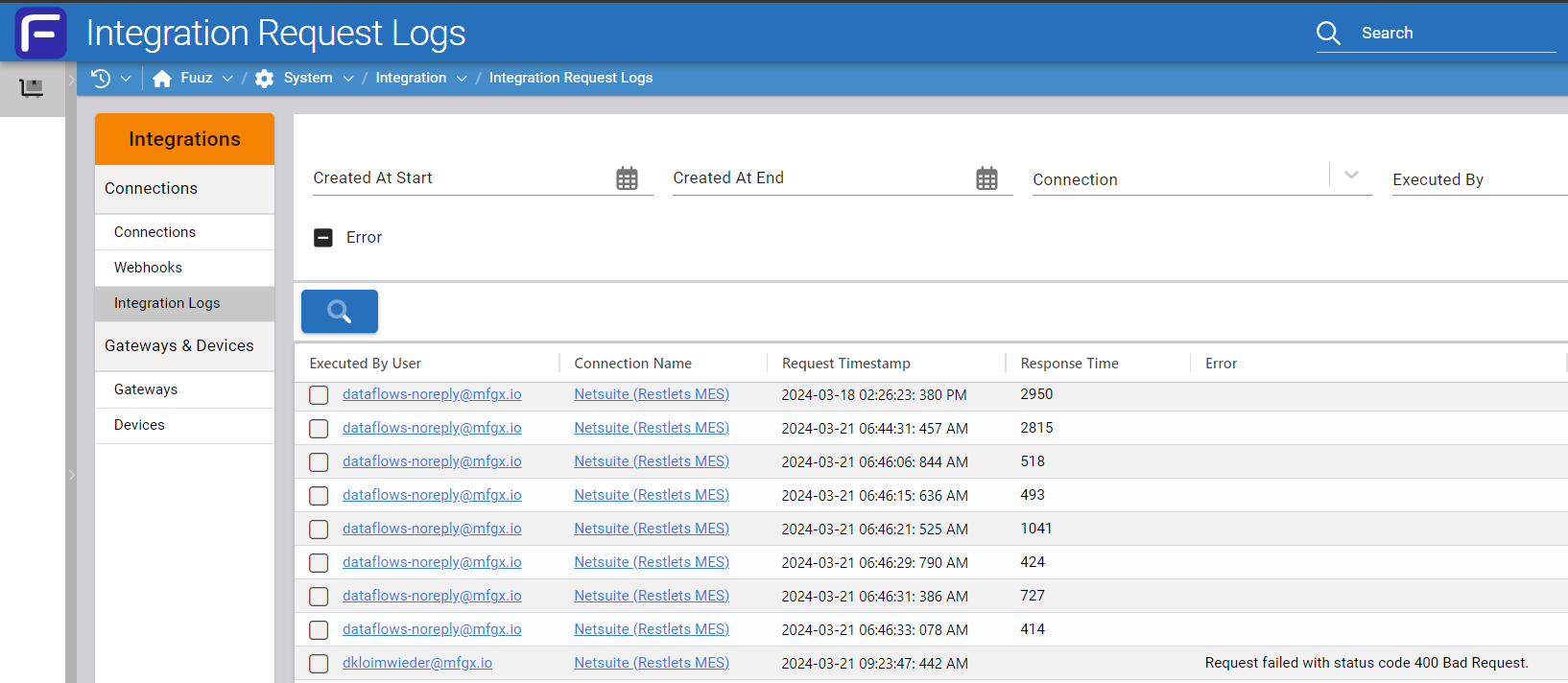
Much of this information may have been (and still is) available in the Data Flow Logs screen; but the information there wasn't comprehensive, and the log format may have varied depending on the data flow the log originated from. This new screen creates a unified view of all requests, even ones which don't originate from data flows, which is helpful when auditing connector usage and external API request volumes.
There are lots of improvements to come for this feature; for example, it doesn't currently log request or response payload information, which is something we plan to add soon to further aid with resolving integration issues when they occur.
You may recall from the February 2024 release notes that we added support for _aggregate queries two months ago. One of the gaps we identified early on was the fact that aggregate queries grouping by date fields would group by the exact millisecond - not very helpful for reporting on transactional data, where you'd typically want to group by the hour, day, or even month.
The April 2024 release includes a feature which solves that problem, and offers some extra API functionality for free: the ability to round date and numeric field values directly in the API!
For example, let's say we wanted to create a report summarizing the total time spent in each workcenter mode in the Fuuz MES app. We can now apply a round argument to the occurAt field, specifying that we want to round to by week - or by hour, day, month, or any other unit of time. The API framework will automatically round to the specified date unit, group by mode, and compute the sum of the duration, ready to display in a table or visualization.
Combined with the pivot and row aggregation features already present in the table view system, this supports the creation of reports and snapshot screens based on transactional data like workcenter history:
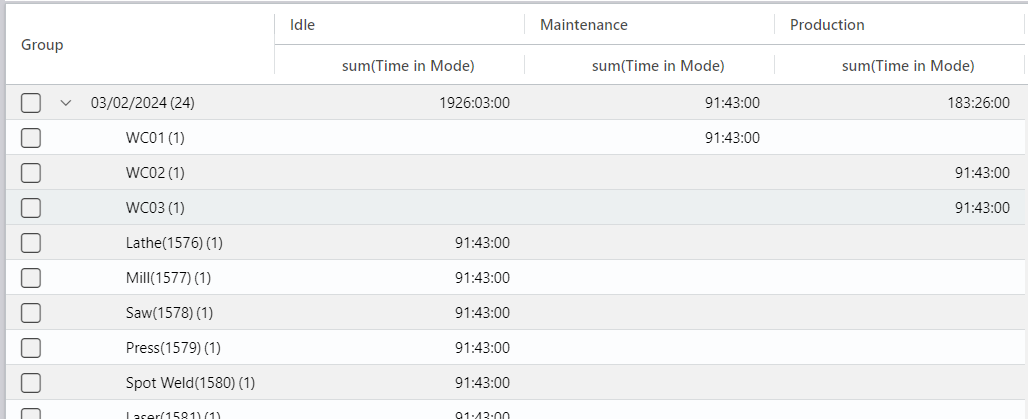
For the moment, this feature is somewhat tricky to use in the screen designer - something we plan to address in Q2 - but it's available as an API feature in this release for use in data flows, documents, and screens which run custom queries. We also plan to use this feature as the foundation of a new visualization builder down the road.
The 2024.4 release also includes a long-awaited improvement to the query builder: it now supports building mutations! In the API explorer, users can simply click the Mutation Builder button, select the model and mutation type, and optionally select which fields to return, and have a simple mutation generated for them.
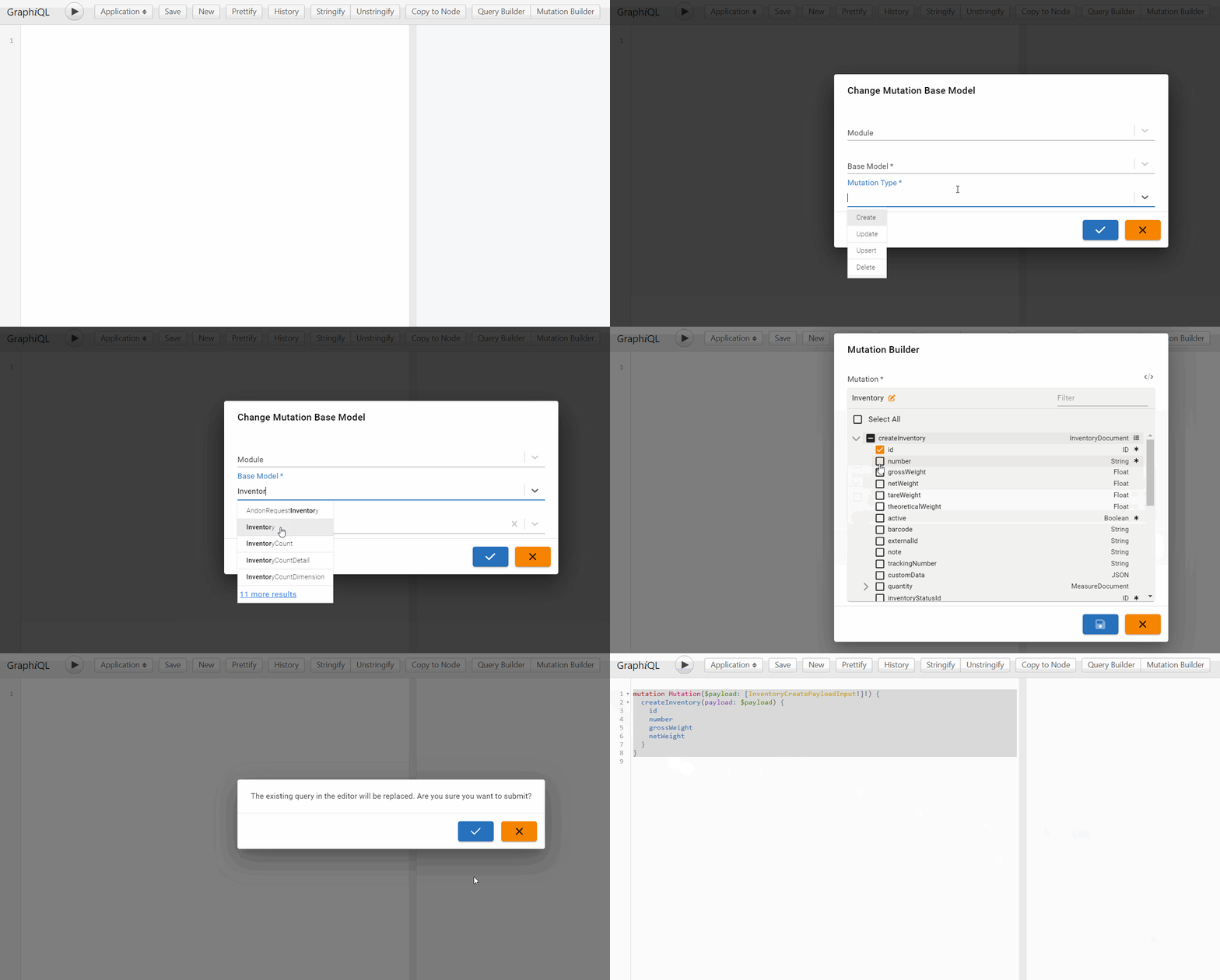
This same feature is also available in the Action element in the Screen Designer, and in Mutate nodes in the Flow Designer.
The April 2024 release introduces a change we've been planning for some time: it limits the designers to only one draft (undeployed) version for each component (screen, flow, etc.) This change might cause some confusion, especially if a component has older draft versions hanging around that need to be deleted before work can be continued from the "latest" version. The decision to apply this limitation was made for a few reasons:
- The possibility of creating more than one draft version by, for example, opening the current deployed rather than current draft version of a flow or screen introduced a lot of room for errors: deploying the wrong set of changes, not deploying all pending changes, an unclear version history, etc. One draft version pushes all work to happen on the same draft instead.
- As part of our ongoing work to simplify app development in Fuuz, we're trying to reduce the number of things a user of the platform needs to worry about - and versioning is one of those. Our goal is to automatically version and deploy changes wherever possible in the future, and eliminating the possibility of multiple draft versions brings us closer to that goal.
- The most common legitimate use for the ability to save one-off versions was to create a "copy" of a component for testing some changes or debugging. Unfortunately, those versions often still caused the same confusion mentioned above, and could cause significant trouble if they were accidentally deployed. Instead, we've added support for copying the entire component to each designer's file menu, supporting that use case in a way that clearly separates the copied changes from the original screen.

Google Chrome has announced a major platform version update for browser extensions they're referring to as "Manifest V3". This update necessitates significant changes to many extensions, and the Fuuz Browser Extension is no exception. Given the risks involved in big updates like this, we've packaged a beta version of the extension our customers can use to test the new Manifest V3 version of the browser extension prior to its production release to the Chrome Web Store, which will occur along with the 2024.5 release on 5/21. You can download that beta version from our public S3 bucket.
For more information on installing an unpacked extension from a ZIP archive, refer to the documentation on installing a beta version of the Fuuz Browser Extension.
- Updated Sequence and Application Configuration screens to disable non-editable fields on Application tenants
- Updated all designers to only permit one draft (undeployed) version of a given app component at a time
- Added
roundarguments to numeric (Int,Float) and date (Date,Time, andDateTime) fields to support rounding the values returned - Updated error message when deleting a document that's referenced elsewhere to include additional information on what is referencing it
- Implemented event-based service scaling to scale infrequently used services to zero replicas while not in use
- Added origin metadata to TCP client flow executions to identify source device and host
- Removed the ability to sign in to the gateway with a username and password to automatically create an API key
- Fixed an error caused by a race condition in the setup process for store-and-forward
- Added integration request logging system and screens to track all requests through the integration platform
- Added TecCom File Upload connector for TecCom Business Cloud
- Corrected a bug on the Webhooks screen with users with access to multiple enterprise environments
- Added access control policy actions and resources for subscribing and publishing to topics via websockets
- Updated to latest Socket.io server library version
- Added formatter support for JSONata script editors, accessible via the Actions menu or
Alt+Fhotkey - Added an option to switch the output panel from a console-style view to a JSON code viewer
- Updated Package Definition Editor to lock package definition versions when exported, requiring a new version to be created when further changes are made
- Corrected a bug limiting the package record selector to the first 1000 records
- Updated system screen menu sidebars to better organize screens
- Updated avatar hover menu to contextually link to relevant system screen menus based on tenant type
- Updated loading backdrops so they no longer cover error snackbars
- Added support for nesting forms and cards within other forms and cards
- Added the ability to search properties and property values in the Property Editor panel
- Added a Generate New Version action to re-generate a table or form from a template
- Added a Keyboard Type property to Text inputs to provide a hint to mobile devices as to what kind of virtual keyboard to display
- Updated to prevent deleting the last tab on a screen
- Updated table columns to set the correct format when selecting a field from the picker
- Updated input element Label property to be transformable to allow dynamic field labels
- Corrected a bug causing the screen designer to get stuck when creating a new screen
- Added "Recently Closed" section to the Navigator panel
- Added a new "multi-type" input for use in schema-driven UIs that accept variable types for the same property (e.g. integer or string)
- Added support for building mutations to the GraphQL input in the API explorer, mutate nodes, and screen actions
- Corrected an issue with the default additional query fields on Image elements
- 20243-March-2024
- 20245-May-2024
- 20242-February-2024
- Aggregate-Query-API
- How-to-use-API-Explorer-and-GraphQL-to-Query-Data-in-Fuuz-for-Beginners
Source: support.fuuz.com
Getting Started (14)
- Access Field Level Help within the Fuuz Platform
- Field-Level Help
- Fuuz Platform 101: Low/No-Code Technology in Manufacturing
- Fuuz Platform Architecture
- Getting to Know the Fuuz Platform
- Logging into Fuuz – Cloud Access
- Manage what displays in Field Level Help throughout Fuuz
- Recovering Your Fuuz Account
- Sharing A Page
- Switching Between Apps in Fuuz
- Switching between Fuuz Environments (Build, QA, Production)
- Trouble Logging Into Fuuz
- Unique Email Plus Addressing
- Welcome To Industry Accelerators!
Training Guides (52)
Applications
- Brand and Configure Your Application
- Create an Application
- Deactivate (Retire) an Application
- Find Pages Beyond the Left Menu
- Install a Fuuz Package
- Navigate the Application Designer
- Retire an Application
Access & Users
- Approve Access Requests
- Approve Application Access Requests
- Configure the Internal Password Policy
- Create a Role
- Create an API Key
- Deactivate and Reactivate a User
- Grant Permissions with Policies
- Investigate Login Activity
- Invite a User to an Application
- Manage App Users
- Request Access to an Application
- Switch Applications, Roles, and Environments
- Understand Developer Access
- Understand Web Access
- Use the User Menu (Profile, Theme, and More)
Data Models & Schema
- Add a Custom Field
- Create a Data Model
- Create a Sequence
- Design Model Fields in the Schema Designer
- Relate Two Data Models
Screens
Weather Lookup Series — guided 3-part build
- Part 1 · Build the Screen (Beginner)
- Part 2 · Store the Readings (Intermediate)
- Part 3 · Watched Locations & Scheduled Capture (Advanced)
Data Flows & Integrations
- Call an External API with a Flow
- Connect to External Systems
- Create a Data Flow
- Create a Notification Channel
- Create a Webhook
- Save Queries, Scripts, and Data Mappings
- Schedule a Data Flow
- Use the Script Editor
Data, Reporting & Monitoring
- Browse Data with Data Explorer
- Build a Document (Report or Label)
- Check Component References
- Create Configuration Records (Modules, Units, Calendars, and More)
- Explore the GraphQL API
- Export Data
- Import Data into an Application
- Investigate Application Logs
- Save an Export Configuration
- Trace a Data Change
Enterprise & Organizations
Platform Concepts & Architecture (10)
- Bridging the Red and Blue Data Divide - How Fuuz Became the First Industrial Platform to Merge Operational and Business Intelligence
- Claude AI Skills for the Fuuz Platform
- Cool Things we built with Fuuz Episode 1 12.5.2025 (Public)
- Differences between MES and ERP from an ERP Consultant Eric Kimberling
- Fuuz can be your "Connected Worker Platform"
- Listen and Learn what MES is and what makes it unique
- Manufacturers struggle with Build versus Buy for their MES and what are the Core 4 Elements
- Stock Price Application
- Why All Manufacturers Build their MES System Part 1
- Why All Manufacturers Build their MES System Part 2
Screens & Application Design (17)
- Application Designer Guide
- Array Input
- Combobox
- Dynamic Field Configurations
- Fuuz Deployment Methodologies
- Fuuz Form Detail Screen Specification
- Historical Data Table Screen Design Standard
- JSON
- JSON Form Fields in Action Steps
- JSON Schema Inputs
- Master Data Table Screen Design Standard
- Mobile Screen Design Standard
- Screen Context Container
- Screen Generation (AI) Flow Template V1.5.1
- Setup Data Table Screen Design Standard
- Table Column Conditional Formatting
- Transform Data in a Column
Data Models & Schema (8)
Data Flows & Scripting (51)
Designing Flows
- Data Flow Design Standards
- Data Flow Logs
- Debugging and Testing our Fuuz Data Flows
- Flow Schedules
- Fuuz Data Flows enable DataOps at Scale, ETL, iPaaS and more
- How to Create APIs Using Data Flows in Fuuz
- How To General E-Commerce Integrations using Data Flows in Fuuz iPaaS
- How to Setup a daily file import using Fuuz Data Flows
- Managing Large Datasets in Fuuz: Data Flow Engine Performance Optimization
- The Power of Data Flows - Unlocking Industrial Intelligence with Fuuz
- Using Fuuz with FTP integrations and Data Flows iPaaS
Data Flow Nodes
- Data Flow Nodes Reference
- Debugging & Context Nodes
- Flow Control Nodes
- Fuuz Platform Nodes
- IIoT & Gateway Nodes
- Integration Nodes
- Notification Nodes
- Source & Trigger Nodes
- Transform Nodes
JSONata Reference
- Aggregation Functions
- Array Functions
- Boolean Functions
- Boolean Operators
- Comparison Operators
- Composition
- Construction
- Constructs
- Custom Fuuz Only JSONata Library
- Date Time Functions
- Date Time Processing
- Expressions
- Fuuz Bindings: $predicateFilter
- Higher Order Functions
- Jsonata Tutorial
- Numeric Functions
- Numeric Operators
- Object Functions
- Other Operators
- Path Operators
- Predicate Expressions
- Processing Model
- Regex
- Simple Queries
- Slow Transform Performance: JSONata vs JavaScript Optimization Guide
- Sorting Grouping and Aggregation
- String Functions
Scripting
Integrations & Connectors (30)
General & iPaaS
- API Keys
- Cloud Connectors - Complete Reference Guide
- Connecting a CRM with your ERP using Fuuz
- Connecting a Vending Machine to your ERP system using Fuuz
- Creating a Scheduled Integration & Sending a CSV File in an Email
- Debug a NetSuite SOAP API integration
- Fuuz Connections help you integrate your Systems and Devices
- Fuuz has lists of Connectors and Drivers you can use
- Fuuz has pre-built integration Connectors
- How to create a check an ODBC connection with another system
- How to Create a RESTful API Using the Fuuz Platform
- How to create a simple Integration and Store data in Fuuz
- How To Design or Configure Policies and Policy Groups for my App in Fuuz
- How to Integrate Fuuz with another product or another API
- How to Integrate with an HR system like ADP using Fuuz iPaaS
- How to use API Explorer and GraphQL to Query Data in Fuuz for Beginners
- How you Integrate your ERP with your MES
- Industry 3 and Industry 4 differences in ERP and MES Integrations
- Integrated Carrier Package
- Make REST-Based Calls With An API Key
- Policy Groups
- System connectivity validation - testing a connection when your 3rd party moves its hosting
- Using Fuuz as an iPaaS to Connect - to an API, Collect - Data from the API, Store - that data in Fuuz tables
Plex
- How to connect using Plex UX datasources from Fuuz iPaaS
- How to integrate with Plex Classic using Fuuz iPaaS
- How to Setup and Connect to Plex APIs
EDI
IIoT & Edge Gateway (18)
- Edge Connections: Complete Industrial Integration Reference
- Edge Gateway Flows
- Edge Gateway Installation Step-by-Step
- Edge to Cloud Infrastructure
- Gateway Deployment & Architecture
- Gateway System Requirements
- How IIoT fits into the Industrial Data "Stack"
Physical Device Connectors
- Connecting To Kepware OPCUA Server
- Fanuc Robot Connectivity using Edge Gateway
- HMI Template Standard - ISA-101 Compliant
- How to connect OPC/UA simulator to the Edge Gateway
- Modbus TCP
- MQTT
- Omron PLC/HMI NX102 Connectivity with Edge Gateway
Edge Data Connectors
Reporting, Documents & Dashboards (8)
- Building a Non-Conformance Report (NCR) Application in Fuuz
- Create responsive structured dashboard layouts using the Grid Container and Grid Cell components
- How to add visualizations (charts and graphs) to reports in Fuuz for Beginners
- How to build real-time reports in Fuuz from scratch for Beginners
- How to modify existing reports in Fuuz for Beginners
- Non-Conformance Report Accelerator
- Printing Documents
- Printing Documents From Fuuz
Administration & Access Control (27)
- Access Control
- Access Requests
- Access Requests: Overview
- Access Type Overview
- Access Types
- Add Users to Fuuz Apps
- App Admin Access
- App Management
- App Users
- Applications (Tenants)
- Authentication Events
- Change a User's Access Type
- Configurations
- Create Users and Set Access Type
- Enterprise Admin Overview
- Enterprise Users
- Enterprise Users vs Access Requests
- How To Login to your Fuuz Enterprise - Non Single Sign On
- How To Login to your Fuuz Enterprise - Single Sign On
- Identity Providers
- Notifications
- Notifications
- Organizations
- Roles
- Settings
- Switching my active Role within Fuuz
- Troubleshooting User Login Errors Due to Identity Provider Misconfiguration
Data Management (8)
Accelerators, Templates & Packages (8)
- Create a Quality Batch Golden Record Analysis Tool in Fuuz
- Fuuz Developer 101 Bootcamp - 2026 Schedule & Enrollment
- Fuuz Developer 101 Bootcamp - Program Overview
- Fuuz Industry Accelerators - Installation & Best Practices
- Fuuz Industry Accelerators - Overview
- How-To: Managing Green/Blue Deployments with Fuuz Package Management Zero-Downtime
- Model Agnostic Scheduling System APS
- Setting up In-House Fuuz
Design Standards (1)
How-To Guides (8)
- Connecting to Fuuz from a remote system to execute a Fuuz API
- Connecting to Fuuz from a remote system to execute a Fuuz API - Extended Features Part 2
- Data Mapping
- Document your Application using Atlassian Confluence and our Pre-Built App
- Fuuz Platform Capabilities
- How to add multiple data records to the Fuuz database with a single API call
- How to on Best Practices for Designing Flows in Fuuz
- Using the Transformation Explorer
FAQ & Troubleshooting (1)
Release Notes (117)
2026
- 2026.1 (January 2026)
- 2026.2 (February 2026)
- 2026.3 (March 2026)
- 2026.4 (April 2026)
- 2026.5 (May 2026)
- 2026.6 (June 2026)
2025
- 2025.1 (January 2025)
- 2025.10 (October 2025)
- 2025.11 (November 2025)
- 2025.12 (December 2025)
- 2025.2 (February 2025)
- 2025.4 (April 2025)
- 2025.5 (May 2025)
- 2025.6 (June 2025)
- 2025.7 (July 2025)
- 2025.8 (August 2025)
- 2025.9 (September 2025)
2024
- 2024.1 (January 2024)
- 2024.10 (October 2024)
- 2024.11 (November 2024)
- 2024.12 (December 2024)
- 2024.2 (February 2024)
- 2024.3 (March 2024)
- 2024.4 (April 2024)
- 2024.5 (May 2024)
- 2024.6 (June 2024)
- 2024.7 (July 2024)
- 2024.8 (August 2024)
- 2024.9 (September 2024)
2023
- 2023.5 (May 2023)
- 2023.1 (January 2023)
- 2023.10 (October 2023)
- 2023.11 (November 2023)
- 2023.12 (December 2023)
- 2023.2 (February 2023)
- 2023.3 (March 2023)
- 2023.4 (April 2023)
- 2023.6 (June 2023)
- 2023.7 (July 2023)
- 2023.8 (August 2023)
- 2023.9 (September 2023)
2022
- 2022 Q1 Fuuz Package Updates (03/11/2022)
- 2022 Q1 Fuuz Release Notes v3.87.0 (03/17/2022)
- 2022 Q1 MFGx Release Notes v3.78.0 (01/06/2022)
- 2022 Q1 MFGx Release Notes v3.79.0 (01/13/2022)
- 2022 Q1 MFGx Release Notes v3.80.0 (01/20/2022)
- 2022 Q1 MFGx Release Notes v3.81.0 (01/27/2022)
- 2022 Q1 MFGx Release Notes v3.82.0 (02/03/2022)
- 2022 Q1 MFGx Release Notes v3.83.0 (02/10/2022)
- 2022 Q1 MFGx Release Notes v3.85.0 (02/28/2022)
- 2022 Q2 Fuuz Release Notes v3.90.0 (04/14/2022)
- 2022 Q2 Fuuz Release Notes v3.91.0 (04/21/2022)
- 2022 Q2 Fuuz Release Notes v3.92.0 (04/28/2022)
- 2022 Q2 Fuuz Release Notes v3.93.0 (05/06/2022)
- 2022 Q2 Fuuz Release Notes v3.94.0 - v3.97.0 (June 13, 2022)
- 2022 Q2 Fuuz Release Notes v3.98.0 (06/16/2022)
- 2022 Q2 Fuuz Release Notes v3.99.0 (06/30/2022)
- 2022 Q3 Fuuz Release Notes v3.100.0 🎉 (07/06/2022)
- 2022 Q3 Fuuz Release Notes v3.101.0 (07/21/2022)
- 2022 Q3 Fuuz Release Notes v3.102.0 (08/11/2022)
- 2022 Q3 Fuuz Release Notes v3.103.0 (08/18/2022)
- 2022 Q4 Fuuz Release Notes v3.107.0 - v3.109.0 (10/27/2022)
2021
- 2021 Q1 MFGx Release Notes v3.29.0 (1/7/2021)
- 2021 Q1 MFGx Release Notes v3.30.0 (1/14/2021)
- 2021 Q1 MFGx Release Notes v3.34.0 (2/4/2021)
- 2021 Q1 MFGx Release Notes v3.37.0 (2/26/2021)
- 2021 Q1 MFGx Release Notes v3.38.0 (3/5/2021)
- 2021 Q1 MFGx Release Notes v3.40.0 (3/25/2021)
- 2021 Q1 MFGx.io Release Notes v3.32.0 (1/21/2021)
- 2021 Q1 MFGx.io Release Notes v3.33.0 (1/28/2021)
- 2021 Q2 MFGx Release Notes v3.41.0 (4/1/2021)
- 2021 Q2 MFGx Release Notes v3.42.0 (4/8/2021)
- 2021 Q2 MFGx Release Notes v3.43.0 (4/16/2021)
- 2021 Q2 MFGx Release Notes v3.44.0 (4/22/2021)
- 2021 Q2 MFGx Release Notes v3.45.0 (4/29/2021)
- 2021 Q2 MFGx Release Notes v3.47.0 (5/13/2021)
- 2021 Q2 MFGx Release Notes v3.48.0 (5/20/2021)
- 2021 Q2 MFGx Release Notes v3.48.0 (5/27/2021)
- 2021 Q2 MFGx Release Notes v3.50.0 (6/03/2021)
- 2021 Q2 MFGx Release Notes v3.51.0 (6/10/2021)
- 2021 Q2 MFGx Release Notes v3.52.0 (6/17/2021)
- 2021 Q2 MFGx Release Notes v3.54.0 (6/28/2021)
- 2021 Q3 Fuuz Release Notes v3.58.0 (7/22/2021)
- 2021 Q3 MFGx Release Notes v3.55.0 (7/1/2021)
- 2021 Q3 MFGx Release Notes v3.60.0 (8/5/2021)
- 2021 Q3 MFGx Release Notes v3.61.0 (8/17/2021)
- 2021 Q3 MFGx Release Notes v3.62.0 (8/19/2021)
- 2021 Q4 MFGx Release Notes v3.68.0 (10/8/2021)
- 2021 Q4 MFGx Release Notes v3.69.0 (10/14/2021)
- 2021 Q4 MFGx Release Notes v3.70.0 (10/21/2021)
- 2021 Q4 MFGx Release Notes v3.71.0 (10/28/2021)
- 2021 Q4 MFGx Release Notes v3.72.0 (11/04/2021)
- 2021 Q4 MFGx Release Notes v3.73.0 (11/11/2021)
- 2021 Q4 MFGx Release Notes v3.74.0 (11/19/2021)
- 2021 Q4 MFGx Release Notes v3.75.0 (12/02/2021)
- 2021 Q4 MFGx Release Notes v3.76.0 (12/09/2021)
- 2021 Q4 MFGx Release Notes v3.77.0: The Holiday Update (12/16/2021)
2020
- 2020 Q2 MFGx Release Notes v2.32.0 (4/9/2020)
- 2020 Q2 MFGx Release Notes v2.33.0 (4/16/2020)
- 2020 Q2 MFGx Release Notes v2.35.0 (4/30/2020)
- 2020 Q2 MFGx Release Notes v3.5.0 (6/18/2020)
- 2020 Q2 MFGx Release Notes v3.6.0 (6/25/2020)
- 2020 Q2 MFGx.io Release Notes v2.32.0 (4/9/2020)
- 2020 Q3 MFGx Release Notes v3.10.0 (7/23/2020)
- 2020 Q3 MFGx Release Notes v3.11.0 (7/30/2020)
- 2020 Q3 MFGx Release Notes v3.13.0 (8/13/2020)
- 2020 Q3 MFGx Release Notes v3.17.0 (9/21/2020)
- 2020 Q3 MFGx Release Notes v3.7.0 (7/6/2020)
- 2020 Q3 MFGx Release Notes v3.8.0 (7/9/2020)
- 2020 Q4 MFGx Release Notes v3.20.0 (10/13/2020)
- 2020 Q4 MFGx Release Notes v3.21.0 (10/15/2020)
- 2020 Q4 MFGx Release Notes v3.22.1 (10/22/2020)
- 2020 Q4 MFGx Release Notes v3.23.0 (11/5/2020)
- 2020 Q4 MFGx Release Notes v3.24.0 (11/12/2020)
- 2020 Q4 MFGx Release Notes v3.26.0 (12/3/2020)
- 2020 Q4 MFGx Release Notes v3.27.0 (12/10/2020)
- 2020 Q4 MFGx Release Notes v3.28.0 (12/17/2020)