-
Notifications
You must be signed in to change notification settings - Fork 0
Create a Quality Batch Golden Record Analysis Tool in Fuuz
Article Type: Configuration / How-To Audience: Solution Architects, Application Developers, Quality Engineers Module: Fuuz Script Editor / Transform Nodes Industry: Biopharmaceutical, Life Sciences, Cell & Gene Therapy Estimated Time: 30–45 minutes Last Updated: January 2026
This guide walks you through creating a Quality Batch Golden Record Analysis Tool in Fuuz. When complete, your tool will automatically analyze batch record data to identify the best-performing "golden" reference batch, detect out-of-spec conditions, and recommend corrective actions based on root cause analysis.
The tool you build will process batch record data from any connected data source, automatically identify the highest-quality "golden" reference batch, detect statistical deviations across all process parameters, map deviations to probable root causes with corrective action recommendations, and generate structured JSON output for dashboards, reports, or downstream workflows.
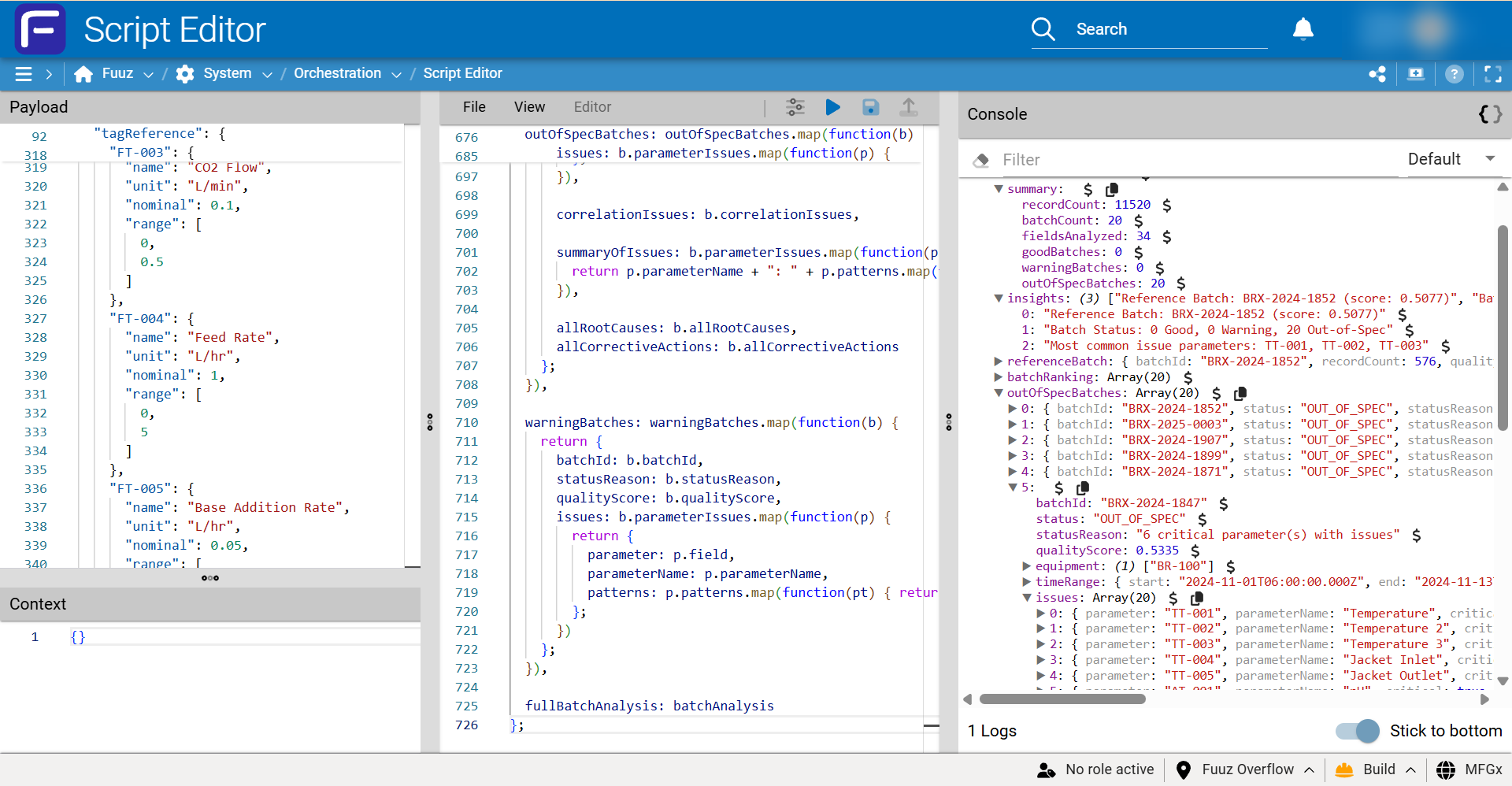
Before you begin, ensure the following requirements are met:
| Requirement | Details |
|---|---|
| Fuuz Access | Application Designer or Developer role with access to Script Editor |
| Data Source | Batch record data available via REST, MQTT, database, or file connector |
| Data Structure | JSON records with batch identifier and numeric process parameters |
| Minimum Data | At least 5 batches with 100+ records per batch recommended |
| Skills | Basic familiarity with Fuuz workflows and JavaScript syntax |
Your batch record data must include these fields:
| Field | Type | Description |
|---|---|---|
batch |
String | Unique batch identifier (required) |
ts |
ISO DateTime | Timestamp for each record (recommended) |
phase |
String | Process phase (e.g., Inoculation, Exponential, Stationary) |
[Tag-xxx] |
Number | Process parameters (TT-001, AT-001, PT-001, etc.) |
Example record:
{
"batch": "BRX-2024-1847",
"ts": "2024-03-15T08:30:00Z",
"phase": "Exponential",
"eq": "BR-001",
"TT-001": 37.02,
"AT-001": 7.21,
"AT-002": 45.3,
"AT-010": 8.5,
"ST-001": 150
}- Navigate to your Fuuz application in the Designer.
- Open the Application Designer.
- Click + New Data Flow and name it
Quality Batch Analyzer.
- Drag a Source node onto the flow canvas.
- Configure the connector to retrieve your batch record data:
- REST API: Configure endpoint URL and authentication
- Database: Write a query to select batch records
- MQTT: Subscribe to the batch data topic
- File: Point to your JSON data file
- Test the connection to verify data is retrieved successfully.
Tip: For testing, you can use the Fuuz sample biopharma training dataset, which contains 20 batches with 11,520 records and intentional quality variations. These samples are attached to this article.
- Drag a JavaScript Transform node onto the canvas.
- Connect the output of your Source to the Transform input.
- Double-click the Transform node to open the configuration panel.
- Click Script Editor to access the JavaScript editor.
- In the Script Editor, delete any existing code.
- Copy and paste the complete Fuuz Pattern Analyzer script (provided separately — see the attached
quality_training_javascript.txt). - The script expects data in the
$$variable (full payload).
Script structure overview:
// The script contains these main components:
// 1. Parameter Knowledge Base - Maps tag prefixes to root causes
var parameterKnowledge = {
"TT-": { name: "Temperature", highCauses: [...], lowCauses: [...] },
"AT-001": { name: "pH", variabilityCauses: [...] },
// ... additional parameters
};
// 2. Statistical Functions - Calculate mean, std dev, CV, z-scores
function calculateStats(values) { ... }
// 3. Golden Batch Identification - Scores batches by quality
function findGoldenBatch(batchStats) { ... }
// 4. Deviation Detection - Identifies out-of-spec conditions
function detectDeviations(batchData, globalStats) { ... }
// 5. Root Cause Mapping - Links deviations to probable causes
function mapRootCauses(deviation, paramInfo) { ... }
// 6. Main Analysis - Orchestrates the full analysis
return analyzeData($$);The default script includes knowledge for common bioreactor parameters. To add your own:
- Locate the
parameterKnowledgeobject near the top of the script. - Add entries for your custom tag prefixes:
// Add custom parameter definitions
parameterKnowledge["WT-"] = {
name: "Weight",
highCauses: ["Scale drift", "Tare error", "Material buildup"],
lowCauses: ["Incomplete fill", "Leak detected", "Calibration needed"],
highActions: ["Verify scale calibration", "Check tare procedure"],
lowActions: ["Inspect fill system", "Check for leaks"]
};
parameterKnowledge["LT-"] = {
name: "Level",
highCauses: ["Overfill condition", "Sensor fouling"],
lowCauses: ["Low feed rate", "Drain valve issue"],
variabilityCauses: ["Control loop oscillation", "Pump pulsation"]
};- Add an output node to handle the analysis results:
- REST API: POST results to a quality management system
- Database: Store results in a batch analysis table
- Notification: Send alerts for OUT_OF_SPEC batches
- Dashboard: Feed results to a real-time quality dashboard
- Connect the Transform output to your chosen destination.
- Click Save to save your workflow.
- Trigger execution from the Source node.
- Review the Transform output in the execution log.
- Verify the output contains:
-
summary— Record counts, batch counts, status breakdown -
referenceBatch— The identified golden batch -
batchRanking— All batches ranked by quality score -
outOfSpecBatches— Detailed issues with root causes
-
Confirm your implementation is working correctly:
| Check | Expected Result |
|---|---|
| Data source connects | Batch records retrieved with numeric parameters |
| Script executes without errors | No JavaScript errors in execution log |
| Golden batch identified |
referenceBatch contains batch ID and score |
| Batches ranked correctly | All batches appear in batchRanking with scores |
| Deviations detected | OUT_OF_SPEC and WARNING batches include issue details |
| Root causes mapped | Each deviation includes rootCauses and correctiveActions
|
| Output delivered | Results arrive at configured destination (API, DB, dashboard) |
Tip: When all checks pass, your Quality Batch Golden Record Analysis Tool is ready for production use.
Here is sample output from analyzing a 20-batch bioreactor dataset:
| Batch ID | Status | Primary Issue | Root Cause |
|---|---|---|---|
| BRX-2024-1847 | ★ GOLDEN | None | — |
| BRX-2024-1862 | OUT_OF_SPEC | Temp HIGH +3.1σ | Cooling valve malfunction |
| BRX-2024-1867 | WARNING | DO LOW −2.7σ | Insufficient aeration capacity |
| BRX-2024-1855 | GOOD | None | — |
| Problem | Possible Cause | Solution |
|---|---|---|
| "No batches found" | Missing batch field |
Verify data includes a batch identifier on each record |
| "No numeric fields" | Parameters stored as strings | Ensure parameter values are numeric, not quoted strings |
| All batches show GOOD | Thresholds too permissive | Adjust deviation threshold (default 1.5σ) to be more sensitive |
| Script timeout | Dataset too large | Filter data to recent batches or increase workflow timeout |
| Unknown parameters | Custom tags not in knowledge base | Add entries to parameterKnowledge for your tag prefixes |
After implementing your Quality Batch Golden Record Analysis Tool, you can build a dashboard to visualize batch rankings and quality trends over time, configure alerts to notify quality teams when OUT_OF_SPEC batches are detected, integrate with your QMS to automatically create deviation records, expand the knowledge base with process-specific root causes and corrective actions, and schedule automated runs for continuous process verification (CPV).
Note: This article includes three downloadable attachments in the original KB —
quality_training_dataset.json(the sample biopharma dataset),quality_training_answer_key.json, andquality_training_javascript.txt(the Fuuz Pattern Analyzer script). They can be downloaded from the original KB article.
- Script-Editor
- Debugging-and-Testing-our-Fuuz-Data-Flows
- Slow-Transform-Performance-JSONata-vs-JavaScript-Optimization-Guide
- The-Power-of-Data-Flows-Unlocking-Industrial-Intelligence-with-Fuuz
Source: support.fuuz.com
Getting Started (14)
- Access Field Level Help within the Fuuz Platform
- Field-Level Help
- Fuuz Platform 101: Low/No-Code Technology in Manufacturing
- Fuuz Platform Architecture
- Getting to Know the Fuuz Platform
- Logging into Fuuz – Cloud Access
- Manage what displays in Field Level Help throughout Fuuz
- Recovering Your Fuuz Account
- Sharing A Page
- Switching Between Apps in Fuuz
- Switching between Fuuz Environments (Build, QA, Production)
- Trouble Logging Into Fuuz
- Unique Email Plus Addressing
- Welcome To Industry Accelerators!
Training Guides (52)
Applications
- Brand and Configure Your Application
- Create an Application
- Deactivate (Retire) an Application
- Find Pages Beyond the Left Menu
- Install a Fuuz Package
- Navigate the Application Designer
- Retire an Application
Access & Users
- Approve Access Requests
- Approve Application Access Requests
- Configure the Internal Password Policy
- Create a Role
- Create an API Key
- Deactivate and Reactivate a User
- Grant Permissions with Policies
- Investigate Login Activity
- Invite a User to an Application
- Manage App Users
- Request Access to an Application
- Switch Applications, Roles, and Environments
- Understand Developer Access
- Understand Web Access
- Use the User Menu (Profile, Theme, and More)
Data Models & Schema
- Add a Custom Field
- Create a Data Model
- Create a Sequence
- Design Model Fields in the Schema Designer
- Relate Two Data Models
Screens
Weather Lookup Series — guided 3-part build
- Part 1 · Build the Screen (Beginner)
- Part 2 · Store the Readings (Intermediate)
- Part 3 · Watched Locations & Scheduled Capture (Advanced)
Data Flows & Integrations
- Call an External API with a Flow
- Connect to External Systems
- Create a Data Flow
- Create a Notification Channel
- Create a Webhook
- Save Queries, Scripts, and Data Mappings
- Schedule a Data Flow
- Use the Script Editor
Data, Reporting & Monitoring
- Browse Data with Data Explorer
- Build a Document (Report or Label)
- Check Component References
- Create Configuration Records (Modules, Units, Calendars, and More)
- Explore the GraphQL API
- Export Data
- Import Data into an Application
- Investigate Application Logs
- Save an Export Configuration
- Trace a Data Change
Enterprise & Organizations
Platform Concepts & Architecture (10)
- Bridging the Red and Blue Data Divide - How Fuuz Became the First Industrial Platform to Merge Operational and Business Intelligence
- Claude AI Skills for the Fuuz Platform
- Cool Things we built with Fuuz Episode 1 12.5.2025 (Public)
- Differences between MES and ERP from an ERP Consultant Eric Kimberling
- Fuuz can be your "Connected Worker Platform"
- Listen and Learn what MES is and what makes it unique
- Manufacturers struggle with Build versus Buy for their MES and what are the Core 4 Elements
- Stock Price Application
- Why All Manufacturers Build their MES System Part 1
- Why All Manufacturers Build their MES System Part 2
Screens & Application Design (17)
- Application Designer Guide
- Array Input
- Combobox
- Dynamic Field Configurations
- Fuuz Deployment Methodologies
- Fuuz Form Detail Screen Specification
- Historical Data Table Screen Design Standard
- JSON
- JSON Form Fields in Action Steps
- JSON Schema Inputs
- Master Data Table Screen Design Standard
- Mobile Screen Design Standard
- Screen Context Container
- Screen Generation (AI) Flow Template V1.5.1
- Setup Data Table Screen Design Standard
- Table Column Conditional Formatting
- Transform Data in a Column
Data Models & Schema (8)
Data Flows & Scripting (51)
Designing Flows
- Data Flow Design Standards
- Data Flow Logs
- Debugging and Testing our Fuuz Data Flows
- Flow Schedules
- Fuuz Data Flows enable DataOps at Scale, ETL, iPaaS and more
- How to Create APIs Using Data Flows in Fuuz
- How To General E-Commerce Integrations using Data Flows in Fuuz iPaaS
- How to Setup a daily file import using Fuuz Data Flows
- Managing Large Datasets in Fuuz: Data Flow Engine Performance Optimization
- The Power of Data Flows - Unlocking Industrial Intelligence with Fuuz
- Using Fuuz with FTP integrations and Data Flows iPaaS
Data Flow Nodes
- Data Flow Nodes Reference
- Debugging & Context Nodes
- Flow Control Nodes
- Fuuz Platform Nodes
- IIoT & Gateway Nodes
- Integration Nodes
- Notification Nodes
- Source & Trigger Nodes
- Transform Nodes
JSONata Reference
- Aggregation Functions
- Array Functions
- Boolean Functions
- Boolean Operators
- Comparison Operators
- Composition
- Construction
- Constructs
- Custom Fuuz Only JSONata Library
- Date Time Functions
- Date Time Processing
- Expressions
- Fuuz Bindings: $predicateFilter
- Higher Order Functions
- Jsonata Tutorial
- Numeric Functions
- Numeric Operators
- Object Functions
- Other Operators
- Path Operators
- Predicate Expressions
- Processing Model
- Regex
- Simple Queries
- Slow Transform Performance: JSONata vs JavaScript Optimization Guide
- Sorting Grouping and Aggregation
- String Functions
Scripting
Integrations & Connectors (30)
General & iPaaS
- API Keys
- Cloud Connectors - Complete Reference Guide
- Connecting a CRM with your ERP using Fuuz
- Connecting a Vending Machine to your ERP system using Fuuz
- Creating a Scheduled Integration & Sending a CSV File in an Email
- Debug a NetSuite SOAP API integration
- Fuuz Connections help you integrate your Systems and Devices
- Fuuz has lists of Connectors and Drivers you can use
- Fuuz has pre-built integration Connectors
- How to create a check an ODBC connection with another system
- How to Create a RESTful API Using the Fuuz Platform
- How to create a simple Integration and Store data in Fuuz
- How To Design or Configure Policies and Policy Groups for my App in Fuuz
- How to Integrate Fuuz with another product or another API
- How to Integrate with an HR system like ADP using Fuuz iPaaS
- How to use API Explorer and GraphQL to Query Data in Fuuz for Beginners
- How you Integrate your ERP with your MES
- Industry 3 and Industry 4 differences in ERP and MES Integrations
- Integrated Carrier Package
- Make REST-Based Calls With An API Key
- Policy Groups
- System connectivity validation - testing a connection when your 3rd party moves its hosting
- Using Fuuz as an iPaaS to Connect - to an API, Collect - Data from the API, Store - that data in Fuuz tables
Plex
- How to connect using Plex UX datasources from Fuuz iPaaS
- How to integrate with Plex Classic using Fuuz iPaaS
- How to Setup and Connect to Plex APIs
EDI
IIoT & Edge Gateway (18)
- Edge Connections: Complete Industrial Integration Reference
- Edge Gateway Flows
- Edge Gateway Installation Step-by-Step
- Edge to Cloud Infrastructure
- Gateway Deployment & Architecture
- Gateway System Requirements
- How IIoT fits into the Industrial Data "Stack"
Physical Device Connectors
- Connecting To Kepware OPCUA Server
- Fanuc Robot Connectivity using Edge Gateway
- HMI Template Standard - ISA-101 Compliant
- How to connect OPC/UA simulator to the Edge Gateway
- Modbus TCP
- MQTT
- Omron PLC/HMI NX102 Connectivity with Edge Gateway
Edge Data Connectors
Reporting, Documents & Dashboards (8)
- Building a Non-Conformance Report (NCR) Application in Fuuz
- Create responsive structured dashboard layouts using the Grid Container and Grid Cell components
- How to add visualizations (charts and graphs) to reports in Fuuz for Beginners
- How to build real-time reports in Fuuz from scratch for Beginners
- How to modify existing reports in Fuuz for Beginners
- Non-Conformance Report Accelerator
- Printing Documents
- Printing Documents From Fuuz
Administration & Access Control (27)
- Access Control
- Access Requests
- Access Requests: Overview
- Access Type Overview
- Access Types
- Add Users to Fuuz Apps
- App Admin Access
- App Management
- App Users
- Applications (Tenants)
- Authentication Events
- Change a User's Access Type
- Configurations
- Create Users and Set Access Type
- Enterprise Admin Overview
- Enterprise Users
- Enterprise Users vs Access Requests
- How To Login to your Fuuz Enterprise - Non Single Sign On
- How To Login to your Fuuz Enterprise - Single Sign On
- Identity Providers
- Notifications
- Notifications
- Organizations
- Roles
- Settings
- Switching my active Role within Fuuz
- Troubleshooting User Login Errors Due to Identity Provider Misconfiguration
Data Management (8)
Accelerators, Templates & Packages (8)
- Create a Quality Batch Golden Record Analysis Tool in Fuuz
- Fuuz Developer 101 Bootcamp - 2026 Schedule & Enrollment
- Fuuz Developer 101 Bootcamp - Program Overview
- Fuuz Industry Accelerators - Installation & Best Practices
- Fuuz Industry Accelerators - Overview
- How-To: Managing Green/Blue Deployments with Fuuz Package Management Zero-Downtime
- Model Agnostic Scheduling System APS
- Setting up In-House Fuuz
Design Standards (1)
How-To Guides (8)
- Connecting to Fuuz from a remote system to execute a Fuuz API
- Connecting to Fuuz from a remote system to execute a Fuuz API - Extended Features Part 2
- Data Mapping
- Document your Application using Atlassian Confluence and our Pre-Built App
- Fuuz Platform Capabilities
- How to add multiple data records to the Fuuz database with a single API call
- How to on Best Practices for Designing Flows in Fuuz
- Using the Transformation Explorer
FAQ & Troubleshooting (1)
Release Notes (117)
2026
- 2026.1 (January 2026)
- 2026.2 (February 2026)
- 2026.3 (March 2026)
- 2026.4 (April 2026)
- 2026.5 (May 2026)
- 2026.6 (June 2026)
2025
- 2025.1 (January 2025)
- 2025.10 (October 2025)
- 2025.11 (November 2025)
- 2025.12 (December 2025)
- 2025.2 (February 2025)
- 2025.4 (April 2025)
- 2025.5 (May 2025)
- 2025.6 (June 2025)
- 2025.7 (July 2025)
- 2025.8 (August 2025)
- 2025.9 (September 2025)
2024
- 2024.1 (January 2024)
- 2024.10 (October 2024)
- 2024.11 (November 2024)
- 2024.12 (December 2024)
- 2024.2 (February 2024)
- 2024.3 (March 2024)
- 2024.4 (April 2024)
- 2024.5 (May 2024)
- 2024.6 (June 2024)
- 2024.7 (July 2024)
- 2024.8 (August 2024)
- 2024.9 (September 2024)
2023
- 2023.5 (May 2023)
- 2023.1 (January 2023)
- 2023.10 (October 2023)
- 2023.11 (November 2023)
- 2023.12 (December 2023)
- 2023.2 (February 2023)
- 2023.3 (March 2023)
- 2023.4 (April 2023)
- 2023.6 (June 2023)
- 2023.7 (July 2023)
- 2023.8 (August 2023)
- 2023.9 (September 2023)
2022
- 2022 Q1 Fuuz Package Updates (03/11/2022)
- 2022 Q1 Fuuz Release Notes v3.87.0 (03/17/2022)
- 2022 Q1 MFGx Release Notes v3.78.0 (01/06/2022)
- 2022 Q1 MFGx Release Notes v3.79.0 (01/13/2022)
- 2022 Q1 MFGx Release Notes v3.80.0 (01/20/2022)
- 2022 Q1 MFGx Release Notes v3.81.0 (01/27/2022)
- 2022 Q1 MFGx Release Notes v3.82.0 (02/03/2022)
- 2022 Q1 MFGx Release Notes v3.83.0 (02/10/2022)
- 2022 Q1 MFGx Release Notes v3.85.0 (02/28/2022)
- 2022 Q2 Fuuz Release Notes v3.90.0 (04/14/2022)
- 2022 Q2 Fuuz Release Notes v3.91.0 (04/21/2022)
- 2022 Q2 Fuuz Release Notes v3.92.0 (04/28/2022)
- 2022 Q2 Fuuz Release Notes v3.93.0 (05/06/2022)
- 2022 Q2 Fuuz Release Notes v3.94.0 - v3.97.0 (June 13, 2022)
- 2022 Q2 Fuuz Release Notes v3.98.0 (06/16/2022)
- 2022 Q2 Fuuz Release Notes v3.99.0 (06/30/2022)
- 2022 Q3 Fuuz Release Notes v3.100.0 🎉 (07/06/2022)
- 2022 Q3 Fuuz Release Notes v3.101.0 (07/21/2022)
- 2022 Q3 Fuuz Release Notes v3.102.0 (08/11/2022)
- 2022 Q3 Fuuz Release Notes v3.103.0 (08/18/2022)
- 2022 Q4 Fuuz Release Notes v3.107.0 - v3.109.0 (10/27/2022)
2021
- 2021 Q1 MFGx Release Notes v3.29.0 (1/7/2021)
- 2021 Q1 MFGx Release Notes v3.30.0 (1/14/2021)
- 2021 Q1 MFGx Release Notes v3.34.0 (2/4/2021)
- 2021 Q1 MFGx Release Notes v3.37.0 (2/26/2021)
- 2021 Q1 MFGx Release Notes v3.38.0 (3/5/2021)
- 2021 Q1 MFGx Release Notes v3.40.0 (3/25/2021)
- 2021 Q1 MFGx.io Release Notes v3.32.0 (1/21/2021)
- 2021 Q1 MFGx.io Release Notes v3.33.0 (1/28/2021)
- 2021 Q2 MFGx Release Notes v3.41.0 (4/1/2021)
- 2021 Q2 MFGx Release Notes v3.42.0 (4/8/2021)
- 2021 Q2 MFGx Release Notes v3.43.0 (4/16/2021)
- 2021 Q2 MFGx Release Notes v3.44.0 (4/22/2021)
- 2021 Q2 MFGx Release Notes v3.45.0 (4/29/2021)
- 2021 Q2 MFGx Release Notes v3.47.0 (5/13/2021)
- 2021 Q2 MFGx Release Notes v3.48.0 (5/20/2021)
- 2021 Q2 MFGx Release Notes v3.48.0 (5/27/2021)
- 2021 Q2 MFGx Release Notes v3.50.0 (6/03/2021)
- 2021 Q2 MFGx Release Notes v3.51.0 (6/10/2021)
- 2021 Q2 MFGx Release Notes v3.52.0 (6/17/2021)
- 2021 Q2 MFGx Release Notes v3.54.0 (6/28/2021)
- 2021 Q3 Fuuz Release Notes v3.58.0 (7/22/2021)
- 2021 Q3 MFGx Release Notes v3.55.0 (7/1/2021)
- 2021 Q3 MFGx Release Notes v3.60.0 (8/5/2021)
- 2021 Q3 MFGx Release Notes v3.61.0 (8/17/2021)
- 2021 Q3 MFGx Release Notes v3.62.0 (8/19/2021)
- 2021 Q4 MFGx Release Notes v3.68.0 (10/8/2021)
- 2021 Q4 MFGx Release Notes v3.69.0 (10/14/2021)
- 2021 Q4 MFGx Release Notes v3.70.0 (10/21/2021)
- 2021 Q4 MFGx Release Notes v3.71.0 (10/28/2021)
- 2021 Q4 MFGx Release Notes v3.72.0 (11/04/2021)
- 2021 Q4 MFGx Release Notes v3.73.0 (11/11/2021)
- 2021 Q4 MFGx Release Notes v3.74.0 (11/19/2021)
- 2021 Q4 MFGx Release Notes v3.75.0 (12/02/2021)
- 2021 Q4 MFGx Release Notes v3.76.0 (12/09/2021)
- 2021 Q4 MFGx Release Notes v3.77.0: The Holiday Update (12/16/2021)
2020
- 2020 Q2 MFGx Release Notes v2.32.0 (4/9/2020)
- 2020 Q2 MFGx Release Notes v2.33.0 (4/16/2020)
- 2020 Q2 MFGx Release Notes v2.35.0 (4/30/2020)
- 2020 Q2 MFGx Release Notes v3.5.0 (6/18/2020)
- 2020 Q2 MFGx Release Notes v3.6.0 (6/25/2020)
- 2020 Q2 MFGx.io Release Notes v2.32.0 (4/9/2020)
- 2020 Q3 MFGx Release Notes v3.10.0 (7/23/2020)
- 2020 Q3 MFGx Release Notes v3.11.0 (7/30/2020)
- 2020 Q3 MFGx Release Notes v3.13.0 (8/13/2020)
- 2020 Q3 MFGx Release Notes v3.17.0 (9/21/2020)
- 2020 Q3 MFGx Release Notes v3.7.0 (7/6/2020)
- 2020 Q3 MFGx Release Notes v3.8.0 (7/9/2020)
- 2020 Q4 MFGx Release Notes v3.20.0 (10/13/2020)
- 2020 Q4 MFGx Release Notes v3.21.0 (10/15/2020)
- 2020 Q4 MFGx Release Notes v3.22.1 (10/22/2020)
- 2020 Q4 MFGx Release Notes v3.23.0 (11/5/2020)
- 2020 Q4 MFGx Release Notes v3.24.0 (11/12/2020)
- 2020 Q4 MFGx Release Notes v3.26.0 (12/3/2020)
- 2020 Q4 MFGx Release Notes v3.27.0 (12/10/2020)
- 2020 Q4 MFGx Release Notes v3.28.0 (12/17/2020)