-
Notifications
You must be signed in to change notification settings - Fork 0
20263 March 2026
Article Type: Release Notes Audience: All Users Module: Platform Releases
Note: QA Release Date: March 3, 2026. Production Release Date: March 17, 2026.
As promised last month, we have a packed list of new features and improvements to highlight this month - so many that we can't highlight them all! If you have questions on any of the features or enhancements in the detailed release notes, leave a comment and I'll be happy to explain. Without further ado, let's jump in!
The first highlight this month is over in our screen designer: a new Structure tab! This new UI is intended to combine and replace the "Layers" and "Scripts" tabs, providing a tree view of the overall screen structure but with a vastly improved user experience - including filters, script preview and editing, and synchronization with canvas selection state. This UI should look familiar - it's the same underlying component as the Application Designer's Workspace panel, keeping the user experience consistent. That also extends to tree hotkeys, like Shift+Click to expand all descendants!
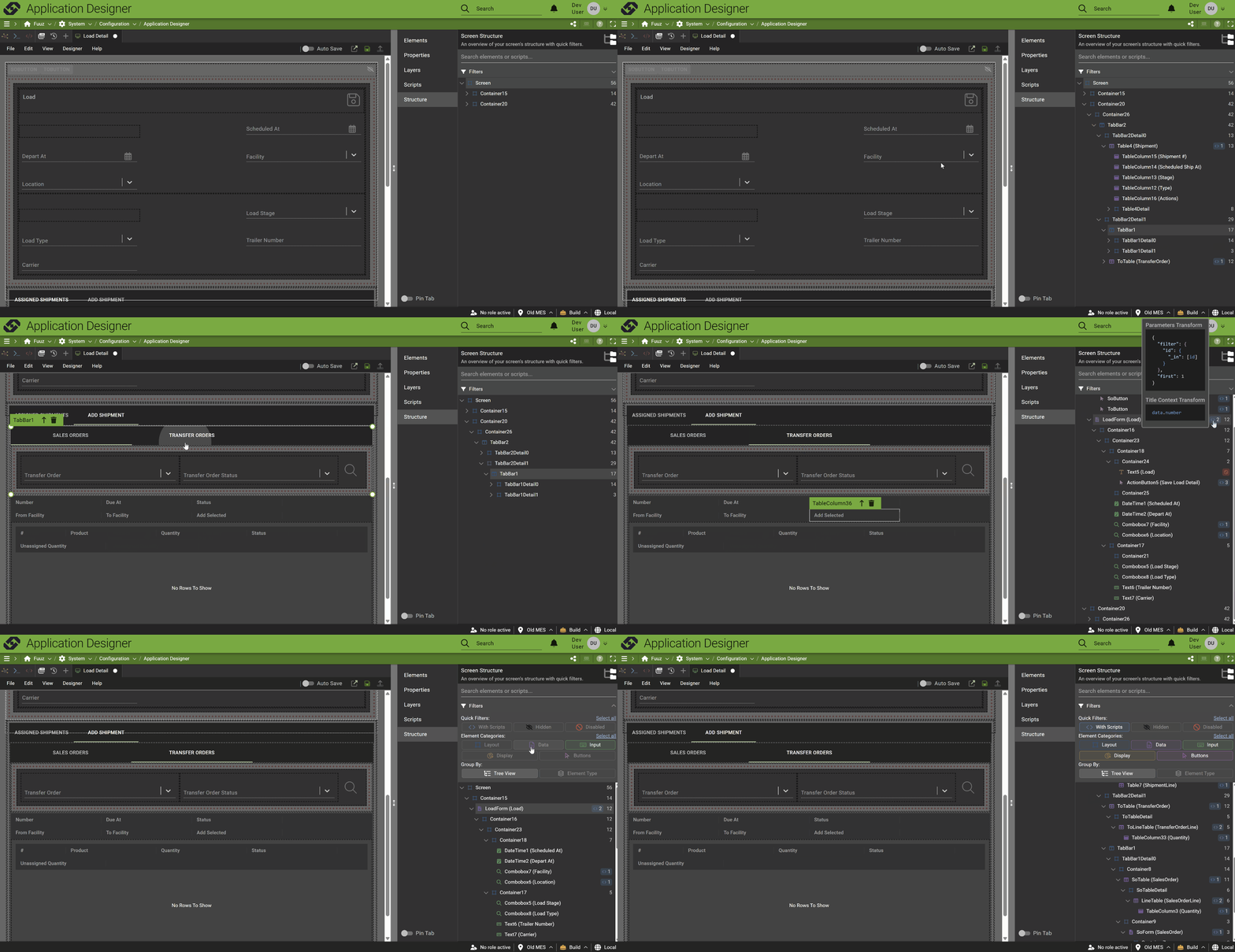
There is one feature still in progress: we haven't yet brought the drag-and-drop features of the Layers tab over to Structure, but we're working on that now. Once that feature is integrated, we'll remove the Layers and Scripts tabs!
The 2026.3 release also includes a new screen, available standalone or as an Application Designer tab: a unified API Documentation page. This screen brings together our existing GraphQL API documentation with other APIs that have always existed, but perhaps been less obvious: data flows and webhooks!
The data flow documentation includes details on any request/response flows that are executable as RPC APIs - including header information, sample cURL requests, and body examples (if available).
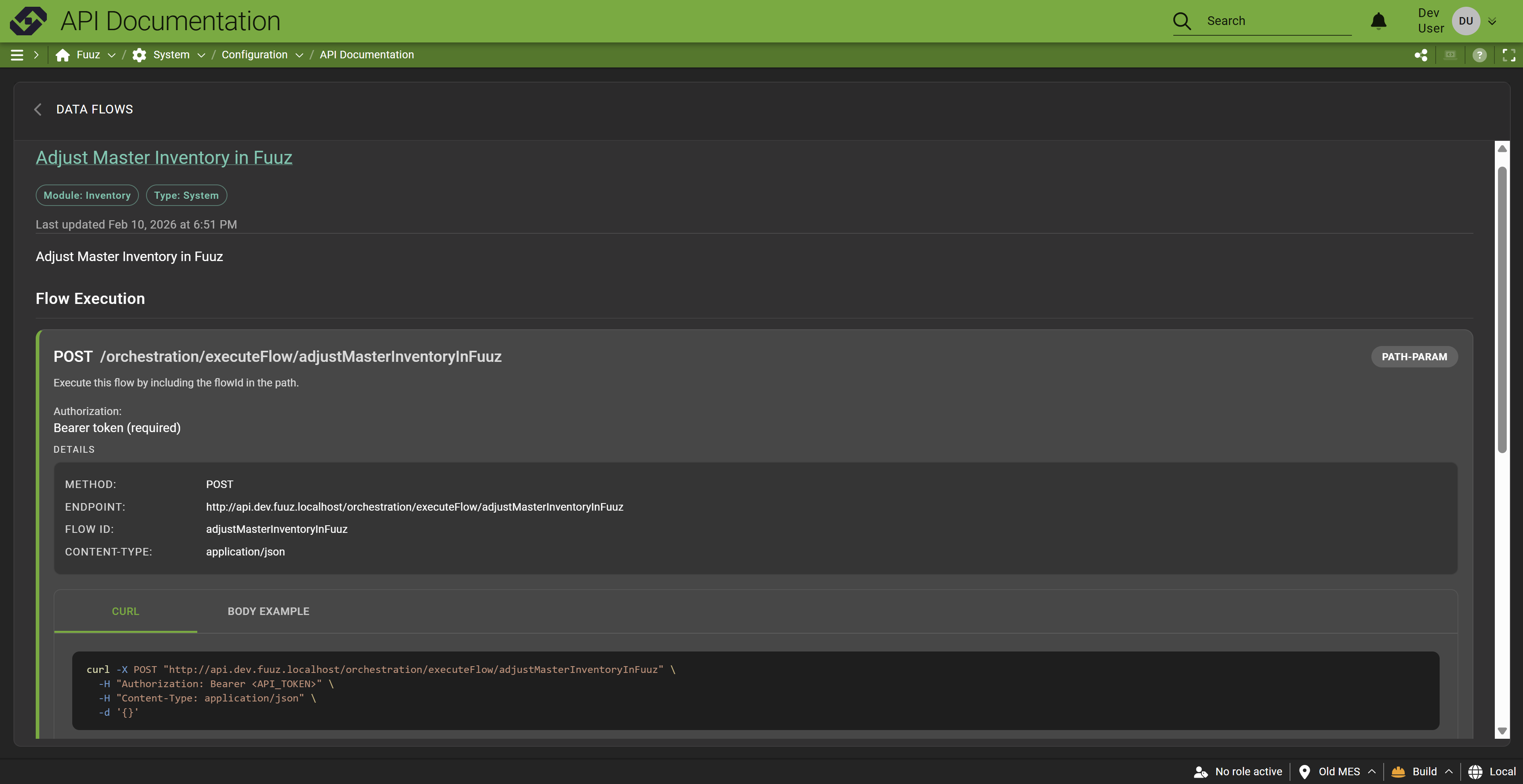
Similarly, any topics available as webhooks provide documentation on how to post information over to them:
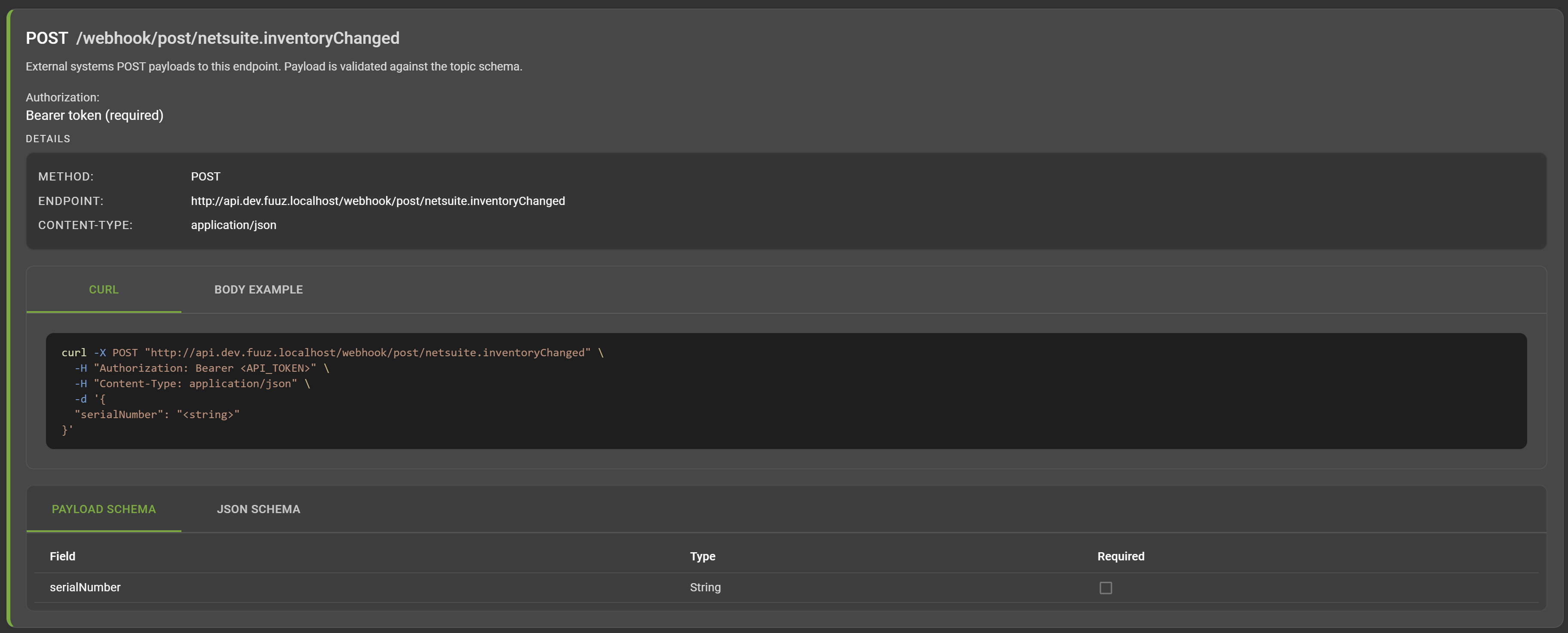
We've had a generic version of this information available in our Knowledge Base for some time, but this new API Documentation screen is based on the app built in the current Fuuz tenant, so it shows the actual flows and webhooks available - much more intuitive!
This month's release includes a slate of enhancements to the application designer - we'll go through a few of them quickly. There are more improvements underway now and even more stacked in our 2026 roadmap, so if you're not using the application designer yet, you probably should be!
First up, we've substantially improved the way the schema designer behaves when used within the app designer. The app designer will now share a single tab for data models rather than opening a new one for each model; the integration between the schema designer and workspace panel has been improved; and the state of that schema designer tab is now persisted across page refresh, addressing the annoying case where your carefully arranged diagram could get wiped out if your session expired.
On a related note, we've added system data models like units, users, and files to the app designer Workspace panel and tree. These models are hidden by default with a new quick filter to display them; when you open a system model, it adds it to the schema designer tab so you can add links from custom models.
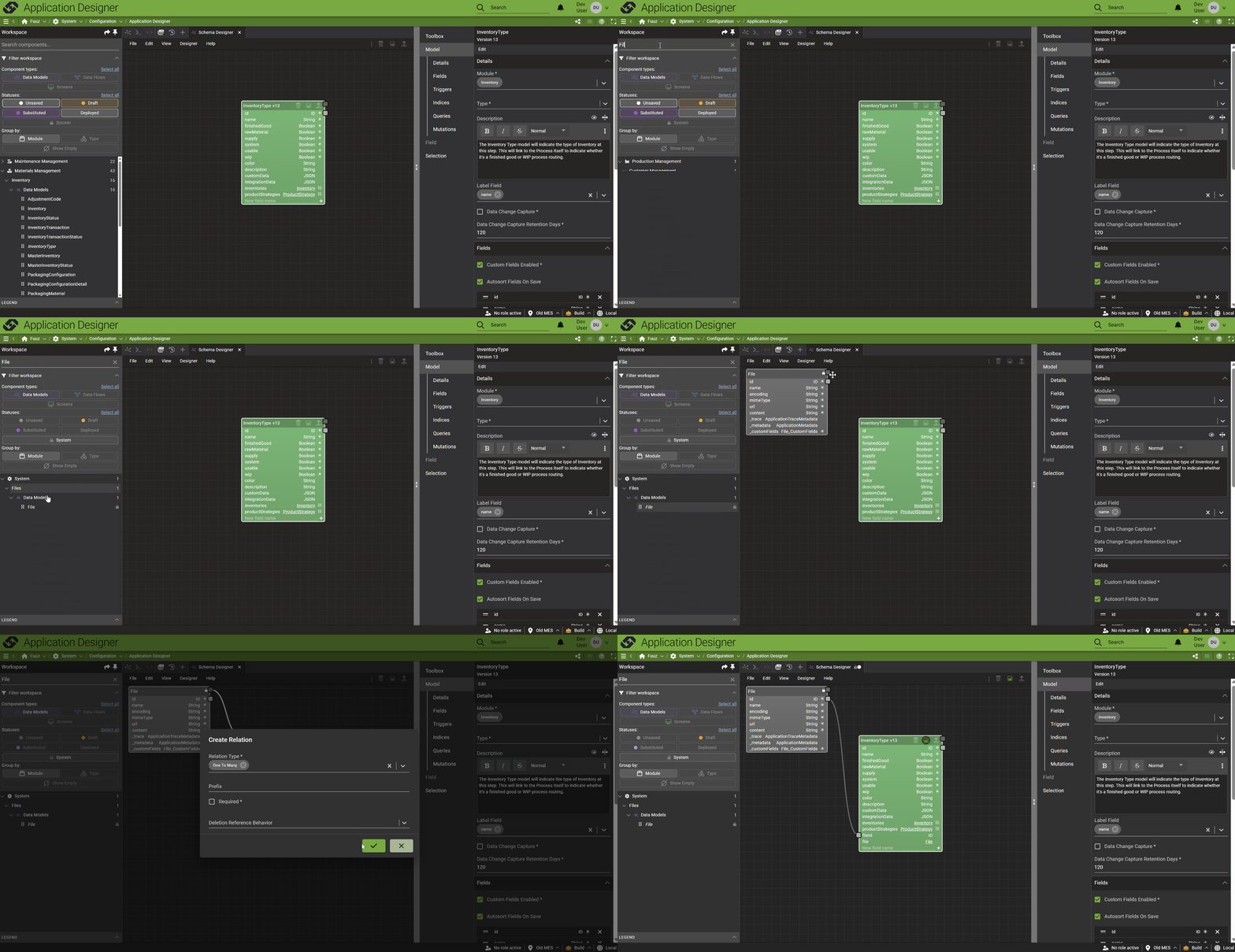
This change means the Toolbox panel in the schema designer is now redundant (and confusing) - so rather than keep both, we've removed the models from the Toolbox panel, making the Workspace the place to go to add models to the diagram. The Toolbox panel looks pretty empty for the moment, but don't worry - we have plans to populate it with useful data model templates!
The Application Designer also includes new tab types for common utilities that are handy when developing an application, including the Script Editor and GraphQL Editor. For now, these tabs are just "utilities" - editing saved scripts or queries isn't fully integrated into the app designer - but that's coming soon!
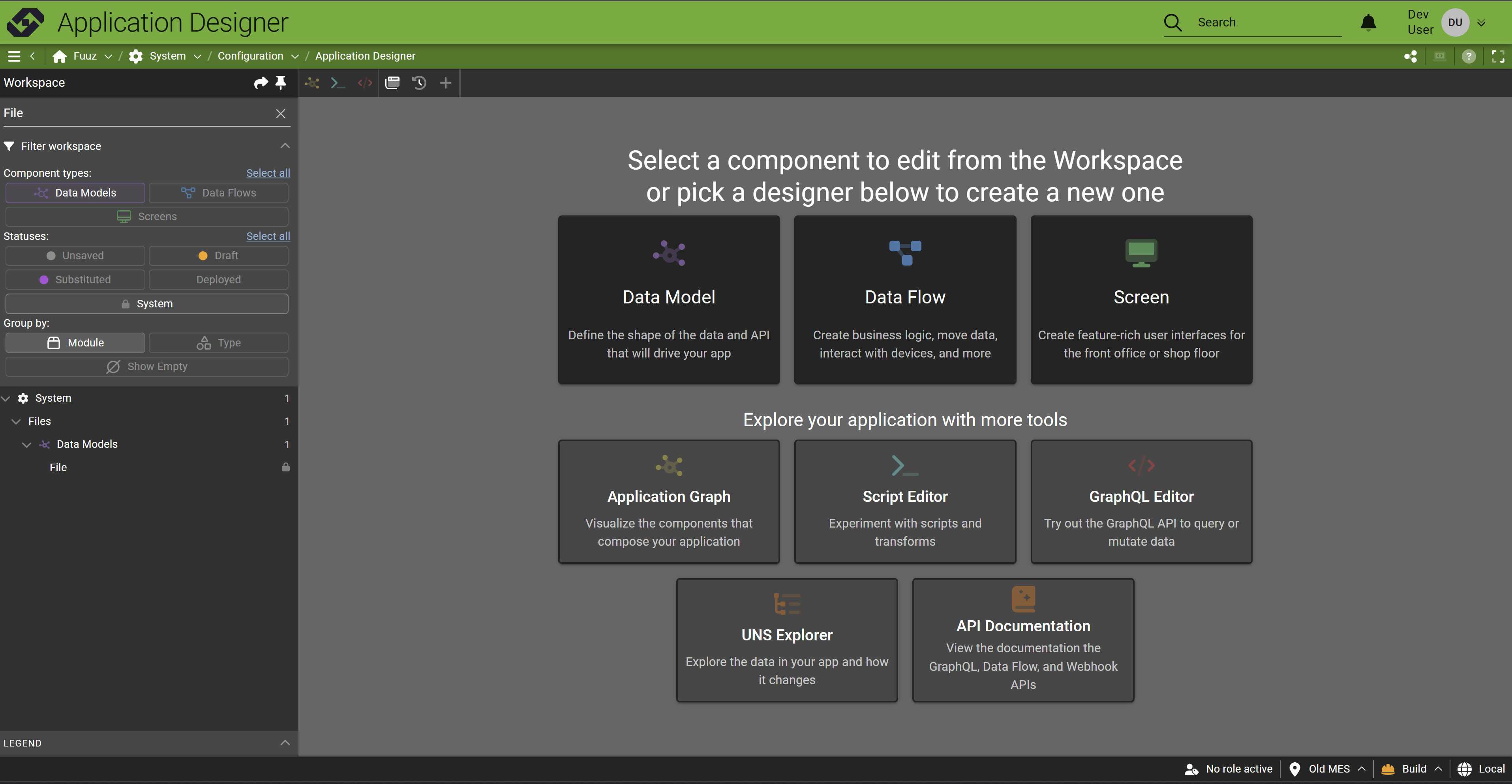
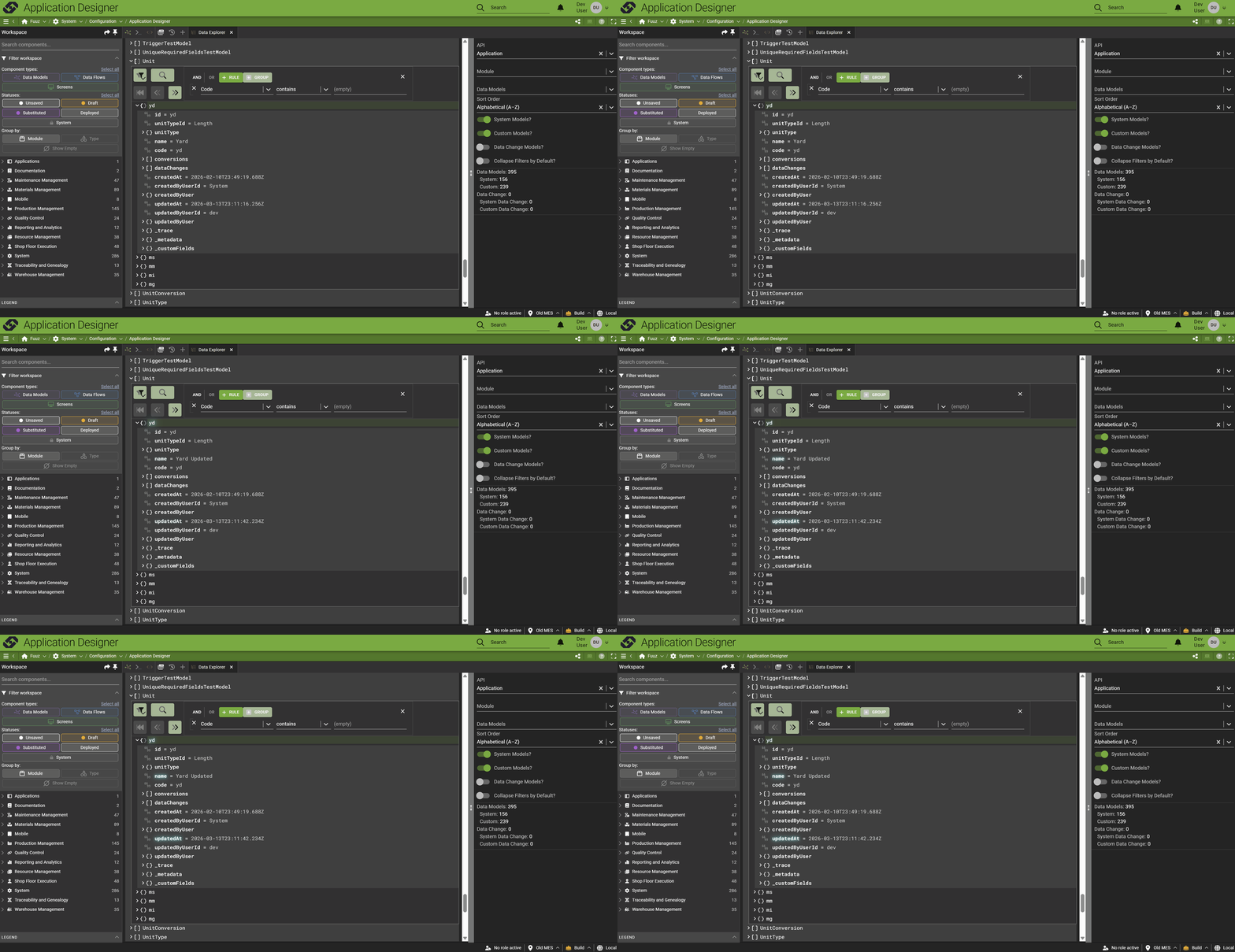
Also included is a link to our UNS/Data Explorer - an enhanced version of the API Tree Browser we released last year. This enhanced version includes live data subscriptions to stream changes into the view and improved performance!
With the 2026.3 release, you'll find that our logo mark has changed! In the site header and tab favicon, you'll find the Fuuz "F" has been replaced with our new "chain" mark. This update has already been applied to our support portal and commercial website, so you may have already seen it - but if not, don't worry... it's still the same Fuuz platform you know and love!

![]()
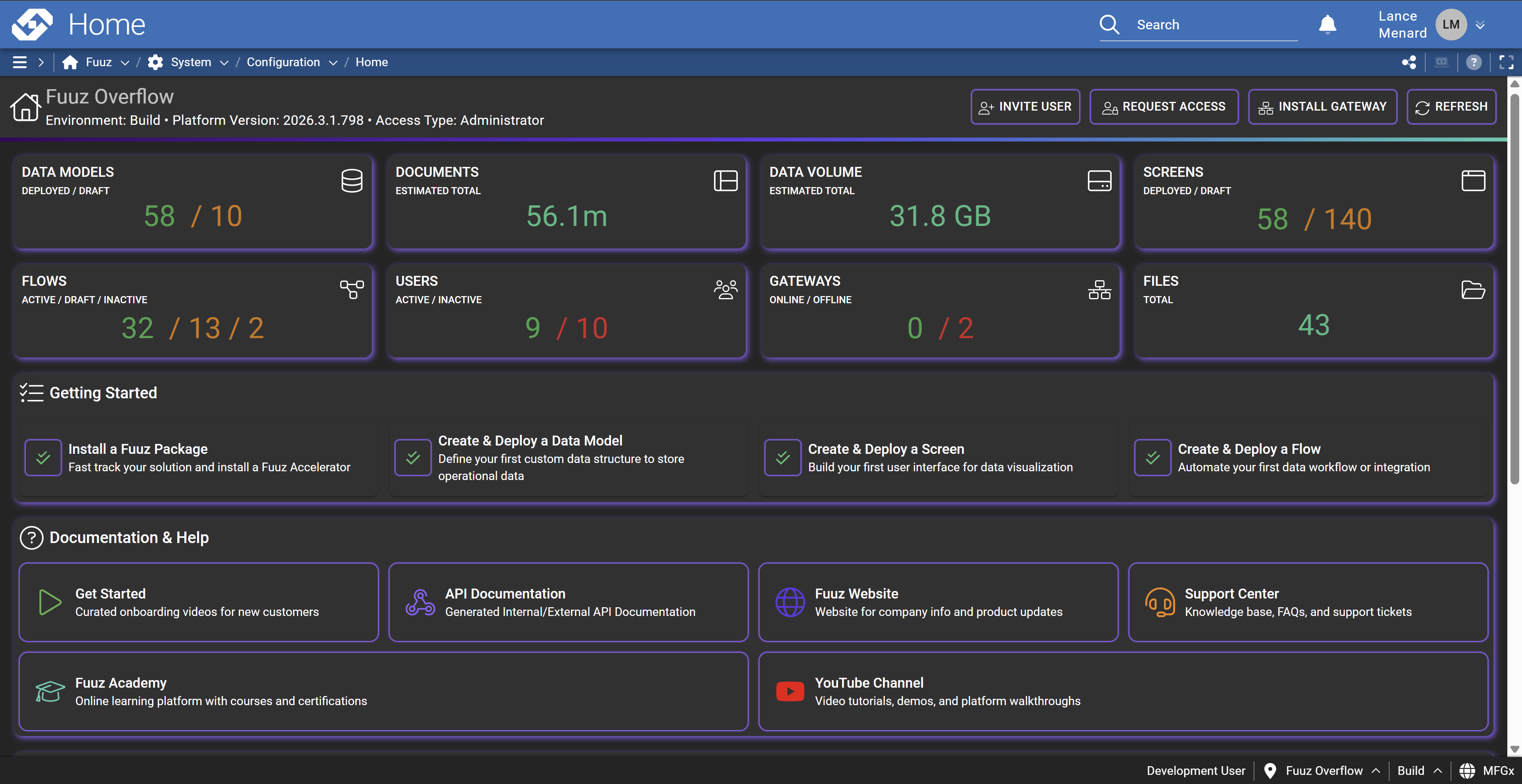
Finally, this month's release includes a revamped set of administration home screen dashboards. These screens are a great landing page for admin users, providing a snapshot of tenant or enterprise application usage and status, common quick actions such as granting or requesting access, plus quick links to get new users started - help, documentation, support, and more!
- Added a "New Model from File" function to quickly create a data model matching a CSV or JSON data file
- Added a "data model type" dropdown when creating many-to-many relations
- Removed validation preventing models from being deployed before creating relations
- Updated data change capture system to skip rebuilding TTL indexes on model deployment if the data change retention hasn't changed
- Updated data models to automatically index all date and date time fields
- Updated data models to use the first version's module until the model is deployed for the first time
- Added new enterprise and app home screens displaying database usage metrics
- Added enterprise-wide metrics dashboard showing system usage across all three environments (build, QA, and production)
- Removed duplicate authentication event logging for API key verification failures occurring in the subscription service
- Removed a misleading error snackbar that could pop up when adding a new user without selecting a role
- Corrected an edge case crash caused by screen delete data change events
- Corrected a bug causing the gateway to not respect the Scan Rate Seconds configuration option on Modbus devices
- Added API Documentation screen (also available in the Application Designer) to act as a one-stop-shop for documentation on available Fuuz APIs
- Standardized and improved data flow node and configuration field documentation across the board
- Updated data flow console to extract and display the most relevant (root) error message when deeply-nested HTTP errors are displayed
- Corrected an issue that could occur when installing a package which included a saved script which had never been deployed
- Updated data tree viewer to support real-time streaming of data changes
- Updated system favicon and logo mark to new Fuuz "chain" (so long, "F"!)
- Corrected an issue with width and height handling causing Gantt charts and visualizations to not render correctly
- Added data props to screen elements to streamline automated UI testing
- Added framework library to support custom navigation drawer contents (to be exposed as a screen designer feature in a future release)
- Updated drawer navigation menu to make sections collapsible
- Added loading backdrop during sign-in/tenant change
- Updated tenant change to streamline state changes and minimize the number of UI changes while loading
- Corrected a bug causing the drawer menu to render incorrectly on mobile devices
- Improved the loading cycle of select inputs to reduce the amount of time they take on page load before they're "ready"
- Added a new Structure tab to provide a filterable and browsable tree view of screen layout
- Added an Accordion screen designer element to easily create groups of collapsible panels
- Added X and Y axis label configuration options for line, bar, and timeseries charts
- Added configuration options to disable date range navigation in timeseries charts
- Added an "On Timer Expired" script to the Timer screen element to allow screen updates when the timer expires
- Added dedicated editable table UI inputs for float, integer, date, date time, time, measure, and ratio measure fields
- Added configuration option to the Table element for Initial Row Height
- Added configuration option to the Table Column element for Background Color Field
- Improved tab management and interaction with Schema Designer
- Added system data models to the Workspace panel tree
- Added support for Script Editor, GraphQL Editor, Data Tree Viewer, and Documentation Explorer tabs
- Addressed a few small bugs that were lingering from previous workspace tree refactor
- Corrected a bug causing the state of new screens to not update correctly when saved
- 20262-February-2026
- 20264-April-2026
- How-to-use-API-Explorer-and-GraphQL-to-Query-Data-in-Fuuz-for-Beginners
- How-to-Create-APIs-Using-Data-Flows-in-Fuuz
Source: support.fuuz.com
Getting Started (14)
- Access Field Level Help within the Fuuz Platform
- Field-Level Help
- Fuuz Platform 101: Low/No-Code Technology in Manufacturing
- Fuuz Platform Architecture
- Getting to Know the Fuuz Platform
- Logging into Fuuz – Cloud Access
- Manage what displays in Field Level Help throughout Fuuz
- Recovering Your Fuuz Account
- Sharing A Page
- Switching Between Apps in Fuuz
- Switching between Fuuz Environments (Build, QA, Production)
- Trouble Logging Into Fuuz
- Unique Email Plus Addressing
- Welcome To Industry Accelerators!
Training Guides (52)
Applications
- Brand and Configure Your Application
- Create an Application
- Deactivate (Retire) an Application
- Find Pages Beyond the Left Menu
- Install a Fuuz Package
- Navigate the Application Designer
- Retire an Application
Access & Users
- Approve Access Requests
- Approve Application Access Requests
- Configure the Internal Password Policy
- Create a Role
- Create an API Key
- Deactivate and Reactivate a User
- Grant Permissions with Policies
- Investigate Login Activity
- Invite a User to an Application
- Manage App Users
- Request Access to an Application
- Switch Applications, Roles, and Environments
- Understand Developer Access
- Understand Web Access
- Use the User Menu (Profile, Theme, and More)
Data Models & Schema
- Add a Custom Field
- Create a Data Model
- Create a Sequence
- Design Model Fields in the Schema Designer
- Relate Two Data Models
Screens
Weather Lookup Series — guided 3-part build
- Part 1 · Build the Screen (Beginner)
- Part 2 · Store the Readings (Intermediate)
- Part 3 · Watched Locations & Scheduled Capture (Advanced)
Data Flows & Integrations
- Call an External API with a Flow
- Connect to External Systems
- Create a Data Flow
- Create a Notification Channel
- Create a Webhook
- Save Queries, Scripts, and Data Mappings
- Schedule a Data Flow
- Use the Script Editor
Data, Reporting & Monitoring
- Browse Data with Data Explorer
- Build a Document (Report or Label)
- Check Component References
- Create Configuration Records (Modules, Units, Calendars, and More)
- Explore the GraphQL API
- Export Data
- Import Data into an Application
- Investigate Application Logs
- Save an Export Configuration
- Trace a Data Change
Enterprise & Organizations
Platform Concepts & Architecture (10)
- Bridging the Red and Blue Data Divide - How Fuuz Became the First Industrial Platform to Merge Operational and Business Intelligence
- Claude AI Skills for the Fuuz Platform
- Cool Things we built with Fuuz Episode 1 12.5.2025 (Public)
- Differences between MES and ERP from an ERP Consultant Eric Kimberling
- Fuuz can be your "Connected Worker Platform"
- Listen and Learn what MES is and what makes it unique
- Manufacturers struggle with Build versus Buy for their MES and what are the Core 4 Elements
- Stock Price Application
- Why All Manufacturers Build their MES System Part 1
- Why All Manufacturers Build their MES System Part 2
Screens & Application Design (17)
- Application Designer Guide
- Array Input
- Combobox
- Dynamic Field Configurations
- Fuuz Deployment Methodologies
- Fuuz Form Detail Screen Specification
- Historical Data Table Screen Design Standard
- JSON
- JSON Form Fields in Action Steps
- JSON Schema Inputs
- Master Data Table Screen Design Standard
- Mobile Screen Design Standard
- Screen Context Container
- Screen Generation (AI) Flow Template V1.5.1
- Setup Data Table Screen Design Standard
- Table Column Conditional Formatting
- Transform Data in a Column
Data Models & Schema (8)
Data Flows & Scripting (51)
Designing Flows
- Data Flow Design Standards
- Data Flow Logs
- Debugging and Testing our Fuuz Data Flows
- Flow Schedules
- Fuuz Data Flows enable DataOps at Scale, ETL, iPaaS and more
- How to Create APIs Using Data Flows in Fuuz
- How To General E-Commerce Integrations using Data Flows in Fuuz iPaaS
- How to Setup a daily file import using Fuuz Data Flows
- Managing Large Datasets in Fuuz: Data Flow Engine Performance Optimization
- The Power of Data Flows - Unlocking Industrial Intelligence with Fuuz
- Using Fuuz with FTP integrations and Data Flows iPaaS
Data Flow Nodes
- Data Flow Nodes Reference
- Debugging & Context Nodes
- Flow Control Nodes
- Fuuz Platform Nodes
- IIoT & Gateway Nodes
- Integration Nodes
- Notification Nodes
- Source & Trigger Nodes
- Transform Nodes
JSONata Reference
- Aggregation Functions
- Array Functions
- Boolean Functions
- Boolean Operators
- Comparison Operators
- Composition
- Construction
- Constructs
- Custom Fuuz Only JSONata Library
- Date Time Functions
- Date Time Processing
- Expressions
- Fuuz Bindings: $predicateFilter
- Higher Order Functions
- Jsonata Tutorial
- Numeric Functions
- Numeric Operators
- Object Functions
- Other Operators
- Path Operators
- Predicate Expressions
- Processing Model
- Regex
- Simple Queries
- Slow Transform Performance: JSONata vs JavaScript Optimization Guide
- Sorting Grouping and Aggregation
- String Functions
Scripting
Integrations & Connectors (30)
General & iPaaS
- API Keys
- Cloud Connectors - Complete Reference Guide
- Connecting a CRM with your ERP using Fuuz
- Connecting a Vending Machine to your ERP system using Fuuz
- Creating a Scheduled Integration & Sending a CSV File in an Email
- Debug a NetSuite SOAP API integration
- Fuuz Connections help you integrate your Systems and Devices
- Fuuz has lists of Connectors and Drivers you can use
- Fuuz has pre-built integration Connectors
- How to create a check an ODBC connection with another system
- How to Create a RESTful API Using the Fuuz Platform
- How to create a simple Integration and Store data in Fuuz
- How To Design or Configure Policies and Policy Groups for my App in Fuuz
- How to Integrate Fuuz with another product or another API
- How to Integrate with an HR system like ADP using Fuuz iPaaS
- How to use API Explorer and GraphQL to Query Data in Fuuz for Beginners
- How you Integrate your ERP with your MES
- Industry 3 and Industry 4 differences in ERP and MES Integrations
- Integrated Carrier Package
- Make REST-Based Calls With An API Key
- Policy Groups
- System connectivity validation - testing a connection when your 3rd party moves its hosting
- Using Fuuz as an iPaaS to Connect - to an API, Collect - Data from the API, Store - that data in Fuuz tables
Plex
- How to connect using Plex UX datasources from Fuuz iPaaS
- How to integrate with Plex Classic using Fuuz iPaaS
- How to Setup and Connect to Plex APIs
EDI
IIoT & Edge Gateway (18)
- Edge Connections: Complete Industrial Integration Reference
- Edge Gateway Flows
- Edge Gateway Installation Step-by-Step
- Edge to Cloud Infrastructure
- Gateway Deployment & Architecture
- Gateway System Requirements
- How IIoT fits into the Industrial Data "Stack"
Physical Device Connectors
- Connecting To Kepware OPCUA Server
- Fanuc Robot Connectivity using Edge Gateway
- HMI Template Standard - ISA-101 Compliant
- How to connect OPC/UA simulator to the Edge Gateway
- Modbus TCP
- MQTT
- Omron PLC/HMI NX102 Connectivity with Edge Gateway
Edge Data Connectors
Reporting, Documents & Dashboards (8)
- Building a Non-Conformance Report (NCR) Application in Fuuz
- Create responsive structured dashboard layouts using the Grid Container and Grid Cell components
- How to add visualizations (charts and graphs) to reports in Fuuz for Beginners
- How to build real-time reports in Fuuz from scratch for Beginners
- How to modify existing reports in Fuuz for Beginners
- Non-Conformance Report Accelerator
- Printing Documents
- Printing Documents From Fuuz
Administration & Access Control (27)
- Access Control
- Access Requests
- Access Requests: Overview
- Access Type Overview
- Access Types
- Add Users to Fuuz Apps
- App Admin Access
- App Management
- App Users
- Applications (Tenants)
- Authentication Events
- Change a User's Access Type
- Configurations
- Create Users and Set Access Type
- Enterprise Admin Overview
- Enterprise Users
- Enterprise Users vs Access Requests
- How To Login to your Fuuz Enterprise - Non Single Sign On
- How To Login to your Fuuz Enterprise - Single Sign On
- Identity Providers
- Notifications
- Notifications
- Organizations
- Roles
- Settings
- Switching my active Role within Fuuz
- Troubleshooting User Login Errors Due to Identity Provider Misconfiguration
Data Management (8)
Accelerators, Templates & Packages (8)
- Create a Quality Batch Golden Record Analysis Tool in Fuuz
- Fuuz Developer 101 Bootcamp - 2026 Schedule & Enrollment
- Fuuz Developer 101 Bootcamp - Program Overview
- Fuuz Industry Accelerators - Installation & Best Practices
- Fuuz Industry Accelerators - Overview
- How-To: Managing Green/Blue Deployments with Fuuz Package Management Zero-Downtime
- Model Agnostic Scheduling System APS
- Setting up In-House Fuuz
Design Standards (1)
How-To Guides (8)
- Connecting to Fuuz from a remote system to execute a Fuuz API
- Connecting to Fuuz from a remote system to execute a Fuuz API - Extended Features Part 2
- Data Mapping
- Document your Application using Atlassian Confluence and our Pre-Built App
- Fuuz Platform Capabilities
- How to add multiple data records to the Fuuz database with a single API call
- How to on Best Practices for Designing Flows in Fuuz
- Using the Transformation Explorer
FAQ & Troubleshooting (1)
Release Notes (117)
2026
- 2026.1 (January 2026)
- 2026.2 (February 2026)
- 2026.3 (March 2026)
- 2026.4 (April 2026)
- 2026.5 (May 2026)
- 2026.6 (June 2026)
2025
- 2025.1 (January 2025)
- 2025.10 (October 2025)
- 2025.11 (November 2025)
- 2025.12 (December 2025)
- 2025.2 (February 2025)
- 2025.4 (April 2025)
- 2025.5 (May 2025)
- 2025.6 (June 2025)
- 2025.7 (July 2025)
- 2025.8 (August 2025)
- 2025.9 (September 2025)
2024
- 2024.1 (January 2024)
- 2024.10 (October 2024)
- 2024.11 (November 2024)
- 2024.12 (December 2024)
- 2024.2 (February 2024)
- 2024.3 (March 2024)
- 2024.4 (April 2024)
- 2024.5 (May 2024)
- 2024.6 (June 2024)
- 2024.7 (July 2024)
- 2024.8 (August 2024)
- 2024.9 (September 2024)
2023
- 2023.5 (May 2023)
- 2023.1 (January 2023)
- 2023.10 (October 2023)
- 2023.11 (November 2023)
- 2023.12 (December 2023)
- 2023.2 (February 2023)
- 2023.3 (March 2023)
- 2023.4 (April 2023)
- 2023.6 (June 2023)
- 2023.7 (July 2023)
- 2023.8 (August 2023)
- 2023.9 (September 2023)
2022
- 2022 Q1 Fuuz Package Updates (03/11/2022)
- 2022 Q1 Fuuz Release Notes v3.87.0 (03/17/2022)
- 2022 Q1 MFGx Release Notes v3.78.0 (01/06/2022)
- 2022 Q1 MFGx Release Notes v3.79.0 (01/13/2022)
- 2022 Q1 MFGx Release Notes v3.80.0 (01/20/2022)
- 2022 Q1 MFGx Release Notes v3.81.0 (01/27/2022)
- 2022 Q1 MFGx Release Notes v3.82.0 (02/03/2022)
- 2022 Q1 MFGx Release Notes v3.83.0 (02/10/2022)
- 2022 Q1 MFGx Release Notes v3.85.0 (02/28/2022)
- 2022 Q2 Fuuz Release Notes v3.90.0 (04/14/2022)
- 2022 Q2 Fuuz Release Notes v3.91.0 (04/21/2022)
- 2022 Q2 Fuuz Release Notes v3.92.0 (04/28/2022)
- 2022 Q2 Fuuz Release Notes v3.93.0 (05/06/2022)
- 2022 Q2 Fuuz Release Notes v3.94.0 - v3.97.0 (June 13, 2022)
- 2022 Q2 Fuuz Release Notes v3.98.0 (06/16/2022)
- 2022 Q2 Fuuz Release Notes v3.99.0 (06/30/2022)
- 2022 Q3 Fuuz Release Notes v3.100.0 🎉 (07/06/2022)
- 2022 Q3 Fuuz Release Notes v3.101.0 (07/21/2022)
- 2022 Q3 Fuuz Release Notes v3.102.0 (08/11/2022)
- 2022 Q3 Fuuz Release Notes v3.103.0 (08/18/2022)
- 2022 Q4 Fuuz Release Notes v3.107.0 - v3.109.0 (10/27/2022)
2021
- 2021 Q1 MFGx Release Notes v3.29.0 (1/7/2021)
- 2021 Q1 MFGx Release Notes v3.30.0 (1/14/2021)
- 2021 Q1 MFGx Release Notes v3.34.0 (2/4/2021)
- 2021 Q1 MFGx Release Notes v3.37.0 (2/26/2021)
- 2021 Q1 MFGx Release Notes v3.38.0 (3/5/2021)
- 2021 Q1 MFGx Release Notes v3.40.0 (3/25/2021)
- 2021 Q1 MFGx.io Release Notes v3.32.0 (1/21/2021)
- 2021 Q1 MFGx.io Release Notes v3.33.0 (1/28/2021)
- 2021 Q2 MFGx Release Notes v3.41.0 (4/1/2021)
- 2021 Q2 MFGx Release Notes v3.42.0 (4/8/2021)
- 2021 Q2 MFGx Release Notes v3.43.0 (4/16/2021)
- 2021 Q2 MFGx Release Notes v3.44.0 (4/22/2021)
- 2021 Q2 MFGx Release Notes v3.45.0 (4/29/2021)
- 2021 Q2 MFGx Release Notes v3.47.0 (5/13/2021)
- 2021 Q2 MFGx Release Notes v3.48.0 (5/20/2021)
- 2021 Q2 MFGx Release Notes v3.48.0 (5/27/2021)
- 2021 Q2 MFGx Release Notes v3.50.0 (6/03/2021)
- 2021 Q2 MFGx Release Notes v3.51.0 (6/10/2021)
- 2021 Q2 MFGx Release Notes v3.52.0 (6/17/2021)
- 2021 Q2 MFGx Release Notes v3.54.0 (6/28/2021)
- 2021 Q3 Fuuz Release Notes v3.58.0 (7/22/2021)
- 2021 Q3 MFGx Release Notes v3.55.0 (7/1/2021)
- 2021 Q3 MFGx Release Notes v3.60.0 (8/5/2021)
- 2021 Q3 MFGx Release Notes v3.61.0 (8/17/2021)
- 2021 Q3 MFGx Release Notes v3.62.0 (8/19/2021)
- 2021 Q4 MFGx Release Notes v3.68.0 (10/8/2021)
- 2021 Q4 MFGx Release Notes v3.69.0 (10/14/2021)
- 2021 Q4 MFGx Release Notes v3.70.0 (10/21/2021)
- 2021 Q4 MFGx Release Notes v3.71.0 (10/28/2021)
- 2021 Q4 MFGx Release Notes v3.72.0 (11/04/2021)
- 2021 Q4 MFGx Release Notes v3.73.0 (11/11/2021)
- 2021 Q4 MFGx Release Notes v3.74.0 (11/19/2021)
- 2021 Q4 MFGx Release Notes v3.75.0 (12/02/2021)
- 2021 Q4 MFGx Release Notes v3.76.0 (12/09/2021)
- 2021 Q4 MFGx Release Notes v3.77.0: The Holiday Update (12/16/2021)
2020
- 2020 Q2 MFGx Release Notes v2.32.0 (4/9/2020)
- 2020 Q2 MFGx Release Notes v2.33.0 (4/16/2020)
- 2020 Q2 MFGx Release Notes v2.35.0 (4/30/2020)
- 2020 Q2 MFGx Release Notes v3.5.0 (6/18/2020)
- 2020 Q2 MFGx Release Notes v3.6.0 (6/25/2020)
- 2020 Q2 MFGx.io Release Notes v2.32.0 (4/9/2020)
- 2020 Q3 MFGx Release Notes v3.10.0 (7/23/2020)
- 2020 Q3 MFGx Release Notes v3.11.0 (7/30/2020)
- 2020 Q3 MFGx Release Notes v3.13.0 (8/13/2020)
- 2020 Q3 MFGx Release Notes v3.17.0 (9/21/2020)
- 2020 Q3 MFGx Release Notes v3.7.0 (7/6/2020)
- 2020 Q3 MFGx Release Notes v3.8.0 (7/9/2020)
- 2020 Q4 MFGx Release Notes v3.20.0 (10/13/2020)
- 2020 Q4 MFGx Release Notes v3.21.0 (10/15/2020)
- 2020 Q4 MFGx Release Notes v3.22.1 (10/22/2020)
- 2020 Q4 MFGx Release Notes v3.23.0 (11/5/2020)
- 2020 Q4 MFGx Release Notes v3.24.0 (11/12/2020)
- 2020 Q4 MFGx Release Notes v3.26.0 (12/3/2020)
- 2020 Q4 MFGx Release Notes v3.27.0 (12/10/2020)
- 2020 Q4 MFGx Release Notes v3.28.0 (12/17/2020)