-
Notifications
You must be signed in to change notification settings - Fork 0
Training Request Access to an Application
What you'll learn: how to ask for access to an application you can't yet open, and what happens to your request. You need: any signed-in Fuuz session. Time: 3 minutes.
An access request originates with you (in your profile or an application's home) but is approved by the enterprise administrator in the enterprise admin tenant — not on the page where you submit it. Submitting puts your request in the enterprise-level queue; an administrator there approves or denies it.
- Open the user menu (avatar, top right) → My Profile, then click REQUEST APP ACCESS. (From an application's home you can also click REQUEST ACCESS — both open the same dialog.)
- In Create a new Tenant Access Request:
- Requested For User Email is pre-filled with your email.
- Pick the Tenant — the application you want access to.
-
Type a Request Reason so the administrator has context.
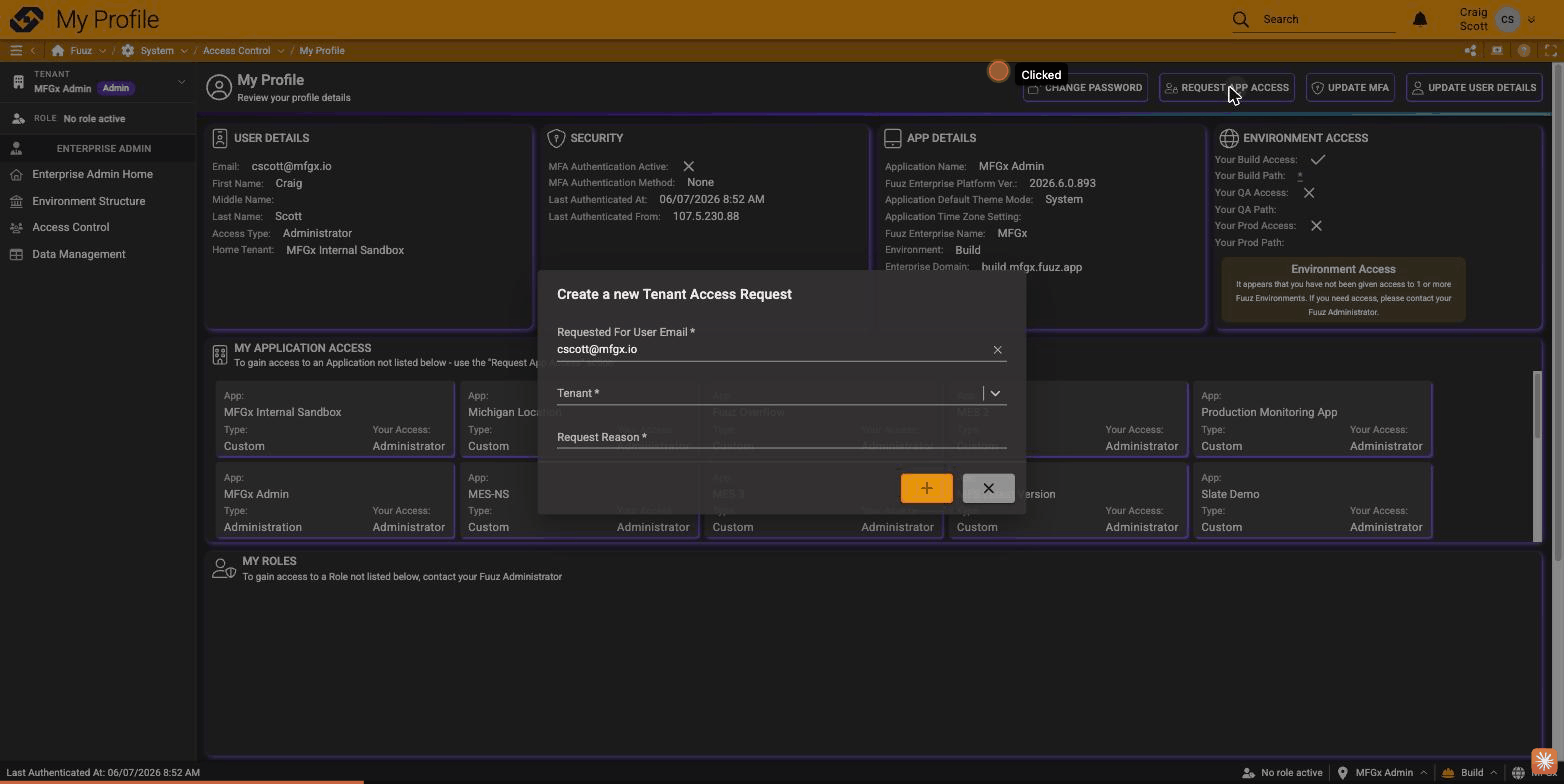
- Click the orange + to submit.
Your request goes to the enterprise admin tenant's access-request queue, where an administrator approves or denies it — see Training: Approve Access Requests. If approved, you get the requested access (and role, if one was specified). Unresolved requests expire automatically, and you'd then resubmit.
On My Profile → My Application Access, the application appears once your request is approved. Until then, it isn't in your list.
Training: Use the User Menu (Profile, Theme, and More) · Training: Approve Access Requests · Training: Invite a User to an Application
Getting Started (14)
- Access Field Level Help within the Fuuz Platform
- Field-Level Help
- Fuuz Platform 101: Low/No-Code Technology in Manufacturing
- Fuuz Platform Architecture
- Getting to Know the Fuuz Platform
- Logging into Fuuz – Cloud Access
- Manage what displays in Field Level Help throughout Fuuz
- Recovering Your Fuuz Account
- Sharing A Page
- Switching Between Apps in Fuuz
- Switching between Fuuz Environments (Build, QA, Production)
- Trouble Logging Into Fuuz
- Unique Email Plus Addressing
- Welcome To Industry Accelerators!
Training Guides (52)
Applications
- Brand and Configure Your Application
- Create an Application
- Deactivate (Retire) an Application
- Find Pages Beyond the Left Menu
- Install a Fuuz Package
- Navigate the Application Designer
- Retire an Application
Access & Users
- Approve Access Requests
- Approve Application Access Requests
- Configure the Internal Password Policy
- Create a Role
- Create an API Key
- Deactivate and Reactivate a User
- Grant Permissions with Policies
- Investigate Login Activity
- Invite a User to an Application
- Manage App Users
- Request Access to an Application
- Switch Applications, Roles, and Environments
- Understand Developer Access
- Understand Web Access
- Use the User Menu (Profile, Theme, and More)
Data Models & Schema
- Add a Custom Field
- Create a Data Model
- Create a Sequence
- Design Model Fields in the Schema Designer
- Relate Two Data Models
Screens
Weather Lookup Series — guided 3-part build
- Part 1 · Build the Screen (Beginner)
- Part 2 · Store the Readings (Intermediate)
- Part 3 · Watched Locations & Scheduled Capture (Advanced)
Data Flows & Integrations
- Call an External API with a Flow
- Connect to External Systems
- Create a Data Flow
- Create a Notification Channel
- Create a Webhook
- Save Queries, Scripts, and Data Mappings
- Schedule a Data Flow
- Use the Script Editor
Data, Reporting & Monitoring
- Browse Data with Data Explorer
- Build a Document (Report or Label)
- Check Component References
- Create Configuration Records (Modules, Units, Calendars, and More)
- Explore the GraphQL API
- Export Data
- Import Data into an Application
- Investigate Application Logs
- Save an Export Configuration
- Trace a Data Change
Enterprise & Organizations
Platform Concepts & Architecture (10)
- Bridging the Red and Blue Data Divide - How Fuuz Became the First Industrial Platform to Merge Operational and Business Intelligence
- Claude AI Skills for the Fuuz Platform
- Cool Things we built with Fuuz Episode 1 12.5.2025 (Public)
- Differences between MES and ERP from an ERP Consultant Eric Kimberling
- Fuuz can be your "Connected Worker Platform"
- Listen and Learn what MES is and what makes it unique
- Manufacturers struggle with Build versus Buy for their MES and what are the Core 4 Elements
- Stock Price Application
- Why All Manufacturers Build their MES System Part 1
- Why All Manufacturers Build their MES System Part 2
Screens & Application Design (17)
- Application Designer Guide
- Array Input
- Combobox
- Dynamic Field Configurations
- Fuuz Deployment Methodologies
- Fuuz Form Detail Screen Specification
- Historical Data Table Screen Design Standard
- JSON
- JSON Form Fields in Action Steps
- JSON Schema Inputs
- Master Data Table Screen Design Standard
- Mobile Screen Design Standard
- Screen Context Container
- Screen Generation (AI) Flow Template V1.5.1
- Setup Data Table Screen Design Standard
- Table Column Conditional Formatting
- Transform Data in a Column
Data Models & Schema (8)
Data Flows & Scripting (51)
Designing Flows
- Data Flow Design Standards
- Data Flow Logs
- Debugging and Testing our Fuuz Data Flows
- Flow Schedules
- Fuuz Data Flows enable DataOps at Scale, ETL, iPaaS and more
- How to Create APIs Using Data Flows in Fuuz
- How To General E-Commerce Integrations using Data Flows in Fuuz iPaaS
- How to Setup a daily file import using Fuuz Data Flows
- Managing Large Datasets in Fuuz: Data Flow Engine Performance Optimization
- The Power of Data Flows - Unlocking Industrial Intelligence with Fuuz
- Using Fuuz with FTP integrations and Data Flows iPaaS
Data Flow Nodes
- Data Flow Nodes Reference
- Debugging & Context Nodes
- Flow Control Nodes
- Fuuz Platform Nodes
- IIoT & Gateway Nodes
- Integration Nodes
- Notification Nodes
- Source & Trigger Nodes
- Transform Nodes
JSONata Reference
- Aggregation Functions
- Array Functions
- Boolean Functions
- Boolean Operators
- Comparison Operators
- Composition
- Construction
- Constructs
- Custom Fuuz Only JSONata Library
- Date Time Functions
- Date Time Processing
- Expressions
- Fuuz Bindings: $predicateFilter
- Higher Order Functions
- Jsonata Tutorial
- Numeric Functions
- Numeric Operators
- Object Functions
- Other Operators
- Path Operators
- Predicate Expressions
- Processing Model
- Regex
- Simple Queries
- Slow Transform Performance: JSONata vs JavaScript Optimization Guide
- Sorting Grouping and Aggregation
- String Functions
Scripting
Integrations & Connectors (30)
General & iPaaS
- API Keys
- Cloud Connectors - Complete Reference Guide
- Connecting a CRM with your ERP using Fuuz
- Connecting a Vending Machine to your ERP system using Fuuz
- Creating a Scheduled Integration & Sending a CSV File in an Email
- Debug a NetSuite SOAP API integration
- Fuuz Connections help you integrate your Systems and Devices
- Fuuz has lists of Connectors and Drivers you can use
- Fuuz has pre-built integration Connectors
- How to create a check an ODBC connection with another system
- How to Create a RESTful API Using the Fuuz Platform
- How to create a simple Integration and Store data in Fuuz
- How To Design or Configure Policies and Policy Groups for my App in Fuuz
- How to Integrate Fuuz with another product or another API
- How to Integrate with an HR system like ADP using Fuuz iPaaS
- How to use API Explorer and GraphQL to Query Data in Fuuz for Beginners
- How you Integrate your ERP with your MES
- Industry 3 and Industry 4 differences in ERP and MES Integrations
- Integrated Carrier Package
- Make REST-Based Calls With An API Key
- Policy Groups
- System connectivity validation - testing a connection when your 3rd party moves its hosting
- Using Fuuz as an iPaaS to Connect - to an API, Collect - Data from the API, Store - that data in Fuuz tables
Plex
- How to connect using Plex UX datasources from Fuuz iPaaS
- How to integrate with Plex Classic using Fuuz iPaaS
- How to Setup and Connect to Plex APIs
EDI
IIoT & Edge Gateway (18)
- Edge Connections: Complete Industrial Integration Reference
- Edge Gateway Flows
- Edge Gateway Installation Step-by-Step
- Edge to Cloud Infrastructure
- Gateway Deployment & Architecture
- Gateway System Requirements
- How IIoT fits into the Industrial Data "Stack"
Physical Device Connectors
- Connecting To Kepware OPCUA Server
- Fanuc Robot Connectivity using Edge Gateway
- HMI Template Standard - ISA-101 Compliant
- How to connect OPC/UA simulator to the Edge Gateway
- Modbus TCP
- MQTT
- Omron PLC/HMI NX102 Connectivity with Edge Gateway
Edge Data Connectors
Reporting, Documents & Dashboards (8)
- Building a Non-Conformance Report (NCR) Application in Fuuz
- Create responsive structured dashboard layouts using the Grid Container and Grid Cell components
- How to add visualizations (charts and graphs) to reports in Fuuz for Beginners
- How to build real-time reports in Fuuz from scratch for Beginners
- How to modify existing reports in Fuuz for Beginners
- Non-Conformance Report Accelerator
- Printing Documents
- Printing Documents From Fuuz
Administration & Access Control (27)
- Access Control
- Access Requests
- Access Requests: Overview
- Access Type Overview
- Access Types
- Add Users to Fuuz Apps
- App Admin Access
- App Management
- App Users
- Applications (Tenants)
- Authentication Events
- Change a User's Access Type
- Configurations
- Create Users and Set Access Type
- Enterprise Admin Overview
- Enterprise Users
- Enterprise Users vs Access Requests
- How To Login to your Fuuz Enterprise - Non Single Sign On
- How To Login to your Fuuz Enterprise - Single Sign On
- Identity Providers
- Notifications
- Notifications
- Organizations
- Roles
- Settings
- Switching my active Role within Fuuz
- Troubleshooting User Login Errors Due to Identity Provider Misconfiguration
Data Management (8)
Accelerators, Templates & Packages (8)
- Create a Quality Batch Golden Record Analysis Tool in Fuuz
- Fuuz Developer 101 Bootcamp - 2026 Schedule & Enrollment
- Fuuz Developer 101 Bootcamp - Program Overview
- Fuuz Industry Accelerators - Installation & Best Practices
- Fuuz Industry Accelerators - Overview
- How-To: Managing Green/Blue Deployments with Fuuz Package Management Zero-Downtime
- Model Agnostic Scheduling System APS
- Setting up In-House Fuuz
Design Standards (1)
How-To Guides (8)
- Connecting to Fuuz from a remote system to execute a Fuuz API
- Connecting to Fuuz from a remote system to execute a Fuuz API - Extended Features Part 2
- Data Mapping
- Document your Application using Atlassian Confluence and our Pre-Built App
- Fuuz Platform Capabilities
- How to add multiple data records to the Fuuz database with a single API call
- How to on Best Practices for Designing Flows in Fuuz
- Using the Transformation Explorer
FAQ & Troubleshooting (1)
Release Notes (117)
2026
- 2026.1 (January 2026)
- 2026.2 (February 2026)
- 2026.3 (March 2026)
- 2026.4 (April 2026)
- 2026.5 (May 2026)
- 2026.6 (June 2026)
2025
- 2025.1 (January 2025)
- 2025.10 (October 2025)
- 2025.11 (November 2025)
- 2025.12 (December 2025)
- 2025.2 (February 2025)
- 2025.4 (April 2025)
- 2025.5 (May 2025)
- 2025.6 (June 2025)
- 2025.7 (July 2025)
- 2025.8 (August 2025)
- 2025.9 (September 2025)
2024
- 2024.1 (January 2024)
- 2024.10 (October 2024)
- 2024.11 (November 2024)
- 2024.12 (December 2024)
- 2024.2 (February 2024)
- 2024.3 (March 2024)
- 2024.4 (April 2024)
- 2024.5 (May 2024)
- 2024.6 (June 2024)
- 2024.7 (July 2024)
- 2024.8 (August 2024)
- 2024.9 (September 2024)
2023
- 2023.5 (May 2023)
- 2023.1 (January 2023)
- 2023.10 (October 2023)
- 2023.11 (November 2023)
- 2023.12 (December 2023)
- 2023.2 (February 2023)
- 2023.3 (March 2023)
- 2023.4 (April 2023)
- 2023.6 (June 2023)
- 2023.7 (July 2023)
- 2023.8 (August 2023)
- 2023.9 (September 2023)
2022
- 2022 Q1 Fuuz Package Updates (03/11/2022)
- 2022 Q1 Fuuz Release Notes v3.87.0 (03/17/2022)
- 2022 Q1 MFGx Release Notes v3.78.0 (01/06/2022)
- 2022 Q1 MFGx Release Notes v3.79.0 (01/13/2022)
- 2022 Q1 MFGx Release Notes v3.80.0 (01/20/2022)
- 2022 Q1 MFGx Release Notes v3.81.0 (01/27/2022)
- 2022 Q1 MFGx Release Notes v3.82.0 (02/03/2022)
- 2022 Q1 MFGx Release Notes v3.83.0 (02/10/2022)
- 2022 Q1 MFGx Release Notes v3.85.0 (02/28/2022)
- 2022 Q2 Fuuz Release Notes v3.90.0 (04/14/2022)
- 2022 Q2 Fuuz Release Notes v3.91.0 (04/21/2022)
- 2022 Q2 Fuuz Release Notes v3.92.0 (04/28/2022)
- 2022 Q2 Fuuz Release Notes v3.93.0 (05/06/2022)
- 2022 Q2 Fuuz Release Notes v3.94.0 - v3.97.0 (June 13, 2022)
- 2022 Q2 Fuuz Release Notes v3.98.0 (06/16/2022)
- 2022 Q2 Fuuz Release Notes v3.99.0 (06/30/2022)
- 2022 Q3 Fuuz Release Notes v3.100.0 🎉 (07/06/2022)
- 2022 Q3 Fuuz Release Notes v3.101.0 (07/21/2022)
- 2022 Q3 Fuuz Release Notes v3.102.0 (08/11/2022)
- 2022 Q3 Fuuz Release Notes v3.103.0 (08/18/2022)
- 2022 Q4 Fuuz Release Notes v3.107.0 - v3.109.0 (10/27/2022)
2021
- 2021 Q1 MFGx Release Notes v3.29.0 (1/7/2021)
- 2021 Q1 MFGx Release Notes v3.30.0 (1/14/2021)
- 2021 Q1 MFGx Release Notes v3.34.0 (2/4/2021)
- 2021 Q1 MFGx Release Notes v3.37.0 (2/26/2021)
- 2021 Q1 MFGx Release Notes v3.38.0 (3/5/2021)
- 2021 Q1 MFGx Release Notes v3.40.0 (3/25/2021)
- 2021 Q1 MFGx.io Release Notes v3.32.0 (1/21/2021)
- 2021 Q1 MFGx.io Release Notes v3.33.0 (1/28/2021)
- 2021 Q2 MFGx Release Notes v3.41.0 (4/1/2021)
- 2021 Q2 MFGx Release Notes v3.42.0 (4/8/2021)
- 2021 Q2 MFGx Release Notes v3.43.0 (4/16/2021)
- 2021 Q2 MFGx Release Notes v3.44.0 (4/22/2021)
- 2021 Q2 MFGx Release Notes v3.45.0 (4/29/2021)
- 2021 Q2 MFGx Release Notes v3.47.0 (5/13/2021)
- 2021 Q2 MFGx Release Notes v3.48.0 (5/20/2021)
- 2021 Q2 MFGx Release Notes v3.48.0 (5/27/2021)
- 2021 Q2 MFGx Release Notes v3.50.0 (6/03/2021)
- 2021 Q2 MFGx Release Notes v3.51.0 (6/10/2021)
- 2021 Q2 MFGx Release Notes v3.52.0 (6/17/2021)
- 2021 Q2 MFGx Release Notes v3.54.0 (6/28/2021)
- 2021 Q3 Fuuz Release Notes v3.58.0 (7/22/2021)
- 2021 Q3 MFGx Release Notes v3.55.0 (7/1/2021)
- 2021 Q3 MFGx Release Notes v3.60.0 (8/5/2021)
- 2021 Q3 MFGx Release Notes v3.61.0 (8/17/2021)
- 2021 Q3 MFGx Release Notes v3.62.0 (8/19/2021)
- 2021 Q4 MFGx Release Notes v3.68.0 (10/8/2021)
- 2021 Q4 MFGx Release Notes v3.69.0 (10/14/2021)
- 2021 Q4 MFGx Release Notes v3.70.0 (10/21/2021)
- 2021 Q4 MFGx Release Notes v3.71.0 (10/28/2021)
- 2021 Q4 MFGx Release Notes v3.72.0 (11/04/2021)
- 2021 Q4 MFGx Release Notes v3.73.0 (11/11/2021)
- 2021 Q4 MFGx Release Notes v3.74.0 (11/19/2021)
- 2021 Q4 MFGx Release Notes v3.75.0 (12/02/2021)
- 2021 Q4 MFGx Release Notes v3.76.0 (12/09/2021)
- 2021 Q4 MFGx Release Notes v3.77.0: The Holiday Update (12/16/2021)
2020
- 2020 Q2 MFGx Release Notes v2.32.0 (4/9/2020)
- 2020 Q2 MFGx Release Notes v2.33.0 (4/16/2020)
- 2020 Q2 MFGx Release Notes v2.35.0 (4/30/2020)
- 2020 Q2 MFGx Release Notes v3.5.0 (6/18/2020)
- 2020 Q2 MFGx Release Notes v3.6.0 (6/25/2020)
- 2020 Q2 MFGx.io Release Notes v2.32.0 (4/9/2020)
- 2020 Q3 MFGx Release Notes v3.10.0 (7/23/2020)
- 2020 Q3 MFGx Release Notes v3.11.0 (7/30/2020)
- 2020 Q3 MFGx Release Notes v3.13.0 (8/13/2020)
- 2020 Q3 MFGx Release Notes v3.17.0 (9/21/2020)
- 2020 Q3 MFGx Release Notes v3.7.0 (7/6/2020)
- 2020 Q3 MFGx Release Notes v3.8.0 (7/9/2020)
- 2020 Q4 MFGx Release Notes v3.20.0 (10/13/2020)
- 2020 Q4 MFGx Release Notes v3.21.0 (10/15/2020)
- 2020 Q4 MFGx Release Notes v3.22.1 (10/22/2020)
- 2020 Q4 MFGx Release Notes v3.23.0 (11/5/2020)
- 2020 Q4 MFGx Release Notes v3.24.0 (11/12/2020)
- 2020 Q4 MFGx Release Notes v3.26.0 (12/3/2020)
- 2020 Q4 MFGx Release Notes v3.27.0 (12/10/2020)
- 2020 Q4 MFGx Release Notes v3.28.0 (12/17/2020)