Repository navigation
EN Start Gallery
Français · Type: reference · Audience: player, author · Context: player's browser · Status: ready · Applies from: 4.1.19
Screenshots of the sample game, The Pantry Key, and of the local Studio, taken from the real production build and the
real Studio by npm run docs:screenshots, never mock-ups. Each picture has its important labels written out below it.
These captures were taken at 4.1.19 (11 October 2026). Since then the interface font changed (Galmuri11, 4.3.0), the hero can be chosen at New Game (4.3.0), and the Studio gained a hero × language matrix and before/after captures (4.4.0): none of those shows here yet. To see the current version, play it at wanoo.github.io/quest-n-click.

Grandma's living room. On the right, the verbs Give, Open, Close, Pick up, Look at, Talk to, Use, Push, Pull ("Look at" is selected), the bag (six empty slots) and four tools: the other playable character (the cat), the map, the pause menu, the sound. Under the scene, the sentence line: Walk to.

A conversation. The column on the right shows Grandma and her topics: Where is the key?, What is for dinner?, Why lock the sardines?, Can I have a cuddle?, Bye!
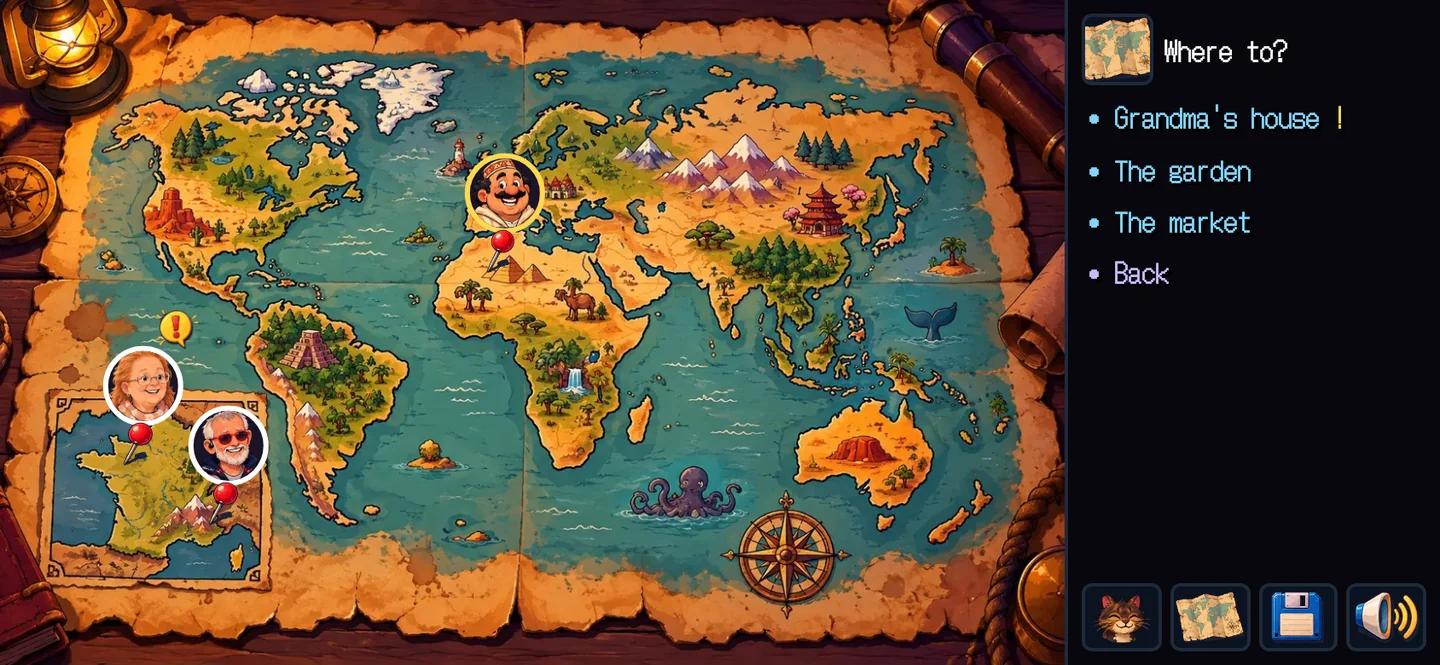
The world map. The characters are pinned where they are; the column asks Where to? with Grandma's house ! (something new there), The garden, The market and Back.

A minigame, pipes. The instruction, from Grandma on the shell phone: Tap a pipe to turn it. Bring the water to the mushrooms. A Skip button at the top right. It plays by touch or with the keyboard.

The Rooms tab. The tabs along the top: Rooms, Storyboard, Assets, Voices, Music, Check, Play, Language, Remix, Notes, then Undo, Redo, Play and Assistant. The room Grandma's house (house) in the placement editor; on the right the Props (pantry, armchair, clock, table, chair, shell, teacup) and Actors; the prop pantry selected, with its states locked and open, its Look lines and its Reactions.

The Check tab. Validator: no error, 0 warning(s). Solver: solved: the ending is reached (35 states explored; --prove checks every state), with its fifteen steps, from "(tutorial) Look at pantry" to "Use key with pantry". Solver health (runs, actions skipped, what splits the states). World: the three rooms and their exits.

The Storyboard tab. 100 % — 165 implemented, 0 partial, 0 missing. Five boards: Opening and tutorial, Grandma's house, The garden, The market, The pantry. Panel 1, Bad news, with Grandma's and Pixel's lines; on the right the panel's preview and its notes.

The Assets tab. Prepare assets (npm run assets), all prepared, 25 sheets, 401 images, 6 backgrounds, 23 sounds. The sheet hero (Pixel, a 6 × 4 grid, 24 cells, 19 used): each cell labelled portrait, walk, idle, curl… or unused; Copy prompt and Upload generated sheet….
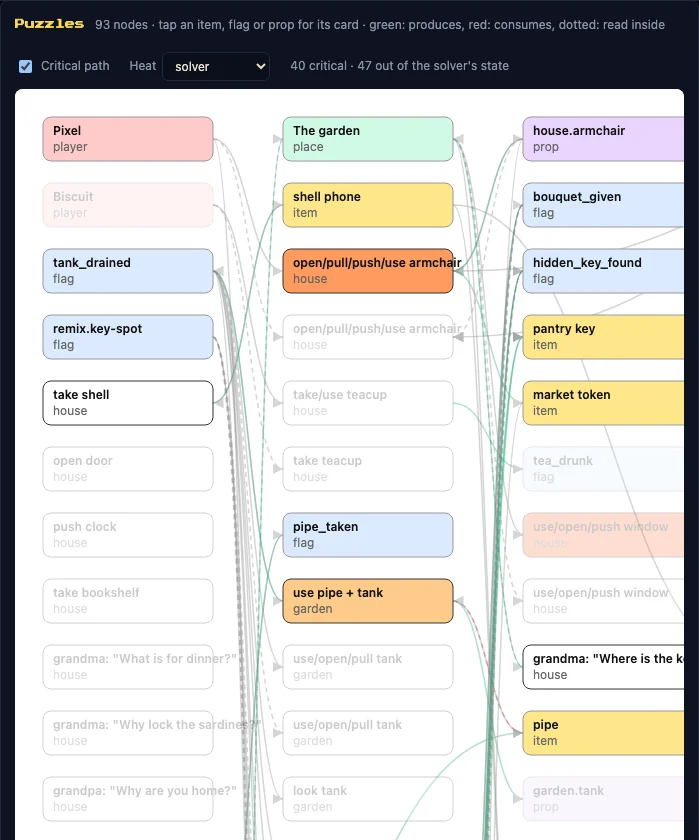
The puzzle graph (Check tab). 93 nodes; green arrows produce, red ones consume. Critical path on: 40 critical, 47 out of the solver's state; nodes such as tank_drained, shell phone, use pipe + tank, pantry key.
# in the engine repository, after npm ci and npx playwright install chromium
npm run docs:screenshotsIt builds the game into .cache/docs-dist, plays the sample game through the end-to-end harness and drives the Studio
with Playwright, then writes WebP files named for the release that took them (4119-<name>.webp at 4.1.19); a
release's captures never overwrite another's. --only=game|studio takes one half; --keep-png keeps the raw
captures. The script: scripts/docs-screenshots.mjs.
Generated publication · publication générée — current documentation · documentation courante: quest'n'click 4.4.0 r1, documentation revision · révision de la documentation 8dc717c69acb62c4742b69c54a7e7dfb620f75d8.
Earlier versions and permalinks · versions précédentes et liens permanents: https://wanoo.github.io/quest-n-click/docs/
An edit made in this wiki is overwritten at the next publication · une modification faite dans ce wiki est écrasée à la publication suivante.
Edit the source · Modifier la source · Report an error · Signaler une erreur
Index (6)
Start (6)
Play (9)
Install (17)
- Requirements
- Install from the release archive
- Install from npm, once published
- Install from the repository to work on the engine
- doctor: checking your machine
- Image toolchain
- Audio toolchain: ffmpeg, fluidsynth, Furnace, uv
- Upgrade
- Upgrade notes: 4.4
- Upgrade notes: 4.3
- Upgrade notes: 4.2
- Upgrade notes: 4.1
- Upgrade notes: v3
- Upgrade notes: v2 to v3
- Coming from web-scumm
- Package reference
- Install troubleshooting
Create a game (55)
- Your first game
- Layout of a created project and of the engine repository
- The working loop
- Content principles and the identity contract
- Rooms
- Geometry: placement, walk zones, masks, layers, camera
- Something is visible but unreachable
- Reactions
- Game commands
- Conditions
- Flags, variables and events: which to use
- Custom code
- Characters
- Items and inventory
- World map
- Dialogues
- Scripts and events
- Moving characters: patrols and walks
- Exits
- Chapters and objectives
- State and saves: persistent or temporary, renaming an id, migrations
- Staging: wide rooms and animations
- The stage: lights, particles, floors
- Skin and fonts
- Title and credits
- Heroes: several characters and hero choice
- Built-in minigames
- A custom minigame
- Translations
- Music in stems
- Sound effects
- Voices: per language and per hero
- Images: prompts, cutting sheets, transparency, scale
- Asset provenance
- The storyboard, source of truth
- Puzzle design
- Classic mechanics
- Review pages
- DSL reference
- Checking your game
- What the solver proves
- Solver options
- Playtests
- Remix
- Speedrun for authors
- The sealed ending
- Production template
- Example games
- Working with an AI
- Build and release a game
- Publish on GitHub Pages
- The static game on Clever Cloud
- Other static hosts
- Sub-path, cache and service worker, incomplete deploys, going back
- Testing on a phone over the LAN
Local Studio (24)
- The local Studio: overview and launch
- Edit a room
- Placement and stage
- Preview, apply, undo
- Storyboard
- Assets and cutting
- Check: validator, solver, critical path, heat, health, coverage
- Before and after captures
- Semantic diff
- Play and replay a session
- Rule explainer
- Language and objectives
- Voices and the heroes × languages matrix
- Map
- Notes
- Remix in the Studio
- Music
- The Assistant: bring your own key
- Demo mode and studio-apply
- Local and LAN security
- Studio API
- Local MCP: setting up each client
- MCP tools
- Studio troubleshooting
Team Studio (21)
- What runs where
- Concepts: revision, transaction, span, lease, preview, build
- Starting as an invited dev
- Working together day to day
- Roles and actions: the full matrix
- Invitations
- Managing members
- Write refused on the hosted Studio: stale base revision (409)
- Write refused on the hosted Studio: span locked (423)
- Recovering after a lost lease, a disconnection or a stale preview
- Comments
- Map and semantic diff
- Publishing builds
- Remote MCP
- The game in Git
- Upgrading the engine of a hosted game
- Hosted assets
- The server's command line
- Health and metrics routes
- Trying it locally with compose.yml
- Known limits
Clever Cloud (23)
- Clever Cloud: overview, cost and prerequisites
- Apps and add-ons
- Domains and TLS
- Keycloak
- Generic OIDC and GitLab
- Configuration
- First deployment
- Backups
- RPO and RTO
- Restore the Studio on a fresh installation
- Redeploys
- Upgrading the server and checking state after a migration
- Limits of going back
- Monitoring
- Security
- Rotating keys
- Recovering admin access
- Changing domain or OIDC provider
- Worker, PostgreSQL or Cellar down
- Exporting the game and leaving the installation
- Retention
- Clever Cloud troubleshooting
- Costs and teardown
Reality Bridge and connectors (16)
- The Reality Bridge: what it is
- Quick start
- Guarantees
- Install and run the Bridge
- Backup and restore
- Several tenants
- Signals and the manifest
- The Bridge's command line
- Connectors overview
- Email connector
- Telnet connector
- SSH connector
- Open Badges connector
- The connector SDK
- Security: Biscuit and signatures
- Bridge and connector troubleshooting
Contribute (25)
- Welcome
- Developer setup
- The dev loop
- Before a pull request
- Conventions
- Writing documentation
- Architecture
- Code tour
- Import boundaries
- Which tests run when
- Mutation testing
- The coverage ratchet
- The quality baseline
- CI explained
- Field passes
- Benchmarks
- Releasing
- npm packages
- Decisions and ADRs
- Governance
- Bot pull requests
- Contributing with AI agents
- Security policy
- Code of conduct
- Licences and credits