Repository navigation
reports_and_lists
QElectroTech can produce the lists a finished project needs: parts, wires, terminals, cables, PLC points, panel space, marker labels for a label printer, and the symbols of a library. They come from the project database, so folios that are not built yet are counted too.
| You want | Use | Section |
|---|---|---|
| Look at a list, write it to CSV or PDF | Project → Reports... | 1 |
| A list drawn on a folio, kept up to date | Lists menu, Add a device list and three more | 2 |
| Marker text for a label printer | Project → Export labels for printing... | 3 |
| A spreadsheet of a symbol folder | right-click a folder, Export symbol list... | 4 |
| A warning before printing items that lie beside the sheet | Settings → Configure QElectroTech → General → Appearance | 5 |
Project → Reports... opens Reports. Nothing is saved in the project.
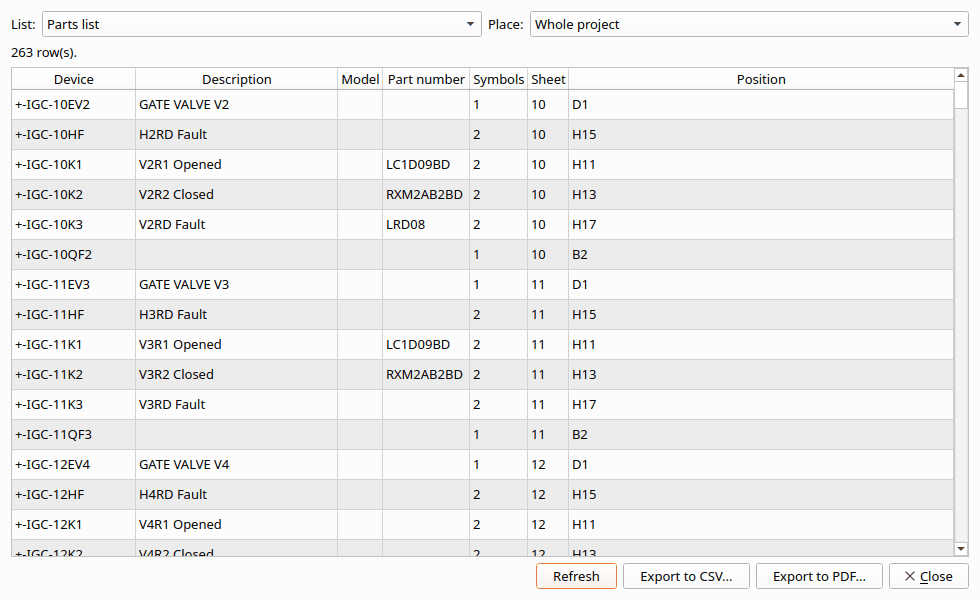
| Control | Does |
|---|---|
| List: | Chooses the list. |
| Place: | Whole project, or one plant or location. |
| Refresh | Reads the project again. |
| Export to CSV... | Writes the list shown to a CSV file. |
| Export to PDF... | Writes the list shown to an A4 landscape PDF. The titles are repeated on every page. |
The line above the table says how many rows the list has. Reading the folios shows a progress dialog.
| List | One row per | Columns |
|---|---|---|
| Parts list | part | Device, Description, Model, Part number, Symbols, Sheet, Position |
| Wire list | wire | Wire, Section, Colour, From, To, Cable, Sheet |
| Potential list | potential | Wire numbers, Names, Pins, Connected, First sheet, Sheets |
| Terminal list | terminal on a strip | Strip, Position, Terminal, Wires, Connected, Sheet |
| Cable list | cable | Cable, Type, Cores, Wired, Length, Sheet, Comment |
| Cable core list | cable core | Cable, Core, Wire, Section, From, To, Sheet |
| PLC input and output list | PLC entry | PLC, Part number, Entry, Address, Type, Function, Sheet, Position |
| Panel space list | place | Place, Parts with a size, Area [m²], Deepest [mm], Parts without a size |
A strip terminal whose pin repeats its number is written -X1:2, not -X1:2:2.
For each place (=plant+location) it adds up the mounting-plate area its parts need.
- The area of a part is width × height × quantity, taken from the part's Parts tab. The sizes are in mm; the total is shown in m².
- Deepest [mm] is the largest depth of any part in the place.
- Parts without a size counts the parts that have a part number but no usable size. When it is not zero, the total is incomplete.
- A size must be a plain number (
45or45,5).45 mmcounts as no size. - A coil and its contacts are one part, counted in the coil's place, as in the parts list. A part left out of the parts list is left out here. Auxiliary blocks and rail length are not counted.
Added in #1941, #1968.
The Lists menu can put a list on a folio as a table that follows the project. Edit a label and the table changes. A table too long for its folio continues on further folios, as the parts list does. Each command opens a dialog of the same name.
| Command | One row per | Columns |
|---|---|---|
| Add a device list | device | reference, description, designation, article, symbols, first sheet |
| Add a wiring table | wire | wire number, both ends as -K1:A1, cable, core, sheet |
| Add a PLC list | I/O entry | the columns the dialog offers |
| Add a signal list | potential | the columns the dialog offers |
The wiring table has the same rows and the same order as the Wiring list dialog. Two differences:
- A wire that ends on a junction is listed as drawn. The dialog follows the junction's chain; a table cannot.
- The table writes an end as the designation (
-K1, with=plant+locationwhen set). The dialog writes the plain label.
A table is saved like the parts list: its name and its query. An older QElectroTech shows it empty and does not crash.
Added in #2010.
Project → Export labels for printing... writes one label per line, as CSV, for label printer software. A value that holds ; or , stays in its cell.
| Choice | Lists |
|---|---|
| Device tags (one per device, in folio order) | One tag per device, not per contact. Terminals are left out. |
| Terminal markers (strip by strip, in strip order) | Strip by strip, in the strip editor's order. Then terminals on no strip, by label (X2:9 before X2:10). |
| Cable numbers (in folio order) | One per cable. |
| Wire numbers (one per wire) | Sorted 2 before 10, as Export the list of names of wires does. |
Full designation (=plant+location-tag) writes =plant+location-K1 instead of K1. It does not apply to wire numbers. The dialog says how many labels there are and shows the first. Save as CSV... writes the file. Spare terminals with no label are skipped, so a printed run has no blank for them.
From the command line:
qelectrotech --export-labels <project> <out.csv> devices|terminals|cables|wires [--full-designation]
Added in #1988.
Right-click a folder in the collections panel and choose Export symbol list.... It writes a spreadsheet of every symbol and macro in the folder. A progress dialog with Cancel shows while it reads.
| Column | Holds |
|---|---|
name, folder, file
|
the symbol and where it is |
kind |
symbol or macro
|
type |
the link type of the symbol |
class_letter |
the letter that placing the symbol gives it |
terminals, terminal_names, unnamed_terminals
|
how many terminals, their names, how many have no name |
labels |
the labels a macro places |
error |
why a file could not be read |
It shows at a glance which symbols lack terminal names or a class letter. A macro is one row, and its folio report arrows are not listed. The file uses ; and UTF-8 with a byte order mark, like the parts list, so Excel opens it in any language.
From the command line: qelectrotech --export-library <folder> <out.csv>.
Added in #1989.
Anything that lies wholly or partly outside a folio's sheet (its border and title block) is cut off or left out when the folio is printed or exported. With Warn about items outside the sheet on, printing, PDF export and image export first list what lies outside, folio by folio, and ask Go on anyway?:
Folio 5 (Kitchen): -K1, a text
- Symbols are named by their label, or their name. Texts, shapes, pictures and tables are named by their kind. Wires and hidden items are left out.
- At most ten folios are listed; the rest are counted (
... and 3 more folio(s)). - Saving does not ask. It only mentions the folios in the status bar.
- The setting is Warn about items outside the sheet, under Settings → Configure QElectroTech → General → Appearance, group Drawing on the sheet. It is on by default.
Added in #1639.
- Project languages, cell numbering and checks: the Check panel and the other project checks
- Device types
- Plants and locations
- Terminal strips
- Building a custom nomenclature or summary table
- Printing and exporting
- CLI reference
Checked against build
b49ce16c4on 2026-11-27 (by hand: the screenshots and menu paths in the sections added on 2026-11-27 were taken on that build; the other details of those sections read from source).
