Users and Accounts
If more than one person uses the same copy of Gubbins, accounts let you say who they are, put a name against every change they make, and limit what each of them may do. It's entirely optional — Gubbins works exactly as it always has until you switch it on.
Where to find it: the Users screen, once the Users module is switched on in Modules. Switching that module on is what turns sign-in on too — the two are the same choice.
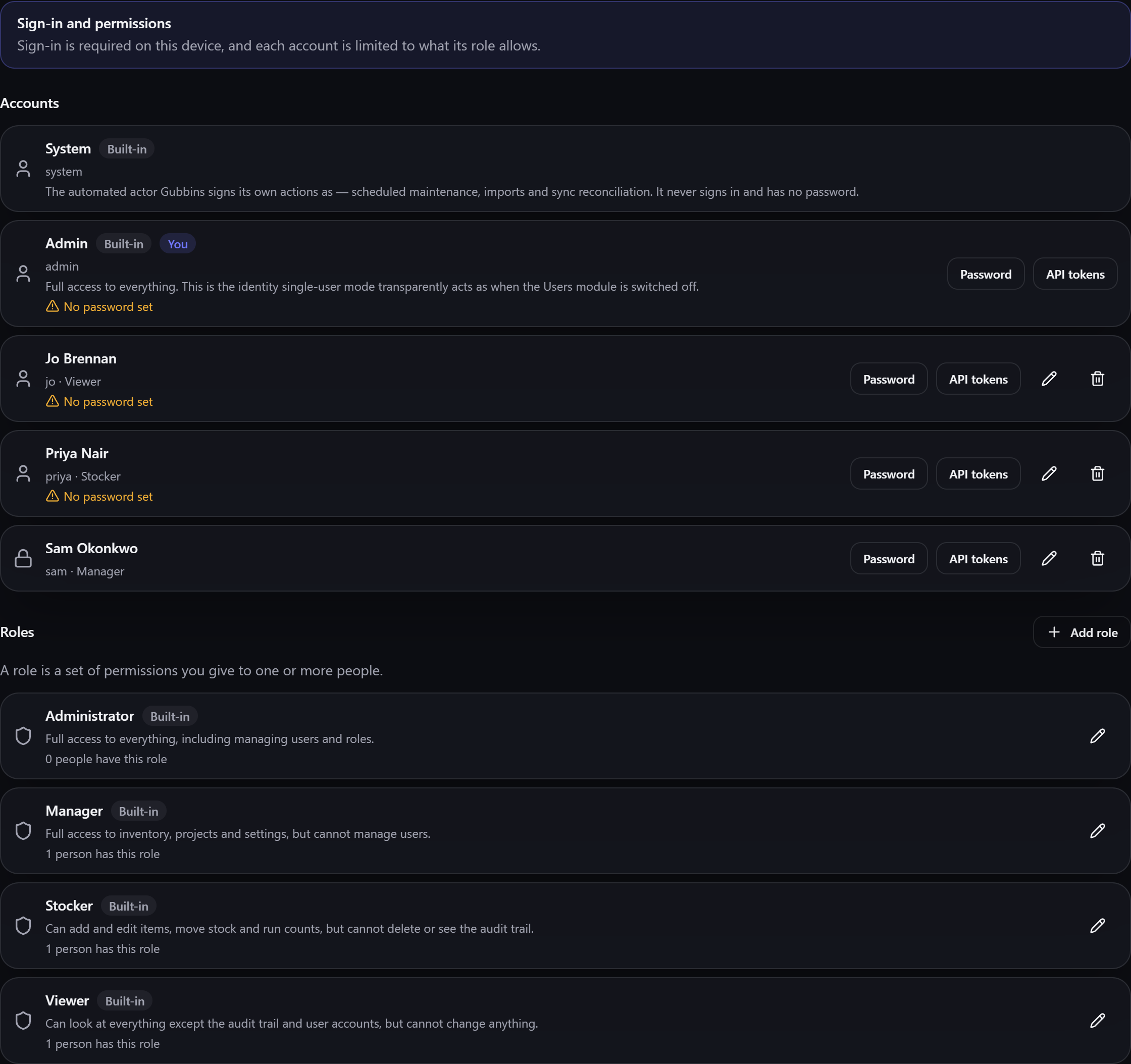
An account does two things:
- Attribution. Every change is recorded against the person who made it, so the activity log answers who as well as what and when.
- Permissions. Each account holds a role, and the role decides which parts of Gubbins that person may see and change.
An account is also what an outside tool acts as: if you run the bridge, each integration presents an API token minted against an account and is held to that account's role.
ℹ️ Note An account is not the same as a contact. A contact is a person recorded as data — someone you lend a drill to. An account is someone who uses Gubbins. They're kept separately, and one person can be both.
Every copy of Gubbins starts with two accounts you can't delete:
- Admin — full access to everything. This is who Gubbins acts as when the Users module is off, which is why nothing changes for a single-person setup.
- System — not a person. It's the name Gubbins puts against things it does itself: tidy-up jobs, sync reconciliation, scheduled imports. It never signs in and has no sign-in tile.
Add user asks for:
| Field | What it's for |
|---|---|
| Username | The handle they sign in with. Unique on this device |
| Display name | What's shown around the app and against everything they change |
| Optional | |
| Description | Optional. A short note on what the account is for, shown on its row |
| Role | What they may do. Without one they can sign in, but nothing else |
| This account may sign in | Untick to suspend an account without deleting it |
When sign-in is turned off for an account you can add a short message shown when they try to sign in, so a refusal isn't a mystery — "On leave until August" is more use than a blank wall.
A password on an account is a choice, not a requirement. Leaving one off is perfectly reasonable on a shared family or workshop device where the point is knowing who did what, not keeping anyone out. Accounts without one are marked plainly, both in this list and on the sign-in screen, so it's never a surprise.
⚠️ Heads-up A password does not encrypt your data. It controls who gets into the app on this device and puts a name against each change. Anyone who can reach this device's files can still read your inventory, whatever passwords you set. If you need more than that, use your device's own passcode or disk encryption — see Privacy & security.
Deleting an account stops that person signing in. It does not erase what they did: their entries stay in your activity log and are shown against the built-in System account instead, so the record of what happened to your inventory stays complete.
Switching the Users module back off in Modules loses nothing. Every account, every role and every record of who changed what is kept exactly as it is — Gubbins simply stops asking anyone to sign in and goes back to acting as Admin. Switch it on again and everyone's account and role are exactly as they were.
💡 Tip You can still reach the Users screen with the module off, to read and tidy accounts before switching sign-in back on. Going to it shows the usual "this module is hidden" page first — choose Continue anyway to open it without turning sign-in on. The screen says plainly that nothing is being enforced.
- Signing in — what people see once sign-in is on, and how to get back in.
- Roles & permissions — deciding what each account may do.
- Activity log — where attribution shows up.
- Bridge API tokens — letting an outside tool act as one of these accounts.
- Modular UI — switching the Users module on and off.
- Privacy & security — what accounts do and don't protect.