Visual Query Builder
The visual builder lets you construct precise searches by clicking, without learning any syntax — combine conditions with AND / OR, nest groups, and see results update live.
Where to find it: Inventory → More menu → Visual search.
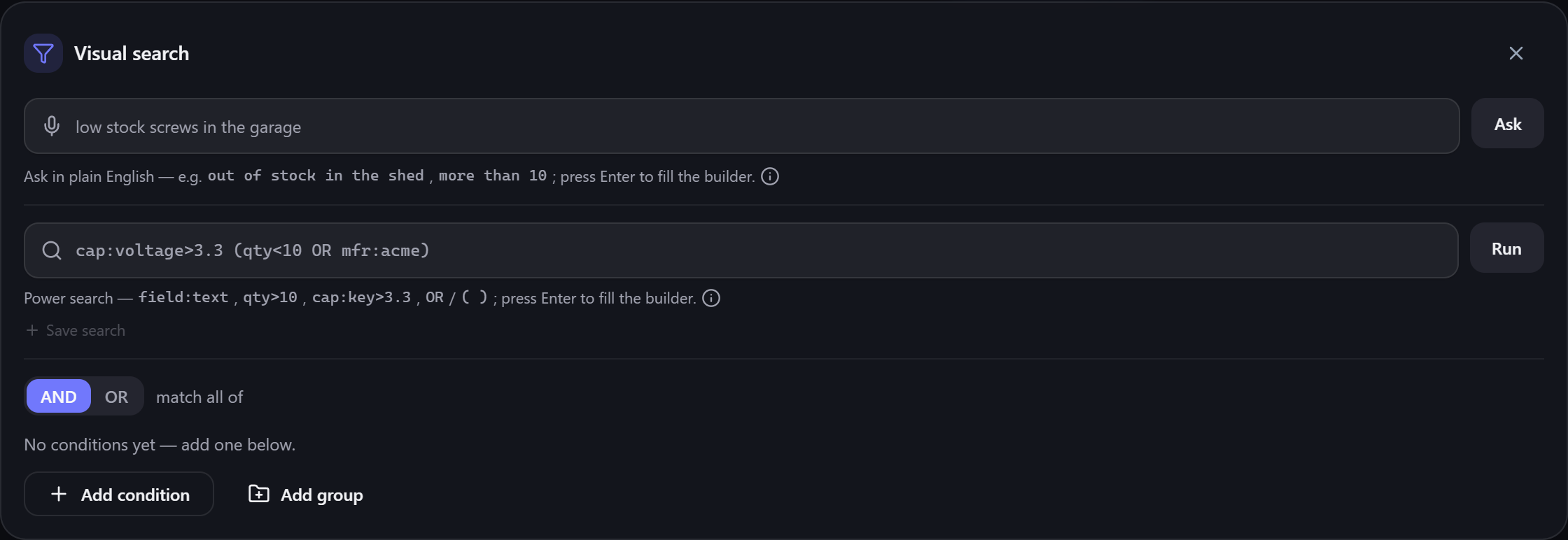
Opening Visual search reveals one panel with three ways in — use whichever suits you, they all build the same query:
- Ask in plain English — type a request and press Enter to fill the builder. See Natural-language search.
-
Power search — a compact
field:valuetext box. See Text query syntax. - The graphical builder — the AND/OR group below, built entirely by clicking.
- Match all / any. The AND / OR toggle at the top of a group decides whether items must match all of its conditions or any of them.
- Add condition. Select Add condition to add a rule — pick a field (name, quantity, category, a capability, a custom field…), an operator, and a value.
- Add group. Select Add group to nest a sub-group with its own AND/OR — this is how you express things like "(low quantity OR on order) AND in the garage".
- Clear. Remove everything and start over with Clear.
Results update as you build, and the panel shows how many items currently match.
💡 Tip The three inputs interoperate: type a request in plain English or the text box to populate the graphical builder, then fine-tune the conditions by clicking. It's often fastest to start with a rough phrase and adjust.
ℹ️ Note While the visual builder is active it supersedes the quick-search box and status chips, so you're always seeing exactly this query's results. Close the panel to return to quick search.
Happy with a query? Save it to recall it later.
-
Text query syntax — the
field:valuelanguage the box accepts. - Natural-language search — build a query from a plain phrase.
- Custom fields & capabilities — the attributes you can filter and rank on.