Webhooks
Have Gubbins call a URL of your choosing when something changes — so Home Assistant, Node-RED, Discord, or anything else that accepts an HTTP request can react to your inventory.
Where to find it: the Webhooks page in the main navigation.
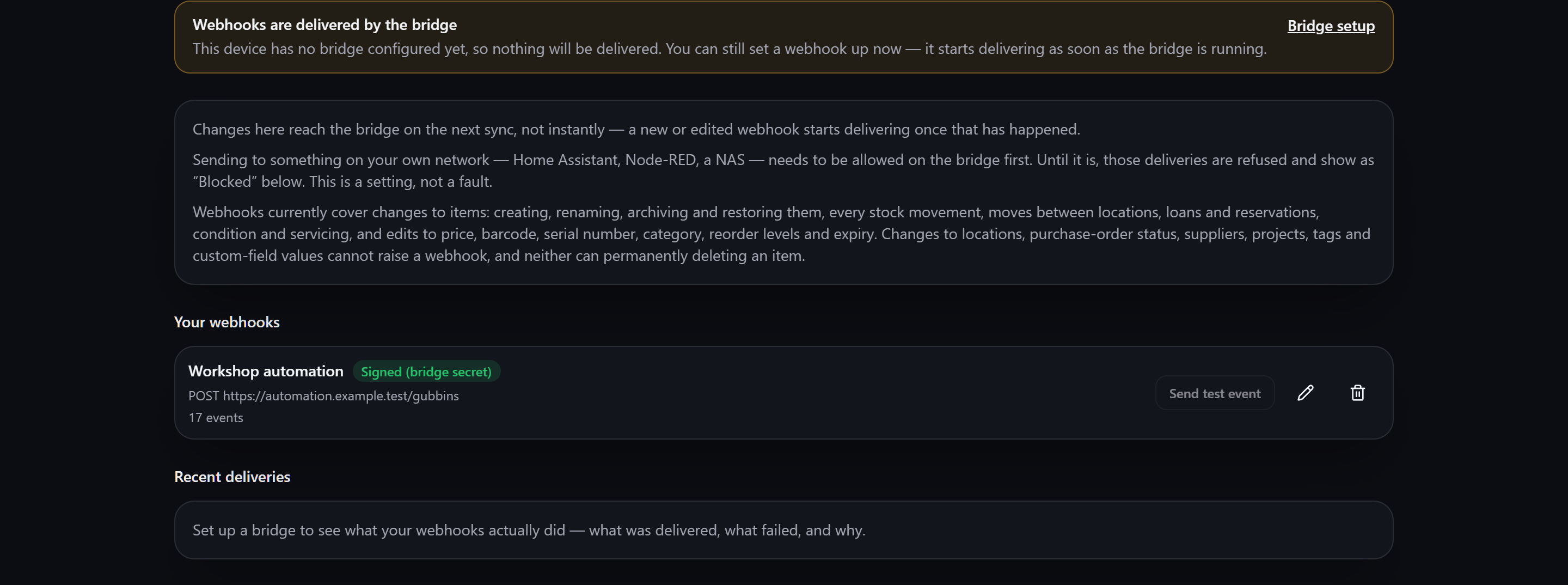
Gubbins itself never calls your endpoint. Your browser can't reliably reach the addresses most
receivers actually live on — a Home Assistant box on your own network, a plain http:// automation
server — so the bridge makes the call instead.
That means webhooks need a running bridge. You can still set one up before you have one: it simply starts delivering as soon as the bridge is up.
ℹ️ Note — changes reach the bridge on the next sync The bridge reads your webhooks out of the data it syncs, so a new or edited webhook starts delivering after your next sync reaches it, not the instant you press Save.
Press Add webhook and fill in:
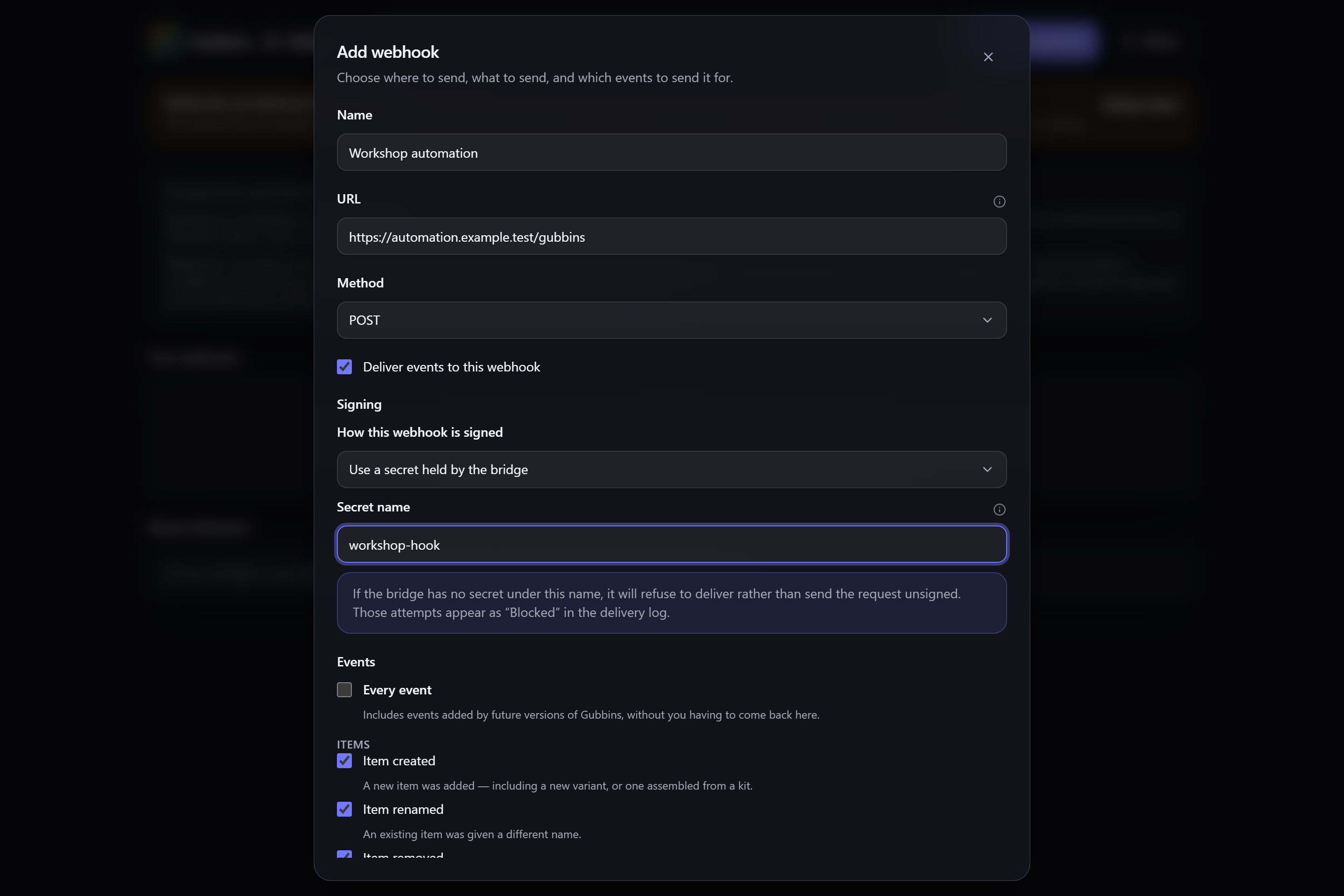
- Name — how you'll recognise it in the list. Purely for you.
-
URL — the address the bridge calls. Must start with
http://orhttps://. -
Method —
POST,GET,PUTorPATCH.POSTis what most receivers expect. - Events — tick the changes you care about, grouped by kind (lifecycle, stock, movement, custody, upkeep). Every event also picks up any events added by future versions of Gubbins.
- Filter (optional) — narrow it further to a particular location, category, tag, specific items, or a quantity threshold.
-
Payload (optional) — send Gubbins' standard event, a preset shaped for Discord, Slack or
Home Assistant, or write your own using
{{item.name}}-style placeholders. A preview shows what a real event would produce. - Extra headers (optional) — for receivers that expect a particular header.
💡 Tip Start with Every event and no filter to confirm the plumbing works end to end, then narrow it down once you're seeing deliveries.
A signature lets your receiver confirm a request really came from Gubbins rather than from anything else that happened to learn the URL. There are two ways to hold the signing secret, and the choice matters.
Use a secret held by the bridge (recommended). You give the webhook the name of a secret you have configured on your bridge. Only that name is stored in Gubbins — the secret value itself never enters your database, your synced data, or a backup.
Store a secret with this webhook. Zero setup: Gubbins generates one for you. It is shown once, with a copy button, and can only be replaced afterwards, never re-read.
⚠️ Heads-up — a stored secret travels with your data A secret stored on the webhook is carried, in readable form, in your synced data and in every backup — which for cloud sync means it sits wherever your sync folder lives. If that matters to you, use a secret held by the bridge instead.
You can also choose not to sign. That's fine for a private endpoint you trust, and a poor idea for anything reachable from the internet.
ℹ️ Note — a missing secret stops delivery, it doesn't downgrade it If you name a bridge-held secret the bridge can't find, that webhook is dropped rather than sent unsigned, and shows as Blocked in the delivery log. Gubbins will never quietly send an unsigned request in place of a signed one you asked for.
ℹ️ Note —
GETcannot be signed AGETrequest carries its data in the address itself, so there is no body to sign. Pick another method if you need a signature.
Webhooks currently cover changes to items:
- creating, renaming, archiving and restoring an item;
- every stock movement, including running low and running out;
- moves between locations;
- loans and reservations (checked out, checked in, reserved, reservation cleared);
- condition changes and logged maintenance;
- edits to price, barcode, serial number, category, reorder levels and expiry.
These cannot raise a webhook at all: changes to locations, purchase-order status, suppliers, projects, tags and custom-field values — and neither can permanently deleting an item.
⚠️ Heads-up — a bulk change may report itself as skipped When a great many changes land at once — a bulk import, for instance — events beyond a safety cap are dropped and you get a single "Events were skipped" notification instead. Your data is unaffected; only the notifications were. Read a bulk change from the bridge's query API rather than from events.
There are two further events outside the everyday list, both off unless you choose them:
- Item looked up — announces that someone asked "where is…" and got an answer. It publishes what was searched for, so it also needs its own separate switch on the bridge.
- Events were skipped — the diagnostic above.
Each webhook has Send test event, which fires a synthetic event through the same filter, payload and signing your real events use, then records the result — the fastest way to tell whether a receiver is actually listening.
Recent deliveries at the foot of the screen shows what your webhooks really did, with each attempt marked:
- Delivered — the receiver accepted it.
- Failed — the receiver was reached but didn't accept it, or couldn't be reached.
- Blocked — refused before anything was sent: either the address is on a private network the bridge hasn't been allowed to reach, or a named signing secret couldn't be found.
- Skipped — not attempted, because recent deliveries to that endpoint had been failing.
ℹ️ Note — the log updates only while you're looking at it The delivery log is fetched from the bridge while the Webhooks page is open. Leave the page and it stops updating; come back and it catches up. Deliveries themselves carry on regardless — the log is a window onto the bridge, not the thing doing the work.
If the log says webhooks are switched off on your bridge, that's different from "nothing delivered yet": the bridge is running but its webhook delivery hasn't been enabled, so nothing is being sent at all. Turn it on in the bridge's own configuration.
Home Assistant, Node-RED, a NAS — a receiver on your own network is the expected case, but the bridge won't reach a private or loopback address until its operator explicitly allows it. Until then those deliveries are refused and appear as Blocked.
This is a setting, not a fault. Turning it on is described in the bridge's own configuration — see Running the bridge.
⚠️ Heads-up A webhook sends your data outward, to an address you chose. Keep them pointed at destinations you trust, sign them where you can, and see Privacy & security.
Webhooks is an optional module. If you don't use it, switch it off on the Modular UI screen and the page disappears from this device's navigation — your webhooks are kept, and the bridge carries on delivering them.
- Running the bridge — getting the bridge going, and its configuration.
- Bridge overview — what the bridge is and what else it can do.
- Webhooks, MQTT & iCal — the live event stream, MQTT publishing and the calendar feed.
- Home Assistant integration — the richer route into Home Assistant.
- Cloud sync — how your webhooks reach the bridge in the first place.
- Privacy & security — what leaves your device, and when.