-
Notifications
You must be signed in to change notification settings - Fork 0
Wishlist
A wishlist is a simple list of things you want to buy but don't own yet — the counterpart to the stock-driven reorder list. Jot down a part you've got your eye on, a tool you're saving for, or something to pick up next time.
Where to find it: the Wishlist tab on the Purchase orders screen.
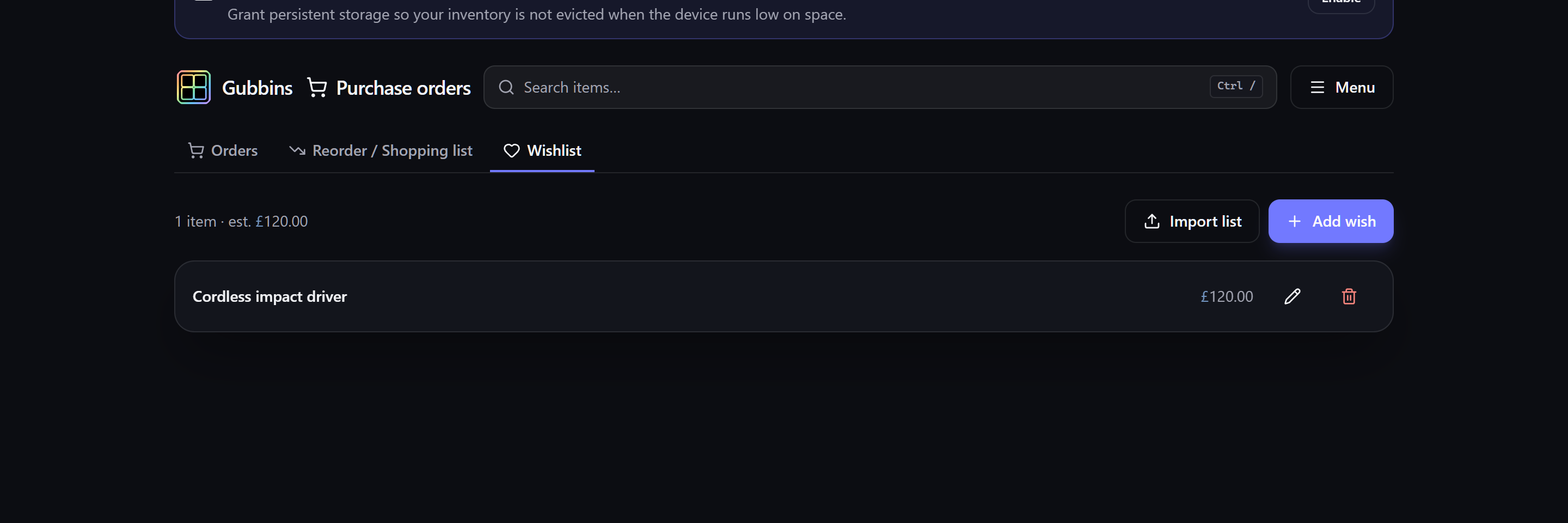
Each wishlist entry stands alone — it doesn't reference an existing item. Give it:
- A name for what you want.
- An optional note, link (to a product page), target price, and priority.
The list sorts by priority, so the things you want most sit at the top.
💡 Tip Paste the product page link and a target price so, when you're ready to buy, everything you need is one click away — no hunting for where you saw it.
Got a list already? Import list takes a pasted block or a file and adds every line to the wishlist in one go — a spreadsheet, a CSV / TSV, JSON, a Markdown or HTML table, or simply one thing per line. Where the list gives a price it becomes the entry's target price, a link becomes its link, and a supplier is kept in the entry's note.
You'll see a preview of what will be added before anything is written. The same importer can send a list to a purchase order instead, if you're ready to actually order it.
⚠️ Heads-up Only ordinary web links (http/https) are accepted for an entry's link, so a wishlist can't carry anything unsafe.
ℹ️ Note The wishlist is for things you don't own. Once you buy something and start tracking it, it becomes a normal item; restocking things you do own is the reorder list's job.
- Reorder & shopping list — restocking what you already own.
- Purchase orders — ordering from a supplier.
Gubbins · a local-first, offline inventory app · Report an issue
Getting started
Inventory
- Items
- Tracking modes
- Locations & stock
- Location photos & regions
- Batches & lots
- Variants & SKUs
- Kits & bundles
- Tags, attachments & related
- Custom fields & capabilities
- Low stock & gauges
- Counting by weight
- Container weights
- Bulk edit & clone
- Inventory views
Asset lifecycle
- Warranty & depreciation
- Current value & revaluation
- Maintenance & servicing
- Test & calibration records
- Condition grading
- Cycle counts & audit day
- Insurance & estate schedule
People, loans & bookings
Users & access
Search
- Search overview
- Visual query builder
- Text query syntax
- Natural-language search
- Saved searches & favourites
Scanning & labels
Purchasing & projects
- Projects & BOM
- Budgets
- Purchase orders
- Reorder & shopping list
- Wishlist
- Supplier parts & price history
- Suppliers
Reports & insights
- Reports overview
- Valuation & spend
- ABC, turnover & aging
- Sales & margin
- Data hygiene
- Parts catalogue
Sales & disposals
Alerts, activity & agenda
Companion extension
Data, sync & resilience
- How your data is stored
- Cloud sync
- Backup & restore
- Export & import
- Migrating from another tool
- Storage triage
- Danger zone: erasing data
Bridge & Home Assistant
- Bridge overview
- Running the bridge
- Bridge API tokens
- Home Assistant
- AI assistant query (MCP)
- Webhooks
- Webhooks, MQTT & iCal
Settings & customisation
- Appearance & theming
- Branding
- Dashboard & widgets
- Modular UI
- Language & region
- Notifications
- Kiosk & tablet mode
Reference