Repository navigation
AI Generation
PlotWeave can build a whole world, or fill in one section of an existing one, using any AI assistant — ChatGPT, Claude, Gemini, or another.
There is no API key and no network call. Every AI feature works by copy-paste: PlotWeave gives you a prompt, you paste it into your assistant along with your story, and you paste the JSON it returns back into PlotWeave. Your story never leaves your machine except where you choose to paste it.
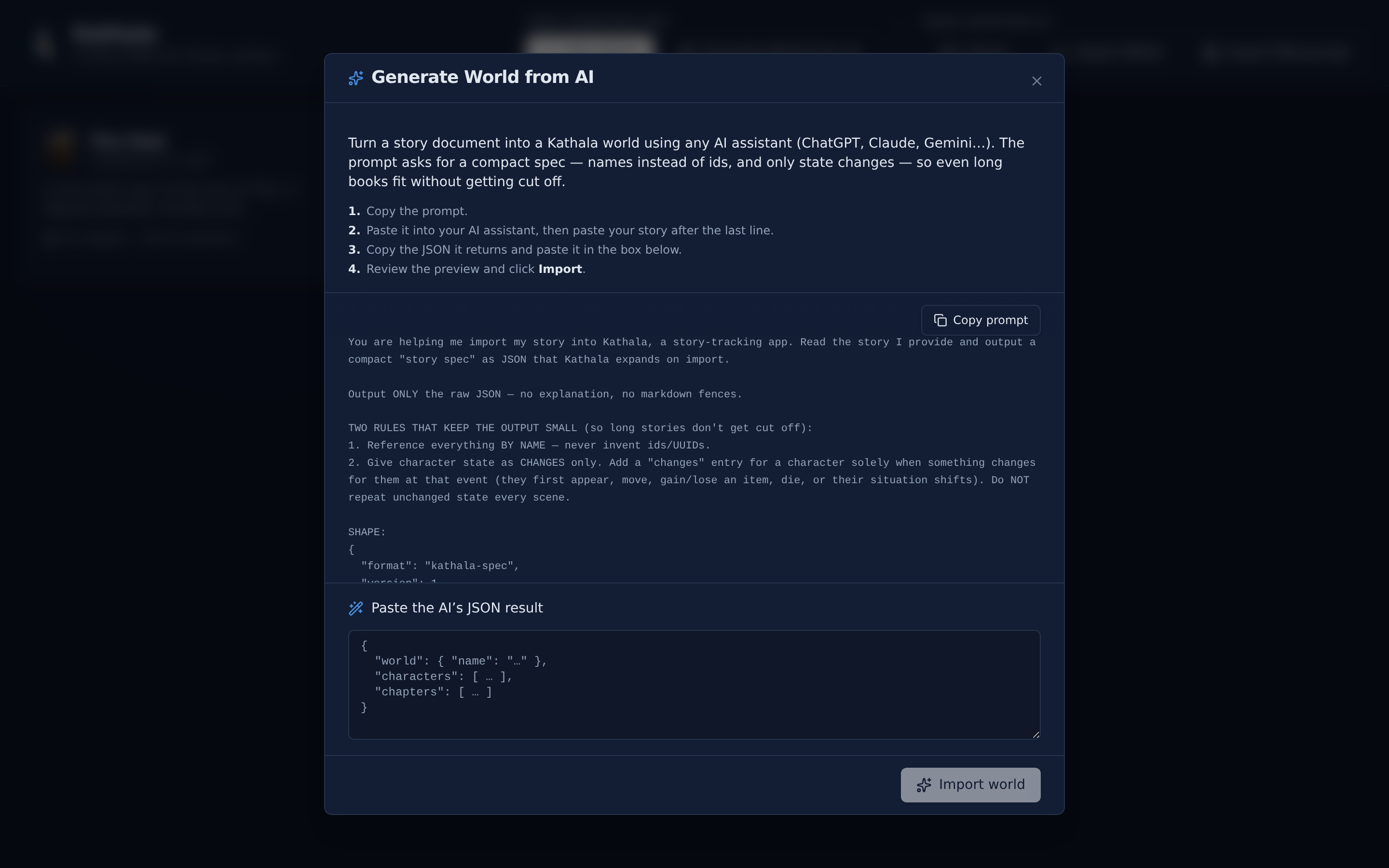
Every one of these dialogs works the same way:
- Click Generate with AI and then Copy prompt.
- Paste it into your assistant, then describe your story (or list what you want) after the last line.
- Paste the JSON it returns into the box. A live preview reports what it found.
- Click the import button. A result banner reports how many records were added, updated, and left unchanged.
Re-running is safe. Across every section, a record whose name (or title) already exists is updated in place rather than duplicated. Fields the AI supplies overwrite the current values; anything it leaves out is untouched. So you can run a generator repeatedly — to top up, and to flesh out what you already made.
Generate World from AI on the world selector builds the entire structure — characters, factions, relationships, chapters, events, and who-knows-what — from a story document.
The prompt deliberately asks for a compact spec: entities are referenced by name rather than long ids, and a character's state is recorded only when it changes (they appear, move, gain or lose an item, or die). That keeps the output small, so even a full novel fits in one response without being cut off. PlotWeave expands the compact spec back into the full model on import, so nothing is lost.
Tip: you don't need a polished manuscript. A detailed synopsis, an outline, or a wiki-style summary all work. The more detail you give, the richer the generated world.
These add to the world you are already in — no new world is created.
| Where | Adds | Notes |
|---|---|---|
| Characters page | A cast | Next to Add Character |
| Items page | A catalogue of objects | Same flow as characters |
| Relationships graph | Bonds between existing characters | See below |
| Lore | Wiki articles, filed into categories by name (created automatically) | A page with a matching title is updated in place |
| Factions | Organisations and their members | See below |
| Knowledge | Facts and reveals | See below |
| Maps | A whole tree of places | See Generate locations |
| Chapter detail | Events, character states, and tension ratings for one chapter | See Generate a chapter |
Each relationship's two endpoints reference characters by name — only pairs where both already exist are imported; unknown names are ignored. A new pair is created; a pair that already has a relationship is updated in place.
Because relationships are snapshot-aware, the prompt also captures how a bond evolves: each relationship can carry a list of changes, and each change names an existing event where the state shifts (allies → rivals → reconciled). Those become per-event snapshots. Add your timeline events first — a change whose event doesn't exist yet is skipped.
New factions are created; factions with a matching name are updated in place, and their members are merged in, never dropped. Members reference characters by name — only existing names are linked, and no characters are created. Generate your cast first.
A fact's origin, readerLearnsAt, and each reveal reference existing events by title and existing characters by name, so add your timeline and cast first. Anything that doesn't match is left unlinked — the fact is still created. A fact with a matching title is updated in place, with its reveals merged in.
Generate with AI on the empty Maps screen (and AI Locations in the map toolbar's ⋯ menu) builds a tree of places — no map image required.
Paste back a nested JSON tree (continent → kingdom → city → district). PlotWeave creates a blank Locations map and drops each place on it as a pin. A place with children becomes a pin that drills into a sub-map holding them, as deep as your tree goes.
A multi-storey place — a castle, tower, or keep — can use levels instead of children. The AI lists its floors, each with its own locations, and PlotWeave builds them as a level group with a floor switcher, so Great Hall on the ground floor and Library on the first floor land on the right floors automatically.
Building out in passes. Re-running extends the same Locations map. New places are added, and existing ones are matched by name across the whole world — updated in place and never duplicated, even if the AI puts a place under a different parent than before. A place's position in the tree is fixed the first time it is created; new children still attach under it.
To help with that, the prompt lists the places you already have as an indented tree, with floors shown as [bracketed] headers, and tells the AI to extend them rather than repeat them. Reuse a place's exact name to nest new children under it, or add floors to a levelled place by reusing its floor names.
You can always upload a real map image later and move the pins onto it.
From a chapter's detail page you can hand your scene text to an assistant and have it fill in the events, character states, and a dramatic-tension rating for each event. The ratings feed the pacing curve on the Timeline.
- Generate drafts a new chapter.
- Update re-derives an existing one from its prose.
This pairs naturally with Import a Manuscript: import the draft, then let the assistant read each chapter back into structure.
Generating a world or importing one starts a fresh edit history, so undo is empty straight afterwards — these are single large acts rather than hundreds of small ones. Section generators (characters, items, lore…) are ordinary edits.
Export before a big import if you want a way back.