Repository navigation
Timeline
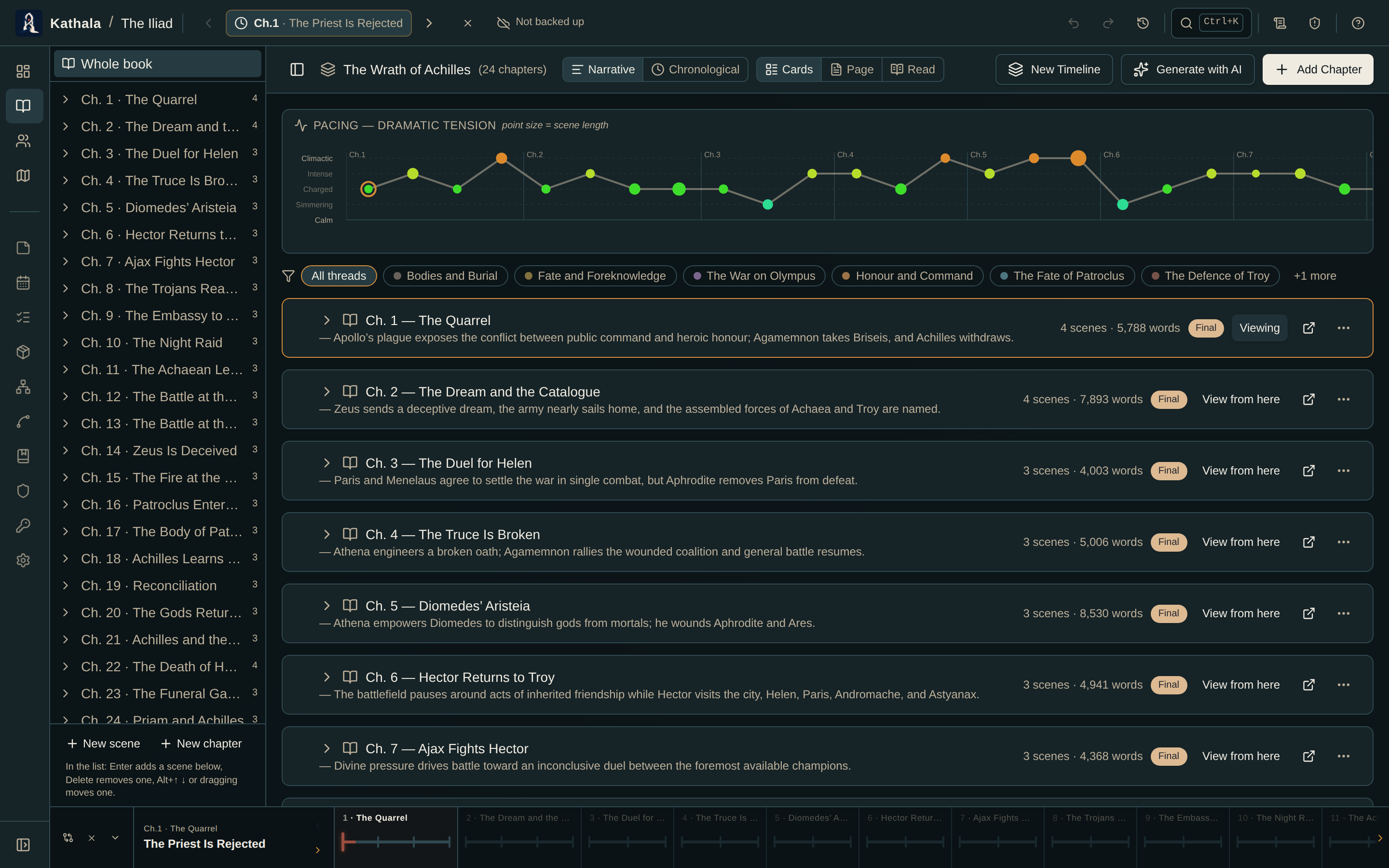
The Timeline is the spine of your story: a list of chapters, each holding an ordered set of events (scenes or beats).
A pacing curve across the top plots dramatic tension chapter by chapter once you rate scenes, so you can see the shape of your story at a glance.
| Term | Definition |
|---|---|
| Timeline | A named sequence of chapters — "Main Story", "Flashbacks" |
| Chapter | A structural unit grouping related events |
| Event | The unit of story time; all state is recorded per event |
- Narrative vs. Chronological — toggle between reading order and in-world order (useful with flashbacks or in-world dates).
- Add Chapter, New Timeline, and Generate with AI live in the header.
- Click an event to move the time cursor to that exact moment.
- Each chapter row has an open button for its detail page, and chapters can be dragged to reorder the narrative.
- Select events with their checkboxes; Shift+click selects a range. The bulk toolbar moves the selection to another chapter, adds a tag, or deletes it.
- Once you have plot threads, a filter row of thread pills appears above the chapters in Narrative view.
Create one with Add Chapter; give it a number, title, and optional synopsis.
Chapters inherit all snapshots from the immediately preceding chapter in the same timeline when they are created, so a chapter starts wherever the last one left off.
Expand a chapter's detail page and click Add Event. Expanding an event card gives you:
| Field | Purpose |
|---|---|
| Title and Description | The scene |
| Status | Idea / Outline / Draft / Revised / Final |
| POV character | Whose perspective it's written from |
| Location | The location marker where it happens |
| Involved / mentioned characters | Who is present, who is referenced |
| Involved items | Objects featured |
| Plot threads and motifs | Which subplots and symbols it advances |
| Structure beat | Its slot on the Structure Board |
| Tension | Feeds the pacing curve |
| Travel days | How many in-world days it covers |
| In-world time | Pin the event to a specific day, overriding the travel clock |
| Is flashback | Excludes it from travel and staleness continuity checks |
| Tags | Freeform labels |
Scene prose is written on the event too, and flows into the Manuscript.
Drag event cards to reorder them within a chapter.
Opening a chapter shows its events in order, each with the characters involved, location, tags, and status.
The right side holds:
- A live Character States panel — where everyone is at the selected event.
- A Relationship States summary.
- A freeform Writer's Notes field that auto-saves.
Hand your scene text to an AI assistant and have it fill in the events, character states, and a dramatic-tension rating for each event — the ratings feed the pacing curve.
- Generate drafts a new chapter.
- Update re-derives an existing one from its prose.
See Generating with AI.
The bar across the bottom of every screen is your time cursor.
| Element | Function |
|---|---|
| Chapter segments | Click one to jump to its first event |
| Event ticks | Click one to set that event as the cursor |
| Active event panel | The chapter number, title, and event title, with prev/next arrows |
| Play | Start Story Playback on the map |
| Compare | Open the Chapter Diff |
| ✕ | Clear the cursor back to All chapters |
Moving the cursor to a scene that names a location pans the map to it. It does not open that location's panel — that only happens when you pick a place deliberately.
Creating another timeline adds a tab at the top of the Timeline page. Characters, items, maps, lore, and factions are shared across every timeline; snapshots are per event.
When to use one: parallel storylines, a flashback storyline set years earlier, an alternate-history branch, or a frame narrative.
Describe how two timelines connect:
| Type | Meaning |
|---|---|
| Frame Narrative | An outer timeline tells or contains the inner story |
| Historical Echo | The same places or patterns recur in different eras |
| Embedded Fiction | A story, play, prophecy, or document inside the world is another timeline |
| Alternate | The timelines branch from similar conditions toward different outcomes |
Choose an Outer / Source and Inner / Target timeline, then add optional character, location, or document anchors.
Frame narratives can also use sync points: pair an event in the inner story with one in the outer story so playback keeps the framing moment aligned.
Frame narratives get a special two-track bar — outer and inner, stacked. Click either track to make it active; playback follows that track while keeping the linked one available for context, and a ghost cursor line marks the corresponding moment on the other track.
Every other multi-timeline world uses a single-height bar with a scope selector on its left:
| Scope | Behaviour |
|---|---|
| One timeline | Scrub that timeline on its own |
| All · Chapter order | Merge every timeline, following chapter numbers across all of them |
| All · Chronological | Merge every timeline, ordered by the in-world day each scene happens |
Each chapter run is tinted with its timeline's colour, and the active event's panel names the storyline it belongs to. The scope is remembered between sessions.
Chapter order suits a book numbered straight through (book III = ch. 1–11, book IV = ch. 12–21), which then reads in order from chapter 1.
Play works in every scope, always on the map.
On a single timeline it's the usual animated run. In a merged view it plays through the whole sequence and the map follows each event's own timeline — as the cursor crosses from one storyline into another, the map switches to that timeline's cast and animates their movement. Chronological order braids the storylines, so the map alternates between them as their scenes interleave.
Each timeline numbers its chapters on its own and keeps its own in-world clock, so switching between tabs never shows how the storylines actually interleave.
The All timelines tab appears alongside your timeline tabs once you have more than one. It merges every timeline into a single sequence with the same two orders as the bottom bar — and the toggle here and the bottom bar's scope selector are one setting, so changing either moves both, and your choice is remembered.
Each row is tagged with a coloured dot, its timeline name, and its chapter, so you can read the true order of events across parallel POVs or braided plots. Click any row to move the time cursor there.
For multi-era stories, give each timeline a start day in World Settings so chronological merging places both eras where they actually fall.
Events are out of order. Events sort by their order within a chapter, then by chapter number. Drag events to reorder them.
A flashback triggers continuity warnings. Check the Is flashback box on the event. Flashbacks are excluded from travel-distance and staleness checks.
Deleting a chapter removed more than expected. Deleting a chapter removes its events and all snapshots recorded at them. Undo restores the whole action; export before large deletions.
- Core Concepts — the cursor and inheritance
- Corkboard · Structure Board · Manuscript
- Chapter Diff · Story Playback · Calendar & Ages