Repository navigation
Dashboard
Opening a world lands you on its dashboard — a bird's-eye view of the whole project.
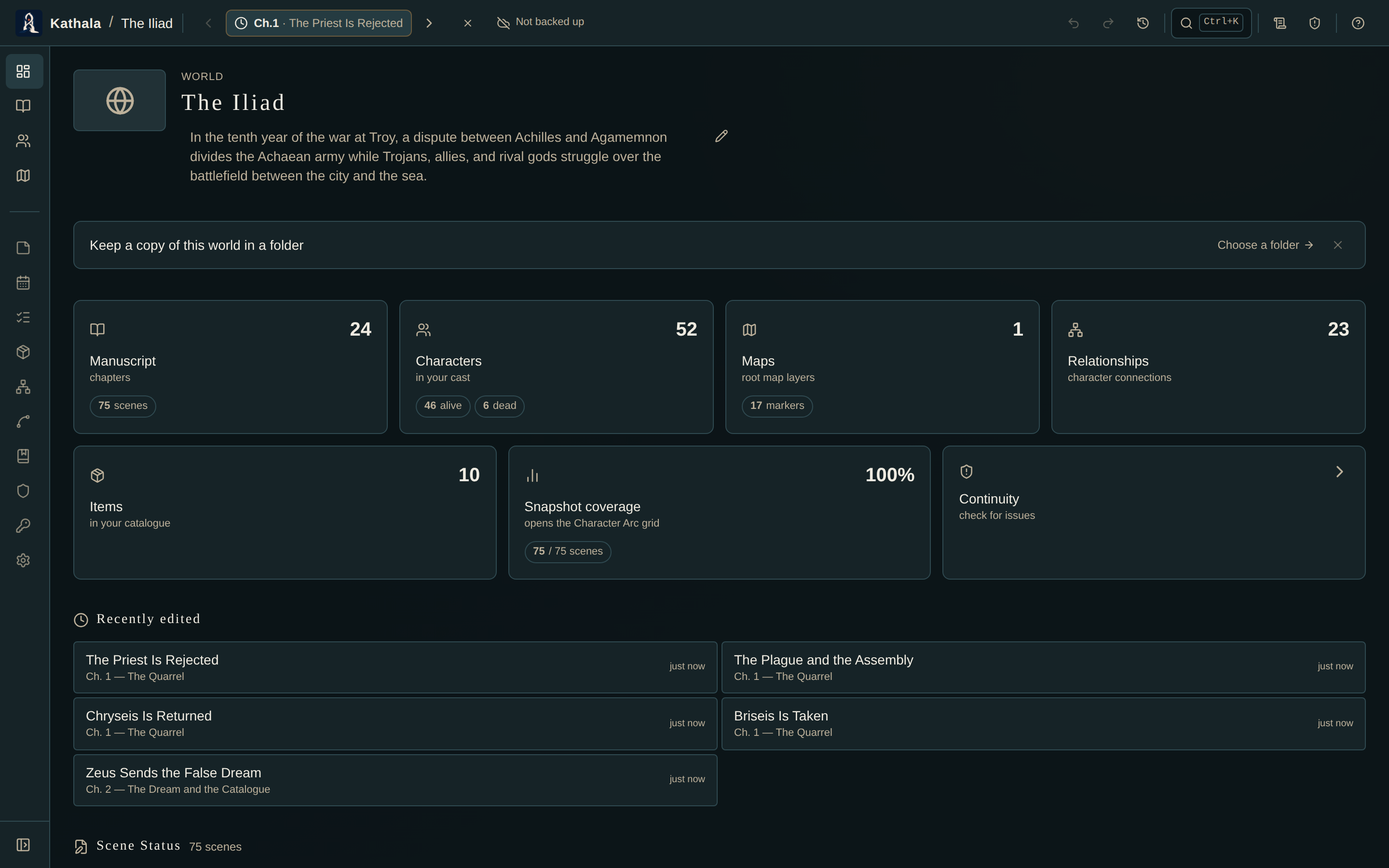
Tiles summarise the timeline, cast, maps, relationships, items, snapshot coverage, and continuity status. The tiles are links — click Timeline, Characters, Maps, or any other to jump straight to that area.
Worlds with linked timelines also show a Timeline Links summary.
Below the tiles sit recent events, scene status, writing progress, and the analytics panels: Cast Balance, Plot Threads, and Motifs & Themes.
In reading mode the dashboard becomes a way in rather than a progress report — the panels that measure the manuscript rather than the story are hidden.
Every screen in a world shares a left navigation rail. By default it is a slim strip of icons, to keep your workspace wide.
- Hover it to slide out the full labels.
- Click the pin at the bottom to keep it expanded.
- The everyday screens (Dashboard, Timeline, Manuscript, Characters, Maps) sit above a More divider, with the rest below.
On a phone the rail is replaced by a ☰ menu in the top bar. The top bar itself keeps the world name, the time cursor, search (Ctrl/⌘+K), and the Writer's Brief, Continuity, and Help tools.
As you write scene prose in the Manuscript view, PlotWeave keeps a lightweight per-day log of the words you add or cut. The Writing Progress panel turns that into an at-a-glance readout:
| Readout | What it shows |
|---|---|
| Total words | Across the whole manuscript |
| Words today | The net change since midnight; green when you've added |
| Day streak | Consecutive days written. A blank day today doesn't break a run you're still in the middle of |
| Daily session goal | Set a per-day word goal; a ring fills as you hit it |
| Burndown bar | Progress against your book word target, with percent complete and words to go |
| 14-day strip | Daily output, so you can see recent momentum |
Set the word target under Manuscript in World Settings.
Give the book a deadline (also under Manuscript in World Settings) and the panel adds a forecast:
- The words/day you'd need to finish on time.
- A projected finish date, from your recent pace.
- An on track / behind pace badge.
It's an honest read on whether your current rhythm will get you there.
The writing log, word target, and deadline all travel through export/import, so your streak and history survive a backup or a move to another device.
- Manuscript — where the words are actually counted
- Cast Balance · Plot Threads · Motifs & Themes
- World Settings — targets, deadline, theme, and the rest