Repository navigation
Sequels
Writing a series? Start a sequel builds book two (or three…) from an existing world, so you don't rebuild your cast and setting from scratch.
Find it on a world card's menu — the ▾ next to Export — on the world selector.
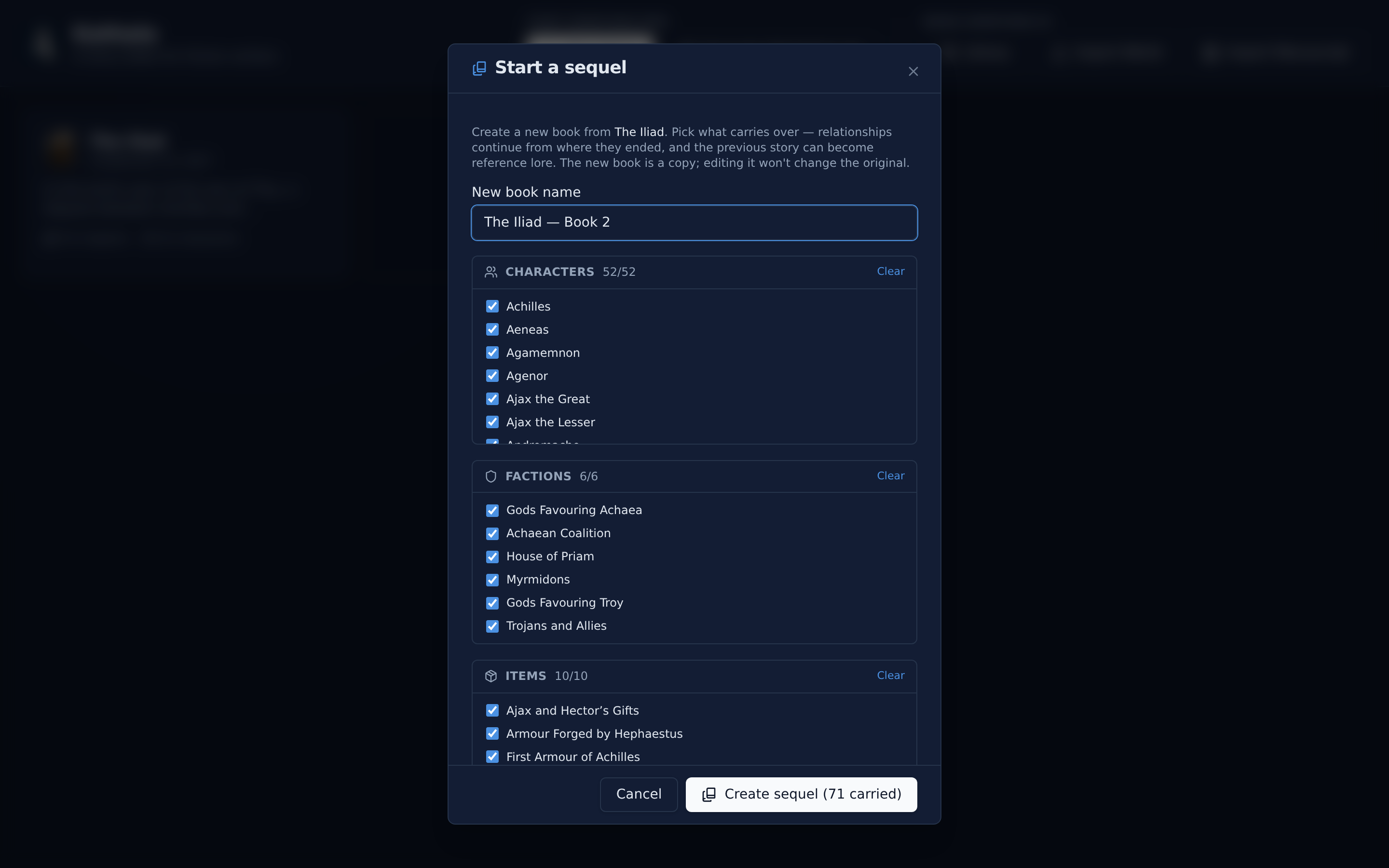
A wizard lets you choose exactly what comes along. Everything is selected by default; tick off what doesn't return.
Pick which come along. Each is copied with a fresh identity into the new book — portraits and map images included.
A carried-over relationship starts book two in the state it ended book one: its final label, sentiment, and strength. Each character arrives at their book-one ending status, alive or dead.
Optionally turn book one's chapters into a recap — one lore page per chapter, grouped in a Previously — {book one} category. Your existing world-building lore can carry forward too.
Optionally start book two with an opening chapter in which every returning character is already placed at their book-one ending location and inventory, so continuity is wired from page one.
Book one's chapters, events, and scene prose are not copied. Book two is a fresh narrative that begins where the last one left off.
It is a fully independent world. Editing it never changes the original, and the original is never modified by the fork.
If you want the two books to share a single continuity check, they need to be one world with two timelines instead — see Timeline & Events.
- Timeline & Events — multiple timelines within one world
- Lore — where the "Previously…" recap lands
- Export and Import