Repository navigation
ACnE
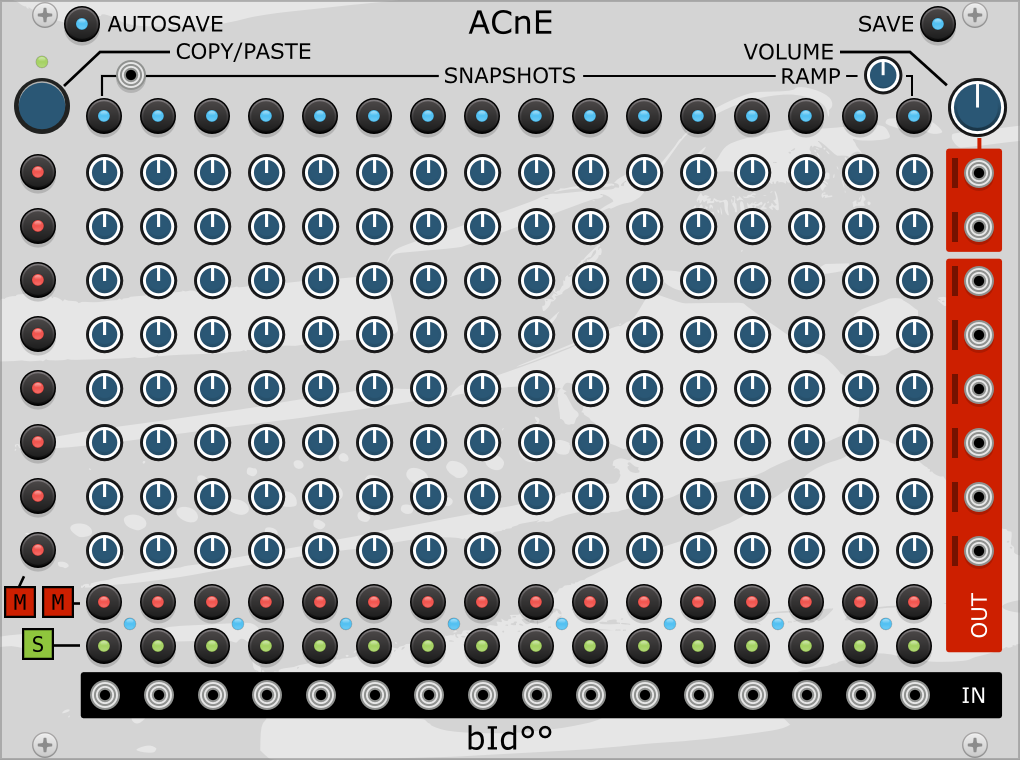
Mixer · 34 HP
ACnE is a matrix mixer: 16 inputs, 8 outputs, and one level knob for every input-output pair. It stores 16 scenes (snapshots) of all levels, mutes and solos, and can morph between them over a set time. Use it as a patch bay, a send matrix, or a mixer whose whole setup changes with one button or one CV.
- Patch up to 16 sources into the IN row at the bottom.
- Patch OUT 1 and OUT 2 (the top red block) to your Audio module left and right.
- In the grid, each column is an input and each row is an output. Turn up the knobs of row 1 and row 2 for the inputs you want to hear.
- Set the main level with VOLUME (top right).
- Click another SNAPSHOTS button to start a new scene. With AUTOSAVE on, everything you change is kept in the current scene.
- Stereo mixer with send effects: use OUT 1-2 as the main stereo bus, and OUT 3-4 as a stereo send to a reverb or delay whose return goes into two free inputs. Hold Shift while you drag a knob in row 1 to set row 2 to the same value: a mono input lands in the centre of the stereo pair.
- Stereo sources: patch a stereo source into inputs 1 and 2 and click the small blue link light between their solo buttons. Mute and solo now act on both, and Shift+drag of input 1 in row 1 also sets input 2 in row 2 (left to left, right to right).
- Song sections: build one scene per part of the song (intro, verse, chorus...), set RAMP to a few seconds, and switch scenes with the buttons for smooth transitions.
- Sequenced scenes: patch a sequencer CV (for example a VCV SEQ-3 row clocked by tOCAnTe) into the small jack left of SNAPSHOTS. 0.625 V selects each next scene, so 0 to 10 V covers all 16. With RAMP at 0 the switch is instant.
- CV router: ACnE is DC-coupled, so it also mixes and routes CVs. Turn a knob to 100 % to pass a CV unchanged; use OUT 3-8, which have no VOLUME stage.
| Control | Range | Description |
|---|---|---|
| Grid knobs (16 columns x 8 rows) | 0-100 % | Level of input N (column) into output M (row). Linear gain, default 0 %. The knob colour goes from blue to pink as you turn it up. |
| Red buttons left of the rows (mute output 1-8) | Off / On | Mutes an output. The red light is on while muted. |
| Red buttons above the inputs (mute input 1-16) | Off / On | Mutes an input in every output. |
| Green buttons above the inputs (solo input 1-16) | Off / On | Solo. As soon as one input is soloed, only soloed inputs are heard. |
| Small blue lights between solo pairs (link inputs 1-2 ... 15-16) | Off / On | Links two neighbour inputs as a stereo pair: their mute and solo buttons toggle together, and Shift+drag copies across the pair (see below). |
| M (left, unmute all outputs) | Button | Clears all output mutes. |
| M (right, unmute all inputs) | Button | Clears all input mutes. |
| S (clear all solos) | Button | Clears all solos. |
| SNAPSHOTS 1-16 | Buttons | Selects a scene. The blue light shows the current scene. Ignored while the scene CV input is patched. |
| COPY/PASTE | Button | First press copies the current scene (the small green light turns on). Select another scene, press again: the copied scene replaces it. Press it again on the copied scene itself to cancel the copy. |
| AUTOSAVE | Off / On | On (default, light lit): every change is written into the current scene at once. Off: changes are heard but only stored when you press SAVE; switching scenes without SAVE discards them. The patch keeps what you hear: saving and reopening it, or duplicating the module, keeps the live levels and mutes even when they differ from the scene. |
| SAVE | Button | Writes the current levels, mutes and solos into the current scene. The light flashes. |
| RAMP (scene morph time) | 0-10 s | Time for all levels to glide to the new scene when you switch. 0 = instant. A new switch during a morph starts from the levels heard at that moment. |
| VOLUME (out 1-2 gain) | 0-100 % | Gain of outputs 1 and 2 only, default 70 %. |
| Input | Description |
|---|---|
| IN 1-16 | The 16 sources. A polyphonic cable spreads its channels over the next inputs that have no cable: channel 1 on its own input, channel 2 on the next one, and so on (one cable from OAI, POUPRE or MAGMA gives one track per sample). Channels that find no free input stay summed on their own input. With the spread turned off in the context menu, every channel is summed into its input. |
| Small jack left of SNAPSHOTS (scene) | Scene select: 0.625 V per scene, 0 V = scene 1, 9.375 V and above = scene 16. A scene is left only once the CV is 50 mV past the edges of its band, so a CV sitting on a boundary does not flip between two scenes. When patched, it replaces the scene buttons. |
| Output | Description |
|---|---|
| OUT 1-2 (top block) | Sums of rows 1 and 2, after VOLUME. |
| OUT 3-8 | Sums of rows 3 to 8. No master gain. |
Outputs are mono and not limited: the sum of several loud inputs can go well above 10 V.
- Level meters: a thin bar between each input jack and the next shows what reaches that track (after the polyphonic spread), and a bar left of each output jack shows that output (after VOLUME for OUT 1-2). Green below -6 dB (5 V = 0 dB), amber up to 10 V, red at 10 V and over; a thin line holds the peak for a second.
- Shift + drag a grid knob: the knob in the paired output row (rows 1-2, 3-4, 5-6, 7-8) for the same input follows it. If the input is linked to its neighbour, it is the neighbour's knob in the paired row that follows instead (input 1 row 1 drives input 2 row 2, and so on). Hold Shift when you click.
- Shift + scroll over a grid knob (with knob scrolling on in Rack's settings): the same pair follows, as with Shift + drag.
- Polyphony: a polyphonic input spreads over the next empty inputs (see Inputs); outputs are mono.
- Context menu: Spread a polyphonic input over the next empty inputs, on for a new ACnE. Patches made before Bidoo 2.7.0 open with it off, so they keep summing; turn it on to spread.
- Smoothing: all levels, mutes and VOLUME glide over 5 ms, so changes do not click.
- Saved with the patch: all 16 scenes (levels, input mutes, solos, output mutes), the current scene, AUTOSAVE, the link buttons and the polyphonic spread option. The patch reopens at the stored levels without fading in.
- Initialize clears every scene, mute, solo and link, and turns AUTOSAVE back on.
- Mutes and solos are part of each scene; the link buttons are global.
- Once you pressed COPY/PASTE, the copy stays armed until you paste it into a different scene, or press COPY/PASTE again on the same scene to cancel it.