Repository navigation
PARTICULES
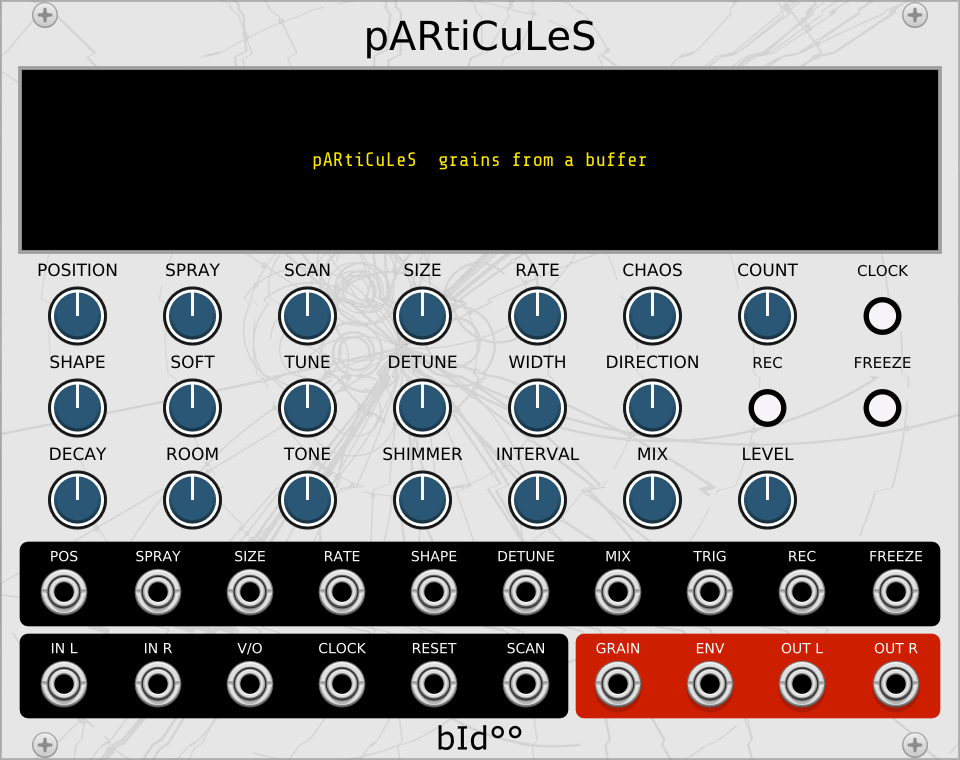
Granular · Sampler · Reverb · Polyphonic · 32 HP
pARtiCuLeS takes grains from a stereo buffer and plays them. The buffer is the live input, recorded without end (the last 20 seconds), or a sample you load. Up to 64 grains sound at once. They start on their own at a rate you set (from regular to random), on a clock with rhythmic divisions, or on triggers. Each grain has its own envelope, from a sharp hit to a slow swell, its own pitch (V/O, polyphonic: the grains take the notes in turn), its own direction (forward, reverse, ping-pong or random) and its own place in the stereo field. Then the grains go through a 16-line reverb with a shimmer.
- Patch a sound into IN L (and IN R for stereo). REC is lit: the screen fills with its waveform from the right.
- Patch OUT L and OUT R. Grains come out at once: ten a second, 100 ms long, around the middle of the buffer.
- Turn SIZE right and SHAPE to the middle for clouds, SIZE left and SHAPE fully left for hits. Turn up SPRAY to scatter the grains, DETUNE to spread their pitch.
- Press FREEZE to hold what is in the buffer (and the reverb's tail), or drop a sample on the module.
- Turn up MIX and SHIMMER for the reverb.
- REC (button, or the REC gate when it is patched, which then replaces the button) records the input into the buffer, newest at the right. It holds 20 seconds; older sound is written over. Starting and stopping fade over 5 ms, so a stop leaves no step in the buffer.
- FREEZE (button or gate) stops the recording while it is on, and holds the reverb's tail.
- Load a sample: right-click the module, or drop a file on it (WAV, AIFF or FLAC; two minutes at most). The file is read in the background: the screen shows LOADING... and the old buffer plays on until the new one is ready (loading another file meanwhile replaces the first). REC goes off so that the sample stays; press REC to record over it. Clear the buffer in the menu goes back to an empty live buffer.
- Grains playing from the old buffer fade out over 3 ms when a new one comes.
- The buffer is saved with the patch while it is not recording (in the patch's storage, as FLAC).
- POSITION: where they are taken, from the oldest sound (left) to the newest (right). While REC records, the buffer moves under it: the same POSITION always means the same distance back in time.
- SPRAY: how far around POSITION each grain may start, at random (0: all at POSITION; 100 %: anywhere).
- SCAN: POSITION moves on its own, forward (right) or back (left). At 100 % it moves at the speed the sound was recorded, so grains taken at SCAN play the sound through, stretched by the grains.
- A grain never crosses the write head while REC records: grains near the newest sound start a little earlier when they would run into it.
- CLOCK off (free running): RATE sets how many grains start a second, 0.5 to 200. CHAOS goes from metronomic (0) to fully random (100 %, the same rate on average). RATE fully left is TRIG only: grains start only on TRIG.
- CLOCK on: grains start on divisions of the clock at CLOCK (set its pulses per beat in the menu, 4 by default). RATE picks the division: 4 bars, 2 bars, 1 bar, 1/2., 1/2, 1/2T, 1/4., 1/4, 1/4T, 1/8., 1/8, 1/8T, 1/16., 1/16, 1/16T, 1/32., 1/32, 1/32T, 1/64. CHAOS is the chance a division is skipped. RESET makes the next pulse the start of a bar. With no clock, only TRIG starts grains.
- TRIG: starts grains at once, in either mode.
- COUNT: how many grains each start gives (1 to 8), each with its own place, pitch and pan.
- SIZE: 1 ms to 2 s.
- SHAPE: the envelope, from percussive (a 0.3 ms attack, then the fall), through a bell, to reversed (a slow rise and a sharp end). SOFT: a straight rise and a sharp, exponential-like fall at 0; smooth raised cosines at 100 %. The shape is drawn at the bottom right of the screen.
- TUNE: ±24 semitones. V/O adds to it, exactly 1 V per octave; a polyphonic V/O gives each new grain the next channel's note, so a chord in gives a cloud of that chord.
- DETUNE: a random pitch for each grain, up to an octave either way at 100 %. The menu's Detune steps keeps it to octaves, or to fifths and octaves (DETUNE is then the chance a grain moves).
- DIRECTION: forward, reverse, ping-pong (forward for half the grain, then back to where it started) or random (drawn for each grain).
- WIDTH: how far each grain may go left or right, at random.
- The grains' level follows how many overlap, so dense clouds stay at about the level of sparse ones.
A 16-line reverb (the same core as Bidoo's Grotte), after the grains.
- DECAY: 0.3 to 30 s. ROOM: the size of the space. TONE: dark to bright (how long the highs last).
- SHIMMER: feeds the reverb back into itself through a pitch shifter, at INTERVAL: +4TH, +5TH, +OCT, +OCT+5, +2OCT, or two intervals stacked, one on each side (+OCT/+5TH, +OCT/+2OCT), as in REI. Each pass climbs by the interval. The feedback lowers itself as DECAY grows and ducks when the reverb gets loud, so it cannot run away.
- MIX: grains alone to reverb alone. LEVEL: the output, up to +6 dB (a soft limit keeps it under 10 V).
| Jack | What it does |
|---|---|
| POS, SPRAY, SIZE, RATE, SHAPE, DETUNE, MIX | Added to their knobs; 10 V is the whole range |
| TRIG | Starts COUNT grains |
| REC | Record gate: while patched, it decides instead of the button |
| FREEZE | Freeze gate (with the button: either one) |
| IN L, IN R | The input; IN R follows IN L when unpatched |
| V/O | Pitch, polyphonic (the grains take the channels in turn) |
| CLOCK, RESET | The clock for CLOCK mode, and its reset |
| SCAN | Added to SCAN; 5 V is the whole range |
| GRAIN | A 1 ms trigger each time grains start |
| ENV | The newest grain's envelope, 0 to 10 V |
| OUT L, OUT R | The output |
The output is 16 samples late (the module works in blocks of 16).
The buffer's waveform, oldest at the left: bright pink in the window the grains are taken from (POSITION ± SPRAY, shaded, with a yellow bar at POSITION), dim elsewhere. Each grain is a blue speck at the place it is reading, brighter as its envelope opens. An orange head at the right edge while REC records. At the top: REC, FROZEN or the sample's name, the buffer's length; the mode, rate or division (and the clock's tempo). At the bottom: the size, COUNT, the direction, how many grains play, and the envelope's shape.
- Percussion from anything: SIZE 10 to 30 ms, SHAPE and SOFT at 0, CLOCK on at 1/16, CHAOS at 30 %, SPRAY at 50 %: a rhythm cut from whatever went in.
- Pads: SIZE 1 s, SHAPE 50 %, SOFT 100 %, RATE about 20 a second, DETUNE on fifths and octaves, MIX 50 %, SHIMMER 40 %.
- Time stretch: FREEZE a phrase, SPRAY low, SCAN at 10 to 30 %, SIZE 100 to 200 ms, RATE 30 a second.
- Chords: a polyphonic V/O from a chord generator, COUNT 3: each start plays the chord's notes together.
- Grains on a sequencer: RATE fully left (TRIG only), a sequencer's gate into TRIG and its pitch into V/O.
- Factory presets: right-click > Preset > Factory presets: Cloud pad, Percussion cuts, Time stretch, Shimmer wash or Grains on triggers. They leave the buffer, the sample and the clock's pulses per beat as they are.
About 8 % of a core at the most (64 one-second grains, the reverb and the shimmer); the reverb and the shimmer alone about 2 % (an i9-12900K).