Repository navigation
REGISTRE
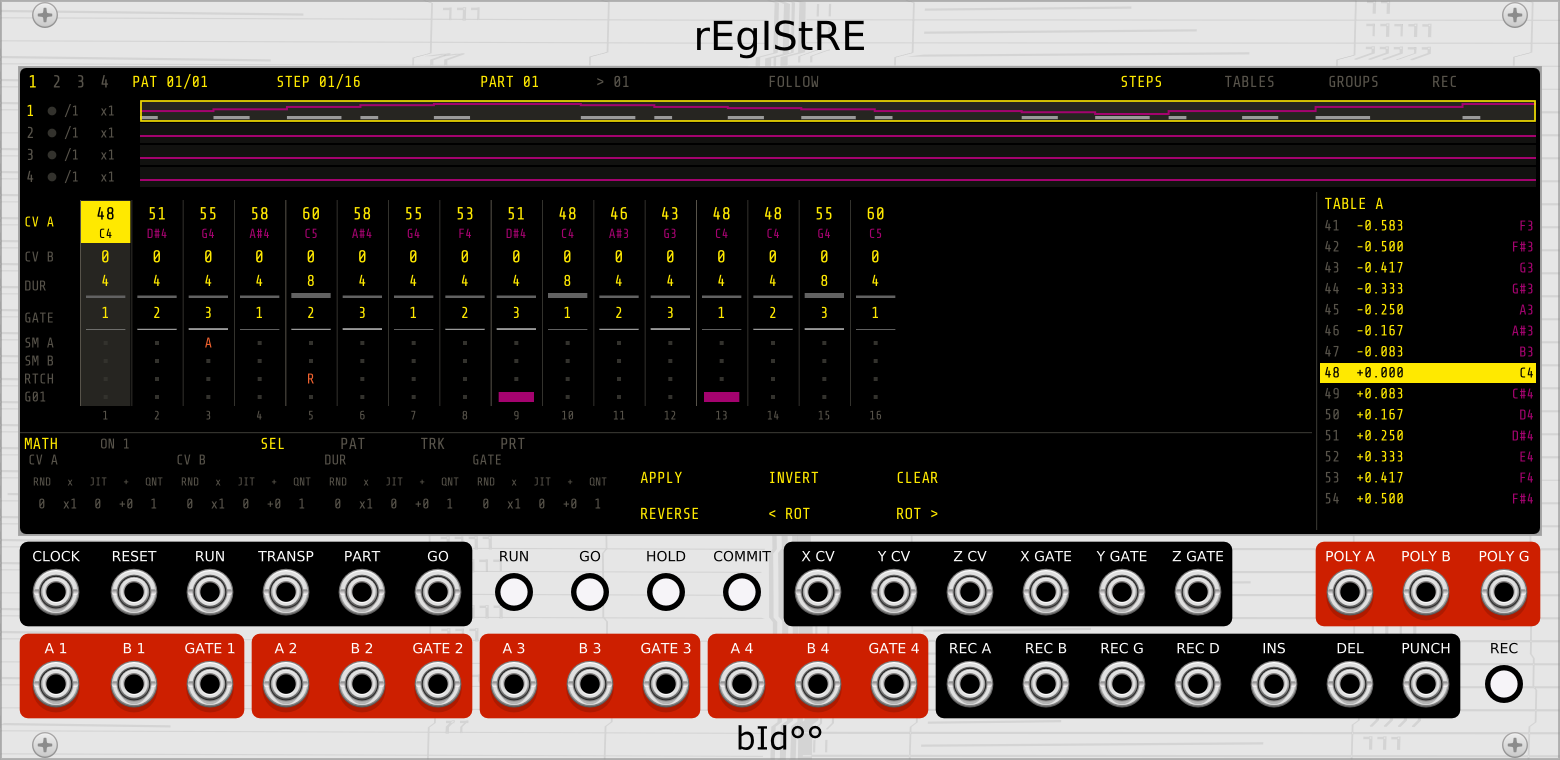
Sequencer · Polyphonic · Quantizer · 52 HP
rEgIStRE is an indexed four-track sequencer, played with the mouse and the keyboard. A step does not hold a voltage: it holds two indices (CV A and CV B, 0 to 99) into its track's two voltage tables, plus a duration and a gate counted in clock pulses. Change one entry of a table and every step that uses it changes: retune a scale, reshape a velocity curve, or turn all the accents off at once. Tracks are cut into patterns that play one after the other; parts hold loops and reset steps that a CV and a gate switch at the end of a loop; MATH transforms whole selections, patterns or tracks; groups of steps change as they play with the X, Y and Z gates and CVs; and recording writes steps from a keyboard or any CV and gate.
- Patch a clock (four pulses a beat, for example tOCAnTe) into CLOCK.
- Patch A 1 to a VCO's V/OCT and GATE 1 to an envelope. Track 1 plays sixteen C4s, one a beat (duration 4, gate 2).
- Click the screen, then type a number and Enter to change the selected cell: CV A 60 is C5 in the default table (12-TET, 0 V at index 48). Arrows move, Shift+arrows select, the wheel changes a value.
- Change DUR and GATE: a step lasts DUR pulses; the gate is high for GATE pulses (0 is a rest, GATE = DUR ties to the next step). A step of duration 0 is skipped.
- Right-click the grid for inserting, splitting, copying and pattern commands, or use the keys below.
STEPS view, top to bottom:
- The header: the four tracks (click one, Tab cycles; a track number lights orange while its gate is high), the pattern and step of the cursor, the part being edited (wheel to change, 0 is STOP), the playing part and the cued one, FOLLOW, HOLD, and the STEPS and TABLES views.
-
The lanes: each track over its whole length, steps as long as their duration, the gates in grey and CV A as a pink line. The yellow bracket is the loop of the part being edited, the orange triangle its reset step, the white line the play cursor, the yellow frame the pattern shown below. Click a lane to go to that step (in FOLLOW, to move the play cursor there).
/1andx1are the track's clock divider and multiplier: the wheel changes them. Right-click a lane for the track's menu. -
The grid: the steps of one pattern, sixteen at a time (it scrolls in longer patterns). Rows: CV A (index and its note), CV B, DUR, GATE, SM A and SM B (smoothing), RTCH (ratchet), and G01..G16: whether the step is in the group shown in the GROUPS view (pink when it is; click to switch).
[and]above a column mark the loop,Rthe reset step. Click a cell to select it; drag up or down to change it (Shift: finer; Ctrl: by 12), drag sideways to select steps. A drag or the wheel on a selected step changes every selected step. Click a flag row to switch it. - The table: the entries of table A (table B when the CV B row is selected) around the selected step's index. Click an entry to give its index to the selected steps; the wheel changes its voltage (10 mV, Shift 1 mV, Ctrl a semitone).
-
MATH: per field (CV A, CV B, DUR, GATE) five settings, changed with the wheel, a drag or typing: RND (a random value from 0 to RND replaces the value), x (multiply;
/ndivides;x0sets the value to+), JIT (adds a random value from -JIT to +JIT),+(adds), QNT (rounds to a multiple). SEL, PAT, TRK or PRT chooses what they apply to: the selection, its pattern, the whole track, or the loop of the part shown (from its start, or the first step, to its end, or the last). APPLY applies, INVERT applies the opposite (subtracts instead of adding, divides instead of multiplying), CLEAR sets them back to no change. REVERSE and ROT reverse or rotate the selected row only, over the same target. A value that MATH would push out of 0..99 stays as it was. Each track keeps its own settings.
TABLES view: the selected track's table A or B (click A or B) as a curve of 100 points from -5 V to +10 V. Drag a point (Shift: finer, Ctrl: on semitones), or select an entry in the list and type a voltage (1.25) or a note (G#3, Bb2, c5+15 for 15 cents) and Enter. The yellow ticks under the curve show the indices the track's steps use. REFERENCE lists the built-in tables and eight user tables: LOAD > A or LOAD > B copies the selected one into the track; SAVE A > USER and SAVE B > USER store the track's table in the selected user table (kept for every patch, in Bidoo/rEgIStRE-tables.json of Rack's user folder); ROUND rounds every entry to a semitone; GO TO STEP selects the index of the selected step. SNAPSHOTS: sixteen slots kept in the patch; click to load (every cursor goes back to its start), Shift+click to save the song, right-click for a menu (load, save, clear, and a name, shown when the mouse is over the slot).
GROUPS view: sixteen groups of steps. A group is a selection of steps that stays with its steps when you insert or delete around them; a step can be in several groups. The list shows how many steps of the shown track are in each group (*: the group has settings); click one to show it.
-
Selection (on the shown track): ADD SEL and REMOVE SEL put the selected steps in or out; INVERT swaps in and out; ROT moves the group one step earlier or later; CLEAR empties it; COPY then PASTE + adds a group's steps to another one. E n / m with PAT or TRK and EUCLID: a Euclidean mask (n hits spread over m steps, repeated) chooses which steps of the pattern or track are in the group (
ein the STEPS view switches one step). - MATH: the group's own transform, the same five settings as the track's; APPLY changes the group's steps on the shown track, INVERT applies the opposite.
- The bus: X, Y and Z, each a gate and a CV on the panel. For the channel chosen (click X, Y or Z; the gate's state and the CV are shown live), the group has a HIGH transform used while that gate is high and a LOW transform used while it is low. They do not change the steps: each time one of the group's steps starts, it plays through them (random and jitter drawn again each time). And a SLOPE per field: the channel's CV times the slope is added to the group's steps, live for CV A and B (volts per volt), at the start of each step for DUR and GATE (units per volt). With no gate patched, LOW is used; with no CV, nothing is added.
- CLEAR SETTINGS sets the group's MATH, HIGH, LOW and slopes back to no change.
REC view: the recording settings.
- MODE: REAL-TIME, STEP or ALTER (see Recording below). INSERT AT (real-time): a new pattern at the TRACK END, a new pattern after the cursor's (NEXT PATTERN), or after the CURSOR's step. WAIT FOR THE FIRST NOTE: the take starts with the first note rather than at punch in (off: it starts with a rest).
- Per track: ARM (also the dot beside each lane, or
a), NEW ON A and NEW ON B (a change of that CV while the gate is held starts a new, tied step: on for A by default, for legato playing), and the DUR GRID and GATE GRID: recorded durations and gates are rounded to multiples of them (wheel to change). - The recording inputs are shown live, with the index they give in the track's tables.
Click the screen first; while it is selected it takes these keys.
| Keys | Action |
|---|---|
| Arrows | Move the cursor (left and right go on into the next pattern), Shift: select |
| Home, End | The pattern's first or last step |
| Page Up, Page Down | The previous or next pattern |
| Tab, Shift+Tab | The next or previous track |
| 0-9, Enter | Type a value (Esc cancels, Backspace erases) |
| + -, * / | Change the selection by one, by twelve |
| Ctrl+Up, Ctrl+Down | Change the selection by one (Shift: twelve) |
| Alt+Left, Alt+Right | Swing: move the end of the cursor's step, the next step gets what it loses |
| i or Insert, Shift+i | Insert a step (a copy of the cursor's) after, before |
| k | Split the step in two (the first half takes the longer half of the duration) |
| Delete, Backspace | Delete the selected steps |
| Ctrl+C, X, V, D | Copy, cut, paste after the selection, duplicate |
| Ctrl+Shift+V | Paste over the values from the cursor on |
| Ctrl+A | Select the pattern; again: the whole track |
| n, Shift+n, j | New pattern after this one, split the pattern at the cursor, join with the next |
| Ctrl+Delete | Delete the pattern |
| s, t, e | Smoothing (A, or B on the CV B and SM B rows), ratchet, in the shown group |
| [ ] | Loop start, loop end at the cursor (again: off) |
| l, Shift+l | Loop the selection (one step selected: its pattern), clear the loop |
| p | Reset step at the cursor (again: off) |
| m, Shift+m | Apply MATH, inverted |
| r, < > | Reverse, rotate the selected row |
| Space | Run or stop |
| f, h, Enter | FOLLOW, HOLD, commit |
| a | Arm the shown track for recording |
| g | Cue the part shown |
| Ctrl+Z, Ctrl+Shift+Z | Undo, redo (every edit is undoable) |
-
A melody in a scale: load MAJOR (or PENTA, BLUES) into table A from the TABLES view. Indices are now scale degrees: MATH
+ 2on CV A transposes in the scale, and a random CV A (RND 14,+ 21) stays in it. - One knob for many notes: give the accented steps of a drum track CV B index 3 and patch B to the accent. Changing entry 3 of table B changes every accent at once; set it to 0 V to remove them all.
-
Arrangement with parts: make one pattern per section (intro, verse, chorus). For each part, set a loop around a section (
lon a pattern) and a reset step where it should start (p). Patch a CV into PART (0.1 V a part) and a gate into GO: the cued part starts at the end of a loop, with every track that has a reset step starting there. - Glides and LFOs: switch SM A on a step: CV A slides to the next step's value after the gate. Two steps of duration 16 and gate 0, both smoothed, make a triangle LFO.
- Rolls: switch RTCH on a step: the gate repeats GATE pulses on, GATE off, for the whole step. Duration 8, gate 1 gives four hits.
-
Polyrhythms: give each track its own divider and multiplier in its lane (
/3,x2), and loops of different lengths. -
Accents that move: put every other step in group 1 (E 8 / 16 over the track) and give it a HIGH transform
+ 3on CV B; patch an LFO's square to X GATE. The accents come and go with the LFO without touching the steps. - Live transposition of a voice: put a track's steps in group 2 with a slope of 1.00 on CV A for channel Y, and patch a keyboard's pitch to Y CV: that track follows the keyboard, the others do not.
-
Record from a keyboard: patch the keyboard's pitch to REC A, its velocity to REC B and its gate to REC G; arm a track (
a), press REC and play. The notes come in on the track's clock, rounded to the DUR GRID; a take is one undo. Press REC again to stop. - Knobs on a loop: set the mode to ALTER, patch a knob's CV to REC A and press REC: each step of the armed track takes the knob's note just before it plays.
- Edit without being heard: press HOLD, make your changes, then COMMIT: they come in at the end of the step, pattern or loop of the track chosen in the menu (press COMMIT twice for at once). Leaving HOLD without committing drops the changes.
| Control | Description |
|---|---|
| RUN | Runs (lit) or stops. Stopped, the gates stay low and the clock moves nothing. |
| GO | Cues the part shown on the screen. It starts as Part transition says; lit while a part waits. |
| HOLD | Edits wait for COMMIT instead of playing at once. Turning it off without committing drops them. |
| REC | Punches in (lit while recording): armed tracks record from the REC inputs, in the mode set in the REC view. |
| COMMIT | Hands the held edits to the sequencer at the end of a step, a pattern or a loop (menu); a second press commits at once. Lit while a commit waits. |
| Input | Description |
|---|---|
| CLOCK | Each rising edge (above 1 V) is one pulse for every track, before its divider and multiplier. |
| RESET | The next clock plays each track's reset step in the playing part, or its first step. |
| RUN | A trigger starts or stops. |
| TRANSP | Adds to the CV A index: 1/12 V per index, so 1 V is 12 indices (an octave in 12-TET). Mono for every track, or polyphonic: channel n for track n. The index stays within 0..99. |
| PART | Selects the part GO cues: 0.1 V per part, 0 V (part 0) stops. While GO stays high the cue follows PART. |
| GO | A rising edge cues the part PART selects (unplugged PART: the part shown on the screen). |
| X CV, Y CV, Z CV | The modulation bus's CVs: added to the steps of the groups that have slopes for them. |
| X GATE, Y GATE, Z GATE | The bus's gates: high (above 1.5 V) switches the groups to their HIGH transforms for that channel, low (or unplugged) to their LOW ones. |
| REC A, REC B | Recording: CV A and CV B, rounded to the nearest entry of the track's tables. In real time they are read half a pulse after a note starts. |
| REC G | Recording: in real time, the notes' gate; in step and alter modes, GATE: 20 per volt, 99 from 5 V. |
| REC D | Recording, step and alter modes: DUR, 20 per volt, 99 from 5 V. |
| INS | Step recording: a rising edge inserts a step after the cursor of each armed track, from the REC inputs; while it stays high the new step follows them. |
| DEL | Step recording: a rising edge deletes the step at the cursor of each armed track. |
| PUNCH | Punched in while high, with the REC button. |
| Output | Description |
|---|---|
| A 1-4 | The track's CV A: the entry of table A at the step's index, smoothed when the step asks for it. |
| B 1-4 | The track's CV B, from table B. |
| GATE 1-4 | 10 V gates, or triggers in trigger mode. |
| POLY A, POLY B, POLY G | The four tracks on one polyphonic cable each: channel n is track n. |
- Part transition: First (the cued part starts when the first track ends its loop), Last (once every track has ended at least one loop, the default), Now (at once, without going to the reset steps).
- Reset at the end of, Reset timed by track: RESET (input) at once, or when the step, pattern or loop of the chosen track ends; the screen shows RESET.. while one waits.
- Import a MIDI file: SMF 0 or 1; channels 1 to 4 go to tracks 1 to 4 (the tracks without notes stay as they are). Each note becomes a step that lasts until the next note, with the note's length as its gate; silences become rests, chords keep their first note, notes longer than 99 pulses become tied steps. Pitch is the index nearest the note in table A (C4 = 0 V), velocity the index nearest velocity / 127 × 10 V in table B; a pattern starts on each bar. Clock pulses per beat (4: 16th notes) and beats per bar set the grid. It is one undo.
- Commit (HOLD) at the end of, Commit timed by track: when a commit comes in, and which track times it.
- Clear every part's loops and reset steps.
- Keyboard: the list of keys.
- A lane's menu (right-click): clock divider and multiplier (1 to 99), triggers instead of gates (a trigger lasts GATE × 0.1 ms; with ratchet the step fires GATE triggers of 0.5 ms spread over it, and smoothing takes the second half of the step), smoothing over the whole track, notes or numbers on the screen, clear the track.
- The grid's menu (right-click): the step and pattern commands, smoothing over the whole pattern, loops and the reset step.
Arm one or more tracks (the dot beside each lane, the REC view or a) and punch in with the REC button or a high PUNCH gate (the button and the screen's REC light while recording). The mode is set in the REC view:
- REAL-TIME: while punched in and running, each rising edge on REC G starts a new step on each armed track; it lasts until the next one (or the punch out) and its gate is the time REC G stays high, both counted in the track's pulses (after its divider and multiplier) and rounded to the grids. The steps go where INSERT AT says. While armed, a track plays its REC inputs instead of its steps once a note comes in, so you hear what you play (rehearse before punching in); this stops at RESET, at stop, at punch out or when you disarm it.
- STEP: the timing of your playing does not count. INS inserts a step after the cursor of each armed track (in the STEPS view), with the values of the connected REC inputs, and moves the cursor to it; while INS stays high the new step follows the inputs. DEL deletes the step at the cursor. The sequencer can keep playing meanwhile.
- ALTER: no steps are added. Just before each step of an armed track plays, its CV A, CV B, GATE and DUR take the values of the connected REC inputs. A run of alterations is one undo.
- Sizes: 4 tracks, up to 100 patterns of up to 100 steps per track, 1000 steps per track, tables of 100 entries from -5 V to +10 V, 99 parts plus the STOP part, 16 groups, 16 snapshots.
- Built-in tables: 12-TET and 24-TET (0 V at index 48), 22 SHRUTI (the 22 just intervals of the Indian octave, 0 V at 44), MAJOR and MINOR (0 V at 28), BLUES (the major scale with the flat third and seventh, 0 V at 36), PENTA (0..49 major pentatonic, 50..99 minor pentatonic, 0 V at 20 and 70), LIN 0-10 (0.1 V a step), LIN +-5, EXP 0-10. New tracks use 12-TET for A and LIN 0-10 for B.
- Exact timing: a step lasts exactly its duration in pulses. A multiplied clock puts its pulses at whole samples between two external pulses, from the period of the last two, so it never drifts; a changed tempo is followed from the next pulse.
- Smoothing moves in a straight line from the end of the gate to the end of the step, over the time the track's pulses last.
- Parts: a part sets, per track, a loop (start and end steps; either may be left out) and a reset step. A part without reset steps (a "naked" loop) carries on from where the tracks are. Loops and reset steps follow their steps when steps are inserted or deleted around them.
- Every edit (values, steps, patterns, MATH, tables, parts, groups, recordings, snapshot loads, MIDI imports) is undoable with Rack's undo. The song, the snapshots and their names, and which tracks are armed are saved in the patch.
- Inspired by the ideas of indexed sequencing (steps pointing into tables of voltages) and of a sequencing environment with parts and transforms.