Repository navigation
cANARd
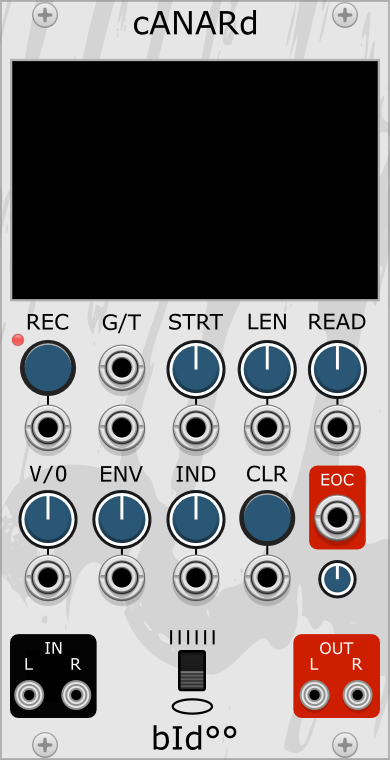
Sampler · 13 HP
cANARd is a stereo live sampler. Record from its inputs (or load a file), then play the whole sample or one of its slices with start, length, speed, fade and three read modes. Slices can come from successive recordings, from markers you place on the waveform, or from transient detection. It is good for capturing a loop from your patch and replaying or chopping it on the fly.
- Patch the audio you want to capture into IN L (and IN R for stereo; R copies L when unpatched).
- Press REC to start recording (the red light turns on), press it again to stop. The waveform appears in the display.
- Patch a clock or trigger into the lower G/T jack (trigger input).
- Patch OUT L and OUT R to a mixer. Each trigger plays the sample from STRT.
- Set READ to loop, and shape the playback with STRT, LEN, the pitch knob over V/O and ENV.
- Live looper: send two triggers to the REC input, one bar apart (for example from a VCV SEQ-3 gate row), to record exactly one bar. Patch the bar clock into the trigger jack with READ on loop: the new recording replaces the old one and plays in time.
- Build a kit by recording: put the slice switch up (slice mode). Each recording is now added at the end of the sample as a new slice. Record a kick, a snare and a hat one after the other, then choose the slice with IND or a stepped CV from a sequencer into the IND input.
- Chop a loop by its hits: load or record a drum loop, set the slice switch up, set the small threshold trimpot under EOC and Shift-click it (or use Detect transients in the menu). Markers appear on each hit; sweep IND to pick one.
- Scrub a recording: patch a gate into the upper G/T jack (gate input) and a slow LFO into the IND input. While the gate is high, the LFO sets the play position inside the STRT/LEN region.
- Smooth loops: with READ on loop or ping-pong, turn ENV up to fade in and out at the region edges. The loop point is already crossfaded over 2 ms; ENV gives longer, audible fades.
| Control | Range | Description |
|---|---|---|
| REC | button | Starts recording, press again to stop. The red light is on while recording. |
| STRT (start) | 0-100 % | Start of the played region, as a fraction of the sample, or of the current slice in slice mode. |
| LEN (length) | 0-100 % | Length of the played region, as a fraction of the sample or slice. Never goes past the end of the slice. Default 100 %. |
| READ (read mode) | Once / Loop / Ping-pong | Once: plays the region once and sends an EOC pulse. Loop: starts again at the start. Ping-pong: plays back and forth. |
| Tune (the knob over V/O) | -48..+48 semitones (-4..+4 octaves) | Transposes the playback, vinyl style (the speed changes with the pitch). Default 0: the sample at its own pitch. Use Reverse in the menu to play backward. |
| ENV (fade) | 0-50 % | Fade in at the start and fade out at the end of the region, as a fraction of the region length. Default 0. |
| IND (slice index) | 0-10 | In slice mode, chooses the slice: the range is spread over all the slices (0 = first, 10 = last). |
| CLR (clear) | button | Removes the sample. |
| Threshold trimpot (under EOC) | 0.01-10 | Sensitivity of transient detection: higher values find fewer, louder hits. Shift-click it to run the detection. Default 1. |
| Slice switch | Off (bottom) / On (top) | On: slice mode. Playback uses the slice chosen by IND, slice markers are shown, and a new recording is appended to the sample as a new slice. Off: plays the whole sample, and a new recording replaces it. |
| Input | Description |
|---|---|
| REC | A trigger starts or stops recording, like the button. |
| G/T, upper jack (gate) | Gate: playback starts when the gate opens and stops when it closes. Used only when the trigger jack is not patched. Polyphonic: one voice per channel. |
| G/T, lower jack (trigger) | Trigger: each trigger restarts playback from the start of the region. Has priority over the gate jack. Polyphonic: one voice per channel. |
| STRT | Added to STRT: 1 V = 10 %. |
| LEN | Added to LEN: 1 V = 10 %. |
| READ | Added to the read mode: 1 V moves one step (Once, Loop, Ping-pong). |
| V/O | Pitch, exactly 1 V per octave: 0 V plays the sample at its own pitch, +1 V an octave up (twice as fast). Added to the knob, 4 octaves up or down at most in total. Polyphonic: one voice per channel. |
| ENV | Added to the fade: 1 V = 5 %. |
| IND | Added to IND (slice choice in slice mode). Also: in gate mode, while the gate is high, it sets the play position inside the region (0-10 V); in trigger mode, when the sample has no slice markers, it sets where a trigger starts inside the region. |
| CLR | A trigger removes the sample, like the button. |
| IN L / R | Audio to record, 5 V = full scale. R copies L when unpatched. |
| Output | Description |
|---|---|
| EOC | 10 V pulse, 1 ms long, when the region has been played once (READ on Once). One channel per voice. |
| OUT L / R | Stereo audio, ±5 V for a full-scale sample (or a 5 V input recorded). Peaks above 8 V are softly limited under 10 V. A mono file plays on both. One channel per voice. |
- The left channel is drawn on top, the right channel below. A blue line shows the play head. The light area shows the played region; its slanted sides show the fades.
- In slice mode, yellow lines mark the slices. Clicking the waveform selects the slice under the mouse (red bar at the bottom) and the marker at its start (drawn red). The click position is also where Add slice marker puts a new marker.
- Right-click the waveform to select a slice and open the context menu in one go (Shift + right-click works too).
- Drag up on the display to zoom in, drag down to zoom out, around the click position. Hold Shift for bigger steps (x2 instead of x1.1). Drag sideways to scroll.
- Delete slice: removes the selected slice and its audio from the sample.
- Delete slice marker: removes the selected (red) marker; the two slices around it become one. The first marker, at the start of the sample, cannot be removed.
- Add slice marker: adds a marker where you last clicked on the waveform.
- Detect transients: replaces all the markers with one per detected hit, using the threshold trimpot (same as Shift-clicking it). Detection listens to both channels, and each marker sits on a zero crossing just before the hit, so the attack stays whole.
- Load sample: opens a file dialog (WAV or AIFF).
- Save sample: saves the current sample as a stereo 32-bit float WAV at the engine sample rate. Float means levels above full scale are kept, not clipped. The patch then points to the saved file.
- Reverse: plays the region backward, from its end to its start.
- Without a cable in either G/T jack, cANARd is silent.
- Saved with the patch: the sample path, the slice markers (with their sample rate) and the Reverse option. When the sample matches no file (a recording, a file with a recording appended, or a file with a slice deleted), the audio itself is stored inside the patch and comes back when you open it. Use Save sample if you also want it as a file of its own.
- Recording can last up to about 90 minutes at 48 kHz. Playback of the current sample continues while you record.
- No clicks: starts, retriggers, stops, clears and loop jumps crossfade over 2 ms, and with READ on Once the region fades out over its last 2 ms. Pitched up, the sample is read from band-limited copies, so it does not alias (samples longer than about 5.8 min at 48 kHz play without these copies). Pitch stays exact far into long samples.
- Saving the patch writes the stored audio at once, without waiting for the module, even while it loads, edits or is bypassed. A sample also loads while the module is bypassed.
- Polyphonic (since version 2.7.2): one voice per channel of the trigger (or gate) or V/O cable, up to 16. Each voice has its own head, and STRT, LEN, ENV and IND read their own channel (a mono CV acts on every voice), so a polyphonic MIDI-CV plays the sample in chords, or one gate cable plays several slices at once. The display shows the first voice's region and a head per playing voice. Recording, READ, slice mode and REVERSE are shared.
- When you change the engine sample rate, a loaded file is loaded again at the new rate, and a sample stored in the patch is resampled in memory. The markers move with it. Resampling keeps the timing and length of the audio exactly.