Repository navigation
SOUNAIRE
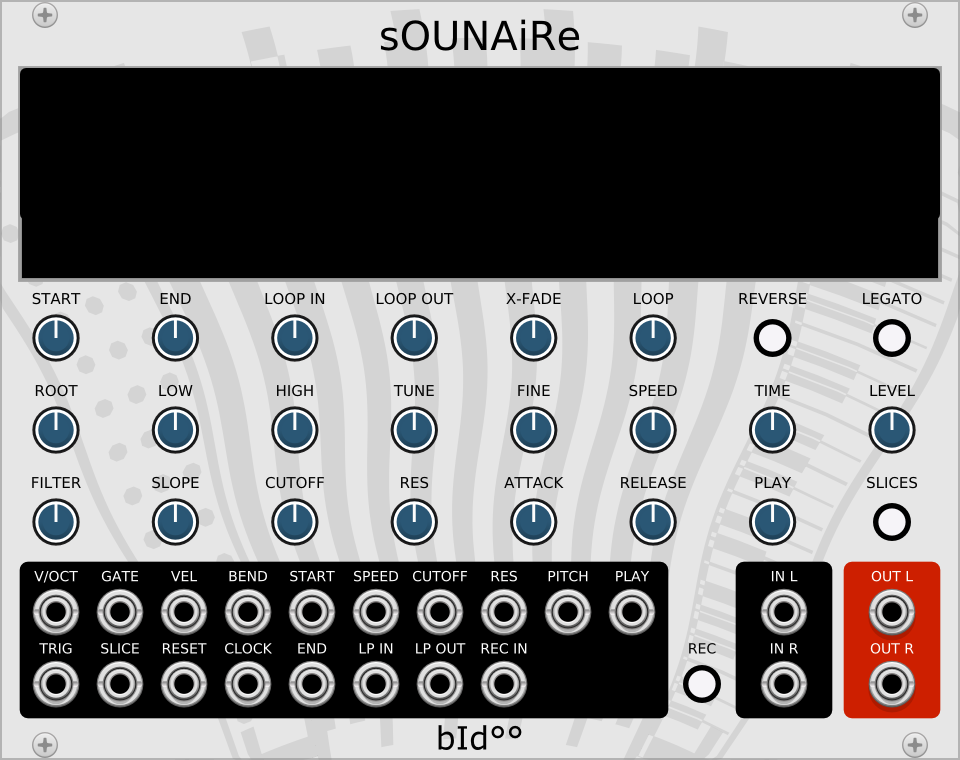
Sampler · Polyphonic · 32 HP
sOUNAiRe is a 16-voice sampler with two modes. In KEYS mode it plays one sample over a key range, with start and end points, loops with crossfades, reverse and legato. In SLICES mode it cuts the sample at its transients and plays one slice per key or per trigger, each slice with its own play type, choke group, level, tuning, pan and envelope. Both modes have a multimode filter per voice, an attack/release envelope and time modes that can change the playback speed without changing the pitch (Signalsmith Stretch). The sample can follow a clock, and you can record into it from the IN jacks. The sample is stored inside the patch as FLAC, so the patch works on another computer without the original file.
- Drag a WAV, AIFF or FLAC file from your file browser onto the module (or use Load sample... in the context menu).
- Patch the V/OCT and GATE outputs of VCV MIDI-CV into V/OCT and GATE. Set MIDI-CV to 8 or 16 polyphony channels if you want chords.
- Patch L and R (OUT) to your Audio module.
- Play a note, or click a key on the piano under the display. The root note was found when the sample loaded (shown on the line under the waveform); if it is wrong, set ROOT by hand.
- Drag the white markers in the display to choose the part of the sample that plays. Turn the mouse wheel over the display to zoom in.
This is KEYS mode, the default. For SLICES mode, see below.
- Sustained instrument: load a held note (pad, string, organ), set LOOP to Forward, then turn on a loop region in the steady part of the sound with LOOP IN and LOOP OUT (or drag the yellow markers). Raise X-FADE until the loop seam is smooth, and set RELEASE to taste. The loop keeps running during the release.
- Drum or one-shot over the keyboard: load a hit, leave LOOP Off and set LOW and HIGH to a single key or a small range, so other notes from your sequencer are ignored. Use several sOUNAiRe modules fed by the same V/oct and gate to split one keyboard into zones.
- Slice by voltage: patch a VCV SEQ-3 CV row (or VCV Random) into START (0-10 V goes through the start-end region). Each new note starts from a different point of the sample, which turns a drum loop or a phrase into a playable slice set.
- Change tempo, keep pitch: set TIME to one of the Stretch modes and turn SPEED: the sample plays slower or faster but stays at the same pitch; V/OCT still transposes. Use "Stretch, keep formants" on voices to avoid the chipmunk effect when you transpose far.
- Velocity and filter: patch the VEL output of MIDI-CV into VEL, set FILTER to Low-pass with CUTOFF around the middle, and patch a VCV ADSR (polyphonic) into the CUTOFF input for a plucked, per-voice filter sweep.
- Sweep a loop: set LOOP to Forward, hold a note and patch a slow LFO into LP IN and LP OUT (or just one of them): the loop travels through the sample without clicks and without changing the pitch. A fast LFO on LP OUT turns it into a stutter. The two points may cross; the loop never gets shorter than 2 ms, where it buzzes around 500 Hz at the sample's own pitch.
- Transpose a whole part: patch a sequencer or a quantizer into PITCH. Every note moves by that interval, on top of V/OCT, so you can shift a played part without changing the keys.
Press the SLICES button (lit orange when on). The sample is cut into slices: slice 1 plays on the BASE key (the ROOT knob), slice 2 on the next key up, and so on, one key per slice. The key only picks the slice: every slice plays at the sample's own pitch, moved by PITCH, TUNE, FINE, BEND and the slice's own tuning. REVERSE and LEGATO do nothing in this mode; their buttons are faded. Each slice has a play type:
| Play type | What it does |
|---|---|
| One shot | Plays the slice to its end, whatever the gate does. |
| Gate | Plays the slice while the gate is high, then releases. Stops at the end of the slice. |
| Loop | Loops the slice forward while the gate is high. |
| Ping-pong | Loops the slice back and forth while the gate is high. |
| Reverse | Plays the slice backward to its start, whatever the gate does. |
| Reverse loop | Loops the slice backward while the gate is high. |
When a sample loads, its transients are found and every slice is set to One shot (see Find the transients when loading in the Context menu). Up to 128 slices.
- Load a drum loop, then press SLICES. The display shows the cuts, each slice numbered, and a row of pads under the waveform, one per slice.
- Click the pads: each one selects its slice and plays it while you hold the mouse button.
- Set ROOT (BASE key of slice 1) to the key where you want the slices to begin, for example C3 for a MIDI controller's drum pads.
- With a slice selected, right-click the module: the Slice N section sets its play type, choke group, level, tune, pan, attack and release.
- If the cuts are wrong, use Find the transients again (after moving the sensitivity slider), Find about N slices, Divide equally, or double-click in the display to add or remove a cut. Ctrl+Z undoes a slice edit.
Besides the keys, the TRIG input plays slices without V/oct:
- Each trigger on TRIG plays the next slice: 1, 2, 3... then back to 1 after the last.
- When SLICE is patched, it picks the slice instead: 0-10 V spreads across all the slices (0 V = slice 1). It is read at each trigger. The next unpatched trigger continues from the slice it picked.
- A trigger on RESET makes the next TRIG play slice 1.
- TRIG is held like a gate: Gate, Loop, Ping-pong and Reverse loop slices play while TRIG stays high.
- TRIG has its own voice, apart from the 16 V/oct voices. A new trigger fades the previous TRIG slice out. It plays at full velocity and follows the CVs of channel 1 (PITCH, BEND, PLAY, CUTOFF...). Its sound comes out on channel 1 of L and R.
Each slice can be in choke group 1 to 4 (context menu, Choke group). When a slice in a group starts, it fades out every other voice playing a slice of the same group (V/oct voices, TRIG, clicked pads). Slices with no group are never cut. Use it for an open hi-hat that the closed hi-hat cuts.
In the Slice N section of the context menu, the selected slice has its own:
- Level: -36..+12 dB, default 0 dB.
- Tune: -24..+24 semitones, added to everything else (in the Stretch modes it transposes without changing the length).
- Pan: from 100 % left to 100 % right, default centre. Panning to one side lowers the other side only.
- Attack: 0-2000 ms, or "the knob" (slider at its lowest) to use ATTACK.
- Release: 0-5000 ms, or "the knob" to use RELEASE.
A new cut gives the new slice the settings of the slice it was cut from. Find the transients again, Find about, Divide equally and One slice reset every slice's settings (choke, level, tune, pan, envelope) and give every slice the play type of slice 1.
- Drum loop on a keyboard: load a drum break, press SLICES and set ROOT to C2. Patch MIDI-CV (polyphonic) into V/OCT and GATE: each key from C2 plays one hit, so you can replay the break in a new order. Set the cymbals' slices to Gate to stop them when you let go of the key.
- Live play-type switching: patch a VCV SEQ-3 CV row into PLAY, with steps at 0, 1, 2, 3... V. With the PLAY knob at "As set per slice", 1 V gives One shot, 3 V gives Loop, 5 V gives Reverse. Each note takes the type of its step, so a pattern of slices turns into stutters and reversed hits.
- Pitched slices: slice a vocal or a melodic phrase and patch a second V/oct line (a sequencer through a quantizer) into PITCH. V/OCT chooses the slice, PITCH plays it in tune with the song. Set TIME to "Stretch, keep formants" so transposed voices keep their timbre. For a melodic phrase, set Find the transients of to "Tonal material" before Find the transients again.
- Shorter hits: lower END to keep only the attack of every slice, or raise START to cut the attack off. START CV moves the start of each new note inside its slice.
- Mix the kit inside the sample: select the kick and raise its Level, pan the hats a little left, tune the snare down 2 semitones, give the crash a long Release.
Patch a clock into CLOCK and the sample plays at the speed that fits the tempo. sOUNAiRe measures the time between pulses and divides by Clock pulses per beat (1, 2, 4, 12 or 24, context menu). It takes the length of the whole sample in beats from The sample lasts: set it (1 to 64 beats), or leave "Guess", which picks the power of two that puts the sample between 70 and 180 BPM, as near 120 BPM as possible. The speed this gives multiplies SPEED and the SPEED CV, in both modes.
- In Repitch mode the pitch moves with the tempo, like a turntable. In the Stretch modes the pitch stays the same.
- A tempo change is followed from the next pulse; a steady clock is smoothed.
- The clock sets the speed only, not the position: start your notes on the beat (gate or TRIG from the same clock) so they line up.
- The line "SYNC 120.0 BPM 4 BEATS" at the bottom left of the display shows the tempo and the length used. When the clock stops for about 2 s, or is unpatched, the speed goes back to SPEED alone.
sOUNAiRe can record its own sample from IN L and IN R.
- Patch the signal into IN L (and IN R for stereo; with IN R unpatched the recording is mono).
- Press the REC button, or send a gate to the REC jack: it records while the button is on or the gate is high (1 V or more). IN L must be patched.
- Press REC again, or let the gate fall: the recording replaces the sample. The REC button turns itself off.
The top line of the display shows "RECORDING" and the time, in orange. A recording is at most 5 minutes, at the engine sample rate; 5 V on the input is full scale. When it ends it is treated like a newly loaded file named "Recording": the root note is detected, the markers are reset, it is cut into slices (if Find the transients when loading is on) and it is written into the patch. Notes already playing keep the previous sample until they end. Use Export the sample as WAV... to keep it as a file.
- Breakbeat replayed from a clock: load a one-bar drum break, press SLICES and use Find about > 16 slices (or Divide equally > 16 slices). Patch a 16th-note clock into TRIG and the bar's clock (one pulse per bar) into RESET: the break plays back in time, starting over on every bar. Change the clock rate and the break follows.
- Random slices: same break, and patch VCV Random (or a sample-and-hold of noise, 0-10 V) into SLICE, clocked by the same 16th-note clock as TRIG. Each trigger plays a slice chosen by the CV. Patch a slower random CV into PLAY to throw in reversed or looped hits.
- Loop kept in time with CLOCK: load a one-bar loop in KEYS mode, set LOOP to Forward with LOOP IN at 0 % and LOOP OUT at 100 %, and TIME to "Stretch (Signalsmith default)". Patch your master clock into CLOCK and set Clock pulses per beat to match it (4 for a 16th-note clock). Start the note on a bar with a long gate on GATE, for example from a sequencer step that lasts the whole pattern. Change the tempo: the loop speeds up or slows down and keeps its pitch. Check the SYNC line: if the guessed length is wrong, set The sample lasts to 4 beats.
- Resampling another module: patch the outputs of a synth voice or an effect chain into IN L and IN R, and a gate from a sequencer into REC (one bar long). When the gate falls, the bar you just played becomes the sample: chop it in SLICES mode, or play it over the keyboard.
- Hi-hat choke: in a sliced drum loop, select the open hi-hat slice and set Choke group to 1, then select each closed hi-hat slice and set it to 1 too. A closed hat now cuts the open one, as on a drum machine.
The tooltips show note names for ROOT, LOW, HIGH and CUTOFF. In SLICES mode the tooltips of ROOT, START and END change to say what they do there.
| Control | Range | Description |
|---|---|---|
| START | 0-100 % | Start point of the playback, as a share of the sample length. Same as the left white marker. In SLICES mode: start inside each slice, as a share of the slice. |
| END | 0-100 % | End point of the playback. Same as the right white marker. START and END can be crossed: the lower one is the start. In SLICES mode: end inside each slice. |
| LOOP IN (loop start) | 0-100 % | Start of the loop region (yellow marker). Not used in SLICES mode. |
| LOOP OUT (loop end) | 0-100 % | End of the loop region (yellow marker). Not used in SLICES mode. |
| X-FADE (loop crossfade) | 0-500 ms | Crossfade at the loop seam, default 10 ms. At least 1 ms, at most half the loop. In Forward mode the end of the loop fades into the sample before LOOP IN; when there is too little sample there (a loop from 0 %), the sample after LOOP OUT fades into the start of the loop instead. Reverse works the other way round. The crossfade is also limited by the sample available on that side. The fade law is set in the context menu (constant level by default, or linear). No crossfade in Ping-pong mode. In SLICES mode it applies to the Loop and Reverse loop slices, the same way. |
| LOOP | Off / Forward / Ping-pong / Reverse | Loop mode. The voice plays from START; once the playhead enters the loop region it stays there until the note ends. Reverse plays the loop backward. A loop shorter than 16 sample frames is ignored (with a cable on END, LP IN or LP OUT it is held at 2 ms instead). Not used in SLICES mode. |
| REVERSE | Off / On | Plays the whole sample backward: playback starts from END and goes towards START. Loop modes still apply, mirrored. The button is lit orange when on, faded in SLICES mode, where it does nothing. |
| LEGATO (one voice) | Off / On | One voice only. A new note while another is held changes the pitch without restarting the sample. The button is lit orange when on, faded in SLICES mode, where it is off. |
| ROOT (root note) | C-1..G9 | The note at which the sample plays at its own pitch. Set automatically when a sample loads (see Context menu). In SLICES mode: BASE key, the key of slice 1. |
| LOW (lowest note) | C-1..G9 | Notes below this are ignored. If LOW is above HIGH, the two are swapped. Not used in SLICES mode. |
| HIGH (highest note) | C-1..G9 | Notes above this are ignored. Not used in SLICES mode. |
| TUNE | -24..+24 semitones | Transposition in semitones. |
| FINE (fine tune) | -100..+100 cents | Fine transposition. |
| SPEED | 0.25x..4x | Playback speed, default 1x. In Repitch mode it also changes the pitch (2x = one octave up). In the Stretch modes it changes only the duration. Multiplied by the clock's speed when CLOCK is patched. |
| TIME | Repitch / Stretch (Signalsmith default) / Stretch (Signalsmith cheaper) / Stretch, keep formants | Time mode. Repitch plays the sample faster or slower to change pitch, like a tape. The Stretch modes use Signalsmith Stretch: pitch and speed are independent. "Cheaper" uses less CPU at some cost in quality. "Keep formants" keeps the timbre of voices when transposed. |
| LEVEL | 0-100 % | Output level, default 80 %. |
| FILTER | Off / Low-pass / High-pass / Band-pass / Notch | Filter mode, one filter per voice. Default Off. |
| SLOPE (filter slope) | 12 / 24 / 36 / 48 dB/oct | Filter steepness (1 to 4 state-variable stages). Default 24 dB/oct. |
| CUTOFF | C-1..D#10 (about 8 Hz-20 kHz) | Cutoff frequency, shown as a note. Kept under 0.45 x the engine sample rate. Cutoff and resonance glide from one value to the next, so audio-rate CV on CUTOFF does not crackle. |
| RES (resonance) | 0-100 % | Resonance, applied on the last filter stage. |
| ATTACK | 0-2 s | Envelope attack, exponential knob. Never faster than 1 ms, to avoid clicks. A slice can have its own attack. |
| RELEASE | 2 ms-5 s | Envelope release after the gate goes low, exponential knob. Default about 46 ms. A slice can have its own release. |
| PLAY (slice play type) | As set per slice / One shot / Gate / Loop / Ping-pong / Reverse / Reverse loop | SLICES mode only. The first position lets each slice play with its own type; the others force one type on every note. Read when a note starts. |
| SLICES (mode) | Keys / Slices | Lit orange when on. Off: KEYS mode, one sample over a key range. On: SLICES mode, one slice per key. |
| REC (record) | Off / Recording | Records IN L / IN R while on; the recording replaces the sample when you turn it off (see Recording). Turns itself off when the recording ends. |
The top row of jacks is for playing; the bottom row is for slices, clock, recording and the moving END and loop points.
| Input | Description |
|---|---|
| V/OCT | Pitch, 1 V/oct, polyphonic. 0 V = C4 (MIDI note 60). Also selects which notes are inside LOW-HIGH. In SLICES mode it picks the slice (the key from BASE) and does not change the pitch. |
| GATE | Gate, polyphonic. A rising edge above 1 V starts a voice on that channel; the voice releases when the gate drops (One shot and Reverse slices play to their end). A new note on a busy channel fades the old one out over 3 ms. |
| VEL | Velocity, polyphonic. 0-10 V gives 0-100 % amplitude, linear, read when a note starts. A mono cable applies to every voice. Unpatched = full level. Clicked keys and pads and TRIG always play at full velocity. |
| BEND | Pitch bend, -5..+5 V = minus/plus the bend range set in the context menu (2 semitones by default). Polyphonic. |
| START | Start offset, 0-10 V, polyphonic. Moves the start of each new note through the START-END region (0 V = START, 10 V = END); in SLICES mode, through the START-END part of the slice. Read only when a note starts. |
| SPEED | Speed CV, 1 V doubles the speed (added to the SPEED knob in octaves). Range clamped to 1/16x..8x, clock included. Polyphonic: channel n drives voice n, a mono CV drives every voice. Followed while the note plays. |
| CUTOFF | Cutoff CV, 1 V/oct, polyphonic, added to the CUTOFF knob. |
| RES | Resonance CV, 0-10 V adds 0-100 %. Polyphonic, like SPEED. Followed while the note plays. |
| PITCH | Transposition, 1 V/oct, polyphonic, in both modes. Added to every note, on top of V/OCT, TUNE and FINE. Followed while the note plays. |
| PLAY | Slice play type CV, 1 V per step, added to the PLAY knob and rounded (0 V: knob position, 1 V: One shot ... 6 V: Reverse loop, with the knob at "As set per slice"). Polyphonic. Read when a note starts. SLICES mode only. |
| TRIG | Slice trigger, SLICES mode only. Each trigger plays the next slice, or the one SLICE picks; held like a gate. Own voice (see Playing slices from triggers). |
| SLICE | Slice select, 0-10 V across all the slices, read at each TRIG. Unpatched: TRIG plays the slices in turn. |
| RESET | A trigger makes the next TRIG play slice 1. SLICES mode only. |
| CLOCK | Clock: the sample's speed follows the tempo (see Clock sync). Pulses per beat set in the context menu. |
| IN L | Left input to record. 5 V = full scale. Must be patched to record. |
| IN R | Right input to record. Unpatched: the recording is mono, from IN L. |
| REC | Record gate: records while high (1 V or more). Works alongside the REC button. |
| END | End CV, added to the END knob: 10 V = the whole sample, so -10..+10 V reaches every position from any knob setting (a bipolar LFO swings around the knob), and the result stops at 0 and 100 %. Polyphonic: channel n drives voice n, a mono cable drives every voice. Followed while the note plays (5 ms smoothing). If END passes the playhead the note ends with a 2 ms fade. Once a loop has caught the playhead, END no longer matters, as with the knob. In SLICES mode it is added to the End inside each slice, for every play type (the loop of a looped slice ends there too). |
| LP IN | Loop in CV, added to the LOOP IN knob, same scale and polyphony as END. Followed while the note plays. Not used in SLICES mode. |
| LP OUT | Loop out CV, added to the LOOP OUT knob, same scale and polyphony as END. Followed while the note plays. Not used in SLICES mode. |
The number of V/oct voices is the larger of the channel counts on V/OCT and GATE.
| Output | Description |
|---|---|
| L | Left audio. |
| R | Right audio. A mono sample plays the same signal on L and R. |
By default the outputs are polyphonic, one channel per voice (see Context menu); the TRIG voice and clicked keys come out on channel 1. A normalized sample at LEVEL 100 % peaks around 4.5 V per voice; above 8 V the outputs are softly limited to stay under 10 V.
The display shows the waveform of the sample, normalized as it plays: each column its peaks, with its RMS (its loudness) as a brighter core, one column per pixel of the screen so it stays sharp when Rack is zoomed in. In KEYS mode the part between START and END is bright pink, the rest is dimmed, and the loop region is shaded pink with yellow markers when LOOP is not Off. In SLICES mode the whole waveform is bright, the cuts are drawn as lines with the slice numbers, and the selected slice is shaded orange. A thin light line shows where each playing voice is, brighter while its envelope is high. With a cable on END, LP IN or LP OUT the markers and the shaded parts follow the voltage of channel 1 (the knobs do not move); dragging a marker still sets the knob, so its marker lands where the knob plus the voltage puts it.
The top line shows the file name, sample rate and length, or "LOADING...", "RECORDING" with the time, a load error, or "DROP A WAV, AIFF OR FLAC HERE" when empty. Under the waveform:
- on the right, KEYS mode: the root note, with the detected offset in cents when there is one (for example "ROOT A3 +12c");
- on the right, SLICES mode: the selected slice, the number of slices, its play type and its key (for example "SLICE 3/12 ONE SHOT KEY D3"), then "CHOKE n" when it is in a choke group and "PLAY: ..." when the PLAY knob forces a type;
- on the left, when CLOCK is synced: "SYNC" with the tempo and the sample's length in beats.
Zoom: turn the mouse wheel over the display to zoom in or out around the mouse, down to about 64 frames across. Shift + wheel (or a horizontal scroll) moves the view. When zoomed, an orange bar at the bottom shows which part of the sample you see. Every gesture below works in the zoomed view.
The strip under the display changes with the mode:
- KEYS mode: a piano of three octaves, with the C keys named. It shows the LOW-HIGH range when it fits in three octaves, else the octaves around ROOT. The range is grey, the root yellow, the keys being played light with a dark mark. Turn the wheel over it to shift it by an octave.
- SLICES mode: one pad per slice, lined up under its part of the waveform and following the zoom, with its number and key when there is room. Pads are grey, the selected one yellow; a pad lights up while its slice plays.
Mouse:
- Click a key (KEYS mode): plays that note while you hold the mouse button. Only the keys inside LOW-HIGH play. Drag across the piano to play the keys you pass over.
- Click a pad (SLICES mode): selects its slice and plays it while you hold the mouse button. Drag to play the pads you pass over.
- Clicked keys and pads have their own voice, at full velocity, and use the CVs of channel 1 (PITCH, BEND, PLAY, CUTOFF...).
- Click and drag near a marker (KEYS mode, within a few pixels): moves that marker. The loop markers can only be grabbed when LOOP is not Off.
- Click away from the markers (KEYS mode): moves the nearest of START and END to the click, then follows the drag.
- Click (SLICES mode): selects the slice under the mouse.
- Drag a cut (SLICES mode, within 5 pixels): moves it between its neighbours. The first cut, at the start of the sample, does not move.
- Double-click (SLICES mode): on a cut, removes it (the slice joins the one before); elsewhere, adds a cut there. The new slice plays like the one it was cut from. A cut must be at least 64 frames from its neighbours.
- Shift + click/drag: snaps the marker, or the dragged or added cut, to the nearest zero crossing, which avoids clicks.
- Ctrl+Shift + drag: selects a region (shaded yellow). When you release, the root note is detected again from that region only. Use it on a clean, steady part of the sound.
- Alt + click: previews the sample from the clicked point while you hold the mouse button. The preview plays at the sample's own pitch, without loop, reverse or filter, and uses the ATTACK/RELEASE envelope and LEVEL.
- Ctrl+Z (Rack's undo): undoes slice edits: adding, removing or moving a cut, finding or dividing the slices, clearing the cuts, play types and choke groups.
- Drop a file on the module: loads it (WAV, AIFF or FLAC).
Sample
- Load sample...: opens a file dialog for a WAV, AIFF or FLAC file. Loading a new file resets the markers to the whole sample and cuts it again (see Find the transients when loading). Notes that are already playing keep the previous sample until they end.
- Export the sample as WAV...: saves the whole sample as a 32-bit float WAV file.
- Find the root note again (whole sample): runs the root detection on the whole sample and sets ROOT.
- Normalize the sample: on by default. Plays the sample so that its peak sits at about -1 dBFS, whatever its recorded level. The display follows this setting.
- Waveform colour: Pink (default) or Blue. The selected slice and a drag selection are yellow on a pink waveform, orange on a blue one.
- Find the root note when loading: on by default. Detects the pitch of the sample when it loads (YIN algorithm, median pitch of the voiced parts between 40 Hz and 2 kHz) and sets ROOT to the nearest note, keeping the remaining offset in cents for tuning. If nothing pitched is found, ROOT is not changed and the cents offset is cleared.
- Polyphonic outputs (one channel per voice): on by default. When off, all voices are mixed into one channel on L and R. Legato always gives one channel.
- Equal-power loop crossfade (off: linear): on by default. The loop crossfade keeps a constant level whatever the material: no dip on noisy or uncorrelated material, no bump on a steady tone. Off, it is a plain linear fade.
- Pitch bend range: 1, 2, 7, 12 or 24 semitones for -5..+5 V on BEND. Default 2.
Clock (CLOCK input)
- Clock pulses per beat: 1, 2, 4 (16th notes), 12 or 24 (MIDI clock). Default 1.
- The sample lasts: "Guess (N beats)", which shows the guess for the current sample, or 1, 2, 4 (1 bar), 8, 16, 32 or 64 beats. See Clock sync.
Slices
- Find the transients of: "Drums (attacks)", the default, finds sharp rises of level; "Tonal material (spectral changes)" finds where new frequencies appear, so it also cuts at a new note played at the same level. Used by the next detection and when loading.
- Sensitivity slider: 0-100 %, default 64 %, shown with the rise it asks for (from 15 dB at 0 % to 4 dB at 100 %). Higher gives more slices. Used by the next detection and when loading.
- Find the transients again: cuts the sample again with the detector and sensitivity above. Transients are at least 60 ms apart, and each cut is placed at the zero crossing just before the attack.
- Find about: 4, 8, 12, 16, 24, 32, 48 or 64 slices: picks the sensitivity that gives the number of slices nearest to that, with the current detector.
- Find the transients when loading: on by default. A new sample is cut at its transients, every slice One shot. When off, a new sample is one slice.
- Divide equally: 2, 4, 8, 16, 32 or 64 slices of the same length.
- One slice (clear the cuts): removes every cut.
- Every slice plays: sets one play type on every slice.
-
Export the slices as WAV files...: asks for a folder and writes every slice there as a 32-bit float WAV file, named after the sample with the slice number (for example
break_01.wav).
Slice N (the selected slice; click a slice in the display or a pad to pick another)
- Plays: its play type.
- Choke group: None, 1, 2, 3 or 4.
- Level, Tune, Pan, Attack, Release sliders: see Each slice's own sound.
Five reminder lines about the gestures close the menu (marker drag with Shift, wheel zoom and scroll, Ctrl+Shift+drag, Alt+click, slice click and double-click with Ctrl+Z).
- Polyphony: up to 16 voices, one per input channel, plus a voice for TRIG and one for the clicked key or pad. All the playing CV inputs are polyphonic (V/OCT, GATE, VEL, BEND, START, SPEED, CUTOFF, RES, PITCH, PLAY, END, LP IN, LP OUT); a mono cable on VEL, SPEED, CUTOFF, RES, PITCH, END, LP IN or LP OUT applies to every voice.
-
Saved with the patch: the sample itself, written as
sample.flacin the patch storage as soon as it loads or a recording ends (16 or 24 bit, as the source, 24 bit for a recording; mono or stereo, only the first two channels of a multichannel file are kept). Markers and ROOT are kept when the patch reloads. The cuts and, for each slice, its play type, choke group, level, tune, pan, attack and release are saved too, as are the selected slice, the detector and sensitivity, the clock settings, the options of the context menu, the cents offset of the detected root and the sample name. - Stretch voices: at most 6 voices are stretched at once; extra voices fall back to Repitch. The stretchers are prepared in the background the first time you pick a Stretch mode (or change sample rate), so the very first notes may play in Repitch. Switching between "default" and "cheaper" stops the stretched voices that are playing.
- Sample rate: a loaded file (or recording) is resampled to Rack's sample rate once, in the background, so it plays at its true pitch and speed at any engine rate. When you change Rack's sample rate, the notes playing fade out and the sample is prepared again.
- Pitching up is anti-aliased: notes above the sample's own pitch are read from band-limited copies of the sample, so high notes do not get harsh metallic aliasing.
- Ends and retriggers are declicked: a 2 ms fade before the end of a sample or slice that does not loop, a 3 ms fade on a retriggered or choked note, at least 1 ms of attack.
- Legato: only one voice plays and the output is mono. When you release the latest note while others are held, the pitch goes to another held note without restarting.
- LOW and HIGH: a note is checked against the range only when it starts.
- SLICES mode keys: a key below BASE or above the last slice plays nothing. The detected cents offset of the root does not apply in SLICES mode; tune the slices with TUNE and FINE, or each slice with its own Tune.
- Undo: Ctrl+Z covers the slice edits listed under Display and mouse. The per-slice sliders (level, tune, pan, attack, release) and the KEYS markers are not undo steps.
- Detected cents offset: the cents shown next to the root apply until you turn ROOT by hand, which clears them. Loading another sample replaces them with its own detected offset, or clears them when no root is detected (or Find the root note when loading is off).