Repository navigation
eDsaroS
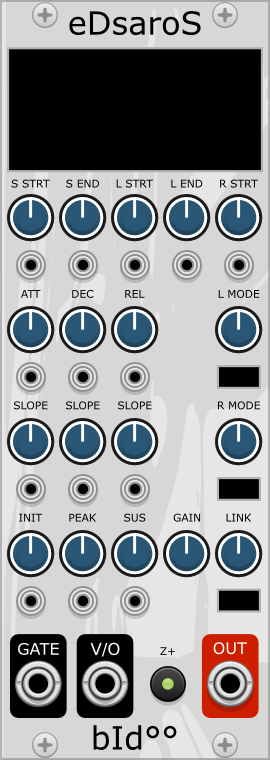
Sampler · 9 HP
eDsaroS is a polyphonic, pitched sample player in the style of a classic hardware sampler. It plays one sample with a sample start and end, a sustain loop (forward or ping-pong) while the gate is held, a release section with its own loop, and a built-in envelope with curved segments. Pitch follows 1V/oct through a high-quality resampler. Use it to turn a single recorded note into a playable instrument.
- Right-click the panel and choose Load sample, or drop a WAV or AIFF file on the panel. The waveform appears in the display.
- Patch the polyphonic V/OCT and GATE outputs of VCV MIDI-CV into V/O and GATE.
- Patch OUT to a mixer and play: each note plays the sample transposed, 0 V = original pitch.
- Set L MODE to forward loop and move L STRT and L END so the held part of the note loops smoothly. Press Z+ to snap the points to zero crossings.
- R MODE is on "play to the end" by default: turn REL up for a longer release tail.
- Sustaining instrument from one note: load a long note, set L MODE to forward loop and put L STRT and L END on a steady part of the sound. Loop points are crossfaded over 2 ms; turn Z+ on for even smoother joins. The loop plays as long as you hold the key.
- Pads with a ping-pong loop: set L MODE to ping-pong, use a long ATT (a few seconds) and a high SUS. Ping-pong loops hide loop seams on textures.
- Release tail from a different part of the sample: set R MODE to forward loop or ping-pong and move R STRT. When you release the key, playback jumps between R STRT and S END while the REL envelope fades it out.
- Drum hits from triggers: enable Trigger mode in the context menu, set ATT to 0, DEC to the hit length and SUS to 0. Short triggers from a sequencer now play the full attack and decay, then the release, whatever the gate length.
- Scan a sample with the link mode: set LINK to Offset and patch a slow LFO into the S STRT input. All the other points follow the start, so the loop moves through the sample with its length kept.
| Control | Range | Description |
|---|---|---|
| S STRT (sample start) | 0-100 % | Where each note starts playing. |
| S END (sample end) | 0-100 % | Where playback ends. Never before S STRT. Default 100 %. |
| L STRT (loop start) | 0-100 % | Start of the sustain loop. Kept between S STRT and S END. |
| L END (loop end) | 0-100 % | End of the sustain loop. Kept between L STRT and S END. Default 100 %. |
| R STRT (release start) | 0-100 % | Start of the release loop (R MODE forward loop or ping-pong). Default 100 %. |
| ATT (attack) | 0-20 s | Attack time, from INIT to PEAK. A retrigger of a voice that still sounds (in its release, or in trigger mode) starts the attack from the current level instead of INIT. Default 0. |
| DEC (decay) | 0-60 s | Decay time, from PEAK to SUS. Default 0.2 s. |
| REL (release) | 0-60 s | Release time, from the current level to 0 when the gate falls. At 0 the sound stops at once. Default 0.5 s. Has no effect when R MODE is Cut. |
| SLOPE (under ATT, DEC, REL) | 0-100 % | Curve of that segment. 50 % is close to a straight line; lower and higher values bend it one way or the other. |
| INIT | 0-100 % | Level at the start of the attack. Default 0 %. |
| PEAK | 0-100 % | Level at the end of the attack. Default 100 %. |
| SUS (sustain) | 0-100 % | Level held after the decay while the gate is high. Default 100 %. |
| GAIN | x1 - x10 | Sample gain. The waveform in the display is drawn with this gain. |
| L MODE (loop mode) | None / Forward / Ping-pong | What happens while the gate is held. None: plays to S END. Forward: loops from L STRT to L END. Ping-pong: plays back and forth between them. The small box below shows ⇥, ⇉ or ⇄. |
| R MODE (release mode) | Cut / Play to the end / Forward loop / Ping-pong loop | What happens after the gate falls. Default: Play to the end. Cut: the sound stops at once. Play to the end: plays on to S END with the release envelope. Forward loop: loops from R STRT to S END. Ping-pong: back and forth between R STRT and S END. The box below shows -, ⇥, ⇉ or ⇄. |
| LINK (link points mode) | None / Offset / Offset widening / Offset narrowing | Makes the other points follow S STRT. Offset: they move by the same amount as the start. Widening: they move further than the start, so the region grows as the start moves later. Narrowing: they move less, so the region shrinks. The box below shows -, ⇥, ⇉ or ⇄. |
| Z+ (zero crossing) | On / Off | Snaps every point to the nearest zero crossing of the sample (start points snap forward, end points backward), to avoid clicks. The green light shows it is on. |
| Input | Description |
|---|---|
| Point CVs (under S STRT, S END, L STRT, L END, R STRT) | Added to the knob: 1 V = 10 %. |
| ATT / DEC / REL CVs | Added to the time: 10 V = 20 s (attack), 60 s (decay, release). |
| SLOPE CVs | Added to the slope: 10 V = 100 %. |
| INIT / PEAK / SUS CVs | Added to the level: 10 V = 100 %. |
| GATE | Gate (threshold about 1 V). Polyphonic. A mono gate opens every voice at once. |
| V/O | Pitch, exactly 1 V per octave, 0 V = original pitch, clamped to ±10 V. Polyphonic. |
| Output | Description |
|---|---|
| OUT | Polyphonic audio. A full-scale sample at GAIN x1 and full envelope gives ±5 V; peaks above 8 V are softly limited under 10 V. |
- Click a sample-point knob (S STRT, S END, L STRT, L END, R STRT, GAIN, L MODE, R MODE, LINK) and the display shows the waveform. Click an envelope knob (ATT, DEC, REL, the slopes, INIT, PEAK, SUS) and it shows the envelope shape.
- In waveform view, yellow markers show the points: the tall markers are L STRT and L END, the shorter ones S STRT, R STRT and S END. Flags point right for start points and left for end points. A blue line shows the play head of the first voice.
- Drag up on the display to zoom in, drag down to zoom out, around the click position. Hold Shift for bigger steps (x2 instead of x1.1). Drag sideways to scroll.
- Load sample: opens a file dialog (WAV or AIFF) in the folder of the last sample.
- Trigger mode (a trigger plays attack and decay, then the release): when on, a rising edge on GATE plays the attack and decay whatever the gate length, then goes straight to the release. Each new edge restarts the voice. Off by default.
- Polyphony: one voice per channel of GATE or VO, whichever has more channels (up to 16).
- With R MODE on Cut, the sound stops as soon as the gate falls and REL does nothing.
- With L MODE on None, the note stops at S END even if the gate is still held. It stays silent until the gate falls and a new gate or trigger arrives.
- The loop points only matter while their loop is in use: L STRT and L END with L MODE on Forward or Ping-pong, R STRT with R MODE on Forward loop or Ping-pong loop.
- In trigger mode with R MODE on Cut, the note stops right after the decay.
- No clicks: every jump of the play head (loop points, ping-pong turns, release loops, retriggers) crossfades over 2 ms, and every sudden stop (Cut, REL at 0, S END with no loop) fades over 2 ms.
- Stereo files are summed to mono. The file is resampled to the engine rate, with its timing and length kept exactly, and loaded again if you change the engine sample rate. A sample loads even while the module is bypassed.
- Saved with the patch: the sample path (not the audio), the Z+ state and the trigger mode option. Keep the file where it is.