Repository navigation
ZOUMAI
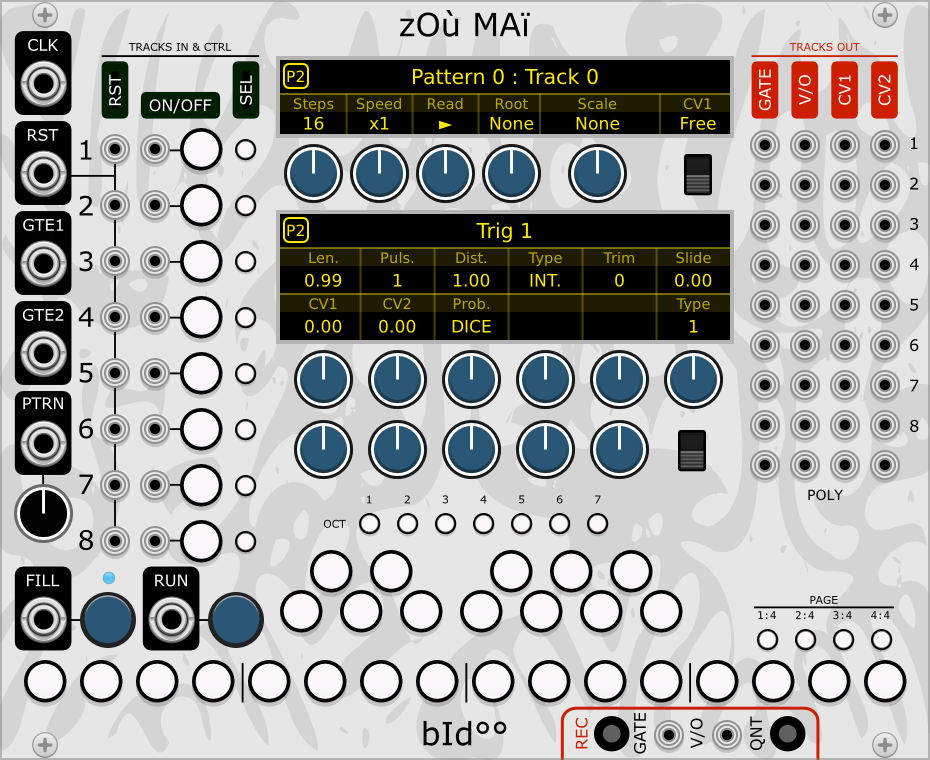
Sequencer · 31 HP
zOù MAï is an 8-track trig sequencer in the style of the Elektron machines. Each track has up to 64 steps (4 pages of 16) and its own length, speed, play direction and scale. Each step ("trig") has a note, a gate length, ratchet pulses, a micro-timing trim, a slide, two CV values and a trig condition (probability, counter, fill, previous, neighbour). It stores 16 patterns and can record notes live. The ZOUMAI-Expander adds per-track fill, force, kill, probability offset, transposition and rotation inputs. It has two clock modes: Step, one clock a step, and Fast, 32 clocks a step (the /128 output of tOCAnTe) to follow a fast, swung or modulated clock exactly.
- Patch a clock into CLK: one pulse per step in the Step clock mode (the default), for example a 16th-note output of VCV Clocked or the Fundamental CLOCK; or, in the Fast clock mode (right-click > Clock mode), 32 pulses per step: the /128 output of tOCAnTe for 16th-note steps.
- Click RUN (or send a trigger to the RUN input). The sequencer starts from the top of every track.
- Track 1 is selected (SEL light). Shift+click some of the 16 step buttons at the bottom to turn trigs on (green).
- Click a step to select it, then click the keyboard and OCT buttons to set its note. The lower display shows its settings.
- Patch GATE 1 to an envelope and V/O 1 to an oscillator's V/OCT input. Select another track with SEL and repeat.
- Drum machine with variations: use tracks 1-4 for kick, snare, hats and percussion (patch their GATE outputs to drum modules). Set some hat trigs to Prob. DICE with Val. 60, and a snare roll to FILL. Press FILL (or patch a gate into the FILL input) to bring the roll in.
- Polymeters: give tracks different Steps (for example 16, 12, 7) and Speed values. Each track loops on its own length, so the parts drift against each other. A new pattern only starts when the longest track has looped.
- Ratchets and swing: set Puls. to 3, Len. to 1 and Dist. to Fit for a triplet ratchet inside one step (or Dist. 1/3). Use Trim (-1..+1 step) to push single trigs late or early for a hand-played feel.
- Follow a swung or modulated clock: right-click > Clock mode > Fast, and drive CLK from tOCAnTe's /128 output (or any clock 32 times faster than the steps, for example a clock multiplier after a modulated LFO). The head then moves on every clock, so the whole sequence speeds up, slows down or swings with the clock, inside the steps too. With a MIDI clock (24 PPQN) and 16th-note steps, set the tracks to Speed x16/3 (6 clocks a step).
- Bassline with CV accents: on a melodic track, set Root and Scale, use CV1 for filter cutoff (VCV VCF) and CV2 for VCA level. CV1 and CV2 only output while the gate is high, so they work as per-note accents.
- Record a riff: patch a MIDI-CV gate and V/OCT (VCV MIDI-CV) into GATE and V/O at the bottom right, select a track, turn on REC and play while the sequencer runs. Turn QNT off to keep your timing off the grid (it is stored as trim).
Right-click > Clock mode chooses how zOù MAï reads its CLK input: one pulse per step, or 32. Everything else is the same in both modes: the knobs, the trig lengths, trims and distances, the patterns, the speeds. Switching keeps every track where it is; switch the clock's rate with it.
- The clock: one pulse per step at Speed x1, for example a 16th-note clock for 16th-note steps (VCV Clocked, the Fundamental CLOCK, or one of tOCAnTe's note outputs such as /16).
- The playhead: it moves on its own between two clocks, at the rate measured between the last two clocks (it needs two clocks to start measuring). Trims, ratchets and gates shorter than a step fall exactly where they are set, between the clocks, to a millionth of a step.
- When the clock changes: a clock that comes early makes the playhead jump to its place; one that comes late holds it just before. Each clock measures the rate again, so a tempo change is followed from the next clock; inside a step the playhead keeps the last rate measured, so a clock that swings or changes speed within the step is not followed there.
- Use it for: a steady clock. It is the simplest patch and the finest timing.
- The clock: 32 pulses per step at Speed x1. tOCAnTe's /128 output gives exactly that for 16th-note steps: 128 pulses per quarter note, 32 per 16th. Any other clock 32 times faster than the steps works too.
- The playhead: it moves only on a clock, by 1/32 of a step times Speed, and stands still between clocks. A trig placed between two clocks plays on the next one: less than 1/32 of a step late at x1.
- When the clock changes: the playhead follows every clock, so the sequence speeds up, slows down and swings with the clock, inside the steps too, with nothing to measure or guess.
- Use it for: a clock that swings or changes speed inside the steps, such as tOCAnTe with its tempo modulated, or a master clock that drifts. With a MIDI clock (24 PPQN) and 16th-note steps, set the tracks to Speed x16/3: 6 clocks a step.
The display's track title shows fast clock while the Fast mode is on, and the CLK input's tooltip says which clock it expects. The mode is saved with the patch.
Track section (applies to the selected track of the current pattern):
| Control | Range | Description |
|---|---|---|
| Steps | 1-64 | Track length. |
| Speed | x1/8, x1/4, x1/2, x3/4, x1, x3/2, x2, x3, x4, x5, x16/3, x6, x7, x8 | Steps played per clock: at x1/8 a step lasts 8 clocks, at x3/2 three steps last 2 clocks. In the Fast clock mode, a step lasts 32 / Speed clocks: 32 at x1, 6 at x16/3 (a 24 PPQN clock with 16th-note steps), 4 at x8. Exact over any run. x5 to x8 and x16/3 since version 2.7.8. Lengths, trims and pulse distances are in steps, so they stretch with the speed. |
| Read | ►, ◄, ►◄, ►*, ►? | Play direction: forward, backward, pendulum, random, brownian (50 % forward, 25 % back, 25 % repeat). |
| Root | C..B | Root note of the track's scale. |
| Scale | No, Ionian ... Chromatic | Quantizer scale for V/O. "No" = not quantized. |
| CV1 (switch) | Free / Quant | When on and a scale is set, CV1 is quantized to the scale (as CV1 minus 4 V). |
Trig section (applies to the selected trig):
| Control | Range | Description |
|---|---|---|
| Len. | 0-64 steps (default 0.9) | Gate length of the trig. With several pulses, each pulse's gate, at most half the gap to the next one; with Dist. on Fit, the span the pulses share. Steps through musical values (see Notes). |
| Puls. | 1-64 | Number of gates (ratchets) the trig plays. |
| Dist. | Fit, 1/32-64 steps (default 1/2) | Distance between two pulses. Fit (the bottom of the knob): the pulses share the trig's length evenly. Steps through musical values (see Notes). |
| Type | INT. / GATE1 / GATE2 | INT.: 10 V gate. GATE1 / GATE2: the gate output copies the GTE1 or GTE2 input while the trig's gate is open. |
| Trim | -1..+1 step | Moves the trig earlier or later than its step. |
| Slide | 0-1 | Glide from the previous note. 0 = no glide. Small values jump almost at once, 1 is a linear glide. |
| CV1, CV2 | -10..+10 V | Values sent to the CV1 / CV2 outputs while this trig's gate is high. |
| Prob. | DICE, COUNT, FILL, !FILL, PRE, !PRE, NEI, !NEI, FIRST, LAST | Trig condition, see Notes. |
| Val. | 1-100 | DICE: chance in %. COUNT: number of passes that play. Shown only for DICE and COUNT. |
| Base | 1-100 | COUNT: length of the counting cycle. Shown only for COUNT. |
| Type (slide type switch) | 1 / FULL | Slide over one step, or over the whole trig (all its pulses). |
P2 (top left corner of each screen, filled while its page is on): the one on the lower screen shows page 2 of the trig section, the one on the upper screen page 2 of the track section (a Swing knob, 50-75 %, see Notes; the other track knobs and the switch hide). The knobs and the screen change, back on page 1 everything returns. The buttons write nothing and the pages are not saved. A track label too long for the title is shortened on the screen.
| Control | Range | Description |
|---|---|---|
| CV1 End, CV2 End | -10..+10 V (default: the trig's CV1 / CV2) | Value of the last pulse; the output moves in equal steps from CV to CV End across the pulses. While CV End equals CV there is no ramp and the knob follows CV; once it differs it stays where you put it when CV moves. Double-click: back to no ramp. |
| Pitch | -12..+12 (default 0) | Semitones per pulse added to V/O. |
| Dist. | 25-400 % (default 100 %, the middle of the knob) | Each gap between pulses is this percentage of the previous one: below 100 % the ratchet accelerates, above it slows down. The first gap is Dist. on page 1. |
Note entry and navigation:
| Control | Range | Description |
|---|---|---|
| Keyboard (12 keys) | C..B | Click a key to give the selected trig that note and turn it on. Click the key it already has to turn the trig on or off. |
| OCT 1-7 | -3..+3 V | Octave of the selected trig (OCT 4 = 0 V, C4). |
| Step buttons (16) | Click: select the trig for editing. Shift+click: turn the trig on/off and select it. | |
| PAGE 1:4-4:4 | Show steps 1-16, 17-32, 33-48 or 49-64 on the step buttons. The selected trig moves to the same position in the new page. | |
| PTRN knob | 1-16 | Pattern. |
| ON/OFF 1-8 | Click: mute / unmute the track. Shift+click: solo / unsolo the track and select it. | |
| SEL 1-8 | Select the track to edit. | |
| FILL | button | Toggles fill mode (blue light). |
| RUN | button | Starts / stops. Starting plays every track from the top, including tracks whose own RST input is patched. |
| REC | on / off | Live recording on the selected track (red when on). |
| QNT | on / off (default on) | Quantize recorded notes to the nearest step. Off: notes keep their timing as trim. |
| Input | Description |
|---|---|
| CLK | Clock, one pulse per step at Speed x1. Between clocks the playhead moves at the measured clock rate, so trims and lengths below one step work; it needs two clocks to measure. In the Fast clock mode: 32 pulses per step at x1 (tOCAnTe's /128 output), and nothing moves between clocks, so a trig between two clocks plays on the next one (less than 1/32 step late at x1). |
| RST | Reset: all tracks restart from the top, except tracks whose own RST input is patched. A clock up to 1 ms after a reset belongs to the reset. |
| GTE1, GTE2 | Signals passed to the gate outputs by trigs of Type GATE1 / GATE2. |
| PTRN | Pattern CV, 0.625 V per pattern: 0-10 V adds 0-16 to the PTRN knob, result patterns 1-16. SAISON sets the right voltages by default; HUITre by default reaches patterns 1, 3, 5 ... 15. |
| RST 1-8 (track) | Restart that track from the top. |
| ON/OFF 1-8 (track) | A trigger toggles the track's mute. |
| FILL | When patched, sets fill mode: high (above 1 V) = fill on. The FILL button is then ignored. |
| RUN | A trigger toggles run, like the button. |
| GATE (REC section) | Gate to record: high above 0 V. |
| V/O (REC section) | Pitch to record, 1 V/oct, rounded to the nearest semitone. |
| Output | Description |
|---|---|
| GATE 1-8 | Track gates: 10 V (or GTE1 / GTE2 for those trig types). 0 V when the track is muted or stopped. |
| V/O 1-8 | Track pitch, 1 V/oct, -3..+3.92 V, plus the expander's transposition. Quantized when a scale is set. Held between notes. |
| CV1 1-8 | The playing trig's CV1 value while the gate is high, else 0 V (or held: Track menu). |
| CV2 1-8 | The playing trig's CV2 value while the gate is high, else 0 V (or held: Track menu). |
| POLY (row under track 8: GATE, V/O, CV1, CV2) | The same four signals on one polyphonic cable each: 8 channels, channel n = track n. |
- Both displays are tables: one column per knob of the row below, each cell with its name over its value, centred on the knob. A value too long for its cell (a long scale name) is written smaller, then shortened.
- Upper display: "Pattern n : track label", then Steps, Speed, Read, Root, Scale and the CV1 mode of the selected track (page 2: Swing).
- Lower display: "Trig n", then two rows for the two knob rows: Len., Puls., Dist., Type, Trim, Slide, then CV1, CV2, Prob., Val., Base and the slide Type (page 2: one row, CV1 End, CV2 End, Pitch, Dist.). Val. and Base appear only for the conditions that use them, and their knobs hide too.
- Step lights: red = playhead of the selected track, green = trig on, bright blue = selected trig (on), dim blue = selected trig (off), dim white = off.
- PAGE lights: blue = the page shown, red = the page the playhead is in.
- ON/OFF lights: green = track playing; in solo mode, blue = soloed track. SEL light: blue = selected track.
- Keyboard and OCT lights show the selected trig's note and octave (the note light is dimmer when the trig is off).
Hover the mouse over a control and press a key.
| Hover over | Keys |
|---|---|
| A step button | C copy trig, V paste trig, E erase trig, R random note, T random note+, Y random condition, U full random, F random CV1, G random CV2, W one semitone up, S one semitone down |
| SEL or ON/OFF of a track | C copy track, V paste track, E erase track, R random track settings, T random notes, Y random notes+, U random conditions, F random CV1, G random CV2, W all trigs up a semitone, S all trigs down, A rotate left one step, D rotate right one step, B euclidean fill |
| A PAGE button | C copy page, V paste page (same track), E erase page, T random notes, Y random notes+, U random conditions, F random CV1, G random CV2 |
| The PTRN knob | C copy pattern, V paste pattern into the current one, E erase pattern, R random pattern, T full random pattern |
What the random actions change:
- Random note: on/off, octave (OCT 3-4), semitone (any of the 12, or only the notes of the track's root and scale when it has a scale) and pulse count (1-9).
- Random note+: the same, plus slide, slide type, length (0-2 steps) and pulse distance (0-2 steps).
- Random condition: condition (DICE to !NEI, not FIRST or LAST), Val. and Base (1-100).
- Full random (trig): note+, condition, CV1 and CV2. Random CV1/CV2: 0-10 V.
- Random track: length (1-64) and read mode (any of the five); trigs are not changed.
- Random pattern: random track settings on all 8 tracks. Full random pattern: also speed, and full random on every trig.
Copy and paste work across patterns and tracks: copy, change the pattern or track, then paste. Paste does nothing until something has been copied.
- Clock mode: Step (the default, one clock a step) or Fast (32 clocks a step, tOCAnTe's /128 output), see Clock modes. Saved with the patch.
- Free trig lengths and distances: off by default. Off, the Len. and Dist. knobs step through musical values (see Notes); on, they move freely along a curve that is fine at the short end. Saved with the patch.
- Add expander: places a ZOUMAI-Expander to the right.
- Trig: erase, copy, paste, the random actions and up/down on the selected trig.
-
Track: slide mode, erase, copy, paste, random actions, up/down/left/right on the selected track, Swing (see Notes), Euclidean (Hits and Rotation sliders, Fill), and Label (a text field naming the track, shown in the display).
- Slide time / rate const.: per track. "Time const.": a glide lasts the same time whatever the interval. "Rate const." (default): the glide time is multiplied by the number of whole octaves in the interval.
- Hold CV1 and CV2 between notes: per track and per pattern, off by default. On, CV1 and CV2 keep the last trig's value (a ramp's last pulse) while the gate is off, like V/O, instead of 0 V; 0 V until the first trig after a load, kept across a reset and a pattern change.
- Pattern: erase, copy, paste, random, full random on the current pattern.
- Page: erase, copy, paste and the random actions on the page shown.
The menu prints the same key next to each item.
-
Musical lengths and distances (since version 2.7.3): Len. and Dist. step through fractions of a step, straight, dotted and triplet: 1/32, 1/24, 1/16, 1/12, 3/32, 1/8, 1/6, 3/16, 1/4, 1/3, 3/8, 1/2, 2/3, 3/4, 7/8, 1, 4/3, 3/2, 2, 3, 4, 6, 8, 12, 16, 24, 32, 48, 64 (as far as each knob goes). The display and the knob's tooltip show these names. Type a value in the knob's field as a fraction (3/16), a number of steps (0.75) or, for Dist., "fit". A value from an older patch that is not in the list stays as it is until you move the knob. The context menu's Free trig lengths and distances gives the old free knobs back (on a curve).
-
Ratchets: with two pulses or more each pulse's gate lasts Len., but never more than half the gap to the next pulse, so every hit stays a separate gate. With Dist. on Fit (the bottom of the knob) the pulses share the trig's length evenly: Len. 1 and Puls. 3 is a triplet inside one step, Len. 1/2 and Puls. 4 a 32nd-note roll; each pulse lasts half its gap. A trig with one pulse keeps its whole length. (Before 2.7.3 a pulse lasted its full length, so pulses closer than Len. merged into one long gate, and Dist. 0 played a single pulse.)
-
Trig conditions: DICE plays with a Val. % chance (plus the expander's DICE offset); at 100 it always plays. COUNT keeps a counter for the trig that cycles from 1 to Base and plays while the counter is at or below Val., for example Val. 1, Base 4 plays one pass out of four. FILL plays only in fill mode, !FILL only outside it. PRE plays when the last trig with a condition on the same track played (PRE and !PRE trigs are not counted), !PRE when it did not. NEI and !NEI do the same with the track above (track 1 has no neighbour, so NEI never plays there).
-
FIRST and LAST: FIRST plays only on the first pass of the track since the pattern started or since a reset (the RESET input, the track's RST input or RUN). For read modes without an end, a pass is as many steps as the track has; for the pendulum, one way there and back. LAST plays only when a change to another pattern is asked for, in the last turn of each step before that change: from the moment the time left in the pattern is at most one pass of the track. So on a track of 4 steps in a pattern of 16, the last 4 steps; on a track of 5, the last 5, whatever its passes are; on the longest track, its last pass. Without a request it never plays; a request made late only brings the steps still to come. Random condition does not draw them. Force and kill apply as on the other conditions; PRE and NEI count them like FILL.
-
Euclidean fill: spreads Hits trigs as evenly as possible over the track's Steps, turned by Rotation. It only turns trigs on and off: notes and settings stay. Set Hits and Rotation in Track > Euclidean, then choose the Fill line or press B over SEL or ON/OFF.
-
Undo: Edit > Undo (Ctrl+Z) reverses the edits made with the buttons, keys and menus (erase, paste, random, up/down/left/right, notes, octaves, step and track on/off, solo, slide mode, CV hold, euclidean fill, labels), named in the menu, at trig, page, track and pattern level. A knob on a trig or a track goes back on that trig or track, even with another one selected. Not undone: recording, and what the inputs do (expander rotations, track on/off inputs).
-
Swing: per track and per pattern, with the Swing knob on the upper screen's page 2 or in the Track menu (50 % is straight, 75 % the most), shown in the display's title. Even-numbered steps start later by (swing - 50) x 2 % of a step: 75 % = half a step, 62.5 % = a quarter. It adds to the trig's trim, gate lengths do not change, pulses move with their trig, and it follows the track's speed. It always belongs to the same step numbers: on an odd length steps n and 1 are both on time. Backward (and on the way back in pendulum) it mirrors like a trim: a trig plays from its end, so the even steps move the same distance along the track, which sounds as coming early instead of late. A swung trig stays inside its own step: trim and swing together stop 1/64 of a step before its end.
-
Ratchet ramps: with 1 pulse they do nothing. Pitch: on a track with a scale each pulse is quantized on its own, so a ramp of 1 can hold a note between two scale degrees; a slide keeps going underneath, towards the trig's note, with the ramp added. Pulses are placed from the first one with exact integers, each gap rounded to the nearest millionth of a step from the previous one, never under 1/64 of a step or over 64 steps. With a Distance other than 100 % a pulse lasts Len. but at most half the gap after it, so its gate always falls before the next one rises (the last pulse keeps Len.). At 100 % everything is as without a ramp, including a Len. longer than Dist., where the gate stays high. As with any ratchet, pulses running past the next trig that plays are cut by it, and those past the end of the track by the loop. Backward, a ratchet plays from its last pulse to its first. V/O stops at +-10 V. Random actions leave ramps and swing as they are (default on a new trig), erase resets them, copy and paste and undo cover them, and undo of a page 2 knob goes back to the trig it was moved on.
-
Timing: positions, trims, lengths and distances are exact (to a millionth of a step): a trig starts on the first sample where the head has reached it, the same at any speed and clock. Between two clocks the head moves at the rate measured between the last two, so a clock that comes early makes the head jump to its position, and one that comes late holds it just before. To follow a clock that changes inside a step (swung or modulated), use the Fast clock mode: the head then moves only on clocks.
-
RUN or a reset between two clocks: step 0 starts at once, the next steps stay on the clock's subdivisions; a step whose time has already passed is skipped.
-
Patterns: 16 patterns of 8 tracks. Stopped, the PTRN knob and CV switch patterns at once. Running, the new pattern starts when the current one ends (when its longest track, in clocks, has looped) or on a reset, and all tracks start from the top.
-
Solo: when any track is soloed, only soloed tracks play; ON/OFF clicks do nothing until solo is cleared.
-
Recording: only while running, on the selected track. A gate starts a note at the playhead; its length is measured until the gate falls. A pitch change of more than a quarter tone under a held gate starts a new note (legato).
-
Slides: the glide starts from the V/O value of the previous trig that played.
-
Saved with the patch: all 16 patterns (tracks and trigs; a pattern at its default takes no room), the current pattern, track, trig and page, and the track labels. The run and fill states are not saved: the sequencer loads stopped.
-
Initialize erases all patterns. Rack's Randomize applies "random track" to all tracks of the current pattern.
-
Expander: place a ZOUMAI-Expander directly to the right. Without it, all its effects are off.
-
Not polyphonic: 8 monophonic tracks on separate outputs.