Repository navigation
antN
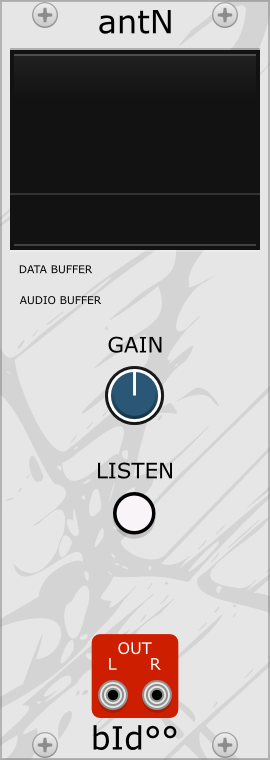
Oscillator · 9 HP
antN plays an internet radio stream or an online audio file inside Rack. Pick a station from the right-click menu or type a URL, press LISTEN, and the stereo audio comes out of OUT L and R. It reads MP3, AAC (AAC-LC and HE-AAC, also called AAC+) and Ogg Vorbis streams over http or https, and .pls / .m3u playlists. It is not an oscillator: it is a sound source for sampling, resampling and processing live radio.
- Right-click the module > Stations, pick a continent, News & talk or Music, then a station: antN starts it at once. Or click the large text field and type or paste the URL of a stream or of a .pls / .m3u playlist.
- Patch OUT L and OUT R to VCV Audio (through a mixer if you like).
- Press LISTEN (not needed after choosing a station). The light turns green while antN connects and fills its buffer (about 1 second of audio), then blue when it plays.
- Set the level with GAIN. Press LISTEN again to stop.
- Live radio as a texture: send OUT L/R through a filter (VCV VCF) and a long reverb, and slowly open the filter. Talk and music turn into an ambient bed.
- Gate the radio rhythmically: patch OUT into a VCA (VCV VCA) driven by an envelope triggered by a clock. You get choppy, rhythmic slices of whatever is on air.
- Resample it: record OUT with VCV Recorder, then load the bits you caught into a sampler such as SOUNAIRE.
- Use it as a modulation source: send OUT through an envelope follower and use the result to modulate a filter cutoff in another voice.
| Control | Range | Description |
|---|---|---|
| URL field (top display) | text | The stream address. Spaces and line breaks are removed. |
| GAIN | 0-3 (x1 default) | Output level. At 1, a full-scale stream gives ±5 V. |
| LISTEN | button | Starts the stream; pressed again, stops it. |
| Output | Description |
|---|---|
| OUT L | Left audio, ±5 V at GAIN 1. |
| OUT R | Right audio. A mono stream gives the same signal on both. |
- The text field is the URL entry. Below it, the status lines show the station's name (the one chosen in the menu, else the name the server announces) and the stream: format, bitrate and sample rate (for example
AAC+ 64 kbps 44.1 kHz), or why it does not play. With no URL it readsright-click: Stations; with a URL but stopped,stopped. A changed URL is used the next time you press LISTEN. Emptying the field clears the URL and stops playback. - DATA BUFFER bar: compressed data received but not yet decoded.
- AUDIO BUFFER bar: decoded audio waiting to be played (full at about 5 s at 48 kHz).
- The light in the LISTEN button: red = stopped; blinking red = the last stream failed (bad URL, network error, unsupported format; the status line says which); green = connecting or buffering; blue = playing; blue with green = playing but the buffer runs low.
Right-click > Stations lists about 120 stations in six continents (Europe, North America, Latin America, Africa, Asia, Oceania), each split into News & talk and Music, about ten per list. They are public broadcasters (Radio France, Deutschlandfunk, BBC World Service, RTÉ, SRF, Sveriges Radio, NPR stations, CBC and Radio-Canada, Radio Nacional Argentina, RTVC, SABC, RTHK, ABC, RNZ...) and well-known independent stations (KEXP, WFMU, SomaFM, Radio Paradise, NTS, Radio Panik, 3RRR...). News and talk are in each station's own language. Each entry shows the station and its country, with the format at the right. The playing station is ticked, and so are the continent and list it is in.
The list is curated, and every stream was checked to play in antN on 7 November 2026. Radio streams move and close, so the list may age: a station that no longer answers just fails like any bad URL. The list lives in res/stations.json in the plugin folder (name, country, continent, category, format, url) and is read when Rack starts, so it can be corrected or extended without rebuilding the plugin.
- Formats: MP3, AAC in ADTS (AAC-LC, HE-AAC v1 and v2 with SBR and PS, mono or stereo, any sample rate) and Ogg Vorbis, including chained Ogg streams (a server restart or a new set of headers in the stream is picked up without stopping). The format is recognised from the first bytes of the stream (MP3 frame or ID3 tag, ADTS header,
OggS), then from the HTTP Content-Type. Ogg Opus, FLAC, MP4/M4A and HLS (.m3u8, used by many broadcasters' own players) are not supported: the status line says so. A stream that sends 512 KB without any audio antN can decode is rejected with "not a supported format". - For a .pls or .m3u URL (or a server that answers with a playlist), antN uses the first http(s) address in the playlist (playlists inside playlists up to 3 levels). Redirects are followed, and old SHOUTcast servers (ICY replies) work.
- antN waits for about 1 second of audio before it starts playing. If the connection slows down and the buffer empties, it pauses, refills, then goes on. A connection that sends nothing for 15 s is dropped.
- A finite MP3 file plays to its end, then antN stops.
- Start, stop, the end of a stream and buffer underruns are faded over 5 ms, so they do not click. GAIN glides over 5 ms too.
- The audio is resampled to Rack's sample rate. Changing the sample rate clears the buffer.
- Saved with the patch: the URL and the station's name. Playback does not start by itself when the patch loads: press LISTEN.
- Initialize (right-click > Initialize) stops playback and clears the URL.
- Not polyphonic. Needs an internet connection.