Repository navigation
bordL
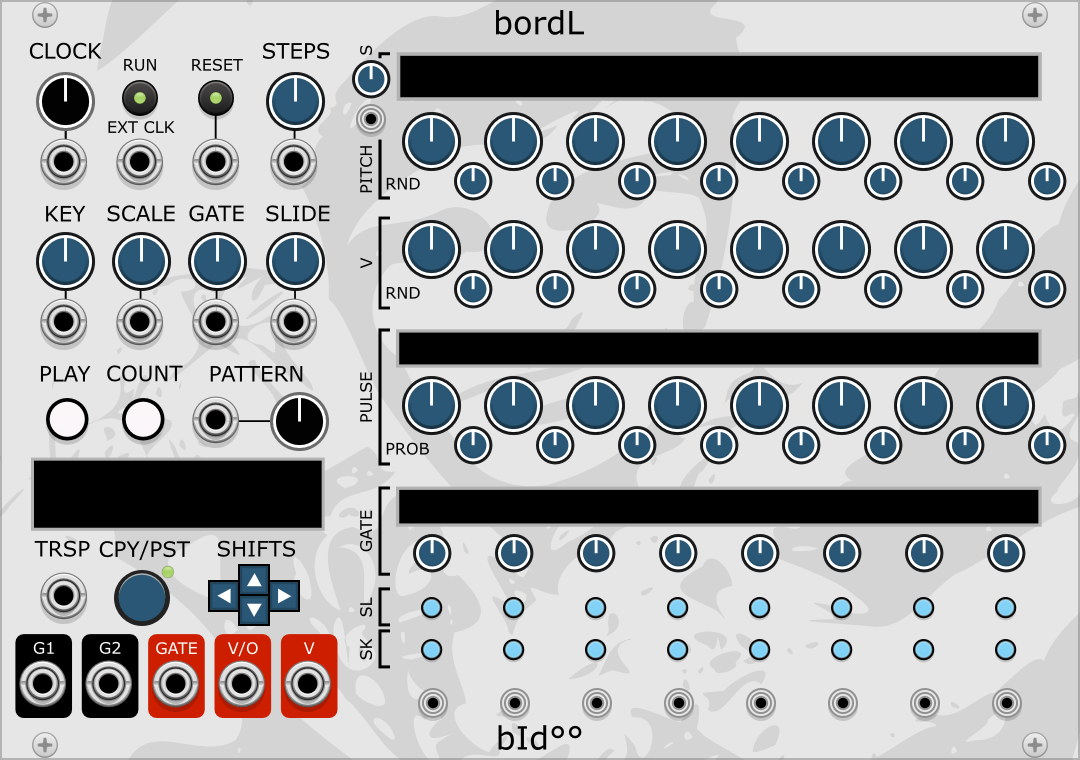
Sequencer · 36 HP
bordL is dTrOY with more per-stage controls: a gate probability, a random pitch amount, and a second CV line (V) with its own random amount, sent to the V output for accents or any modulation. The sliders are replaced by knobs with small displays. Like dTrOY it plays 8 stages as up to 16 steps, in 5 play modes, with a quantizer and 16 patterns.
- Patch V/O to an oscillator's V/OCT input (VCV VCO) and GATE to an envelope (VCV ADSR) driving a VCA.
- The internal clock runs at 120 BPM: you hear 8 steps, one per clock. Or patch a clock into EXT CLK.
- Turn the 8 PITCH knobs; the display above them shows the quantized note names. Pick a KEY and a SCALE.
- Turn the PULSE knobs to make stages last several clocks, and the GATE trimpots to choose the gate mode (the icon above each shows it).
- Patch V (the last red output) to a filter cutoff or VCA level and turn the V knobs for accents.
- Generative melody that stays in key: set KEY and SCALE, turn up a few PITCH RND trimpots and lower some PULSE PROB trimpots. Each stage draws a new random offset and a new chance to play every time it starts, while the quantizer keeps the notes in the scale.
- Accents and filter moves: patch V to the cutoff CV of VCV VCF (or to a VCA's CV) and set high V values on the stages you want accented. Add some V RND to make the accents breathe.
- Ratchets with ghost notes: give a stage 3-4 pulses with gate mode "Multiple" and set its PROB to 60 %. The whole ratchet plays or stays silent as one block.
- Polyrhythms from the stage outputs: patch the 8 bottom outputs to drum modules. Each fires a 1 ms trigger when its stage starts (or on every pulse, from the context menu), so the melody's rhythm also drives a kick or hi-hat.
- Pattern chains: write patterns 1-4, then step through them with a stepped CV into the PATTERN input (0-10 V = patterns 1-16). The play position carries over when the pattern changes.
| Control | Range | Description |
|---|---|---|
| CLOCK | 15-960 BPM (default 120) | Tempo of the internal clock. One clock = one pulse. Ignored when EXT CLK is patched. |
| RUN | button | Starts and stops the sequencer. The green light is on while it runs. |
| RESET | button | The next clock plays the first step. With the internal clock, the clock restarts at once and the first step plays now. |
| STEPS | 1-16 | Number of steps in steps count mode, or number of pulses in pulses count mode. Steps 9-16 play stages 1-8 again. |
| KEY (root note) | C..B | Root of the scale. |
| SCALE | No, Ionian ... Chromatic (46 entries) | Quantizer scale. "No" leaves the pitch unquantized. |
| GATE (gate length) | 10-100 % | Gate length as a fraction of one pulse. |
| SLIDE (slide curve) | 10-100 % | Shape of the glide on slide stages: 100 % is linear, lower values move faster at the start. The glide always lasts one pulse. |
| PLAY (play mode) | button | Cycles forward (blue), backward (cyan), ping-pong (green), random (yellow), brownian (red). |
| COUNT (count mode) | button | Toggles steps (blue) / pulses (green) count mode. |
| PATTERN (edited pattern) | 1-16 | Pattern shown and edited by the panel. It is also the played pattern when the PATTERN input is not patched. |
| S (pitch sensitivity) | 10-100 % | Scales the stage pitches before transposition and quantizing. |
| CPY/PST | button | Copy then paste a pattern (see Notes). The green light shows a copy is waiting. |
| SHIFTS ◄ ► | buttons | Rotate all 8 stages (every per-stage setting) left or right. |
| SHIFTS ▲ ▼ | buttons | Transpose every stage pitch knob up or down by 1/12 V (one semitone at 100 % sensitivity). |
| PITCH 1-8 | -4..+6 V | Pitch of each stage. |
| PITCH RND 1-8 (random pitch) | 0-100 % | Random offset added to the stage pitch before quantizing, up to ±5 V at 100 %. Drawn once each time the stage starts. |
| V 1-8 (accent) | 0-10 V | Value sent to the V output while the stage plays. |
| V RND 1-8 (random accent) | 0-100 % | Random offset added to V, up to ±5 V at 100 %, result kept within 0-10 V. Drawn once per stage. |
| PULSE 1-8 | 1-8 | Number of clocks each stage lasts. |
| PROB 1-8 (probability) | 0-100 % | Chance that the stage's gate plays. Drawn once when the stage starts and kept for all its pulses. The pitch still moves when the gate is muted. |
| GATE 1-8 (gate mode) | Rest / Single / Multiple / Hold / G1 / G2 | Rest: no gate. Single: one gate on the first pulse. Multiple: one gate on every pulse. Hold: the gate stays open for the whole stage. G1, G2: the GATE output copies the G1 or G2 input for the whole stage. |
| SL 1-8 (slide) | button | Toggles slide on the stage: the pitch glides from the previous note during the first pulse. |
| SK 1-8 (skip) | button | Toggles skip: the stage is left out of the sequence. |
The SL and SK buttons, PLAY and COUNT are momentary buttons that flip the value stored in the edited pattern, so a MIDI-mapped button flips them too.
| Input | Description |
|---|---|
| CLOCK CV (under CLOCK) | Internal clock tempo, 1 V/oct, added to the knob (+1 V doubles the tempo). |
| EXT CLK | External clock. Each rising edge is one pulse. The gate length follows the measured clock period. |
| RESET (under RESET) | Same as the RESET button. A reset arriving up to 1 ms after an external clock counts for that clock. |
| STEPS CV | Adds 1 step (or pulse) per volt to STEPS, result 1-16. |
| KEY CV | 0-10 V adds 0-11 semitones to the root note. |
| SCALE CV | Adds one scale per volt to SCALE. |
| GATE CV | Adds to the gate length, 10 V = +100 %. |
| SLIDE CV | Adds to the slide curve, 10 V = +100 %. |
| PATTERN | Played pattern: 0-10 V selects patterns 1-16. The panel still edits the PATTERN knob's pattern. |
| TRSP | Transposition, 1 V/oct, added after sensitivity and before the quantizer. |
| S CV (under S) | Adds to the pitch sensitivity, 10 V = +100 %. |
| G1, G2 | External gates used by stages in G1 / G2 gate mode. Any signal passes, audio included. |
| Output | Description |
|---|---|
| GATE | Gate, 0 / 10 V (or the G1 / G2 signal in those modes). |
| V/O | Pitch, 1 V/oct. It holds the previous note through Rest stages. |
| V | Accent CV of the current stage, 0-10 V, held between stages. |
| 1-8 (bottom row) | Stage outputs: a 1 ms, 10 V trigger when the stage starts (or on every pulse, see the context menu). Skipped stages send nothing. |
- The main display shows the play mode (►, ◄, ►◄, ►* random, ►? brownian), "steps:N" or "pulses:N", the root note (including the KEY CV) and scale, the edited pattern "Pn" and the played pattern, blinking (0.5 s on, 0.25 s off).
- The display above the PITCH row shows each stage's note name after sensitivity, transposition and quantizing (without the random offset).
- The display above the PULSE row shows each pulse count; the one above the GATE row shows each gate mode as an icon (empty bar = Rest, empty bar with a filled first square = Single, three squares = Multiple, full bar = Hold, G1, G2).
- The SL and SK lights show the slide and skip state; they flash (inverted) when the stage plays.
- Randomize pitches: random values on the 8 PITCH knobs (-4..+6 V).
- Randomize gates: random pulse counts (1-7) and gate modes (Rest to G2).
- Randomize slides & skips: about 20 % of stages get a slide, 15 % a skip, on the edited pattern.
- Stage outputs on every pulse: the stage outputs fire on every pulse of the stage instead of only its first.
- Count modes: in steps mode, the first STEPS steps play. In pulses mode, steps play until their pulses add up to STEPS; the last stage is shortened if needed and the rest is skipped. Skipped stages count no pulses.
- Play modes: ping-pong turns around on the first and last playing steps. Random picks any non-skipped step. Brownian moves one step forward or back at random.
- Patterns: 16 patterns. Everything on the panel except CLOCK, RUN and RESET is stored per pattern, including the probability, random and V knobs. When the PATTERN input changes the played pattern, the play position carries over.
- Copy/paste: press CPY/PST on the source pattern (the light turns on), turn PATTERN to the target and press CPY/PST again. Pressing it twice on the same pattern cancels.
- Saved with the patch: all 16 patterns, the run state, the edited and played patterns and the stage-output option.
- Undo: Edit > Undo (Ctrl+Z) reverses paste, the SLIDE, SKIP, play mode and count mode buttons, transpose and rotate, and the Randomize lines of the menu, named in the menu. A knob on a pattern goes back on that pattern, even with another one selected. The pattern is put back within a few samples: the change goes through the audio thread, with no lock.
- Initialize resets all 16 patterns. Rack's Randomize randomizes the knobs (not the pattern selector or the buttons) and also the slides and skips of the edited pattern.
- Not polyphonic: one voice, monophonic outputs.