Repository navigation
COPIA
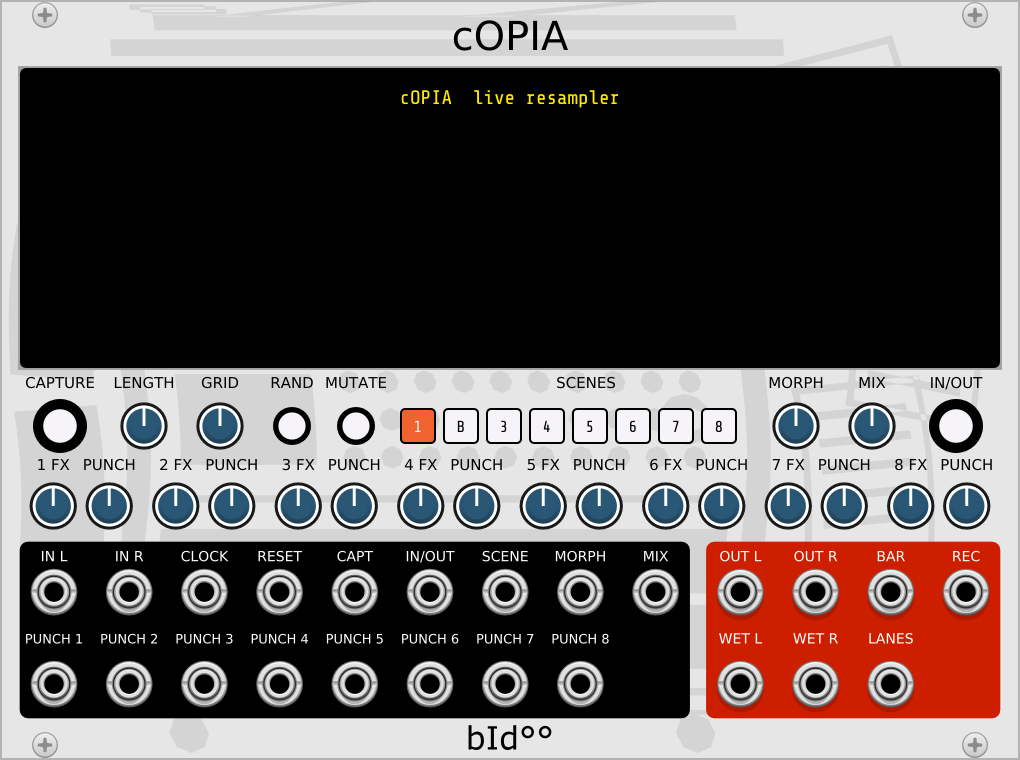
Effect · Sampler · Sequencer · 34 HP
cOPIA is a live resampler for the end of a patch. Press CAPTURE and it records 1 to 8 bars of the mix, starting on the next bar of its clock. It then plays them back in time with the clock and remixes them with eight effect slots: repeats, reverses, slicing, tape stops, grains and more. Each slot follows its own lane of blocks that you draw on the display, on a grid of 8ths, 16ths, 32nds or triplets. Eight scenes hold different remixes, and a morph moves from one to another. IN/OUT brings the remix in over the live mix or in its place, so one module does the whole job without a mixer. The captured loop is kept in the patch.
The remix engine is the one of Bidoo's Mangle plug-in (VST3 / CLAP).
- Patch the end of your mix into IN L and IN R, and OUT L and OUT R to your Audio module. With the remix out, the mix passes through unchanged.
- Patch a 16th-note clock into CLOCK (for example tOCAnTe's 16th output; the module expects 4 pulses per beat by default) and the clock's reset into RESET.
- Press CAPTURE. Its centre blinks orange: it is waiting for the next bar. Then it stays lit while it records 4 bars (LENGTH), and a ring goes round as it fills.
- When the ring is closed, the loop plays, in time with the clock, but you don't hear it yet. Press IN/OUT: on the next step the remix replaces the mix.
- The lanes on the display already hold a pattern. Press RAND for another one, or draw your own blocks. Turn a PUNCH knob to push a slot in by hand. Press IN/OUT again to go back to the live mix.
- Drop a remix on the drop: capture during a build, then send a gate to IN/OUT on the first bar of the next section. The remix of what was just playing comes in exactly there, and goes out when the gate falls.
- Triplets over a straight beat: set GRID to 1/8T and give Slicer, Repeat and Reverser a 1/8T size in their slot menus. The captured bars are cut and replayed on triplets while the rest of the patch stays on 16ths.
- Stutter the live mix: right-click a slot's label and set Capture effects read to LIVE (the label shows LV). That slot's Repeat or Slicer now cuts what is playing now, not the loop. With no loop captured yet, every slot works on the live mix.
- Scenes as song parts: build a calm remix in scene 1 and a busy one in scene 2, then switch with the pads or with a sequencer's CV into SCENE. A change waits for the next bar.
- Slow evolution: right-click pad 2, set it as morph B, and patch a slow LFO (BanCoù in cycle mode) into MORPH. The remix drifts between the two scenes: settings glide, and the pattern changes halfway.
- Resample the remix: turn on Capture the output instead of the input and capture again. The remix becomes the new loop, ready to be cut again.
- CAPTURE (the button or a trigger) arms the capture. It starts on the next bar line of the clock and records LENGTH bars. Pressed again while armed, it gives up. Pressed while it records, it does nothing.
- Shift+click on CAPTURE clears the loop.
- A new capture goes into a second buffer. The loop that plays keeps playing until the new one is complete, then the new one takes over on that bar, with a 5 ms crossfade. The remix never stops.
- The capture gives up if the clock stops or is reset while it records. The previous loop stays.
- The loop plays from the clock's position: beats since the bar where it was captured, wrapped around the loop. After a RESET or a stop, it comes back on the beat. The end of the loop crossfades (5 ms) into the sound that came just before its first bar, so the wrap does not click.
- While the clock is stopped, the loop is silent.
- Room: each buffer holds 3,072,000 frames, which is 32 s at 96 kHz, 64 s at 48 kHz and 16 s at 192 kHz. When the bars would not fit at the current tempo, the capture is shortened to 4, 2 or 1 bar.
- At first, before anything is captured, the slots remix the live input instead of a loop.
Each slot plays one effect. Its lane tells it when to play: while a block is under the play head, the slot is on, and the block's level is the slot's wet mix (100 %: only the effect). A block can also have:
- a shape: Hold, Ramp up, Ramp down, Swell (up then down) or Steps, which moves the level along the block;
- a probability: the block plays on a given loop or not, from a draw seeded by the scene, so it is the same on every playback;
- ratchets (x2 to x8): the slot starts again on each equal part of the block.
The ninth lane, Chance, plays one slot for each of its blocks. The slot is picked by weight, with the scene's seed. Mute a slot to keep it out of the picks.
A PUNCH knob (or its CV) above 2 % takes its slot over its lane: the slot plays, with the knob as its wet mix, until the knob comes back down.
The effects (each has up to five settings in the slot's menu):
| Effect | What it does |
|---|---|
| Off | The slot does nothing. |
| Repeat | Repeats the slice where the block starts (Size), each repeat shorter (Shrink), pitched and quieter (Decay). |
| Reverser | Plays each slice backward, or the slice before the block back and forth (Ping-pong). |
| Slicer | On every slice, plays it as it is, a slice from up to Range slices back, the one before again, or backward, by chance. |
| Gate | A 16-step gate pattern on the grid (Rate, Pattern, Smooth, Depth). |
| Tape | The tape stops, starts, stops and starts again, or scratches back and forth. |
| Grain | Two overlapping grains: frozen where the block starts, following the sound, or backward; Size, Pitch, Jitter, Spray. |
| Crush | Fewer bits, a lower sample rate. |
| Drive | Razor, Shape, Fold or Shift distortion, with a tone control. |
| Filter | Resonant low, high, band pass, notch, or a comb tuned to the cutoff. |
| Delay | Synced echoes with feedback: Normal, Ping-pong or Tape. It keeps the dry sound: the block's level is the send. |
| Ring | A ring modulator, its oscillator spread across the sides. |
| Flanger | A swept short delay, as a flanger or a chorus. |
| Phaser | 4 to 12 swept all-pass stages around a centre. |
| Filter Pattern | A resonant filter stepping through one of twelve 16-step cutoff patterns on the grid. |
| Reactor | A transient starts a loop of what follows it, played a number of times. |
Repeat, Reverser, Slicer, Tape, Grain and Reactor take their sound from a recording: the loop (LP) or the live input (LV), as the slot's source says. The others process the sound coming down the chain. The slots run in order, 1 to 8, each one on what the one before gave.
- There are eight scenes. A scene holds the pattern (the lanes, the seed), the grid and length, and for each slot its effect, settings, source, filter and weight. The loop, the mutes, the PUNCH knobs and the menu options belong to the module.
- Click a pad, or move the SCENE CV, to change scenes. The change waits for the next bar (see the menu). An empty scene starts as a copy of the one playing.
- MORPH goes from the scene playing (A) to scene B, the pad marked B (right-click a pad to choose it).
- Below 50 %, the pattern, grid, length and effects are A's; from 50 %, B's.
- A slot that plays the same effect in both scenes glides its settings and filter frequency between them.
- The FX knobs and GRID always show the scene playing; turning them changes that scene.
- IN/OUT brings the remix in. The button latches; the IN/OUT input brings it in while its gate is high (1 V or more). Either one is enough.
- The change waits for the next step by default (see the menu), then glides over 15 ms.
- MIX and the mix law decide how the remix and the live mix combine. With the default law (equal power) and MIX at 100 %, the remix replaces the mix; lower MIX blends them.
- WET L and WET R always give the remix alone, in or out, for a separate send or a recorder.
- Self-playing remix breaks: patch tOCAnTe's 16th output into CLOCK and its reset into RESET. Feed HUITre's trigger for one song part into CAPTURE, and HUITre's CV2 (10 V on the parts you choose) into IN/OUT. The module captures at one part and comes in at others, with no hands.
- Remix lanes driving the patch: patch LANES into a VCV Split. Each lane's gate opens a VCA on a send, or triggers a drum, exactly when its slot plays.
- A bar counter for free: BAR gives a trigger on every bar line. Use it to reset sequencers or to step scenes with a counter into SCENE.
- Live stutter controller: patch the knobs of a MIDI controller (VCV MIDI-CC) into PUNCH 1 to 8. Each knob pushes its slot in and sets how much.
| Control | Range | Description |
|---|---|---|
| CAPTURE | button | Arms a capture on the next bar; again to give up. Shift+click clears the loop. Lit while armed (blinking) and while recording, with a ring that fills; a full ring once a loop plays. |
| LENGTH | 1 / 2 / 4 / 8 bars | How long a capture is. Default 4 bars. |
| GRID | 1/8, 1/8T, 1/16, 1/16T, 1/32 | The lanes' step, for the scene playing. Default 1/16. |
| RAND | button | A new pattern for the scene playing: a new seed, new lanes for every slot and the Chance lane (heavier slots get more blocks), new settings for the effects. |
| MUTATE | button | Changes the scene playing a little: some steps flip, the settings move, sometimes a new seed. How much: Mutate amount in the menu. |
| Scene pads 1-8 | click | Plays that scene at the next scene change point. The scene playing is orange; a scene waiting is outlined orange; used scenes are grey; B marks the morph target. Right-click: menu (see Display and mouse). |
| MORPH | 0-100 % | From the scene playing to scene B. |
| MIX | 0-100 % | How much of the remix, with the mix law. Default 100 %. |
| IN/OUT | Out / In | Latching: brings the remix in. |
| FX 1-8 | Off and 15 effects | The effect of each slot, in the scene playing. Choosing an effect sets its settings to their defaults. |
| PUNCH 1-8 | 0-100 % | Above 2 %, the slot plays with this as its wet mix, over its lane. |
| Input | Description |
|---|---|
| IN L | Left input. 5 V is full scale. Polyphonic cables are summed. |
| IN R | Right input. Unpatched: IN L is used on both sides. |
| CLOCK | The clock. Pulses per beat set in the menu (4 by default). Unpatched, the module runs on its own at Tempo without a clock. |
| RESET | The next clock pulse is beat 1 of bar 1. Without a CLOCK cable, it sets the free-running clock back to the start. |
| CAPTURE | A trigger arms the capture, as the button. |
| IN/OUT | Gate: the remix is in while it is high (1 V or more). |
| SCENE | 0-10 V picks a scene, 1.25 V per scene (0 V: scene 1). Read when it moves to another scene's range, so the pads still work in between. |
| MORPH | 0-10 V, added to the MORPH knob (10 V = 100 %). |
| MIX | 0-10 V, added to the MIX knob. |
| PUNCH 1-8 | 0-10 V, added to each PUNCH knob. A gate from a sequencer plays the slot for its length. |
| Output | Description |
|---|---|
| OUT L, OUT R | The mix: the live input and the remix, as IN/OUT, MIX and the mix law say. |
| WET L, WET R | The remix alone, whatever IN/OUT says. Limited to about 4.9 V. |
| BAR | A 1 ms trigger at every bar line while the clock runs. |
| REC | A gate, high while a capture records. |
| LANES | 8 channels: 10 V on channel N while slot N plays (its block, a Chance pick or its PUNCH knob). |
OUT, WET and LANES are 32 samples late (the module works on blocks of 32 samples), the remix and the live mix together, so they stay in time with each other.
The top strip shows the loop's waveform in pink, its bar lines and the play head. While recording, an orange bar fills along its bottom. On the left: NO LOOP, ARMED (blinking), REC or the loop's length in bars, and the tempo (or STOPPED). On the right: the scene playing, the morph target and amount when MORPH is up, and IN or OUT.
Below, one row per lane, for the scene playing. The darker columns are every other beat, the white line is the play head. Blocks are yellow, as tall as their level, paler when their probability is under 100 %, with a mark for each ratchet.
Each lane's label shows the slot number (orange while it sounds), its effect and its source (LP: the loop, LV: the live input).
- Click the number: mutes or unmutes the slot (grey when muted).
- Click the name, or right-click the label: the slot's menu (below).
- Click LP / LV: switches the source.
- Click the Chance label: Dice (a new Chance lane) or clear it.
In the lanes:
- Click an empty step: draws a one-step block there; drag sideways to make it longer.
- Drag a block sideways: moves it. Drag it up or down: changes its level.
- Double-click a block: its menu: Level, Shape, Probability, Ratchets, Erase.
- Right-click a block: erases it. Double right-click: clears the lane.
Right-click the top strip: Pattern length (1 or 2 bars) for the scene playing, Rand, Mutate, Clear the pattern, Clear the loop.
The slot's menu: Effect; the effect's settings as sliders, in the effect's own units (lengths such as 1/16 or 1/8T, percent, semitones, Hz...); Capture effects read (LOOP or LIVE); Filter (None, Low pass, High pass, Band pass, Notch) and Filter frequency, a filter after the effect; Weight for Rand and the Chance lane; Mute; Dice (a new lane for this slot); Clear the lane.
A pad's menu (right-click): Morph B (the MORPH knob goes to this scene), Copy, Paste, Clear (the scene starts again as a copy the next time it plays; not for the scene playing).
Clock
- Clock pulses per beat: 1, 2, 4 (16th notes), 8, 12, 24 (MIDI clock), 48 or 96. Default 4. The CLOCK input's tooltip shows it.
- Beats per bar: 3, 4, 5 or 7. Default 4. It sets the bar lines for CAPTURE, LENGTH, BAR, the pattern length and the bar waits.
- Tempo without a clock: 30-300 BPM, default 120, used while CLOCK is unpatched.
Remix
- Scene changes wait for: at once, the next step, the next beat, the next bar (default).
- IN/OUT waits for: at once, the next step (default), the next beat, the next bar.
- Mix law: Equal power (default), Crossfade, The live mix stays (the remix is added on top), The remix stays, Remix only (replace).
- Remix comes in after capture: off by default. When on, IN/OUT switches on by itself when a capture ends.
- Capture the output instead of the input: records OUT instead of IN, to resample the remix.
- Mutate amount: 0-100 %, default 30 %.
- Clear the loop: same as Shift+click on CAPTURE.
Three reminder lines about the lane gestures close the menu.
- Clock: the tempo comes from the time between pulses; a steady clock is smoothed, a change of more than 10 % is followed at once. Between pulses the position moves on at that tempo, but never past the next pulse. The clock counts as stopped before its second pulse and when no pulse has come for 2 s plus one interval.
-
Saved with the patch: the loop, as
loop.flac(24 bit) in the patch storage, with its length and position on the bar; the eight scenes (lanes, blocks, seeds, grids, lengths, effects, settings, sources, filters, weights); the mutes, the scene playing, morph B and the menu options. A cleared loop is removed from the storage on the next save. - Memory: about 50 MB per cOPIA for the two loop buffers, plus 12 s of live history.
- Bypass: IN L and IN R go straight to OUT L and OUT R.
- Where it comes from: the effects, the lanes, the Chance lane, ratchets and probabilities are those of Mangle, Bidoo's glitch plug-in, through the shared bidoo-dsp library.