Repository navigation
OUAIve
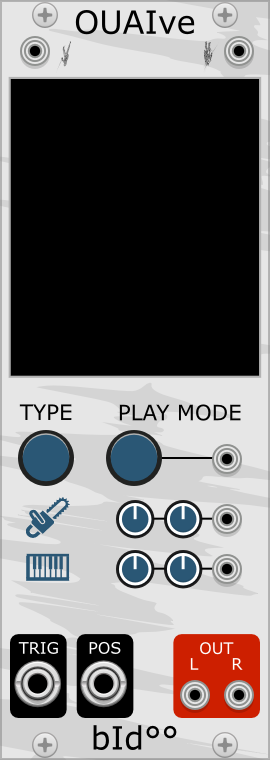
Sampler · 9 HP
OUAIve is a stereo sample player with three trigger modes: one-shot trigger, gate (with CV scrubbing), and slice, which cuts the sample in up to 128 equal slices. Each slice mode can play forward, backward or in a loop, at a pitch up to 4 octaves down or up (vinyl style, no time stretching), with a V/O input. Use it for one-shots, chopped breaks, or to scrub through a sample with a CV.
- Right-click the panel and choose Load sample, or drop a WAV or AIFF file on the panel. The waveform appears in the display.
- Patch a clock or gate sequencer into TRIG.
- Patch OUT L and OUT R to a mixer (or only one of them for a mono sum).
- Each trigger plays the sample from the start. Press TYPE to switch to GATE or SLICE mode; the display shows the current mode at its top.
- In SLICE mode, set the number of slices with the slice knob (chainsaw icon). Each trigger plays the next slice.
- Chopped break on a clock: load a one-bar break, press TYPE until the display says SLICE, set the slices to 16, and clock TRIG with sixteenth notes from VCV Clocked or tOCAnTe. Patch the bar reset of the clock to the reset input (top left) so the slices stay in time: each bar starts again on slice 1.
- Rearrange slices: in SLICE mode, patch a stepped CV (a VCV SEQ-3 row, 0-10 V) into POS. Each trigger now plays the slice chosen by POS instead of the next one.
- Scrub with a CV: in GATE mode, patch a slow LFO or a VCV Slew Limiter output (0-10 V) into POS and hold a gate on TRIG. The play head follows the CV, like moving a tape by hand.
- Reverse and stutter: patch a sequencer row into the PLAY MODE input: 0 V forward, 5 V backward, 10 V repeat. Repeat on short slices gives stutters.
- Chain events at the end of a sample: the end-of-cycle output (top right) sends a short pulse when playback stops; use it to trigger an envelope or the next module.
| Control | Range | Description |
|---|---|---|
| TYPE (trigger mode) | TRIG / GATE / SLICE | Each press moves to the next mode. See Notes for what each mode does. |
| PLAY MODE (read mode) | Forward / Backward / Repeat | Each press moves to the next read mode. Ignored while the PLAY MODE input is patched. |
| Slices knob (chainsaw icon) | 1-128 | Number of equal slices in SLICE mode. |
| Slices CV amount (small knob next to it) | -100..+100 % | Attenuverter for the slices CV: at 100 %, 1 V adds one slice. |
| Tune (the knob in the keyboard icon's row) | -48..+48 semitones (-4..+4 octaves) | Transposes the playback, vinyl style (the speed changes with the pitch). Default 0: the sample at its own pitch. |
| Fine tune (small knob next to it) | -100..+100 cents | Fine tuning, up to a semitone either way. |
| Input | Description |
|---|---|
| Reset (top left, tiny) | A trigger stops playback and rewinds the slices: the next trigger plays slice 1, even when it arrives at the same time as the reset. |
| PLAY MODE input | Read mode, replaces the button: about 0 V forward, 5 V backward, 10 V repeat. |
| Slices CV (end of the chainsaw row) | Added to the number of slices, scaled by its amount knob. |
| V/O (end of the keyboard icon's row) | Pitch, exactly 1 V per octave: 0 V plays the sample at its own pitch, +1 V an octave up (twice as fast). Added to the two tunings, 4 octaves up or down at most in total. Polyphonic: one voice per channel. |
| TRIG | Trigger or gate (threshold about 1 V), depending on the mode. Polyphonic: one voice per channel. |
| POS | Position, 0-10 V. TRIG mode: where a trigger starts playing (0 V = start, 10 V = end). GATE mode: the play head position (scrubbing). SLICE mode: which slice a trigger plays (0-10 V spread over the slices). Polyphonic: one voice per channel. |
| Output | Description |
|---|---|
| End of cycle (top right, tiny) | 10 V pulse, 1 ms long, each time playback stops (end of the sample or slice, or gate closed). One channel per voice. |
| OUT L / R | Audio, ±5 V for a full-scale sample. A mono file plays on both. A stereo file plays in stereo when both outputs are patched; with only one patched, it gets the mono sum. One channel per voice. |
- Top line: the loaded file's name between two arrows. Click ◄ or ► to load the previous or next WAV or AIFF of the same folder (by name, round from the last to the first).
- Second line: the trigger mode (TRIG, GATE or SLICE), the read mode (► forward, ◄ backward, ►► repeat) and the number of slices
|n|in SLICE mode. It is only drawn when a sample is loaded. - The left channel is drawn on top, the right channel below. A blue line shows the play head while the sample plays. In SLICE mode, yellow lines mark the slices.
- Drag up on the display to zoom in, drag down to zoom out, around the click position. Hold Shift for bigger steps (x2 instead of x1.1). Drag sideways to scroll the zoomed view.
- Load sample: opens a file dialog (WAV or AIFF) in the folder of the last sample.
- TRIG mode: a trigger plays the whole sample from the start (from the end when backward), or from the POS position when POS is patched. Forward and backward stop at the end; repeat loops to the start (or to the POS position).
- GATE mode: without POS, the sample plays from the start when the gate opens and stops when it closes. With POS patched, POS sets the play head directly (smoothed over about 5 ms) and you hear it only while the gate is high; speed has no effect then.
- SLICE mode: each trigger plays the next slice, or the slice chosen by POS. Forward plays the slice once, backward plays it from its end to its start, repeat loops it.
- In TRIG and SLICE modes, repeat keeps looping until the next trigger. To stop it, send a trigger to the reset input.
- No clicks: starts, retriggers, stops, resets and loop jumps crossfade over 2 ms, and playback that stops at the end of the sample or slice fades out over its last 2 ms. Pitched up, the sample is read from band-limited copies, so it does not alias (files longer than about 5.8 min at 48 kHz play without these copies). Pitch stays exact far into long files.
- Polyphonic (since version 2.7.2): one voice per channel of the TRIG, POS or V/O cable, up to 16, each with its own head (and its own slice in SLICE mode); a mono cable acts on every voice. A polyphonic POS with one trigger plays several slices at once; a polyphonic V/O plays the sample in chords. The reset input and the modes are shared. The display shows a head per playing voice.
- Saved with the patch: the sample path (not the audio), the trigger mode and the read mode. Keep the file where it is. The file is resampled to the engine rate, with its timing and length kept exactly, and loaded again if you change the engine sample rate. A sample loads even while the module is bypassed.