Repository navigation
EMILE
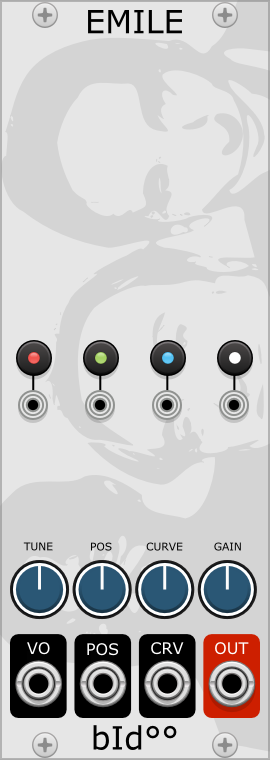
Sampler · 9 HP
EMILE turns a PNG image into sound. It reads one row of pixels at a time as a spectrum: the left edge of the row is the lowest frequency, the right edge the highest, and the brightness of each pixel is the level of that frequency. Move the position from the top row to the bottom row and the picture plays like a spectrogram turned on its side. It is good for drones, evolving pads and noisy textures drawn in an image editor.
- Right-click the panel and choose Load image (png), or drop a PNG file on the panel. The image appears in the display.
- The four colour buttons (red, green, blue, white = alpha) are all on for a new module, so the image plays straight away. Turn some off to hear only part of the colours.
- Patch OUT to a mixer. You hear the row under the blue line.
- Turn POS to move through the image, or patch a slow ramp into the POS input.
- Adjust TUNE, CURVE and GAIN to taste.
- Play the image as a spectrogram: patch a slow unipolar saw from VCV LFO (0-10 V) into POS. EMILE scans the image from top to bottom and starts again at the top.
- Drone that changes on demand: leave POS still on a bright, busy row, and patch a gate sequencer into the colour toggle inputs. Each trigger turns a colour channel on or off, so the timbre jumps between the red, green, blue and alpha content of the same row.
- Play it from a keyboard: patch V/OCT from VCV MIDI-CV into VO. Every partial follows the pitch, but EMILE has no envelope, so put a VCV VCA with an ADSR after OUT.
- Draw your own sound: in an image editor, draw on a black background. Remember that x is frequency and y is time. A thin vertical line gives a steady partial, a slanted line gives a glide while POS sweeps, and noise gives noise.
| Control | Range | Description |
|---|---|---|
| Red / green / blue / white buttons | On / Off | Toggle which colour channels of the image are heard: red, green, blue and alpha (white light). The level of each pixel is the average of the channels that are on. All on by default; Initialize turns them all on again. EMILE is silent with all four off. |
| TUNE | -4..+6 octaves | Shifts all frequencies, in octaves. Frequencies pushed above the top of the spectrum are dropped. The pitch is the same at every sample rate. |
| POS (position) | 0-100 % | The row being played: 0 % = top row, 100 % = bottom row. |
| CURVE (frequency curve) | 0.01-0.1 | How the width of the image maps to frequency. Low values squeeze the picture toward the bass, high values spread it toward the treble. Default 0.05. |
| GAIN | x0.1 - x10 | Output level before a soft (tanh-like) saturation. High values add distortion. |
| Input | Description |
|---|---|
| Colour toggle inputs (under each button) | A trigger (rising edge above about 1 V) toggles that colour channel, like pressing the button. |
| VO | Tune in 1V/oct, added to the TUNE knob. |
| POS | Added to POS: 0-10 V moves from the top to the bottom row (clamped to 0-10 V). |
| CRV | Added to CURVE: 10 V = +0.09 (clamped to 0-10 V). |
| Output | Description |
|---|---|
| OUT | Mono audio, softly limited to ±5 V. |
- The display shows the whole image, stretched to fit, with a blue line on the row being played.
- The display has no mouse interaction. Drop a PNG anywhere on the panel to load it.
- Load image (png): opens a file dialog in the folder of the last image. Only PNG files up to 25 megapixels are read; any other file leaves the module empty.
- Not polyphonic: all inputs and the output are mono.
- EMILE builds a new spectrum every 1024 samples (about 21 ms at 48 kHz) with an inverse FFT of 4096 points and 4 overlapping frames, so fast POS modulation is smoothed into steps of that size. Each frequency keeps its phase from one frame to the next, so steady columns give steady tones rather than clicks.
- A wide image gives finer frequency detail; very dark images are quiet, raise GAIN.
- Saved with the patch: the path of the image (not the image itself) and the state of the four colour buttons. Keep the file where it is: if it has moved, the path is still kept, and the menu opens in its folder.