Repository navigation
MOiRE
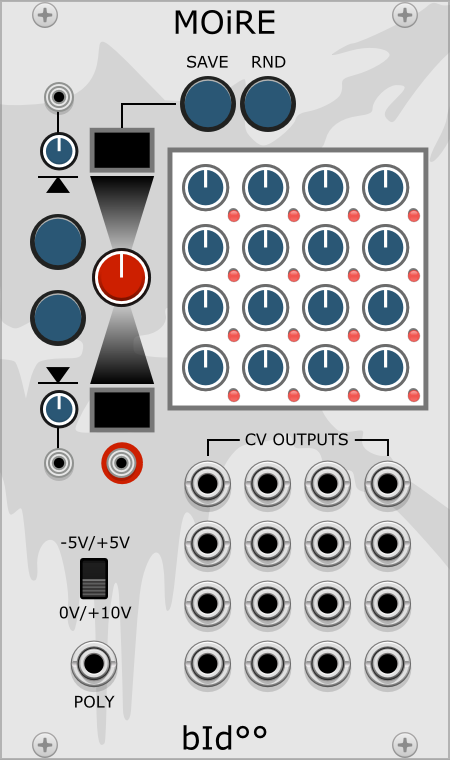
Controller · 15 HP
MOiRE stores 16 scenes of 16 CV values and morphs between two of them with one big knob. You pick a current scene (morph at 0%) and a target scene (morph at 100%), then turn or modulate MORPH to glide all 16 outputs from one scene to the other. It is a quick way to move many parameters of a patch at once, by hand or from a CV.
- Patch a few CV OUTPUTS to parameters of your voice (filter cutoff, wavefolder, VCA level...).
- Leave both scene trimpots on 01. Set the 16 knobs where you like and press SAVE: the values go into the target scene.
- Turn the upper (target) scene trimpot to 02, set the knobs differently, press SAVE again.
- Click the red MORPH knob once (this hands the knobs back to the morph), then turn it: the outputs glide from scene 01 to scene 02.
- Slow evolving patch: patch an VCV LFO with OFFSET on (0 to 10 V) and a slow rate into the MORPH input. Keep the MORPH knob at 0% so the LFO sweeps the full range between your two scenes.
- Scene sequencer: patch a stepped CV (for example a VCV SEQ 3 row) into the target scene input. Each 0.625 V moves one scene up, so 0, 0.7, 1.3, 1.9 V... pick scenes 01, 02, 03, 04. Morph with the knob or an LFO while the target changes.
- Switches among the morphs: click the small LED of a control to put it in jump mode. That output stays on the current scene's value and snaps to the target value when MORPH passes 50%. Use it for a waveform selector or a switch input that should not slide.
- 16 voices of modulation: patch POLY into a polyphonic input (for example a poly VCF cutoff, or VCV Split to fan out). Each channel carries one control.
| Control | Range | Description |
|---|---|---|
| SAVE | button | Writes the 16 current output values into the target scene. |
| RND | button | Fills the target scene with random values (0-10 V). The control modes do not change. |
| Target scene trimpot (top, ▲) | 1-16 | Scene reached at MORPH 100%. Shown in the upper display. |
| Current scene trimpot (bottom, ▼) | 1-16 | Scene used at MORPH 0%. Shown in the lower display. |
| Upper round button | button | Go to the target scene: sets MORPH to 100% and releases every overridden knob. |
| Lower round button | button | Go to the current scene: sets MORPH to 0% and releases every overridden knob. |
| MORPH (red knob) | 0-100% | Position between the current scene (0%) and the target scene (100%). Clicking it releases every overridden knob. |
| Control 1-16 (knobs) | 0-10 V | Show the morphed value; turn one to override it (see Notes). |
| Mode LED 1-16 (small red button under each knob) | Morph / Jump | Light off: the value slides with MORPH. Light on: the value jumps from the current to the target value when MORPH reaches 50%. |
| -5V/+5V · 0V/+10V switch | 0 to 10 V / -5 to 5 V | Output range for all 16 outputs. The bipolar setting subtracts 5 V. |
| Input | Description |
|---|---|
| Target scene (top jack) | Added to the target trimpot: 0.625 V per scene, so 0-10 V covers the 16 scenes. Clamped to 1-16. |
| Current scene (bottom left jack) | Same for the current scene. |
| Morph (red jack) | Added to the MORPH knob, 0-10 V = 0-100%, clamped. |
| Output | Description |
|---|---|
| CV OUTPUTS 1-16 | One output per control, 0 to 10 V or -5 to 5 V. |
| POLY | All 16 controls on one 16-channel cable, same voltages as the individual outputs. |
- The two displays show the target scene (top) and the current scene (bottom), 01 to 16.
- Grabbing a control knob overrides it: its output follows the knob and no longer the morph. The override stays until you click the MORPH knob or press one of the two go-to buttons.
- Randomize target scene only: same as the RND button.
- Typical editing workflow: grab knobs to set values (they become overridden), press SAVE to store them in the target scene, then click MORPH to release them.
- The control knobs can be MIDI-mapped or automated: moving one that way overrides it, like grabbing it with the mouse.
- Control modes are global: each control has one mode for all 16 scenes. Rack's Randomize also changes the modes; RND does not.
- Saved with the patch: all 16 scenes and the 16 control modes.
- Initialize clears every scene to 0 and sets all controls to morph mode. Randomize fills all 16 scenes with random values and random modes.
- POLY always carries 16 channels.
- PILOT is the bigger version with banks, a built-in scene sequencer, gate and note modes.