Repository navigation
Release notes
The versions published on Google Play, newest first. SatMe-PC has versions of its own (YYYY.MM.NN), published on GitHub: below. The README gives the full feature list.
Each version on github.com/f4ioz/SatMe/releases: satme-pc.tar (Linux), satme-pc-windows.msi (Windows installer), satme-pc-windows.zip (Windows, portable), the PDF manual (SatMe-manuel-en.pdf, SatMe-manuel-fr.pdf), SHA256SUMS. SatMe-PC shows these notes itself (the Quoi de neuf window) and says when a newer version is published.
The release page — web publishing to your own site, SSDV from SO-127, IO-86 and the Geoscan satellites, a Journal whose video follows the preview (sped-up sound, closing summary), Windows data kept safe, the manual as a PDF.
- Web publishing (an optional module, off by default, which no profile switches on): SatMe-PC sends what you choose — SSTV and SSDV pictures, planches, reports, contacts, the journal's videos, FT8/FT4 passes — to an address of your site (PHP, WordPress, a small Python server…) or into a folder on this PC (static site, Nextcloud, Syncthing, an rsync or FTP mirror). Tester (test) first, then each kind Sur clic (at a click, the default), Automatique or Jamais (never). A documented, versioned API (v1), ready-to-use receivers in PHP and Python. En direct (live), optional and part by part: auto-pilot, QO-100 spectrum, DATV picture, FT8/FT4, favourite satellites, awards; the site never connects to the station.
- SSDV: SO-127 (HADES-SA)'s decoded in USB (Télémesure › SSDV en BLU, the IC-9700 in USB-D; Capturer les bits, Relire a WAV, Essai), IO-86's through its repeater's AFSK 1200, the Geoscan satellites' pictures; the last three days' SSDV pictures in SSTV › Images; SSDV campaigns for the auto-pilot. Checked on made-up signals: to be confirmed on a real pass.
- Fréquences (Doppler): every live transmitter with its frequency and the rig's mode for it (SSDV, slow FSK, GENESIS FSK: USB-D); Autre fréquence… (another frequency) to type your own, Doppler-corrected and kept for that satellite.
- Journal: the video follows the preview exactly, and its length is announced; three paces named for where they apply — Hors passage (outside the pass: before the AOS and after the LOS, even for a single pass), Pendant le passage (during the pass), Image ou contact (picture or contact); Options › Son: Son accéléré (sped-up sound, up to ×4, pitch kept, only where something is heard) and Sauter les silences (skip the silences); a closing summary card (figures, track, pictures in a grid at their own size) and its Durée du bilan (summary length).
- SSTV: the series 33 slide numbers read (« SLIDE 6/12 », yellow and thin), the series' number too; Relancer l'analyse on the sheet's event pictures only or on all; the satellite followed inset beside the live picture (sky, small globe, AOS/TCA/LOS).
- FT8/FT4: the Passages FT8/FT4 sur le site card (with web publishing).
-
Windows: an MSI update no longer deletes anything; installed, SatMe-PC keeps its data in
%APPDATA%\SatMe, never in the program folder. Before installing this one over 2026.10.33 or older, copy adonneesfolder kept in the program folder elsewhere. - « Locator » instead of « grid square » (French: instead of « carré »; the Locators tab, « 37/100 locators »…), and in French « pylône » instead of « mât ».
- The manual as a PDF attached to every release (English, French); ⤓ Télécharger le manuel (PDF) at the top of the built-in manual (F1).
The release page — FT8 / FT4 transmit, the awards, the Sked on the globe, the view from the satellite, DATV pointing, the SDR's satellite scale.
- FT8 / FT4 transmit (FT8/FT4 tab, Émission FT8/FT4 card): through the IC-9700 SatMe already keys, terrestrial or through a linear transponder (RS-44, QO-100) with the Doppler. Double-click a line to answer, 📣 Appeler CQ, editable Tx1–Tx6, automatic sequence up to RR73/73, ✓ Noter le QSO. No unattended QSO: a QSO only starts from your action, an attendance watchdog (3 min) stops transmitting, ■ Arrêter l'émission and Esc always there; refused when the clock drifts. Data mode (USB-D) set by itself while transmitting is armed, the previous mode put back when it stops. The tab fits on one page; receiving reads « R-12 », two-digit reports and free text.
- SSTV: the countdown to the next picture (a ring, « Prochaine image dans 1:24 », 🔔 a beep 5 s before); a picture is no longer cut in two when its sync is lost in the middle, ⧉ Réunir / ↶ Séparer for older ones.
- 🤖 Auto-pilot in the lists: a pass an SSTV campaign will receive carries a 🤖 next to its time (Suivi, header, Agenda, Orbites).
- Journal › FT4 / FT8 decodes on the replay (Options › Décodages FT4/FT8): a panel over the view, placed and sized, kept in the video (16:9 and 9:16) with the real flags; Redécoder depuis l'enregistrement (re-decode from the recording).
- Sked on the globe: the common window also replayed on the Orbites globe (looks, cameras, Réglages du globe), its video on the map or the globe in 16:9 or 9:16, and Globe animé (comme à l'écran) filmed by the browser.
- Orbites: the Vue du satellite camera (also in the Sked and the Journal), the Traces slider, 📺 ISS en direct (NASA video, source found by itself), the logo in full screen; the Tableau: cards never cut off, in Vitrine the globe beside the card (size and side adjustable) and no "come and listen" by default, the globe movable.
- Agenda › Diplômes (awards): the awards to claim (ARISS SSTV, AMSAT certificates, VUCC, DXCC, WAS…) matched with the pictures and the log, alerts, Préparer la demande — nothing is sent.
- Agenda › Activités à venir › Activer l'auto-pilote: an SSTV campaign created and switched on in one click, from the rotator's lowest elevation (or the station's minimum), editable in the confirmation; receive only.
- DATV, reception: Pointage (huge MER, trend, best, tone), quality history, level from the AGCs, beacon auto-calibration, Mon spectre (an SDR on the same LNB), LongMynd settings and tolerant decoding; subtitles: spoken translation, adjustable display, summary of the station received.
- DATV, transmission: free or busy slots, signal summary, Tester l'encodeur (encoder test), Horloge en direct (live clock) source, gain ramp and calibrated power per rate.
- SDR: the satellite scale between the spectrum and the waterfall (Doppler included, click to follow, Ctrl + wheel for the correction). Converters and transverters: one table per band and device; Calibrer la clé SDR… and Aligner… a transponder.
- Télémesure › SSDV pictures completed over several passes, kept on disk, Importer des paquets… (import packets).
- Réglages › Services en ligne › Site web: the first way to send pictures, planches, reports, contacts and videos to your site; it became web publishing in 2026.10.34.
The release page — QO-100 narrow-band transmitting, antenna polarisation, the demonstration, the compact video caption, steadier DATV.
- QO-100, narrow-band transmitting (cockpit › Émission sub-tab): the ADALM-PLUTO straight on 2.4 GHz in SSB (the browser's microphone, or a sound card for FT8 from WSJT-X) and CW, its oscillator parked below the transponder, the AMSAT-DL band plan per mode, PTT with a 2 s watchdog and a time-out, dummy load at every start, cut when LEILA is heard; Fixed / Portable profiles (estimated EIRP, suggested power); the IC-9700 + up-converter with its LO measured on its own downlink.
- Antenna polarisation (new module): an ESP32 box on USB drives a WiMo switch (V, H, right, left); Suivi › Polarisation, the profile at AOS, Sonder H/V (probe H/V) and what it learns; a virtual ESP32 to try everything.
-
Demonstration:
satme --demo, a made-up station (QF4DMO); thesatme-demo.tar.gzarchive for a VM or a Raspberry Pi. - Journal, 16:9 video: the caption takes only 19 % of the picture, in three columns.
- DATV: TV-style subtitles, nothing cut off; callsigns read in the picture follow the station (Vus avant); lists latest on top; Essayer aussi other rates, automatic restart, the Marge (D).
The release page — one Journal editor (16:9 or 9:16), Orbites live, the dashboard and its Vitrine look, satellite cards with photos, the modules.
- Journal: one editor, for one pass as for several. A session groups passes; an opened pass is a session of one pass. The same preview, the same tabs (Moments, Options, Fabriquer, Ajouter), the same settings, the same files. The sky and the map show the passes one after the other, the globe all together. 🌍 Plusieurs passages at the top of a pass, Ouvrir seul (open alone) from several.
- Screen 16:9 or phone 9:16 format: the frame is drawn over the preview (Fabriquer); the SSTV picture and the overlays are placed with the mouse or a finger, and the video, the GIF and the picture keep them in the same place.
- Start before the AOS, end after the LOS (0 to 30 min): you see the satellite coming, on the page as in the files.
- Two zooms (from afar outside the passes, near in a pass), the camera eases from one to the other; more satellites (favourites, their footprints as an option); the replay slows down as a pass or a picture comes near.
- The preview is the file: the page plays at the video's speeds (×20 in a pass, real time with the sound where a contact is heard; speed ×1 to hear the whole pass) and shows what is ticked for the video (RX, S-meter, the contact's record, opening card, next pass's card, mosaic).
- Exports of one pass or several: MP4 video with the contacts' sound, animated GIF, picture of the moment, WAV sound (end to end), the passes' files in a ZIP.
- Orbites always at the present time: opening the tab or the dashboard is at ×1, never paused nor on a replayed pass. The Passage view follows the pass under way live, else the next one with its countdown (▶ Rejouer en accéléré is a click away).
- ⛶ Tableau: Orbites full screen, six looks — Dessin animé (the globe turns by itself), Classique radioamateur (flat map, grey line), Nuit, Rétro, Pédagogique (bubbles coming one at a time, cards, "did you know?") and Vitrine for a stand or a club fair (big cards turning by themselves: "the ISS passes over us in 12 min — come and listen!", a satellite's photo, amateur radio in four lines, the club and its link as a QR code). Panels as you choose: time, next passes, chosen satellite, station, sunrise and sunset, the Moon, space weather, ticker.
- Satellite cards with a real photo (under Orbites' list, a dashboard panel): country, launch, mission, orbit, a story, frequencies, Wikipedia summary; a free photo (author and licence shown) asked once from Wikimedia Commons then kept, a drawing without the Internet.
- Nearly 250 landmarks, drawn by family: none / main / all, Types ▾ and Size (small to very big).
- Suivi your way (mouse or finger): panels fold, handles widen the columns and make the sky / map / globe bigger, Fréquences compact, ⊞ Disposition.
- Modules (Réglages › Modules): tick what interests you — QO-100, DATV, SSTV, SDR, FT8, APRS, METEOR, planes, ships… — or pick a profile. A module unticked leaves the menu, its settings and the status bar. On updating, everything stays ticked.
-
New version: its window opens by itself, once per version. Portable shows in the header when SatMe-PC runs from its
donneesfolder. The SSTV auto-pilot banner counts the AOS and LOS down every second.
The release page — orbits in 3D, the journal's sessions, the knob relayed, portable SatMe-PC.
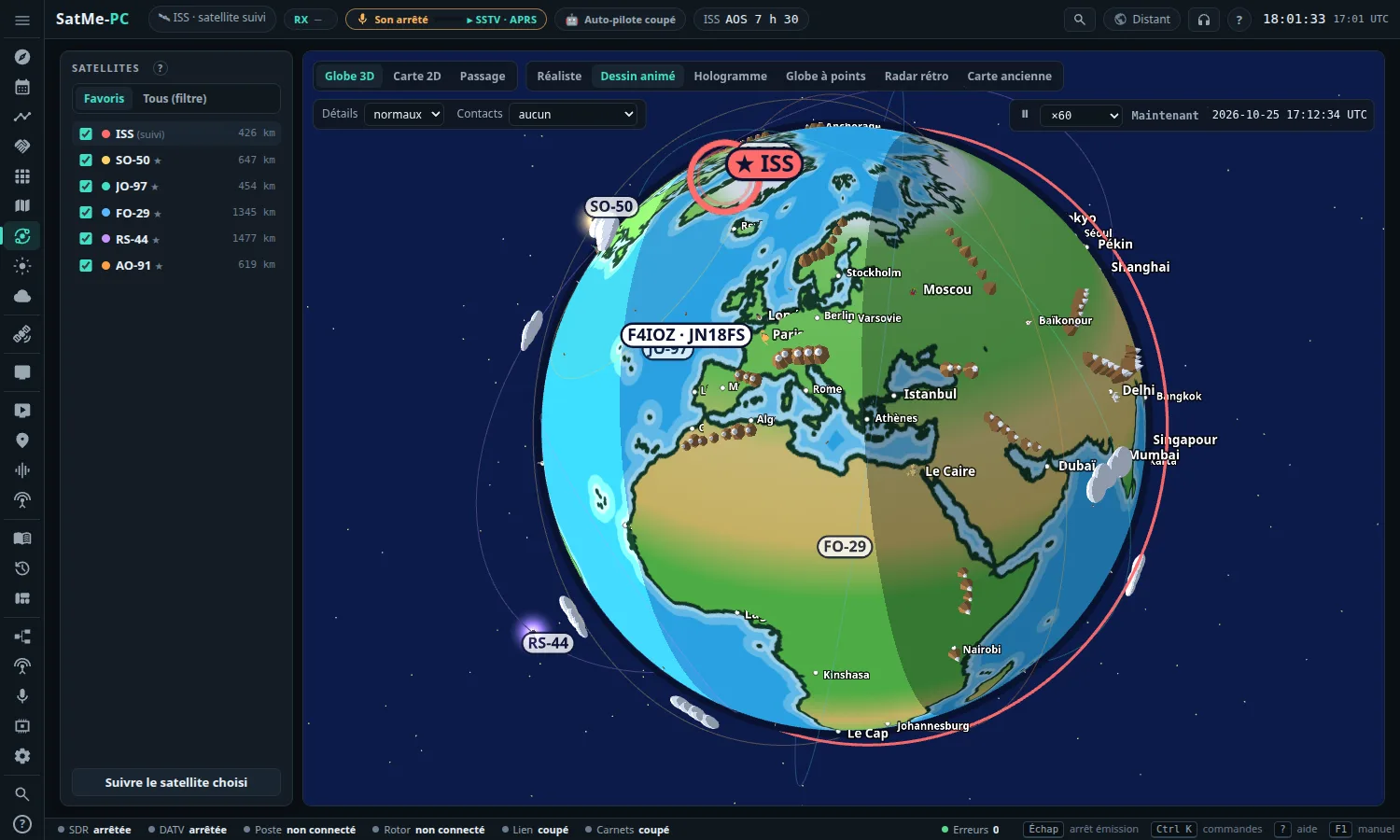
- New Orbites tab (Ciel workspace): the Earth in 3D with your favourite satellites (or those ticked in Tous, all) on their orbits, their footprint on the ground and a line to the station when they are up. Six looks (Réaliste, Dessin animé — cartoon, the default —, Hologramme, Globe à points, Radar rétro, Carte ancienne); the satellite chosen stands out (ring, ★, thick orbit); time from ×1 to ×1200. See Orbits.
- Détails (details: simple, normal, rich): cities, shaded relief, and on the cartoon mountains on the real summits (NOAA's ETOPO1 relief), landmarks, boats, in rich whales, forests and penguins. Villes (cities): all, the capitals (name, flag or both), or none. The log's contacts as dots, with the callsign, or locator squares.
- Carte 2D (2D map): the same satellites flat, footprints, ground track, day and night. Passage: the passes of the next 36 hours, ▶ Jouer le passage (play the pass) fast (AOS, culmination, LOS, sky, elevation, azimuth, distance, Doppler), three cameras and an adjustable height.
- Suivi tab: a Globe button beside Ciel and Carte.
- Journal: a Globe view replays the pass round the Earth, the contacts at their time (station → satellite → correspondent), the SSTV pictures beside the station; drag the globe to move it, the video keeps it where it is. Picture, GIF and video in the globe view. See The globe view.
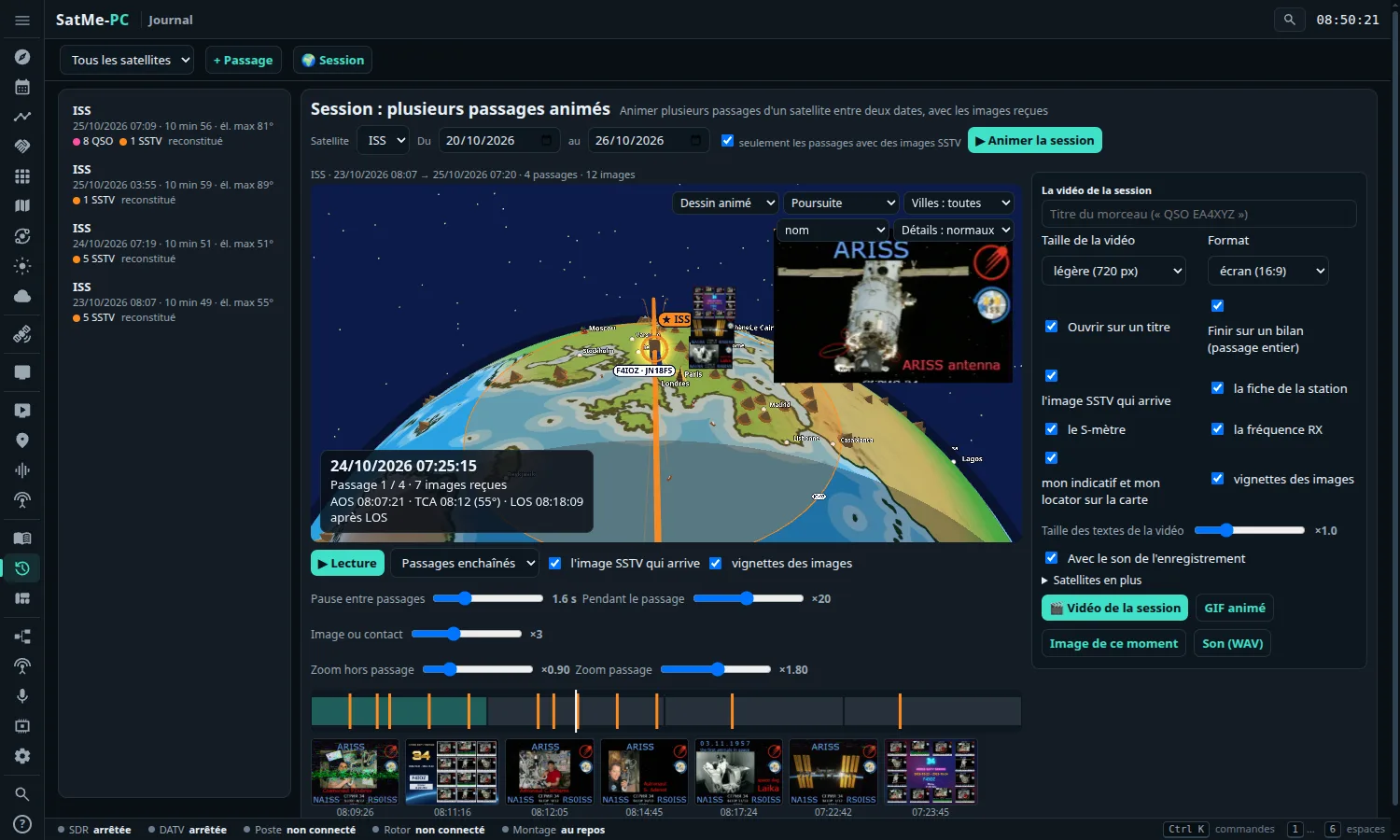
- Journal › 🌍 Session: a satellite and two dates, all its passes animated one after another on the globe (passes in a row or continuous time), three speeds (outside the passes, during a pass, on a picture or a contact), the session's timeline, the SSTV pictures arriving one by one; ▶ Animer la session de l'événement (play the event's session) from a pass; the session's video (opening card, passes, cards between them, mosaic of the pictures). The videos' text size can be set, and their caption gives AOS, TCA and LOS. See Session.
- Knob relay: the USB knob plugged into another PC tunes your station from afar (Réglages › Interfaces › Molette USB › Relais vers une autre station: the station's address and password, used once and never kept). Knob on Windows: the volume keys are read too, and can be captured. See The USB volume knob.
-
Portable SatMe-PC: a
donneesfolder beside the program keeps all the settings and files, nothing is written elsewhere on the PC. See Portable SatMe-PC. - All worked out in the browser, without the Internet.
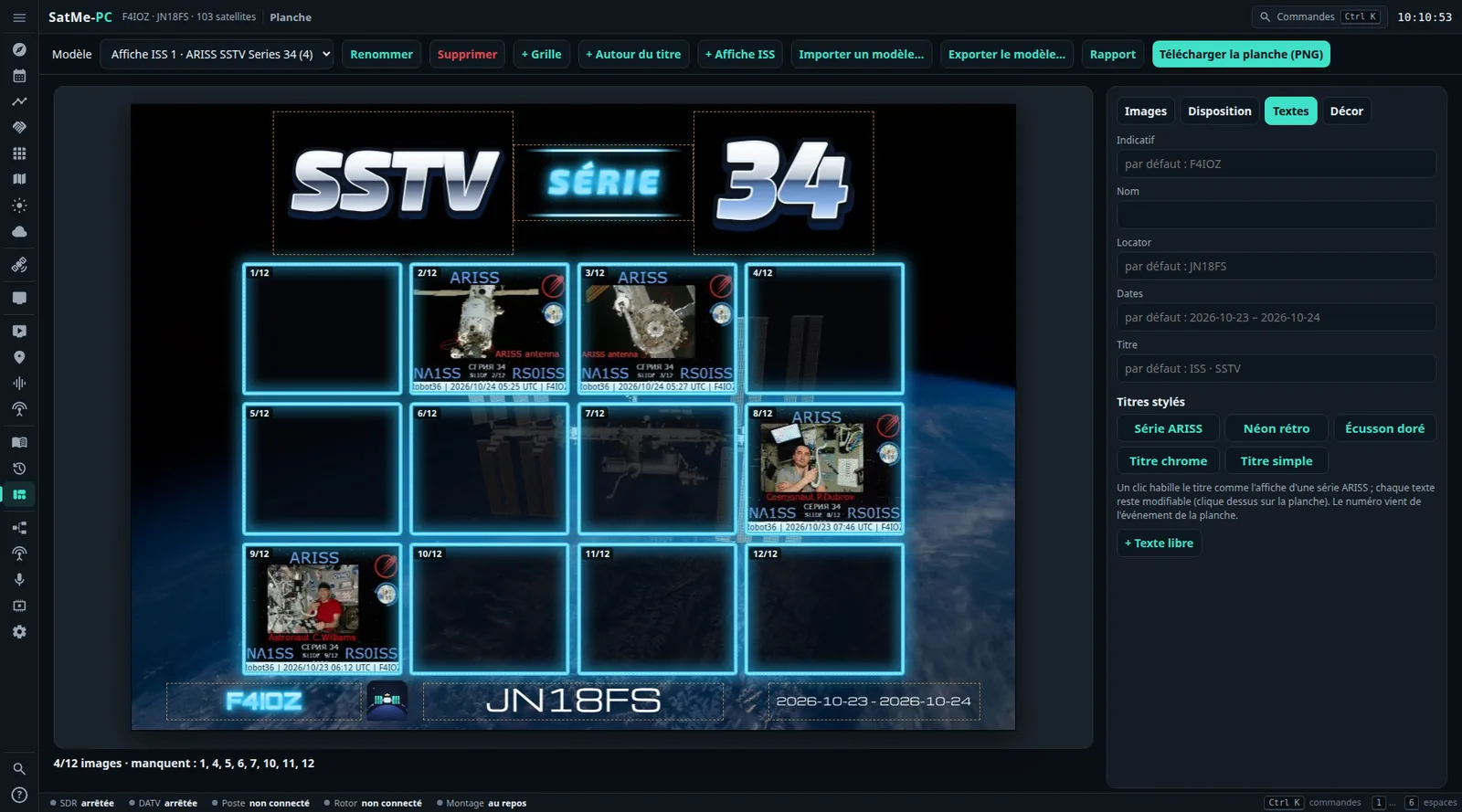
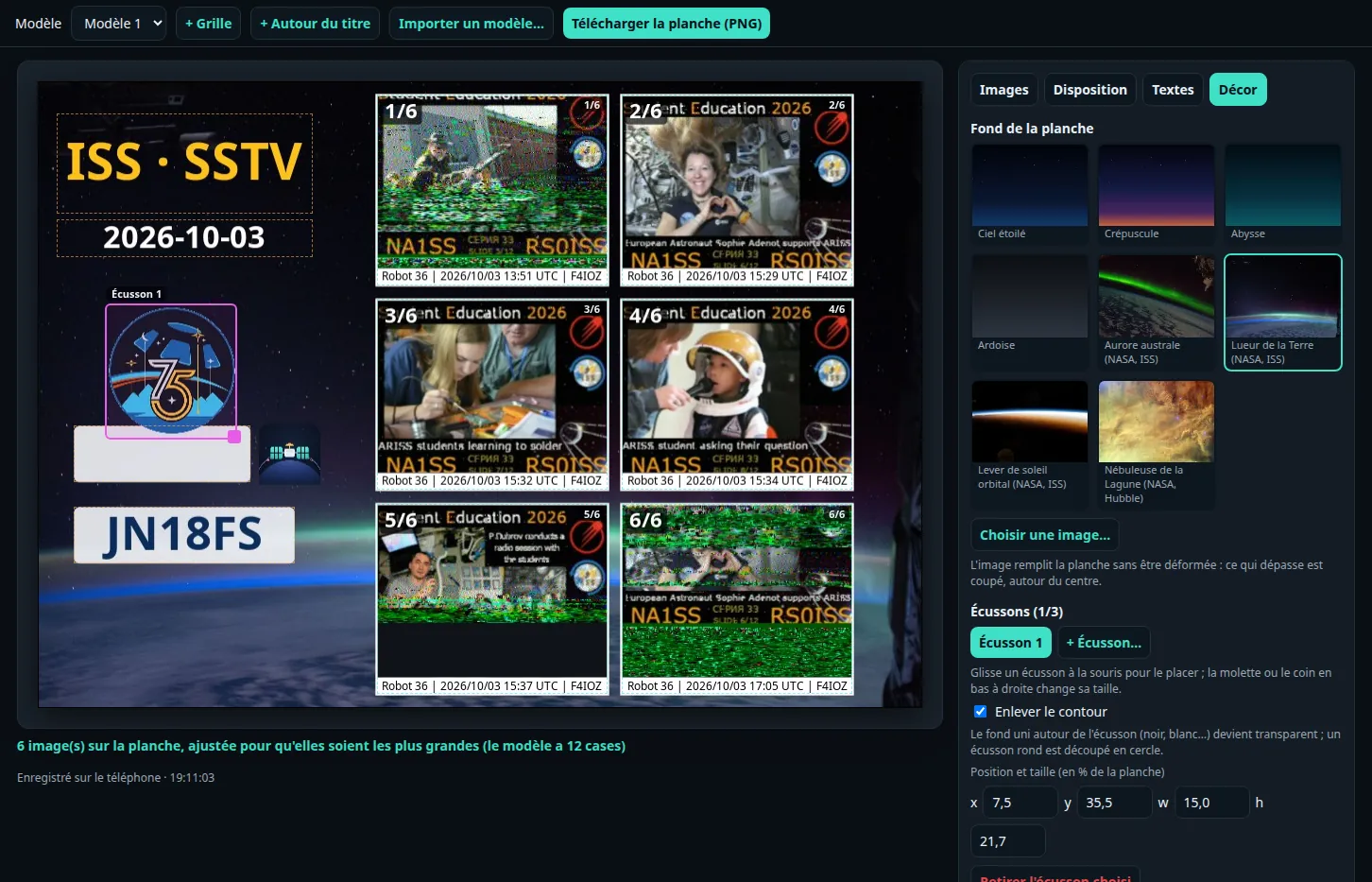
- Stylish SSTV sheet, like an ARISS series poster: in Textes (texts), Titres stylés (styled titles: Série ARISS, Néon rétro, Écusson doré, Titre chrome, or Titre simple to go back) dresses the title in one click, the number taken from the event's name; each text stays editable.
- For each text: a Police (font; seven free fonts bundled with SatMe: Orbitron, Exo 2, Audiowide, Russo One, Michroma, Bungee, Monoton), an Effet (effect: outline, relief, neon, chrome, gold, gradient), the Seconde couleur (second colour), Italique (italic), Filets lumineux (glowing rules), Espacement des lettres (letter spacing).
- Décor (background): the Cadre des images (picture frame: Fin, blanc, Arrondi, ombré, Néon and its colour); seven new backgrounds, five NASA photos (the ISS above and against the Earth, its solar arrays, the Earth at night, the W40 Butterfly Nebula) and two drawn ones (Nébuleuse, Orbite).
- + Affiche ISS (ISS poster): a stylish sheet ready made, NASA background, chrome and neon title, twelve boxes in neon frames. See The stylish sheet.
- With fewer pictures on the sheet, the boxes go between the title and the texts at the bottom, never over them.
The release page — start-up and updates.
- Quick setup (Configuration rapide) at the first start: callsign and name, locator (checked) or latitude and longitude (the square computed without the Internet), minimum elevation, UTC or local time, language, access from the network and port, in four steps; Passer (skip) at any time. Always there in Réglages › Démarrage. See Quick setup.
- What's new (Quoi de neuf): once after an update (never on a new install); later from the help (?), the palette (Ctrl K) and Réglages › Démarrage.
-
New version available: once a day SatMe-PC looks at the latest release on GitHub; a ⬆ 2026.10.NN badge at the top, its notes, the release page and the right file (
.msion Windows,satme-pc.taron Linux), Masquer (hide). Nothing is downloaded or installed by itself; turned off in Réglages › Démarrage › Mise à jour. See A new version. -
Réglages › Démarrage: Accès depuis le réseau (
--reseau), Port (--port) and Dossier des données (--dossier) set from the page, with where each value comes from; kept insatme-pc.properties, taken into account at the next start, ⟳ Redémarrer SatMe-PC where the launcher allows it. The command line always wins; new option--local. Another data folder: copy your data or start empty, the old one never deleted. See Startup options. -
Deployment (Réglages › Sauvegarde): the settings and the startup options in one file, without the secrets (unless the box is ticked), imported on another PC after a preview setting by setting;
satme-pc.service(systemd) orSatMe-PC-demarrage.cmd(Windows) to start SatMe-PC with the session, to install yourself. See Deployment. -
Guided install (
installe-satme.sh): the box Page ouverte aux autres machines du réseau writes into the startup file, andlance-satme.shreads the port from it; run the script again to make the launchers anew. See Install SatMe-PC.


The release page — each point in detail under Upcoming, below.
- SSTV gallery by slide: copies of one slide together, a mark from 0 to 100 per picture, the number read at the bottom of ARISS slides; Brute | Corrigée | Fusion in the viewer — the received picture is never changed. See SSTV.
- A sturdier SSTV decoder: each picture decoded again at its end from its own sound (kept only when it marks better); the live decoder no longer gets stuck after a noisy stretch.
- SSTV sheet tied to its event, Remplir par diapo, each box's version, the event report as a web page or a PDF with the Montage drawing. See SSTV sheet.
- Journal: SSTV versions and report elements in the pass's pictures, GIFs and videos; Supprimer (delete) a pass.
- SSTV options: live reception quality, missing slide alert, each pass's sound and its retention, QSL picture, ARISS award pack.
- Montage: several plans of the same station. Rotator: Calibrer le rotor…, a step-by-step assistant (K3NG) and a software correction. See Calibrating the rotator.
On the main branch, not yet in a version published for the phone. On the PC, these are in SatMe-PC 2026.10.27 (and the SatMe-PC versions before it).
- The SatMe-PC guide rewritten in twelve chapters — every function and where to click: SatMe-PC guide; also as a PDF manual.
- Upcoming activities (Agenda › Activités à venir): SSTV from the ISS and other satellites, ARISS school contacts, SSDV, METEOR, read from the ARISS calendar, AMSAT-UK and AMSAT-F news, SatNOGS and AMSAT listener reports; your passes during each activity; alerts (new activity, useful pass, « ça émet maintenant » — it is on the air now); Préparer la campagne SSTV in one click. The ISS SSTV is on 437.550 MHz FM in Robot 36. See Upcoming activities.
- SSTV, the gallery by slide: copies of one slide together, a mark from 0 to 100 per picture, the number read at the bottom of ARISS slides (badges « 2/12 », « 2/12✎ », « ≈2/12 »), ⟳ Relancer l'analyse; the Diapos de la série card (slides received, missing, fitted timetable, coming passes and the slides they should bring). See SSTV.
- SSTV, the corrected picture: Brute | Corrigée | Fusion in the viewer, decoded again from its recording, specks removed, copies fused — the received picture never changed. Options SSTV: live reception quality (level, sync, S/N, estimated mark), missing slide expected alert, each SSTV pass's sound and its retention (nothing deleted by default), QSL picture, ARISS award pack. See SSTV.
- SSTV sheet: its event (campaign, activity or a series seen in the gallery), Remplir par diapo strictly by place, each box's version (Auto, received, corrected, fused), a template exported and imported as a .satme-planche file, the event report as a web page or an A4 PDF. See SSTV sheet.
- The event report draws the receiving chain: with Ajouter la chaîne de réception, Chaîne : Dessin du montage (montage drawing; the default) or Chaîne simple (simple chain), and the plan chosen (by default, the one that best draws the event's SSTV reception) — drawn as Station › Montage draws it, lit for what the auto-pilot sets up, with your cut-out photos where Photo à la place du dessin is ticked; in the web page as in the PDF, the functions under the hardware when printed. The SatMe logo heads the report and each PDF page (on the phone too, whose report keeps the simple chain). See The receiving chain drawn.
- Journal, SSTV pictures and report elements (Fabriquer, kept with the pass): the pass's default version — Brute (reçue) (raw) at first, Auto (best mark), Corrigée (corrected), Fusion (fused) — then picture by picture, Créer la fusion, Marquer corrigée/fusion; the event's report elements (receive montage, slide grid, pass sky plot, elevation profile, SSTV figures, event's sheet, SatMe logo), each an overlay placed with the mouse and/or a card in the video and the GIF, all off at first; the Rapport du passage shows the version chosen. On the phone too (Share), each element at its own place. See SSTV pictures and report elements.
- SSTV, the decoder: Re-décoder chaque image à la fin (decode each picture again at its end; on by default, PC and phone) — each picture decoded again from its own sound in the background, the corrected version kept only when it marks better, the received picture never changed; the live decoder no longer gets stuck after a noisy stretch or a jump in the sound; decoding again re-fits big jumps in the sound; less colour grain on weak pictures. On 42 ISS pictures of series 34 (one station, Robot 36): mean mark 82.8 → 90.2; see the comparison with OscarWatch and QSSTV.
-
SatMe-PC fixes and touches:
- Sheet: a Supprimer (delete) button (asked first; the SSTV pictures stay in the gallery; on the phone too); the callsign, locator and dates typed in Textes kept with the sheet (preview, PNG, SSTV, report — not in an exported template); + Case stops at 60; the picture of an ARISS series (JPEG, PNG) dropped on the page becomes a template; Remplir par diapo follows the satellite filter and the series' real slide count; the PC's own words (not the phone's), and « tu ».
-
Journal: Supprimer a pass (only its entry: recordings, SSTV pictures and contacts stay); the options keep in this browser only what you change, the rest follows the station's journal settings; Fichier du passage avec ses contacts unticked is honoured; the Image de ce moment named
…_moment.png; a refused contact says why. - SSTV viewer: ⟳ Redécoder en nouvelle image and ⟳ Version corrigée depuis l'enregistrement (named apart); the Diapo list follows the series' slide count; deleting names the sound, GIF, corrected version and « à garder » mark; a refused QSL or ARISS pack says so in the page. Options SSTV: « écrire « reçu avec SatMe » ».
- Shortcuts: on the Montage, E only toggles « Modifier »; Esc also releases the IC-9700's PTT. Horizon: changing the number of sectors splits the obstacles again instead of clearing them. Montage: Tout remplacer warns that the pieces, cables and photos are erased. Agenda: Actif asks for confirmation. Sizes are written « 12,3 Mo » in French.
- Montage: several plans of the same station, Afficher le plan de ce qui tourne, the detected chain kept as a plan; decoders fed by the rig's sound light the rig. See Montage.
- Rotator: Calibrer le rotor…, a step-by-step assistant (the controller's O2, F2, O, F calibrations as the K3NG firmware does them, a check with inclinometer and compass), and a per-axis software correction. See Settings.
- Journal: the video's SSTV picture moved and sized with the mouse. DATV: the ground station's wide band spectrum over the Internet, with my reception drawn over it (the MiniTiouner's MER against the ground station's level).
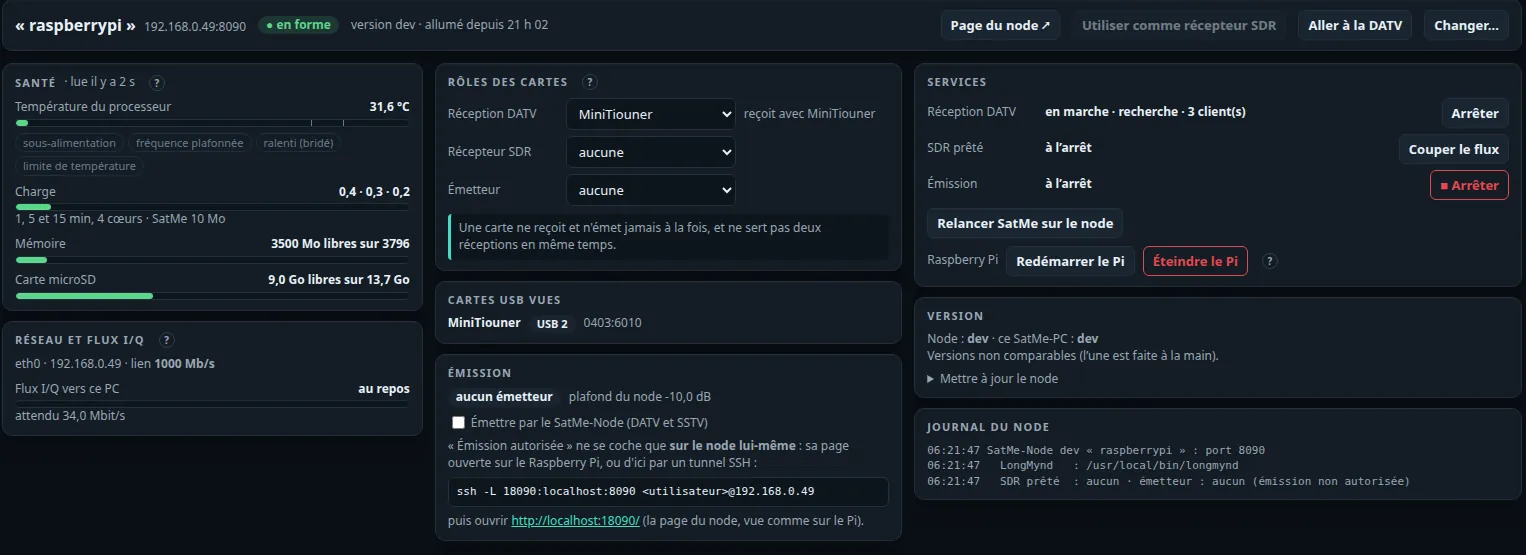
- SatMe-Node in SatMe-PC: a Station › SatMe-Node page — the Pi's health (temperature and throttling, load, memory, microSD, network and I/Q stream, USB boards), each board's role (DATV receiver, SDR receiver, transmitter), services, version against the PC's, log; restart or switch off the Pi, after a confirmation. The node's SDR as the PC's receiver, its transmitter (off by default, allowed only on the node itself); Montage draws the node and proposes a Twin LNB's wiring. The install guide redone: which Pi for which boards, Twin LNB, bladeRF and Pluto, Java on Debian 13. See SatMe-PC › SatMe-Node and Install SatMe-Node.
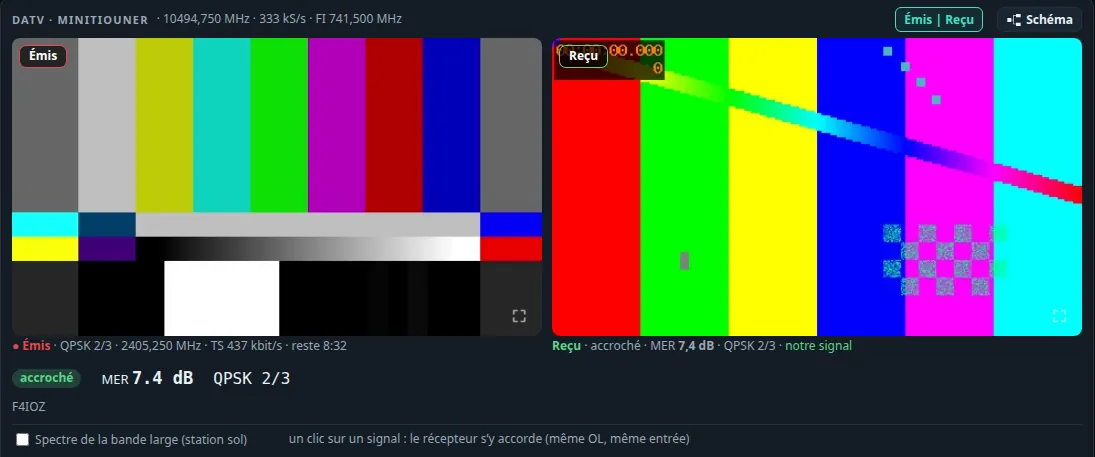
- DATV: the node's LNB supply kept when changing station, from the PC as from the phone; SatMe-PC finds a receiving node by itself. On the phone, the wide band's stations received with a touch and the picture full screen (see QO-100); on the PC, Émis | Reçu: the picture transmitted beside the one received, each enlarged.
- SSTV sheet: fewer pictures than the template, chosen and reordered, laid out as large as can be; one copy of each slide of a series sent again and again; a Background tab: a background (built in, four NASA pictures or your own, fitted to the sheet) and up to three patches dragged and resized, their surround removed. On the phone and the PC. See SSTV.
- Upcoming activities, phone: the three alerts (new activity, before each useful pass, « ça émet maintenant ») are off by default — no more notices forced on after an update; turn them on in Activités à venir, under Prévenir (Notify). Those you had turned on yourself stay on.
- The IC-9700 transmits from SatMe-PC: PTT held (one client, 2 s watchdog, time-out), the page's microphone to the rig (USB sound card or network), RF power capped; HTTPS for the page opened from another machine. See SatMe-PC › The IC-9700 transmitting.
- SSTV: a picture ends when only FM noise remains; pictures named after the sound that made them (QO-100 when it is the dongle on QO-100); a picture's satellite corrected from the viewer.
- Fixed: a pass's contacts are no longer drawn on top of each other in the log.
- Stylish SSTV sheet (phone and control desk; on the PC, in the SatMe-PC 2026.10.29): + ISS poster, Styled titles, each text's font and effect, the picture frame, seven new backgrounds. See SSTV.
- CAT: the rig moves to the new satellite at once (linear or FM). See Rig control (CAT).
- Rotator: the pass planned before AOS, a 180° flip instead of a full turn. See Rotator.
- Log: the satellite taken from the rig; satellite, date and time editable; compound calls (EA3/M5JFS) and flags. See Logbook.
- QO-100: the beacon calibration follows a drifting LNB; FT8 tolerates drift. See QO-100.
- SatMe-PC: many new features (station layout, IC-9700 over the LAN, telemetry, SSTV campaigns…), see SatMe-PC.
- METEOR pictures (LRPT), in beta, see METEOR pictures: METEOR-M2-3 and M2-4 decoded on the phone from an RTL-SDR dongle — colour by day and infrared, north up, a preview while the pass comes in; started by hand or by itself a minute before each pass; a raw I/Q WAV recording decoded too. Checked on the recording of a real pass, not yet live. On a METEOR page, a METEOR card replaces SSTV with one button, Receive the pictures; the LRPT 72 kbps channel is chosen by itself.
- Coastlines and borders on the METEOR pictures, drawn from the satellite's orbit (switch on the METEOR page, on by default); when a recording is replayed, the orbit also tells the pass's direction.
- Rotator: no more endless relay clicking, see Rotator: one axis at a time, the mast a little ahead of the satellite, at most one command every 6 s, and never the same one again while the mast stays where the controller left it (a G-5400 stops a few degrees from its command); a command the controller did not take goes out again after 10 s; the setting is now called Offset before moving (4° by default). The automatic CAT search no longer opens the rotator's port nor an Arduino board.
- Icom IC-910H and IC-9100 in satellite mode, see Rig control (CAT): bench-tested.
- Fixed: a recording stopped by hand while the rotator was connected could stay shown as running.
- Rotator: a pass over the end stop is planned, see Rotator: the antennas go round the far side of the zenith, or tilt over the top with 180° of elevation, rather than turning back at the stop; a full turn only when worth it, never during an expected SSTV picture nor while transmitting (message). A dial with the stop, the dead zone, the overlap, the cable and the planned path; an elevation gauge; the Mechanics card (stop north/south, travel, dead zone).
- The rotator's path on the compass, in white, behind an icon on the satellite's page (rotator connected).
- Kenwood TS-2000 in SAT mode, see Rig control (CAT): Doppler on VFO A and B, mode of each side, CTCSS, S-meter.
- The rotator's search on plugging in no longer opens a rig interface.
- The pass journal on the PC, see Pass journal: turn on the control desk, open the address it shows (USB cable or Wi-Fi, same code). The passes replayed large with their sound, on the sky or an OpenStreetMap map (footprint, your station, the stations worked or heard linked to the satellite); the moment with the RX frequency, the S-meter, the SSTV picture arriving and the station's card; a timeline to click, drag (a whole QSO) and zoom; accelerated replay and its options; the sound, a picture, a video, a GIF or the pass file made by the phone and downloaded on the PC.
- The SSTV sheet on the PC, see SSTV: the template large and framed to the screen, boxes and texts moved with the mouse or the arrow keys, pictures dragged into the boxes, texts typed, a template imported from the PC, the sheet downloaded at full resolution.
- The control desk's page is tighter; the desk, the sheet and the journal are linked, under one code.
-
Pass journal, see Pass journal:
- passes kept even with their page closed (automatic SSTV, every pass under CAT, a recording left running), with a quiet notification that opens the pass;
- bookmarks ⚑ during the pass, with a note, or put into the log at their time;
- the IC-9700's S-meter (read once a second, never while transmitting) and the RX frequency at rest, on the replay and in the video; your square written on the map;
- go straight to a moment (a callsign, a picture, a frame, a bookmark); accelerated replay (×5 to ×50) that slows down around what was logged and where something was heard;
- + Contact here: a contact for the log at any moment of the pass, filled with what the pass knew;
- several recordings for one pass; the Summary tab with a map of every station worked and heard;
- the page by theme, behind icons; a smooth replay on the phone, S-meter shown.
- Passes found from Wavelog / Cloudlog by station location, date, satellite and square; the missing contacts added to the phone's log, marked as already online. A station on a grid line ("JN06,JN16") has its point between its squares.
- Share, one path: the whole pass or a moment (a whole QSO), as a picture, a video with its sound, a GIF or a sound. A pass in one file (save icon): sound, pictures, bookmarks, its contacts if you wish, for another SatMe station to replay — each file keeps its time.
- CAT connected by itself stays on and opens the port once; a rig silent for 15 s gets its link reopened. See Rig control (CAT).
- Recording › Room taken on the phone: recordings older than 30 days that nothing uses, offered for deletion.
- "Antennas" instead of "mast" everywhere.
- Record every pass under CAT no longer passes for automatic SSTV: no "automatic SSTV" warning on changing satellite, the automatic SSTV box left unticked, the satellite's transmitter left alone, a notification in its own name ("… : every pass recorded (CAT)"). See Audio recording.
- Continuous SSTV decoding on by default (turned on once for everyone; unticking it is kept): a picture starts on its sync pulses even when its header was lost as the satellite rose. See SSTV.
- Pass journal (⋮ menu), see Pass journal: every pass followed kept on the phone — the real trajectory, the rig's frequencies, the antennas, the recordings — on the sky or an OpenStreetMap map with the footprint; contacts and APRS frames as points with their callsign, SSTV pictures as stretches of trajectory; replay with the sound, the SSTV picture drawn as it arrives, cards for the stations (log, APRS, QRZ.com); export of what is shown as a picture, a video (three sizes, sound or not) or a GIF, with an opening title and a closing summary; past passes found again from the log, the pictures, the APRS frames and the recordings.
- Older recordings' spoken header estimated: the sound and the pictures decoded again from them come back to the time they were received (they were about 10 s late).
- Record every pass under CAT (option): 5 s before AOS to 5 s after LOS while the rig is under CAT, its audio input listened to when arming. See Audio recording.
- SSTV page in four tabs; the sheet opens on large pictures, a tap places one, the series' missing pictures listed. See SSTV.
- One User-Agent for every service SatMe asks.
- CAT connected by itself when it is wanted: automatic SSTV armed, a minute before each pass armed (again if it dropped), the rig's cable plugged in. See Rig control (CAT).
- Journal exports always in UTC, marked; the replay's sound set by the recording's end, never its spoken header (a pass that began before the recording goes on silent until its sound).
- Prepare any pass: a rocket-and-wrench icon next to the bell, on every pass and on the next pass, opens Prepare the pass for that very pass (the big button that seemed to be for the first pass only is gone). With CAT connected, the rig goes to the satellite being prepared — on opening, on picking another pass, before the test.
- Station test: one button asks the equipment itself — the rig (both sides of a pair), the rotator, 2 s of audio level, the age of the GPS fix, the online log. Read only: nothing transmits, nothing moves.
-
SSTV, see SSTV:
- pictures cleaned of the lines and dashes lost in noise (a box to untick for the raw picture);
- each picture keeps its own sound: listen, decode it again alone, share or save it;
- a video of the picture arriving with its sound, light (to send by message) or HD, with a caption and the SatMe logo;
- an animated GIF of the picture arriving (no sound, sped up, looping), for the networks that loop GIFs;
- pictures exported with or without that caption;
- decoding a recording again keeps the time and place the picture was received, and shows when it was decoded again; a second decoding no longer replaces the first;
- SSTV sheet: the pictures of a series, in the order you choose, on an imported template (ARISS…) or a SatMe background, with callsign and logo, name @ locator and dates.
- Videos, sounds, the sked card and the APRS day card: share or save on the phone.
- Prepare the pass (first version): nine lights — satellite, position, CAT, Doppler, pointing, audio, recording, log, online log — OK, to check, error or not needed, each leading to what fixes it; station profiles (Home, Portable and your own) with their rigs, compass and audio source; simultaneous passes marked ⇄.
- Automatic SSTV on any favourite satellite, not only the ISS: pick the satellite among your favourites, then its transmitter (those marked SSTV first; an occasional SSTV event is often sent on a transmitter that is not marked). The satellite gets its previous transmitter back afterwards, and the warning follows the satellite armed. See SSTV.
- PDF of the selection: a window asks how many coming passes of each selected satellite go into the PDF — only the ticked ones, or the next 1 to 20, looked for up to two weeks ahead. See Passes and tracking.
- Selection bar on two lines (the PDF button was squeezed in French); day names in the app language; a few labels translated.
- APRS (beta), a full page with a status strip and six tabs: map over OpenStreetMap, messages and APRS Thursday, sending, packets, trophies, settings. Reception during recording, from a KISS radio (Kenwood TH-D72, switched to KISS and tuned by SatMe) or a Yaesu FT3D; transmission through the IC-9700 or the KISS radio; on the ISS (145.825 MHz) or terrestrial (144.800 MHz). See APRS.
- Automatic ISS SSTV: each pass recorded and decoded by itself, from 10 s before AOS to 5 s after LOS, screen off included.
- Rigs: Kenwood TH-D72 in full duplex with its panel; a Yaesu FT-817 or an Icom IC-705 on each side, or with an SDR dongle; the ISS APRS transmitter (AFSK) sets the rig to FM; CAT settings tidied up. See Rig control (CAT).
- ISS on time: across sources, the freshest elements for now win (never a prediction for later), and AMSAT's TLE bulletin is read with its JSON one. See Orbital elements.
- Short AMSAT names and AMSAT status whatever the source (matched by NORAD number).
- SSTV from a WAV or MP3 (the rig's SD card); smoother satellite list with SatNOGS.
- SatMe as a radio in Wavelog / Cloudlog; contacts uploaded automatically.
- PC desk: fix, hold back or delete a contact; new squares and duplicates while typing; Wavelog profiles; coming passes.
- Rig tuned before AOS by default; FT-817 + IC-705 pair; QRZ.com login kept across restarts.
- SatMe GP server and SatNOGS DB source.
- Back returns to the page you came from; settings without duplicates; accessibility; compact pass cards.
- SSTV "Listen and decode"; silent satellites hidden; phone calendar; spoken header at the start of recordings.