Repository navigation
SatMe PC Getting around
← SatMe-PC guide · October 2026
Starting SatMe-PC, the first start (quick setup, « Quoi de neuf », a new version), finding your way around the page (rail, header, status bar), the decoders' sound, the shortcuts, the command palette and the built-in manual.
-
Linux: Installing SatMe-PC — download
satme-pc.tar, unpack it, startsatme, then open http://localhost:8090/. -
Windows: Installing SatMe-PC on Windows —
satme-pc-windows.msi, double-click: the page opens by itself, with an icon by the clock. - The MiniTiouner by the antenna: Installing SatMe-Node on a Raspberry Pi.
| Option | Effect |
|---|---|
--port 8090 |
the page's port (8090 by default) |
--reseau |
the page open to the network's other machines, behind a password (see Remote access); without it, this PC only |
--dossier DIR |
where settings, log, journal, pictures and recordings are kept (~/.satme; %APPDATA%\SatMe on Windows) |
--noeud |
SatMe-Node: only the receivers and the transmitter, driven over the network (on the Raspberry Pi) |
--bureau · --console
|
open the page in the browser and an icon by the clock (the default on Windows); or none of that |
--local |
this PC only, even when the startup file says otherwise |
-v · -h
|
the version; the help |
--reseau, --port and --dossier can also be set from the page, Réglages › Démarrage (kept in a startup file read at launch); the command line wins over the file, the file over the defaults. See Startup options.
SATME_SANS_SERIE=1 (or -Dsatme.sansSerie=true): this copy of SatMe-PC opens no serial port — to try a second copy beside the station without risking raising RTS/DTR on the rig.
Optional tools (Linux), only for the features that use them:
| Package | For |
|---|---|
ffmpeg |
DATV picture and sound, DATV transmission, journal videos, subtitles, MP3 (bundled on Windows) |
tesseract-ocr |
callsigns read in the DATV picture, importing an SSTV flyer |
hackrf |
the HackRF One test transmitter |
bladerf |
the bladeRF 2.0 |
python3-venv |
voice to text (the engine is installed from Réglages) |
rtl-sdr |
rtl_tcp for an RTL-SDR dongle |
First setting: the quick setup opens by itself; otherwise Station (key 6) › Réglages › Ma station: the callsign, the locator (for example JN18FS) and the passes' minimum elevation, then Enregistrer (save). Without a callsign, no transmission is possible and the SSTV sheet has no text.
At the first install (no settings yet), the Configuration rapide window (quick setup) opens by itself. Five steps, Suivant › / ‹ Précédent (next, previous), Terminer (finish) at the last:
- Ta station (your station): the Indicatif (callsign, checked: letters, digits, « / ») and the Nom (name, written under the callsign on SSTV sheets, optional).
- Où est la station (where the station is): the Locator (Maidenhead), checked (« ✓ locator reconnu », locator recognised); or, under ou le calculer depuis la latitude et la longitude (plus précis) (or compute it from latitude and longitude, more precise), the latitude and longitude in decimal degrees — the six-character locator is computed on the spot, without the Internet, and the passes start from that exact point. Then Passages au-dessus de (° d'élévation) (passes above, degrees of elevation).
- Affichage (display): the Heures (times: heure locale de ce PC, this PC's local time, or UTC, like the log) and the Langue des rapports PDF, des messages et des notes de version (language of PDF reports, messages and release notes: celle du système, the system's, français, anglais; the page itself is in French). Le poste et le rotor (rig and rotator) are not set here: a link, Terminer et y aller (finish and go there), leads to Réglages › Poste et rotor.
- Ce qui t'intéresse (what interests you): a profile of the modules (Satellites FM/SSB, SSTV ARISS, Parabole QO-100 / DATV (dish), Météo et non-sat (weather and non-sat), Tout (everything), the default); fine-tune later in Réglages › Modules.
- Démarrage (start-up): Accès depuis le réseau (the page open to the other machines, with the same warning as in the settings) and the Port de la page (the page's port) — taken into account at the next start; from this PC only, or a session opened with the password. And Me prévenir quand une nouvelle version de SatMe-PC est publiée (tell me when a new version is published, ticked).
Passer (skip), at any time, closes the window without blocking anything. It writes the same settings as Réglages › Ma station (and Réglages › Démarrage for the network and the port), and opens again from Réglages › Démarrage › Configuration rapide…, the help window (?) or the palette (Ctrl K).

At the first start after an update, a Quoi de neuf window (what's new) says what changed since the last version started here, version by version; Fermer (close), and it does not come back for that version. Never on a new install (the quick setup comes instead), nor on a version built by hand. Always there afterwards, with the notes of every version: in the help window (? › Quoi de neuf), the palette (Ctrl K, « Quoi de neuf ») and Réglages › Démarrage (Quoi de neuf…).

SatMe-PC asks GitHub, at start and then once a day, for the latest published version. Newer: the Nouvelle version … disponible (new version available) window opens by itself, once per version and per browser, and a discreet ⬆ 2026.10.NN badge stays in the header, before the ?. A click on the badge opens again Nouvelle version … disponible (new version available): its notes, La page de la version (the release page on GitHub) and the right file — satme-pc-windows.msi on Windows (close SatMe-PC, run the installer), satme-pc.tar on Linux (run bash installe-satme.sh again, or unpack the tar over the old one); the settings stay. Masquer (hide) hides the window and the badge for that version, in this browser.
Nothing is downloaded or installed by itself. To ask GitHub nothing more: untick Réglages › Démarrage › Mise à jour › Vérifier les mises à jour; Vérifier maintenant (check now) asks again at once.

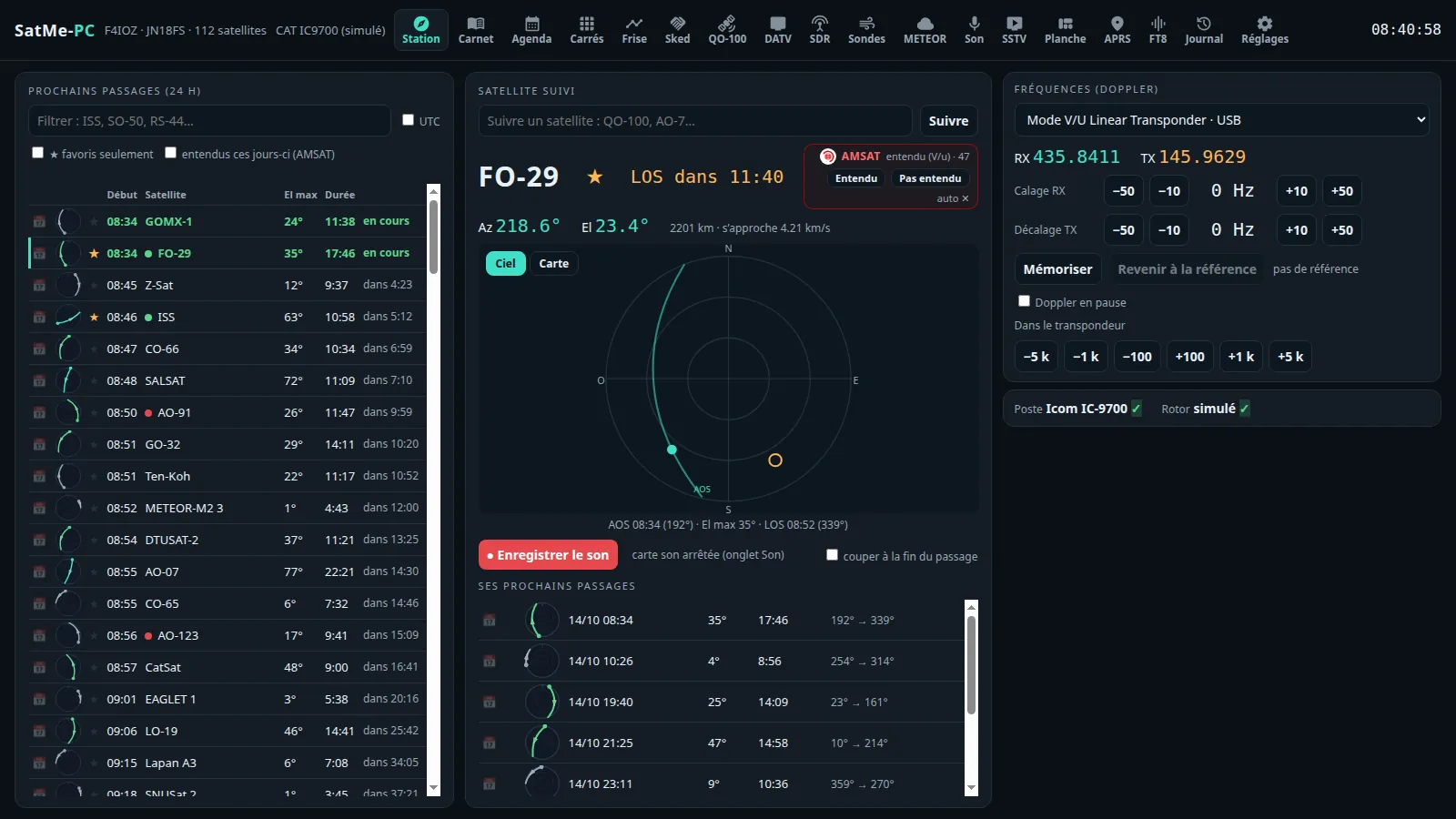
The page has four fixed parts:
- The rail on the left: the six workspaces and their tabs (icons; [ or ☰ at the top unfolds it to read the names). At the bottom of the rail: 🔍 Commandes (Ctrl+K) and ? Raccourcis (shortcuts).
- The header on top: the station and the state of reception.
- The tab's area in the middle; in the QO-100, DATV, SSTV and Agenda tabs, icon sub-tabs at the top (the last one opened is kept).
- The status bar at the bottom.
| Key | Workspace | Tabs |
|---|---|---|
| 1 | Ciel | Suivi, Agenda, Frise, Sked, Locators, Carte, Avions, Navires, Météo spatiale, METEOR, Sondes |
| 2 | QO-100 | the QO-100 cockpit |
| 3 | DATV | DATV reception and transmission |
| 4 | Modes | SSTV, APRS, FT8/FT4, Télémesure |
| 5 | Carnet | Carnet, Journal, Planche |
| 6 | Station | Montage, SDR, Son, SatMe-Node, Réglages |
Each workspace reopens its last tab. Avions, Navires and Sondes appear only when ticked in Réglages › Modules. The Journal and the Planche are separate pages (/journal, /planche) in the same frame: the rail leads back to the other tabs. Each tab also has its own address (http://localhost:8090/#sstv, #agenda…), to bookmark. On a narrow screen (phone), the rail becomes a bar at the bottom.
From left to right:
- SatMe-PC, then what is followed: « ISS · satellite suivi » (satellite followed), or the QO-100 cockpit.
- RX: the active receiver's frequency and mode (the rig over CAT, else the SDR).
- Son: the decoders' sound chip (see below).
- 🤖 Auto-pilote: the master switch of the SSTV campaigns (« Auto-pilote coupé », auto-pilot off, by default).
- The next pass and its countdown (« ISS AOS 8 h 44 »), or the LOS of the pass under way.
- Red-orange TX during a transmission (DATV, SSTV, FT8 / FT4, the IC-9700's PTT, I/Q calibration, test card): one click stops everything.
- When a newer version is published: the ⬆ 2026.10.NN badge (see A new version).
- 🔍 Commandes (Ctrl K), Distant (the remote mode), 🔈 Écouter ici (listen here: SatMe-PC's sound played in this browser), ? (the shortcuts), local time and UTC.
- When they are in use: the USB knob's chip (target and step), the 🔊 loudspeaker of the spoken announcements (one click silences them at once).
SDR, DATV, Poste, Rotor, Enregistrement (under way), Balayage, Lien (WebSocket), Node, Carnets (rigctld), Erreurs: each item gives its state in one word and leads with one click to its tab or its settings. A click on Poste (rig) opens a small Connecter / Déconnecter menu that sends exactly the model and port shown in Réglages. Erreurs lists the page's and the server's errors.
The header's Son chip (key S) says what SSTV, FT8, CW, APRS and voice to text hear, with a small level meter (« Son arrêté », sound stopped, as long as no source is running, then the decoders listening: « ▸ SSTV · APRS »).
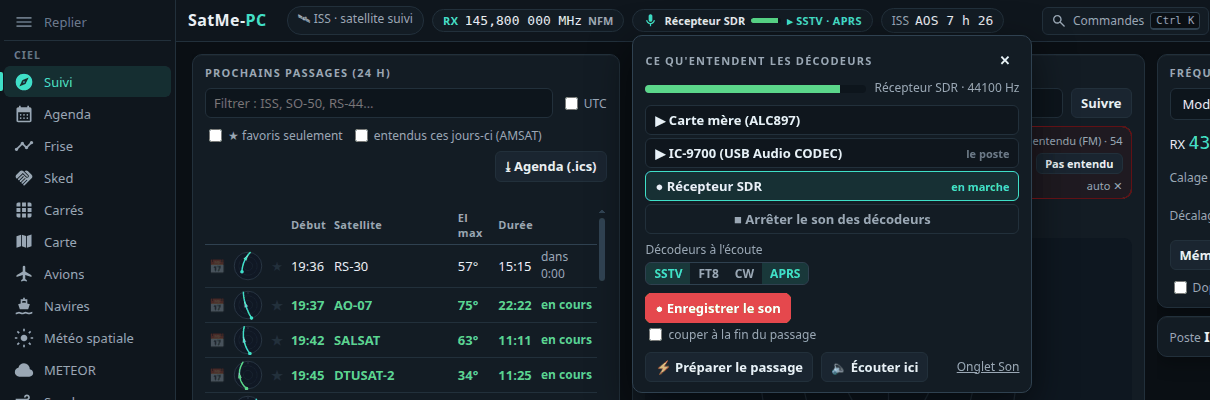
Its menu:
- the sources: the sound cards by name (« IC-9700 (USB Audio CODEC) », « Carte mère (ALC897) »), the SDR receiver, the IC-9700 over the network; one click chooses and starts;
- Démarrer / Arrêter (start / stop) the source;
- the decoders listening, each one with its tick box;
- ● Enregistrer le son (record the sound; key E), ⚡ Préparer le passage (key P), 🔈 Écouter ici.
A decoder that hears nothing offers the gesture that fixes it (« ▶ Démarrer le récepteur SDR », « choisir une carte son »). Switching a decoder on, or asking for a recording, starts the card it needs: the one chosen for this satellite, the last one used, the rig's own — never a guessed card. Sound cards are recognised from the system (/proc/asound, sysfs; no port opened): a codec on the same USB hub as the rig on CAT becomes « IC-9700 (USB Audio CODEC) ». Receive only.
The Son tab (Station workspace) has the same things, larger: Carte son (le son du poste) (sound card, the rig's sound) with Démarrer / Arrêter and the level, ● Enregistrer, Couper l'enregistrement à la fin du passage (stop the recording at the end of the pass), Enregistrer chaque passage du satellite suivi (de l'AOS à 30 s après le LOS) (record every pass of the followed satellite), Décoder l'APRS (AFSK 1200 bauds), Décoder la SSTV en direct, and the list of Enregistrements (recordings: 16-bit WAV, at half the card's rate, named as on the phone: SatMe_RS-44_20261013_203051Z.wav).
Ctrl+K (or 🔍 Commandes) opens the palette: type a few letters, ↑ ↓ to choose, Enter to confirm, Esc to close (a second Esc stops any transmission).

In it you will find:
- the tabs and sub-tabs (« SSTV › Images », « Agenda › Activités à venir »…) and the Réglages categories;
- a typed frequency (« 145,8 », « 10489.750 M », « 437,5 »): the SDR receiver listens to it (receive only);
- a satellite: follow it;
- a callsign: open it in the log;
- actions: « Arrêter toute émission » (stop all transmission), record, prepare the pass, the SSTV campaign under way, « Quoi de neuf », « Configuration rapide »…
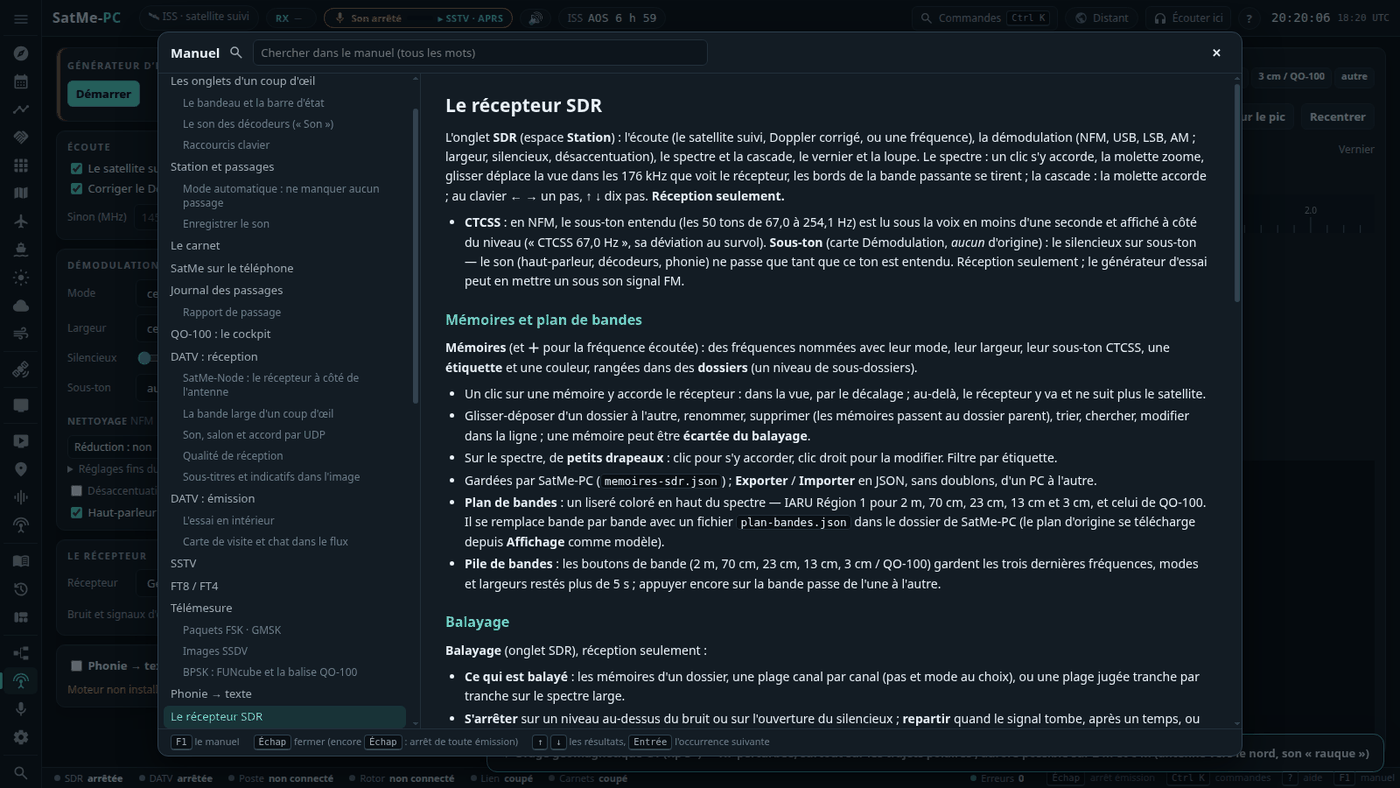
F1 opens the SatMe-PC manual at the current tab's chapter (the full guide, in French); it can be searched for words (all the words, ↑ ↓ in the results, Enter the next occurrence). Esc closes it. The ? beside a card's title gives its short explanation (hover, click or Enter), with En savoir plus (learn more) leading to the manual.
⤓ Télécharger le manuel (PDF) (download the manual), at the top of the manual: this guide laid out for printing — cover, contents with page numbers, the chapter at the top of each page, the screenshots. Also attached to every release on GitHub, in French and English.
? shows them at any time (outside an input field).
| Key | Effect |
|---|---|
| Esc | stop every transmission (DATV, SSTV, FT8 / FT4, I/Q calibration, test card) and release the IC-9700's PTT; only stops, never starts anything. Also the header's TX light, with one click |
| Ctrl+K | the command palette |
| 1 … 6 | the workspaces: 1 Ciel · 2 QO-100 · 3 DATV · 4 Modes · 5 Carnet · 6 Station |
| ? · F1 · [ | this help · the manual · unfold or fold the rail |
| S | the decoders' sound |
| E | record the sound, or stop the recording (except on the Montage tab, where E only toggles « Modifier ») |
| P | prepare the followed satellite's pass |
| N | log a contact (the log, cursor on the callsign) |
| ← → ↑ ↓ | QO-100: tune by 100 Hz / 1 kHz; SDR (spectrum selected): one step / ten steps |
| + − 0 · E · V | Montage: zoom in, zoom out, the whole drawing · edit (only: E does not record there) · full or simplified view |
| Space | Journal: play / pause; Émission IC-9700 panel selected: PTT held |
Start satme --reseau (or set Accès depuis le réseau to oui in Réglages › Démarrage, then restart SatMe-PC), then open http://<the PC's address>:8090/ (hostname -I gives it) from a tablet or the living-room PC. On Linux with ufw, open the port to the local network once: sudo ufw allow from 192.168.1.0/24 to any port 8090 proto tcp (adapt the range). The other machines go through a login page (password, see Remote access); this PC gets in without one. Without HTTPS, everything goes in clear: home network only, never opened to the internet; from outside, a VPN.
-
Linux: be in the
dialoutgroup (sudo usermod -aG dialout $USER, then log in again) for the serial ports. -
Windows: install the adapter's driver (CP210x, FTDI, CH340); the rig appears as
COM3,COM4… - Start with the simulated rig and the simulated rotator (Réglages › Poste et rotor), then plug in the real hardware one item at a time.
- With no hardware at all: the SDR tab's Générateur d'essai (test generator), the Essai (test) buttons of telemetry, of the QO-100 beacon and of ships, the SSTV Mire (test card).
See also Hardware safety.