Repository navigation
SatMe PC SSTV sheet
← SatMe-PC guide · October 2026
The SSTV pictures of an event (an ARISS series, a satellite sending its pictures for a few days) laid out on a template — SatMe's grid, an « around the title » template, the ISS poster, or the blank picture of an ARISS series —, with a background, patches, the callsign and the locator, and if you like styled titles like an ARISS series poster (fonts, chrome, neon, gold, glowing frames); downloaded at full size, sent in SSTV, or put in the event report (web page or PDF). It is the same sheet as on the phone.
Where: workspace Carnet (key 5) › Planche (a separate page, http://localhost:8090/planche; also Planche SSTV › in SSTV › Images). The pictures come from this PC's SSTV gallery.
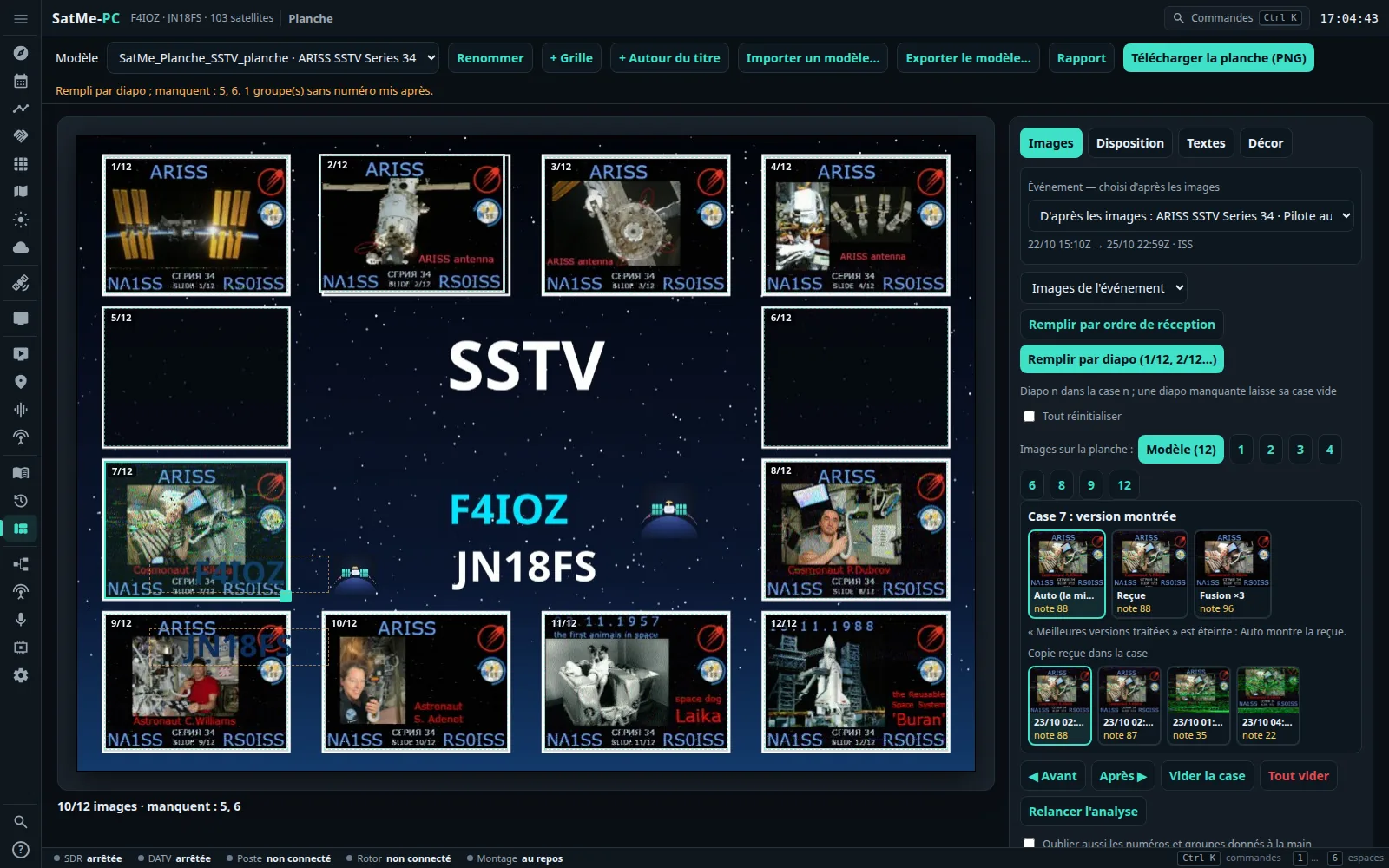
- At the top: Modèle (template: the list of sheets, « name · event (number of pictures) »), Renommer (rename), Supprimer (delete), + Grille (grid), + Autour du titre (around the title), + Affiche ISS (ISS poster), Importer un modèle… (import a template), Exporter le modèle… (export the template), Rapport (report), Télécharger la planche (PNG) (download the sheet).
- On the left: the sheet itself; below it, what is missing (« 10/12 images · manquent : 5, 6 », missing: 5, 6, or « Série complète », series complete).
- On the right: four tabs, Images, Disposition (layout), Textes (texts), Décor (decoration).
Everything is saved by itself (half a second after each change) in SatMe-PC's planches/ folder. The page opens on the last sheet modified.
Gestures on the sheet: a click selects a box (the Images tab opens), a text or a patch (the Décor tab opens); dragging moves; the square handle at the bottom right of the selected element resizes it; the mouse wheel on a patch changes its size; the keyboard arrows move by small steps (Shift: large steps). A click on empty space deselects. You can also drag a thumbnail from the gallery onto a box.
- + Grille: a new sheet « Modèle N » of 12 4:3 boxes in the right two thirds, the title, the dates, the callsign and « name @ locator » on the left, on a starry sky.
- + Autour du titre: 12 boxes around the centre, which is left to the title.
- + Affiche ISS (ISS poster): a stylish sheet ready made, « Affiche ISS N » — see The stylish sheet.
-
Importer un modèle…: the blank picture of an ARISS series (JPEG, PNG, 25 MB at most) — its « NO IMAGE » boxes are found by themselves (« Modèle importé : 12 case(s) trouvée(s). », template imported: 12 box(es) found) — or a SatMe template (
.satme-planche, see below). Either can also be dropped anywhere on the page: a.satme-planche, or the JPEG/PNG picture of an ARISS series, becomes a new template (any other file is refused: « Ce fichier n'est ni un modèle SatMe (.satme-planche) ni une image JPEG ou PNG. », this file is neither a SatMe template nor a JPEG or PNG picture). - Renommer: the sheet's name (60 characters at most).
Supprimer (delete; at the top, in red): after confirmation (« Supprimer la planche « … » ? Ses images SSTV restent dans la galerie. », delete the sheet? Its SSTV pictures stay in the gallery), the sheet is deleted and the page opens the last of the remaining sheets. The SSTV pictures are never deleted with it.
At the top of the Images tab, the Événement (event) box: an auto-pilot campaign (Agenda › SSTV), an announced SSTV activity (Agenda › Activités à venir), or failing that a series seen in the gallery (the pictures of one satellite less than two days apart). Chosen by itself — D'après les images (from the pictures): the one that holds the most pictures of the sheet, the auto-pilot first — or by hand in the list; Aucun événement (no event) is possible. Its dates and its satellite are recalled below. It is kept in the sheet's file, even if the campaign is deleted afterwards.
Images tab:
- The list of pictures shown: Images de l'événement (the event's pictures; the default), Tous les satellites (all satellites), or one satellite.
- Une par diapo (copies groupées) (one per slide, copies grouped; ticked): the gallery shows only one tile per slide, the best scored, with its badge (« 2/12 », « 2/12✎ », « ≈2/12 ») and its score; « ▸ +3 copie(s) » unfolds the others.
- Remplir par diapo (1/12, 2/12…) (fill by slide): slide n in box n, its best-scored copy. It follows the list above: Images de l'événement takes the slides planned for the event; one satellite chosen takes only that satellite's groups, with its series' number of slides (12, or 36 for a series of 36…); Tous les satellites, the whole gallery. Strictly by place: a missing slide leaves its box empty (no slide 5: box 5 empty), nothing moves up; groups without a number are not placed (« 1 groupe(s) sans numéro mis après », 1 group(s) without a number put after); an estimated number only takes a slide that no number read or given by hand has; a template of k boxes takes slides 1 to k. Versions and copies chosen by hand are kept, except with Tout réinitialiser (reset everything) ticked. The message says what is missing (« Rempli par diapo ; manquent : 5, 6. », filled by slide; missing: 5, 6).
- Remplir par ordre de réception (fill in order of reception): the pictures shown in the order they arrived, one copy per slide.
- By hand: select a box, then click a picture (the selection moves to the next box); or drag the thumbnail onto the box. ◀ Avant / Après ▶ (before / after) swap the selected box with its neighbour, Vider la case (empty the box), Tout vider (empty all).
- Images sur la planche (pictures on the sheet): Modèle (12), or 1, 2, 3, 4, 6, 8, 9… pictures: the sheet is fitted so that these pictures are as large as possible (on an imported ARISS picture, the boxes too many are hidden). On a fitted sheet, a click on a picture adds or removes it.
- Relancer l'analyse (run the analysis again): measures the pictures again, reads the numbers again, rebuilds the groups — only the pictures of the sheet's event (the default when it has one) or all the pictures, chosen beside the button (with Oublier aussi les numéros et groupes donnés à la main, also forget the numbers and groups given by hand, after confirmation).
In the editor each box carries the number of the slide it received (« 7/12 », « ≈5/12 »), which follows the picture if it is moved.
A click on a full box opens, under the fill buttons, the panel Case n : version montrée (box n: version shown):
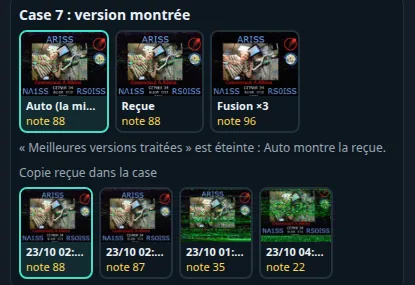
- Auto (la mieux notée) (the best scored), Reçue (received), Corrigée (corrected), Fusion ×N (merge) — those that exist, with their thumbnail and their score. A corrected version is made in the SSTV viewer; a merge can be made here: + Créer la fusion (create the merge; the slide has at least two copies), then it is selected.
- Copie reçue dans la case (received copy in the box): the copies of this slide (time, score, ✨ if a corrected version exists); a click puts another one in.
- A box set by hand carries a small mark in the editor only (« Reçue », « Fusion », « ✋ »); a version chosen then deleted shows Auto, with « ⚠ ».
- Auto follows the Meilleures versions traitées option (best processed versions; Disposition tab): unticked (the default), Auto shows the received one.
Each box's choice is kept with its slide by Remplir par diapo; Tout réinitialiser puts everything back to Auto.
Disposition:
- Nom du modèle (template name).
- Une ligne sous chaque image (mode, heure, indicatif) (a line under each picture: mode, time, callsign): « PD 120 | 2025/05/31 20:00 UTC | F4IOZ ».
- Numéro sur chaque case (number on each box): « n/12 » or the slide number, at the top left of each picture.
- Meilleures versions traitées (reçue, corrigée ou fusion : la mieux notée) (best processed versions: received, corrected or merge, the best scored; unticked: the sheet stays clean, as received) and Marquer « corrigée » / « fusion » sur la planche (mark « corrected » / « merge » on the sheet; in the caption, else a badge in a corner).
- + Case (box; 60 boxes at most: beyond, « 60 cases au plus sur une planche. »), Retirer la case choisie (remove the selected box), and the position and size (in % of the sheet) of the selected element.
Textes: Indicatif (callsign), Nom (name), Locator, Dates (empty: the default values — Réglages, the pictures' locator, the pictures' dates — are shown in grey), Titre (title); + Texte libre (free text); for the selected text: its field, its colour (six swatches), its background (none, white veil, black veil), its font and effect (see The stylish sheet), its position, Retirer le texte choisi (remove the selected text). The SatMe logo places itself next to the callsign. Indicatif, Locator and Dates typed here are kept with the sheet and used wherever it is drawn: the preview, the downloaded PNG, the sheet sent in SSTV and the report. They do not go into an exported template (each station puts its own). The Nom (name) is the station's (Réglages), not the sheet's. A sheet made before this version reads as before: empty fields, default values.
Décor:
- Fond de la planche (sheet background): Ciel étoilé (starry sky; the default), Crépuscule (dusk), Abysse (abyss), Ardoise (slate), Nébuleuse (nebula), Orbite (orbit: the Earth's curve and its glow), nine NASA pictures (Aurore australe, Lueur de la Terre, Lever de soleil orbital, Nébuleuse de la Lagune, L'ISS au-dessus de la Terre, L'ISS devant la Terre, Panneaux solaires de l'ISS, La Terre de nuit, villes et aurore, Nébuleuse du Papillon W40 — aurora australis, airglow, orbital sunrise, Lagoon Nebula, the ISS above the Earth, the ISS against the Earth, the ISS solar arrays, Earth at night with cities and aurora, W40 Butterfly Nebula) or Ton image (your picture; Choisir une image…, choose a picture: it fills the sheet without being distorted, what sticks out is cropped). A template made from an imported ARISS picture keeps its own background.
- Cadre des images (picture frame): Aucun (none: the thin white line as always), Fin, blanc (fine, white), Arrondi, ombré (rounded, shadow) or Néon (neon), with its Couleur du néon (neon colour; eight hues).
- Écussons (patches; three at most): + Écusson… (PNG, JPEG), then drag, the wheel or the corner for the size; Enlever le contour (remove the surround) makes the plain background around it transparent (a round patch is cut out as a circle); Retirer l'écusson choisi (remove the selected patch).
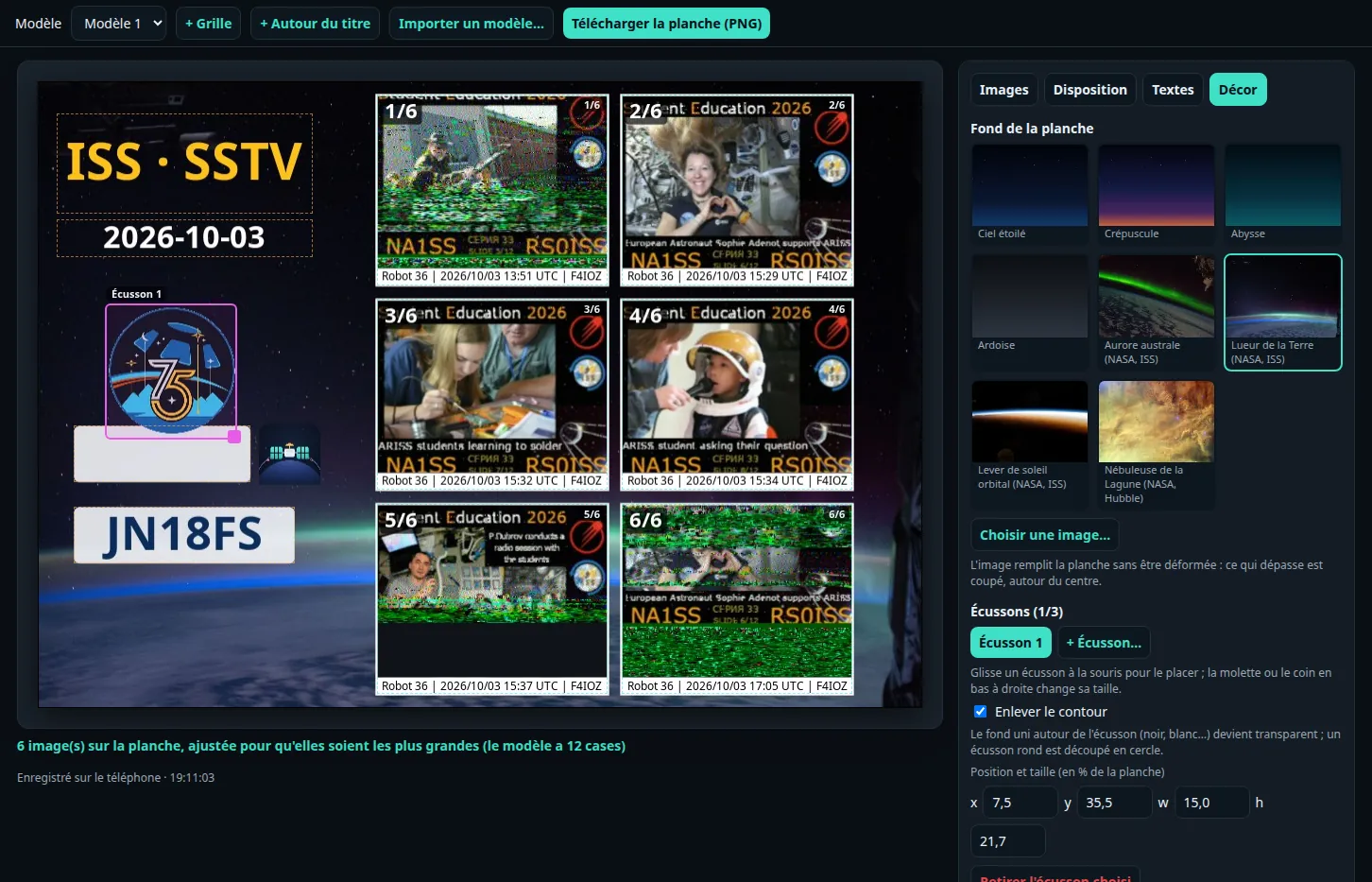
Like an ARISS series poster: a big « SSTV » in chrome, « SÉRIE » (series) in neon between two glowing rules, the series' number, frames that glow. It is all done in the Textes (texts) and Décor tabs, on any sheet; + Affiche ISS (ISS poster) makes one ready made. (The page is in French here; with SatMe-PC in English the labels are those in brackets.)
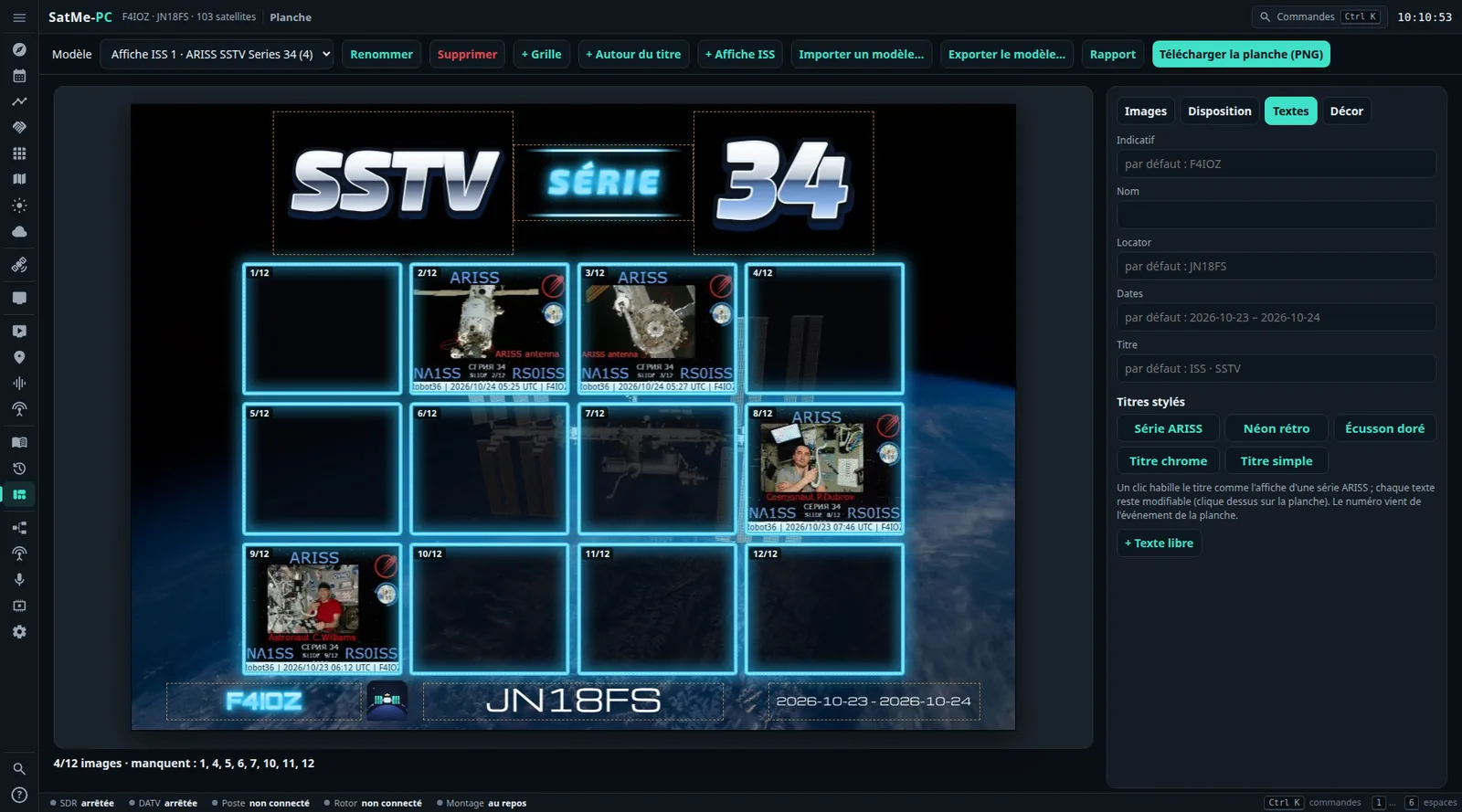
+ Affiche ISS (ISS poster; at the top) makes a new sheet « Affiche ISS N »: the NASA background L'ISS au-dessus de la Terre (the ISS above the Earth), the styled title Série ARISS, twelve boxes in a blue neon frame, a line under each picture, and at the bottom the callsign (in neon), « name @ locator » and the dates. Fill it like any other (Remplir par diapo, by hand…); everything stays editable.
The series' number comes from the name of the sheet's event (« ARISS SSTV Series 34 » → « 34 »). A poster made before the sheet has its event only says « SSTV SÉRIE »: once the event is chosen (Images tab), click Série ARISS again in Textes › Titres stylés.
Textes tab, under the Titre field, Titres stylés (styled titles): one click dresses the sheet's title.
- Série ARISS (ARISS series): « SSTV » in chrome, « SÉRIE » in blue neon between two glowing rules, the number in bluish chrome (no number known: « SSTV » and « SÉRIE » only).
- Néon rétro (retro neon): the number (or « SSTV ») in cyan neon, the event's name in pink neon.
- Écusson doré (gold badge): the event's name and the number in gold.
- Titre chrome (chrome title): the sheet's Titre, in chrome.
- Titre simple (plain title): the ordinary title comes back, in place of the styled one.
The title goes where the previous one was, else on the title text, else in a band at the top; it grows into the free room around, without touching the boxes (in a row when wide, stacked otherwise), and pushes down the texts it would touch. Another styled title replaces the previous one in the same place. Each line stays an ordinary text: click it on the sheet to change its words, colour, font, effect or place.
With a text selected (click it on the sheet), the Textes tab also shows, under its colour and background:

- Police (font): each button writes the text in its font — SatMe (par défaut) (the default), Orbitron, Audiowide, Exo 2, Russo One, Michroma, Bungee, Monoton. Seven free fonts (OFL licence) bundled with SatMe: nothing is fetched from the internet. A letter a font lacks is replaced by the closest one (without its accent).
- Effet (effect): Simple (plain), Contour (outline: hollow letters), Relief, Néon (neon), Chrome, Or (gold), Dégradé (gradient).
- Seconde couleur (dégradé, remplissage du contour) (second colour: gradient, outline filling): with Dégradé or Contour only.
- Italique (italic), Filets lumineux (glowing rules: a line that glows above and below the text, in its colour) and Espacement des lettres (letter spacing; a slider).
The text's colour also has the neon hues (cyan, pink, violet…). The preview shows the font and the effect as soon as the sheet is saved (half a second after the click): it is the very drawing of the downloaded PNG, of the sheet sent in SSTV and of the report, and the same on the phone.
Décor tab:

-
Seven more backgrounds: two drawn, Nébuleuse (nebula: clouds of colour over the stars) and Orbite (orbit: the Earth's curve and its blue glow), and five public-domain NASA photos: L'ISS au-dessus de la Terre (the ISS above the Earth), L'ISS devant la Terre (the ISS against the Earth), Panneaux solaires de l'ISS (the ISS solar arrays), La Terre de nuit, villes et aurore (Earth at night, cities and aurora), Nébuleuse du Papillon W40 (W40 Butterfly Nebula, Spitzer). Where each picture comes from: the repository's
THIRD-PARTY.md. - Cadre des images (picture frame), round each picture: Aucun (none: the thin white line as always), Fin, blanc (fine, white: a white mat), Arrondi, ombré (rounded, shadow), Néon (neon: a tube of light) and its Couleur du néon (neon colour).
The font, the effect and the frame go with an exported template (.satme-planche).
-
Télécharger la planche (PNG): at full resolution (the width of the imported ARISS picture, else 2400 px), named
SatMe_Planche_<satellite>_<date>.png. - Transmitting it in SSTV: SSTV › Émission › Image: Planche SSTV (see Transmitting a picture).
- To your site (with web publishing ready): 🌐 Planche vers le site and 🌐 Rapport vers le site (the report as a PDF). The planche says everything about its series: the satellite, the event or campaign, the dates, slides received and missing, the best picture of each slide, the passes that brought pictures with their journal video, and the link to its report. In Automatique, the planches with pictures go by themselves, 2 min after the last picture received.
Exporter le modèle…: a file SatMe_Modele_<name>.satme-planche to give to another operator — the layout, the boxes, the texts and their styles, the number of pictures, the background, the patches (cut out when Enlever le contour is ticked) and the version chosen for each box. Without the SSTV pictures: the callsign and the « name @ locator » remain fields filled in by the station that imports it — unless Garder mon indicatif écrit en dur (keep my callsign hard-written) is ticked. Télécharger le fichier (download the file).
Importer un modèle… (or the file dropped on the page) always makes it a new template, never over another one (« Modèle « … » importé : remplis-le avec tes images. », template « … » imported: fill it with your pictures). A file made by a newer version of SatMe is refused with a message.
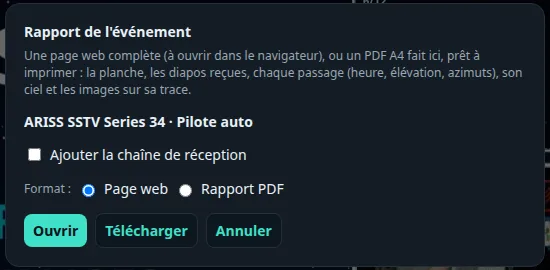
Rapport (at the top) opens the Rapport de l'événement (event report) window: the sheet's event, the Ajouter la chaîne de réception (add the receiving chain) box, the Format — Page web (web page) or Rapport PDF (PDF report) — then Ouvrir (open; a new tab) or Télécharger (download). With Ajouter la chaîne de réception ticked, two more choices:
- Plan de la station (station plan): one of the plans of Station › Montage; first in the list, and chosen by default, the plan that best draws the event's SSTV reception.
- Chaîne : (chain) Dessin du montage (montage drawing; the default) or Chaîne simple (simple chain: the list of pieces, as before).
The report, without looking anything up on the internet:
- the header: the event (series, dates, satellite), the callsign, the locator, and four figures: slides received, pictures received, passes received, best score;
- the sheet;
- the slides 1 to n: received or not, the best score, the number of copies; for a missing slide, the past passes that should have sent it;
- the pass timeline and the pass table: UTC time, max elevation, AOS → LOS azimuths, slides planned and received, outcome (reçu, received; reçu sous l'élévation minimale, received below the minimum elevation; prévu, rien reçu, planned, nothing received; trop bas, too low; à venir, upcoming) and what the auto-pilot says about it;
- the sky of each pass: the track, each picture in orange at the place where it arrived, the elevation profile and the slides' time slots;
- the slide schedule (fitted period, landmarks, restarts);
- with Ajouter la chaîne de réception: the receiving chain of the chosen plan (see below) and, for a campaign, what the auto-pilot set up at each pass.
The SatMe logo heads the report (web page) and each page of the PDF.
With Dessin du montage, the chain is drawn as Station › Montage draws it: the chosen plan, lit for the event's SSTV reception — the band's antenna, the rig, its sound to the SSTV decoder, the rotor —, the equipment drawings, or your cut-out photos for the pieces where Photo à la place du dessin (photo instead of the drawing) is ticked, the cables in colour with their labels, and SatMe's functions in columns (only those at work, the others summed up as « +N autres »). A caption says what is lit.

It is what the auto-pilot sets up for each pass, not a record of what actually ran during the passes: the caption says so.
- Web page: on a screen, the hardware on the left and the functions on the right; on a narrow screen and when printed, the functions go under the hardware. The drawing is in the page (SVG).
- SatMe-PC's PDF report: the same drawing, as vectors; the functions go under the hardware when, side by side, the drawing would be too small to read on A4.
- On the phone, which has no Montage: no Chaîne : choice, the report (web page or PDF) keeps the simple chain; the SatMe logo is there too.
The geometry of past passes is recomputed with the orbital elements loaded (SatMe does not keep those of the time): the report says so, with their date. The web page is a single HTML file (pictures inside, charts in SVG), to print to PDF from the browser if wanted; the PDF report is made by SatMe-PC itself (A4, the event's name and « page n/N » at the top of each page; a card too long continues on the next page, « (suite) », continued), SatMe_Rapport_<event>_<day>.pdf. The report contains no address of the station; nothing is sent.