Repository navigation
SatMe PC Settings
← SatMe-PC guide · October 2026
Where: Station workspace (key 6) › Réglages (or Ctrl+K, « Réglages › … »). On the left, the list of categories (the last one opened is kept); on the right, its cards. Each card has its own Enregistrer (save) or applies as soon as a box is ticked.
| Category | What is set there |
|---|---|
| Ma station (my station) | callsign, locator, minimum elevation; horizon |
| Modules | the parts of SatMe-PC you care about, the profiles |
| Poste et rotor (rig and rotator) | the rig (CAT, over USB or the network; the IC-9700 as IF), the TH-D72, the rotator, its plan and its calibration, the converters, the Doppler / CAT log, the ADALM-PLUTO, the antenna polarisation box |
| Satellites | orbital elements, AMSAT status, QO-100 at start |
| Interfaces | satellite link (WebSocket), frequency for logging programs (rigctld), USB knob |
| Annonces (announcements) | spoken announcements |
| Services en ligne (online services) | QRZ.com, AMSAT, PSK Reporter, Wavelog / Cloudlog, hams.at skeds |
| Phonie → texte (voice to text) | the engine, the model, the translation, the voice |
| Téléphone (phone) | taking over the phone's settings |
| Accord fin (fine tuning) | magnifier, vernier, voice netting (SDR dongle) |
| Émission (transmission) | IC-9700 (PTT, time-out, power), cut-off if the page goes silent, transmitters' I/Q correction |
| Démarrage (start-up) | access from the network, port, data folder; looking for a new version; the quick setup and « Quoi de neuf » (what's new) |
| Accès à distance (remote access) | password for other machines, HTTPS, remote mode, app, screen kept on |
| Sauvegarde (backup) | the whole station in one file, and restoring it; deployment to another PC, starting with the session |

- Station card: Indicatif (callsign), Locator (JN18FS), Passages au-dessus de N° d'élévation (passes above N° of elevation), Enregistrer. Required before any transmission, and for the sheet, the QSL, the log.
- Horizon card: see The horizon.
Where: Réglages › Modules. Tick what interests you, one box per part of SatMe-PC: SDR, QO-100, DATV, FT8 / FT4, CW, Phonie → texte (voice to text), spoken announcements, APRS / KISS, telemetry, SSTV (with the Planche and the Agenda's auto-pilot), Orbites, space weather, upcoming activities, METEOR, radiosondes, planes, ships, Montage, SatMe-Node, phone, polarisation, and Publication web (web publishing; off by default, see below).
The core is always there: Suivi, Agenda, Frise, Locators, Sked, Carte, the rig, the rotator and Doppler, the log, the Journal, Son, Réglages, remote access, updates.
- Profiles, in one click: Satellites FM/SSB, SSTV ARISS, Parabole QO-100 / DATV (dish), Météo et non-sat (weather and non-sat), Tout (everything). No profile ticks Publication web, nor unticks it when it is ticked. Then tick or untick module by module.
- A module unticked leaves the rail (an empty workspace too), the palette (Ctrl+K), the map's layers, its settings cards and its status-bar items. Its address shows « Ce module est désactivé · Réglages › Modules » (this module is off). Unticked while receiving or transmitting, it stops after confirmation and gives its receiver back.
- Beside each box, what it needs: METEOR, radiosondes, planes and ships go through the SDR (or a SatMe-Node).
- The choice is kept by SatMe-PC: the same menu in every browser.
- On updating, everything stays ticked (except planes, ships and radiosondes if they were unticked). A module added later comes ticked, except Publication web: unticked, unless the station had already set its site (address and token). The quick setup offers the profiles.
Where: Réglages › Poste et rotor, Poste (CAT) card.
- The model: Icom IC-9700, Icom IC-9100, Icom IC-910H, Kenwood TS-2000, Deux postes (FT-817 / IC-705) (two rigs: an RX port, a TX port, the transmit band), Kenwood TH-D72, IC-9700 simulé or TS-2000 simulé (simulated: nothing is opened).
- The speed (vitesse du poste (the rig's speed), or 4800 to 115200) and the port (↻ reads the ports again). For the IC-9700: the Liaison (link) USB (câble du poste) (the rig's cable) or Réseau (LAN de l'IC-9700) (network), and the Son (sound) AF — démodulé par le poste (demodulated by the rig) or FI — démodulé par SatMe (IF — demodulated by SatMe).
- Régler le poste même quand le satellite n'est pas visible (set the rig even when the satellite is not visible; off by default).
- Connecter (connect; or the status bar's Poste chip); Déconnecter (disconnect). The card says « connecté » or « déconnecté », RX and TX.
Pick the right rig's port: Icom CAT raises RTS/DTR (its USB bridges need it). The TH-D72 shows up as « CP2102 USB to UART Bridge Controller »; on that cable, CAT or KISS (APRS tab), not both. Kenwood TH-D72 card: Émission sur la bande (transmit on band) A or B, Relire (read back); each change goes to the rig when asked.
Doppler / CAT log (card of the same name, off by default): Noter chaque passage suivi avec le poste connecté (log each followed pass with the rig connected) — every 5 s the time, azimuth, elevation, range, the Doppler predicted on both legs, the frequency written to the rig and read back, one CSV per pass in doppler/, linked from the pass in the Journal. Journal détaillé (detailed log): the spectrum around the downlink kept during followed passes, for the pass report.
Converters and transverters: a table per band, see below. ADALM-PLUTO (émission DATV): the Gain d'émission maximal (maximum TX gain; −10 dB by default) and Couper l'oscillateur d'émission du Pluto quand SatMe s'en sert en réception (power down the Pluto's TX oscillator when SatMe uses it for reception).
Where: Réglages › Poste et rotor, Poste (CAT) card: model Icom IC-9700, Liaison Réseau (LAN de l'IC-9700); the IC-9700 par le réseau panel opens below (the rig's IP address, ports 50001 / 50002 / 50003, Network User1 ID, password, Identifiants codés (coded credentials), sound, buffer, journal des paquets (packet log), spectre du poste (the rig's scope), Enregistrer), then Connecter.
SatMe-PC joins the IC-9700's built-in network server (three UDP ports: control 50001, CI-V 50002, audio 50003; one session at a time), with no USB cable. It takes the CI-V there (the same Doppler control as over USB) and the received sound, offered as the source « IC-9700 (réseau) » to the Son tab, SSTV, FT8, voice to text and « Écouter ici ».
- On the rig: MENU › SET › Network: DHCP (or a fixed address), Network Control: ON, Network User1 ID and its password, Network Radio Name, the ports (50001 by default). The rig's address shows in that same menu; type it into SatMe-PC with the ports.
-
Receive only by default: no sound is sent, the transmit audio path is not requested, every CI-V transmit command (PTT
1C 00, tuner1C 01,17,28, even behind the29prefix) is refused. One exception, ticked on this PC: Émission par le réseau autorisée (transmission over the network allowed) lets PTT through (see The IC-9700 transmitting). On disconnecting the session is always handed back to the rig; a lost link is taken up again in the background. - Sound: 16-bit PCM at 16 kHz by default, 8 kHz for a slow link; a 40 to 300 ms buffer puts packets back in order and asks again for missing ones. The samples' layout (byte order, signed or not) is recognised from the sound itself.
-
Credentials: the rig expects a coded form of the user ID and password. The simplest: capture on your network the start of a connection that works (port 50001, a
.pcapor.pcapngfile), type the ID and password in clear, then Identifiants codés › Apprendre le codage depuis une trace (learn the coding from a capture): SatMe-PC reads the coded fields there, learns the coding and says whether the rig had accepted that login. The file is read in memory then forgotten; neither the coded bytes nor the clear text are shown or written to a log. The 16 coded bytes can also be pasted (hexadecimal). -
Spectre du poste (option): the scope the rig sends over CI-V, as a strip in the Suivi tab; set back OFF on the rig at disconnection. Journal des paquets: headers only, in
icom-reseau-trace.txt.
AF or IF sound. The Son menu says what the rig sends on its sound output (USB or network):
- AF (the rig's factory setting): the rig demodulates, SatMe receives its sound. If the rig actually sends its IF, SatMe notices (energy high in the band, an IF folded to about 4 kHz) and says so: set the rig's output to AF.
- IF: the rig sends its last IF, centred on 12 kHz, about 15 kHz wide; SatMe demodulates it itself in the SDR tab, receiver « IC-9700 FI »: waterfall, USB, LSB, CW, FM, AM, cleaning, channels, recording and decoders. On the rig: MENU › SET › Connectors › USB AF/IF Output › Output Select: IF (AF to go back). Over the network the 16 kHz sound folds the IF: ±3.6 kHz usable around the dial; through the USB sound card (48 kHz): the whole IF, ±7.5 kHz. The centre is the rig's RX dial read by CAT; Recentrer le poste (recentre the rig) moves the rig's RX shift (receive only). Sens inversé (reversed direction) if stations go up when the dial goes down.

Doppler / CAT log (off by default): during a followed pass with the rig connected, every 5 s the time, azimuth, elevation, range, the Doppler predicted on both legs, the frequency the loop wrote and the one it read back — one CSV per pass in doppler/, linked from the pass in the Journal. Only what the CAT loop already does is noted. Journal détaillé (off by default): the spectrum around the downlink kept during followed passes, for the pass report.
Where: the Émission IC-9700 panel of the Suivi tab (and of the QO-100 cockpit); its settings in Réglages › Émission, Émission du poste (IC-9700) card: Émission par le réseau autorisée, Minuterie d'émission (transmit time-out; 1 to 10 min, 3 by default), Puissance au plus (power cap, %), Carte son du poste (the rig's sound card), Son par le réseau (sound over the network; Vérifier sur une capture (.pcap), verify on a capture).
The Émission IC-9700 panel (Suivi tab, and the QO-100 cockpit while it is shown) drives the transmission of the IC-9700 connected by CAT (USB, network or simulated), from this PC or from another machine (remote mode, same password).
-
PTT held: the PTT button stays down while you talk (or the space bar, the panel focused). SatMe sends
1C 00 01, then1C 00 00on release. One client holds the PTT, everyone sees who (red TX strip at the top of every page), and anyone may stop it (the strip, Esc). From another machine, one confirmation per session, as for DATV. - Released by itself: 2 s without news from the page holding it (tab hidden, window left, link lost, microphone closed), the time-out reached (Réglages › Émission, 3 min by default, 1 to 10), the rig no longer answering (its TX state read back twice a second), the rig disconnected (the unkey goes before the CAT closes), SatMe-PC closed. A refused unkey is sent again as soon as the rig answers. Nothing transmits at start nor after a reconnection. Keep the rig's own time-out (its menu) too: it is the last guard if the PC stops dead.
-
The browser's microphone: 48 kHz mono, a light compressor, a level control, a meter, the browser's AGC as an option; 20 ms frames over a WebSocket of their own (
/api/poste/micro/ws), sent only during the PTT, and dropped by SatMe-PC when that client does not hold the PTT. To the rig: its USB sound card (« CODEC », recognised or chosen in Réglages › Émission), or over the network. On the rig, the modulation source DATA OFF MOD must be USB (or LAN over the network), and VOX off. Browsers give the microphone only to a secure page: this PC (http://localhost), or HTTPS from another machine (see Remote access). -
Power: the rig's RF power (CI-V
14 0A, 0 to 255) in % and in estimated watts for the band (100 W on 144 MHz, 75 W on 430 MHz, 10 W on 1200 MHz), a slider and presets (5, 10, 25, 50, 100 %), read and written on the band that transmits (SUB in satellite mode). Puissance au plus (Réglages › Émission): never exceeded; under that cap, the PTT waits for the rig to confirm a power below it. -
Over the network: Émission par le réseau autorisée (Réglages › Émission), off by default, can only be ticked on the station's PC (never from another machine nor through a phone backup). Ticked, only PTT passes the guard (
1C 00): tuner, CW and voice memories stay refused; the TX audio stream is asked for at login (reconnect the rig after ticking it). Unticked during a transmission: the PTT is released at once. - The network TX audio is not verified on a rig yet: it follows the received sound's format and the public descriptions of the protocol (20 ms packets, 16-bit, at the receive rate). To verify it: capture with Wireshark Icom's own software transmitting a few seconds into a dummy load, then Réglages › Émission › Vérifier sur une capture: SatMe reads what that software asks at login and the shape of its packets, compares, and keeps the mark and size it found. Nothing of the capture is kept.
- Tuning SSB while transmitting: the USB knob, the mouse wheel and a drag (finger or mouse) on the Suivi tab's RX / TX frequencies tune as in reception, with the USB knob's step. On a linear satellite the position in the transponder moves, uplink and downlink locked, and the Doppler goes on. With no satellite driving the rig (terrestrial SSB, Doppler on hold, satellite below the horizon), the knob tunes the rig's dial directly, shown in place of the satellite's frequency.
Liaison pendant l'émission (link during transmission; Réglages › Émission): Couper aussi l'émission lancée depuis ce PC après 2 s sans nouvelles de sa page (also stop a transmission started from this PC after 2 s without news from its page) — from another machine it is always 2 s; here, without this box, 15 s.
FT8 / FT4: the Émission FT8/FT4 card goes through this same IC-9700 PTT and its guards (time-out, maximum power, transmitting over the network), one message at a time, never without the operator's action; it puts the rig in USB-D while transmitting is armed. See FT8 / FT4.
Where: Réglages › Poste et rotor, Convertisseurs et transverters card: a table, one line per box between the antenna and a device — name, RF band (from… to…, in MHz, sky side), local oscillator, Inversé (oscillator above the band: inverted spectrum), and what it stands in front of: Clé SDR, CAT RX (the rig's receive side), CAT TX (the rig's transmit side). Frequencies stay the sky's everywhere; SatMe sends the device the IF = RF − LO (LO − RF when inverted). For each device, the first enabled line covering the frequency wins (↑ ↓ for the order); the FI column shows what the device will get, or what is wrong (negative IF, empty band).
- Presets: QO-100 downlink through a 9750 LNB to the SDR dongle (the only one on by default), LNB + down-converter to 2 m or to 70 cm in front of the rig, 2400 uplink driven at 432 (LO 1968) or at 144 (LO 2256), 2 m and 70 cm transverters with a 28 MHz IF. Rétablir les préréglages puts them back.
- Nothing lost: at the first start, the previous setting (one downlink converter, one uplink converter, those of the QO-100 station chain) becomes the « Chaîne QO-100 » lines at the top, the presets below, off. The QO-100 tab's station chain and those lines stay linked both ways.
- No line, no command: a frequency the rig cannot receive (10 489 MHz on an IC-9700) and no CAT line converts is not sent; the status bar's Poste item turns yellow and says why on hover. Hovering the cockpit's RX / TX frequencies: « FI envoyée au poste : … MHz » (the IF sent to the rig); the SDR tab's frequency: the IF sent to the dongle.
Calibrer la clé SDR… (the table's button, or beside the ppm error in the SDR tab): receive only. Pick a reference — a QO-100 CW or PSK beacon, a GSM base station's FCCH tone (give the ARFCN channel, SatMe adds 67.708 kHz; tick garder le maximum, it comes in bursts), or a known frequency (a local beacon) —, Accorder la clé (the SDR goes to manual frequency), and SatMe finds the peak within the chosen window (to a tenth of a bin, the middle of both lobes for the PSK beacon); a click on the spectrum picks it by hand. It gives the offset, the dongle's error in ppm and the correction to Enregistrer into the dongle (whole ppm). Behind an LNB it also gives the LNB's real oscillator if the dongle is right, with Corriger l'OL de cette ligne: one measurement cannot split the two errors — calibrate the dongle on a terrestrial reference first, then the QO-100 beacon; with a GPSDO-locked LNB the offset is the dongle's. After correcting the LO, reset the QO-100 tab's calibration to zero.
Aligner… (Suivi tab, Fréquences (Doppler) card): a linear transponder's alignment step by step, kept per satellite (the card's Calage RX and Décalage TX): 1) the beacon — choose it, then move the RX calibration until it sounds right; 2) a clear spot in the transponder — you key the transmitter yourself and send dots, then move the TX offset until you hear yourself centred; 3) Mémoriser pour ce satellite (the reference « Revenir à la référence » goes back to). The assistant never transmits.
Where: Réglages › Poste et rotor, Rotor card.

- The link: GS-232 (port série) (serial port: the port, speed 9600 by default), rotctld (réseau) (network: host, port 4533) or Rotor simulé (simulated rotator).
- Connecter / Déconnecter; Suivre le satellite (follow the satellite); Parquer (park), Stop, or an az / el position then Aller (go). The card shows the Pylône (mast) and the Cible (target).
- Réglages du rotor (rotator settings; collapsed): Course en azimut (azimuth travel: 360° (un tour) (one turn), 450° (recouvrement 90°) (90° overlap), 540° (recouvrement 180°)), Butée (end stop: au nord (north), au sud (south)), Monte à 180° ? (goes up to 180°?: non : 90° au plus (no: 90° at most), oui : 180° (retournement) (yes: 180°, flip)), compte depuis la butée (counts from the end stop), retournement (flip), azimut seul (azimuth only), Parking az / el, Élévation min, Écart avant de bouger (offset before moving; 4° by default), Attente avant AOS (min) (wait before AOS), Zones cachées (hidden zones; ✕ clears them), then Appliquer (apply).
The pass plan: the azimuth travel (360°, or 450° / 540° with an overlap), Monte à 180° ? (only a rotator that goes to 180° can flip), the north or south end stop, the wait before AOS, and hidden zones (roof, tree, hill: 170-190<20 ; 300-330<10, or drawn by dragging on the small sky) — the plan gives them almost no weight and puts its unwinds there. It keeps the most of the pass, weighed by elevation (a minute at 60° is worth far more than at 5°), then the shortest travel, then the fewest changes. The small sky shows the next pass's plan with the settings applied. The rotator's speed is measured while the mast runs far from its command. The plan is drawn on the Suivi sky (see The rotator's plan).
Calibrer le rotor… (calibrate the rotator; Rotor card) opens a step-by-step assistant: 1. Sécurité (safety), 2. Élévation 0°, 3. Élévation haut (elevation top), 4. Azimut, 5. Vérification (check), 6. Correction.

- While it is open, automatic tracking is stopped (it resumes as it was when the assistant closes). At the top: the controller's raw reading (
C2) and SatMe's (corrected), and ■ STOP (commandS) always on screen. Nothing moves without a click: bring the mast to its end stops with the control box, or with the check step's buttons. -
Steps 1 to 3, the controller's calibration commands (the GS-232A's, taken up by the K3NG firmware; the letter O, not the digit zero): Envoyer O2 (ici = 0°) (send O2, here = 0°) with the boom at a real 0° (inclinometer laid on the boom); at the top end stop, type the real angle at the top: at 180°, Envoyer F2 (ici = 180°); otherwise, do not send F2 (it would take that angle for 180°): set the firmware (
ELEVATION_MAXIMUM_DEGREES…) or Appliquer cette correction logicielle (apply this software correction); then Envoyer O (butée gauche, CCW) (left end stop) and Envoyer F (butée droite, CW) (right end stop) according to the end stop set. Each command reads the potentiometer and writes it to the EEPROM; SatMe sends the expected keystroke and reads « Wrote to memory ». Passer (skip) skips a step. Another firmware (?>) or rotctld: only the software correction applies. - 5. Vérification: each button sends the mast to a test position (el 45 / 90 / 135, az 90 / 180 / 270; the other axis does not move). Once still, note the inclinometer (elevation) or the compass (true azimuth) in Mesuré (measured), choose the axis, Relever (record): the table shows the error. une droite (décalage + échelle) (a straight line: offset + scale) or par points (by points), then Créer la correction depuis le tableau (build the correction from the table), Suivant (next).
- 6. Correction: the correction in place; Remettre l'élévation à zéro, Remettre l'azimut à zéro (reset elevation / azimuth); Terminer (finish). Switch the controller off and on again, reconnect, read again: the EEPROM must have kept the calibration. Réponses du contrôleur (the controller's answers; collapsed) shows what it answered.
Software correction (rotator settings, or drawn from the assistant): per axis, controller reading ↔ real angle (lu:réel;…, read:real, e.g. 0:0;180:160; one point: an offset, two: offset and scale, more: piecewise); Appliquer la correction (apply the correction), Remettre à zéro (reset). It applies to the commands sent and to the positions shown; the end stops stay in real degrees and the controller is never sent beyond its travel. The page the phone serves has the same assistant; the phone's Rotor screen shows and edits the correction.
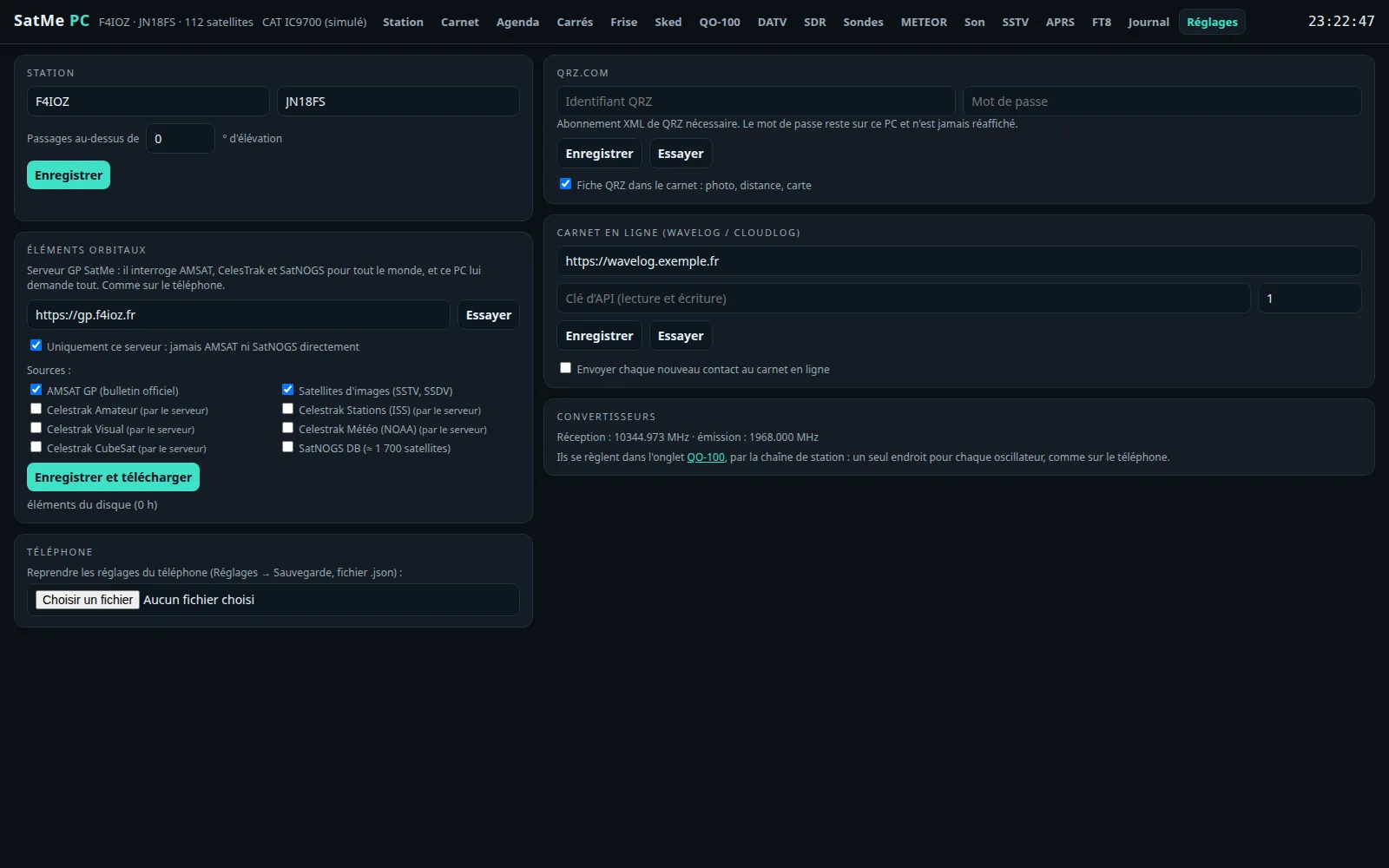
Éléments orbitaux card (see also Orbital elements): the server (https://gp.f4ioz.fr, Essayer (try), Par défaut (default)), Uniquement ce serveur : jamais AMSAT ni SatNOGS directement (this server only: never AMSAT or SatNOGS directly), the Sources (AMSAT GP (bulletin officiel) (official bulletin), Satellites d'images (SSTV, SSDV) (picture satellites), the Celestrak groups (through the server), SatNOGS DB), Enregistrer et télécharger (save and download); the line below gives the elements' age. As on the phone: the SatMe GP server first (https://gp.f4ioz.fr by default), or that server only, and the sources to choose — AMSAT's bulletin, CelesTrak's groups (through the server only: the PC never asks CelesTrak anything), SatNOGS DB, and the picture satellites (SSTV, SSDV): LAPAN-A2, ASRTU-1, HADES-SA, Geoscan-2/4/5, 239Alferov, UmKA-1, UTMN2, SONATE-2… most of them missing from AMSAT's bulletin, asked one by one by their number.
- AMSAT Live OSCAR Status (Services en ligne): Signaler tout seul chaque passage où j'ai fait un contact (report by itself each pass where I made a contact; « Heard » on amsat.org, with my callsign and my locator, once the pass is over).
- QO-100 at start: Reprendre la réception QO-100 au démarrage (resume QO-100 reception at start; otherwise a banner offers it in the cockpit). Reception only.
For other programs on the PC (a logger, a dashboard, a script): Réglages › Interfaces › Lien satellite, off by default. Once ticked, ws://localhost:8095/ (the port can be changed) pushes JSON text frames; on this PC only, unless SatMe-PC was started with --reseau. Nothing a client sends is acted upon (ping is answered, close echoed).
type |
When | Fields |
|---|---|---|
hello |
on connecting |
app, version, callsign, locator
|
satellite |
every second while a satellite is followed |
time, name, catnum, az, el, rangeKm, rangeRateKmS, transmitter, downlinkHz, uplinkHz (with Doppler), dopplerDownHz, dopplerUpHz
|
passAlert |
the followed satellite and the ★ favourites |
kind (aosSoon 5 min before, with inS; aos; los), name, catnum, aos, los (ms UTC), maxEl, aosAz, losAz
|
qsoLogged |
a contact goes into the log |
time, call, grid, satellite, catnum, mode, rstSent, rstRcvd, downlinkMHz, uplinkMHz, az, el, myGrid
|
{"type":"satellite","time":1792089000000,"name":"ISS","catnum":25544,"az":212.4,"el":31.7,"rangeKm":812.3,"rangeRateKmS":-4.512,"transmitter":"FM voice repeater (V/U)","downlinkHz":437806580,"uplinkHz":145987810,"dopplerDownHz":6580,"dopplerUpHz":-2190}
Réglages › Interfaces › Fréquence pour les carnets, off by default: a server speaking the rigctld network protocol, port 4532 (it can be changed; not the rotator's), on this PC only unless « Réseau local » (local network) is ticked and SatMe-PC was started with --reseau. A logging or digital-modes program set to « rigctld » at 127.0.0.1:4532 reads:
-
fthe sky frequency of the reception in progress — the rig when connected by CAT, else the SDR receiver; on QO-100 the nominal downlink (10 489 750 000), or the uplink when « Noter la montée » (log the uplink) is ticked; -
mthe mode and passband,vVFOA,s/isplit and the transmit frequency when there is one (QO-100's uplink, the rig's TX),twhether SatMe is transmitting now (DATV, SSTV, I/Q calibration); -
\dump_state,\chk_vfo,\get_powerstat,\dump_caps, the long forms, and the extended answers (+,;).
T (PTT) and every transmit setting are always refused (RPRT -11). F and M too, unless « Autoriser le changement de fréquence » (allow frequency change) is ticked: they then retune the SDR receiver only — never the rig, nor while QO-100 is on the rig.
Réglages › Interfaces › Molette USB, off by default, Linux and Windows: the USB volume knob tunes, as on the phone. On Linux it is read from /dev/input; when it cannot be read, the card gives the udev rule (plugdev group) to copy into a terminal. On Windows, see below.
-
Turning: one step (10 Hz, 100 Hz or 1 kHz). Pressing: change the step, next target, or offset to zero. Keys A, B, C of a small keypad choose the target (« Apprendre » (learn), then press the key).
-
Accorde (tunes): Auto (the SDR tab tunes the SDR receiver, the QO-100 cockpit the narrow band; elsewhere the rig when linked by CAT, else the running SDR), or always the Poste (rig: VFO, RX or TX offset), the SDR, QO-100.
-
Capturer (capture; option): SatMe alone reads the knob, the desktop volume no longer moves while SatMe-PC runs; never a full keyboard.
-
Reception only: the knob never keys a transmitter and starts nothing.
-
The udev rule (Linux), when the card says the knob cannot be read — in a terminal, then unplug and replug the knob (your account must be in the
plugdevgroup):echo 'SUBSYSTEM=="input", ATTRS{idVendor}=="2341", ATTRS{idProduct}=="484d", MODE="0660", GROUP="plugdev"' | sudo tee /etc/udev/rules.d/70-satme-molette.rules && sudo udevadm control --reload && sudo udevadm trigger(the card gives the same line with the plugged knob's numbers). A chip in the header shows the target and the step, and changes them.
-
On Windows: the volume keys are read through PowerShell (shipped with Windows, nothing to install). Windows does not tell them apart: they are all the PC's volume keys, the knob's and a keyboard's alike. Capturer takes them all for SatMe: the PC's volume no longer moves while SatMe-PC runs (the card says so).

The knob plugged into this PC tunes another SatMe-PC station, the one you run from afar. On this PC, start SatMe-PC, tick Accorder avec la molette de volume USB (tune with the USB volume knob), then in the same card, Relais vers une autre station (relay to another station):
- The station's address:
https://satme.mydomain.org(behind nginx) orhttp://192.168.0.65:8090(at home). - Its remote access password (the one in the station's Réglages › Accès à distance), Se connecter (log in). It is used once to open a session and never kept; only the session is, on this PC (readable by your account alone).
- « Relais en marche vers … · N crans envoyés » (relay running to …, N steps sent): each step goes to the station, which applies it with its own knob settings (step, target, learned keys), even when it has no knob of its own. Arrêter le relais (stop the relay): the knob tunes this PC again.
When the session ends on the station (Fermer les autres sessions, log out the other sessions, or after its 30 days): « Session terminée sur … » (session ended on …), and the relay waits for the password. The station must be a recent SatMe-PC. Reception only, as always.
Réglages › Annonces, Annonces vocales card, box Annoncer à voix haute ce qui arrive (en français) (announce aloud what happens, in French), off by default: what the station does, said aloud in French.
- What (each announcement has its box): the followed satellite N minutes before AOS, its AOS and LOS (maximum elevation), a DATV / SSTV / I/Q transmission starting or stopping and « Émission en cours » (transmission in progress) every N minutes, LEILA on QO-100, a new SSTV picture, your own callsign decoded in FT8 / FT4 or CW, DATV locked or lost and the callsign read in the picture, an aircraft scatter window, the rotator at its end stop or lost, the SDR receiver stopped by itself, the knob's step.
- How: numbers in words, callsigns spelled (Alfa, Bravo…), frequencies digit by digit; three levels of detail; the same sentence never twice in 30 s, three waiting at most.
- Through: the browser's voice (a local French voice), or a voice on the PC (speech-dispatcher, eSpeak NG, Piper), the SDR speaker lowered meanwhile. Tester (test); a speaker in the header mutes at once.

- QRZ.com: user name and password (an XML subscription is needed; the password stays on this PC and is never shown again), Enregistrer, Essayer; Fiche QRZ dans le carnet : photo, distance, carte (QRZ record in the log: photo, distance, map).
- AMSAT Live OSCAR Status: see above.
- PSK Reporter (off by default): the FT8 / FT4 stations heard sent every 5 minutes with their locator, the frequency and the satellite, with your callsign and your locator — only when the frequency is sure (rig on CAT).
- Carnet en ligne (Wavelog / Cloudlog) (online log): the address, the API key (read and write), Enregistrer, Lire les profils (read the profiles; « Ici → » (here →) the station profile of the place you operate from; if it is missing, create it: DXCC, country, CQ and ITU zones); Envoyer chaque nouveau contact au carnet en ligne (send each new contact to the online log) after a delay (30 s to 30 min). Only contacts entered after it is switched on are sent. See the log.
- Envoyer vers un site web (send to a web site; only with the Publication web module ticked): an address of your site or a folder, an optional token, Tester, each kind Sur clic / Automatique / Jamais, the En direct parts, the queue. See Web publishing.
- Skeds annoncés (hams.at) (announced skeds): Montrer les skeds annoncés sur hams.at (show the skeds announced on hams.at) and an optional API key (the common window with you); fetched every 5 minutes.
- Phonie → texte: Modèle (model), Calcul (computing: carte NVIDIA si elle répond, sinon processeur (NVIDIA card if it answers, else processor), carte NVIDIA (CUDA), processeur), Python, Installer le moteur (install the engine), Vérifier (check); Traduction (translation): Traduire en (translate into), the languages heard, Installer la traduction; Traduction parlée (spoken translation): Installer la voix (install the voice), Installer la voix clonée (install the cloned voice), Retirer (remove). See Phonie → texte.
-
Téléphone: Reprendre les réglages du téléphone (take over the phone's settings; its
.jsonbackup file). - Accord fin (clé SDR): Loupe (magnifier), Vernier and its Rapport (ratio: 20 Hz, 200 Hz or 2 kHz per cm), Caler sur la voix (voice netting) — they act on the dongle's software offset, never on the rig.
- Émission du poste (IC-9700) and Liaison pendant l'émission: see The IC-9700 transmitting.
Correction I/Q des émetteurs card: the Émetteur (transmitter: ADALM-PLUTO, bladeRF 2.0, HackRF One), the sliders, Remettre à zéro (reset); Mesure et calibration (measurement and calibration): the attenuation, Porteuse d'essai (test carrier; la mesurer, measure it), Calibration automatique, Arrêter (stop). For each transmitting board (ADALM-PLUTO, bladeRF, HackRF, by serial number), the LO leakage, the image and the crystal error corrected just before the transmitter, for DATV as for SSTV. Neutral by default: samples and LO exactly as before. Sliders (applied live to a transmission on that board), a test tone and an automatic closed-loop calibration, indoors only (1245 MHz, −40 dB at most, the HackRF's VGA at 0): another SDR receiver of the station hears the tone, the leakage and the image, and SatMe looks for the bottom; the receiver lent by the SDR tab is given back as it was.
Réglages › Démarrage: three cards, Options de démarrage (startup options), Mise à jour (update) and Configuration rapide (quick setup).

The command line options, set from the page: Accès depuis le réseau (access from the network, --reseau), Port (--port), Dossier des données (data folder, --dossier). A table in three columns: the option, En ce moment (now: its value and where it comes from — ligne de commande, fichier de démarrage or par défaut: command line, startup file, default), Au prochain démarrage (at the next start: the choice to save — par défaut (non), oui, non for the network; a port from 1024 to 65534; a folder). Enregistrer (save).
-
The order: the command line wins over the startup file, the file over the defaults (this PC only, port 8090,
~/.satmeor%APPDATA%\SatMe). An option given in the launcher therefore wins over this setting: the page says so, and it has to be removed from the launcher for the setting to count.--localforces "this PC only" whatever the file says. -
The startup file:
~/.config/satme/satme-pc.propertieson Linux and macOS ($XDG_CONFIG_HOME/satme/when set),%APPDATA%\SatMe\satme-pc.propertieson Windows; its path is written under the card (Fichier de démarrage : …, « pas encore écrit », not written yet, until something is saved). Outside the data folder, since it says where that folder is. Linesport=8090,reseau=true,dossier=/path, editable by hand while SatMe-PC is stopped. See also Install SatMe-PC. -
Taken into account at the next start (« Enregistré : pris en compte au prochain démarrage de SatMe-PC »). The ⟳ Redémarrer SatMe-PC button (restart) only appears where SatMe-PC can start itself again safely: started by the icon on Windows or by
lance-satme.shon Linux. Otherwise the page says what to do: under systemd,systemctl --user restart satme-pc; in a terminal, Ctrl+C and start it again. Refused while transmitting; before it, a confirmation recalls that the transmission, the rig, the rotator and the receptions stop as when closing. The page comes back by itself (at the new port if it changed). - Accès depuis le réseau on oui: a warning recalls the password the other machines must give (with none yet, one is drawn at the start) and that without HTTPS everything travels in clear — home network only, never open to the Internet; see Remote access. A confirmation before saving.
- Dossier des données: a full path SatMe-PC can write to, outside the current folder. Two choices appear: copier mes données dans le nouveau dossier au prochain démarrage (copy my data into the new folder at the next start; it must be empty or new) or commencer avec un dossier vide (start with an empty folder). The old folder is never deleted. A folder inside the program's folder is refused (on Windows, the installer replaces it at each update: see On Windows).
- From this PC only (127.0.0.1, ::1) or a session opened with the remote access password; elsewhere the fields are greyed out (« Seulement depuis le PC de la station, ou une session ouverte avec le mot de passe »). A request coming from another site is refused.
Mise à jour card: Vérifier les mises à jour (check for updates, ticked by default) — one question to GitHub's public API, without an account, at start and then once a day; the answer is kept (mise-a-jour.json). The status line gives the version here, the latest published (plus récente, newer, or à jour, up to date) and when it was last checked. Vérifier maintenant (check now) asks again at once; La page de la version opens the GitHub release page. A newer version brings the ⬆ 2026.10.NN badge into the header (see Getting around). Nothing is downloaded or installed by itself. A build made by hand (development) asks nothing.
Configuration rapide card: Configuration rapide… opens the five steps of the first start again (see Getting around), Quoi de neuf… the notes of every version; this SatMe-PC's version beside them.
Réglages › Accès à distance, Accès à distance card: the password drawn at the first start, Nouveau mot de passe (8 caractères au moins) (new password, 8 characters at least) then Enregistrer, Fermer les autres sessions (close the other sessions), Supprimer le mot de passe (delete the password), Se déconnecter (log out). Started with --reseau (or Accès depuis le réseau on oui in Réglages › Démarrage), SatMe-PC asks every other machine for a password (a login page); this PC itself gets in without one.
-
At the first start with
--reseau, a four-word password is drawn, written in SatMe-PC's log and shown here until replaced (8 characters at least). With no password, other machines get nothing. - A session lasts 30 days (a cookie). Five wrong tries from one address: a minute's wait, then twice as long after each series (an hour at most).
- The password is kept only hashed (PBKDF2) in
acces-distant.properties, never in the backup; changing it closes the other sessions (Fermer les autres sessions too). A transmission started remotely asks the same confirmations as here. - Without HTTPS the password and the page go in clear: a trusted network only (or an encrypted tunnel).
-
HTTPS (HTTPS card, off by default, set on this PC only): the same page on a second port (8443 by default), with a certificate made by this PC on first use (EC P-256, about a year, made again by itself a month before the end, kept in
https/) for its names and addresses. The browser warns once: compare the SHA-256 fingerprint it shows with the card's before accepting. The page becomes « secure »: the microphone (IC-9700 transmitting), screen kept on and install then work from another machine. Open the port:sudo ufw allow from 192.168.1.0/24 to any port 8443 proto tcp. Nouveau certificat (new certificate) makes a new one (browsers will warn again). Plain http stays as before. -
Firewall (Linux, ufw): open the page's port to the home network only, once, in a terminal:
sudo ufw allow from 192.168.1.0/24 to any port 8090 proto tcp(adapt the range). For pairing the phone by QR code, the next port:sudo ufw allow from 192.168.1.0/24 to any port 8091 proto tcp. From outside, go through a VPN into the home network (and allow the VPN's range the same way); never open the port to the Internet. - Sur cet appareil (on this device): Garder l'écran allumé (keep the screen on) and Installer l'application (install the app: a window of its own, an icon), for this browser; browsers allow them only on http://localhost or over HTTPS.
For the page opened from afar (a VPN, another house): the Distant (remote) button at the top, or Réglages › Accès à distance › Mode distant, for this browser only (suggested when the page is opened from another machine). The Mode distant badge and its « ? » list what is lightened.
-
🔈 Écouter ici takes the low-latency path: a WebSocket (
/api/son/ws, behind the same session), 20 ms frames at 8, 12 or 16 kHz (low-passed then resampled), as 16-bit PCM or µ-law (half the bandwidth: 64 kbit/s at 8 kHz). The player keeps a 60 to 120 ms buffer set from the measured jitter (95 % of the gaps + 20 ms), replaces a lost frame by the previous one faded, follows the sound card's drift (±0.5 %), and shows the estimated latency, the jitter, the round trip, the frames concealed. On this PC, about 0.11 s instead of 0.6 s with the HTTP stream, which stays as the fallback (Voie (path) choice: auto, low latency, HTTP stream). - Over http from another machine, browsers refuse the AudioWorklet: the same buffer then runs in a ScriptProcessor (about 20 ms more). No Opus (it would need a native encoder on the PC).
- Lightened: SDR spectrum and waterfall at 5 frames a second (256 points, levels in one byte), the magnifier, the QO-100 panorama, the DATV wide band and level meter less often, DATV video as a thumbnail every 2 s (▶ Vidéo en direct (live video) on the picture to ask for it), map, aircraft and ships every 5 to 10 s, the live stream reduced to the shown tab, animations off.
- Reception only: this path refuses any sound going up and any transmit command (the connection is closed). The IC-9700's microphone and PTT have their own path (Émission IC-9700 panel, see The IC-9700 transmitting), over HTTPS from another machine.
Réglages › Sauvegarde, Sauvegarde générale card (general backup): ⤓ Télécharger la sauvegarde (download the backup) — the whole station in one file (rig, rotator, QRZ, online log… settings, the log, pass journal, APRS and its trophies, SSTV sheets), avec les enregistrements, images SSTV, METEOR et radiosondes (with the recordings, SSTV, METEOR and radiosonde pictures; heavier); the size is shown beside it (« environ 12,3 Mo », about 12.3 MB: SatMe-PC's French page writes sizes with a decimal comma, here as in the recording lists). It holds your passwords and keys: keep it to yourself. Restaurer (restore): choose a backup; it is taken up at SatMe-PC's next start (nothing is lost: the settings replaced are kept apart in avant-restauration-…, the log is merged, files already there stay; Annuler (cancel) as long as it is not done).
Déploiement card: the station's settings and the startup options in a small JSON file, to set up another PC the same way (a club's PCs, a portable station). Not the log nor the pictures: the general backup keeps them.
-
⤓ Fichier de déploiement (deployment file):
deploiement.json. Without the secrets by default (passwords, API keys, QRZ.com login, SatMe-Node codes); the box avec les secrets (mots de passe, clés, identifiants) adds them — then keep the file to yourself. The remote access password and the HTTPS certificate are never in it. -
Importer sur ce PC (import on this PC): choose the file; a preview first shows what would change, setting by setting (Réglage, Ici, Dans le fichier: setting, here, in the file; secrets masked « •••• » and marked 🔒), and how many are already the same. Two boxes: les réglages de la station (the station's settings, put in at the next start; those replaced kept in
avant-deploiement-…) and les options de démarrage (réseau, port, dossier), written at once into the startup file. Importer (after a confirmation) or Annuler. Until SatMe-PC has restarted, the card says so, with Annuler. - Like the startup options: from this PC only, or a session opened with the password.

Same card, Lancer SatMe-PC avec la session: a file to install yourself — SatMe-PC installs nothing. ⤓ satme-pc.service (Linux), a systemd --user unit; ⤓ SatMe-PC-demarrage.cmd (Windows), a small launcher for the Startup folder; Voir (show) displays them in the page. The options given on the command line right now are copied into them; the others are read from the startup file, as usual.
-
Linux: in the folder of the downloaded file,
Optional:
mkdir -p ~/.config/systemd/user && cp satme-pc.service ~/.config/systemd/user/ systemctl --user daemon-reload && systemctl --user enable --now satme-pcloginctl enable-linger $USERso that it starts at power-on, without opening a session. Afterwards, to restart it:systemctl --user restart satme-pc(the Redémarrer button is not offered under systemd). -
Windows: Windows + R, type
shell:startup, Enter: the Startup folder opens; putSatMe-PC-demarrage.cmdthere (or a shortcut toSatMe-PC.exe: right click › New › Shortcut).
- Nothing opens by itself. A serial port opens only when it is chosen and « Connecter » is clicked. No automatic search.
- RTS and DTR low by default. Icom CAT raises them (its USB bridges need it): pick the right rig's port. The TS-2000 keeps them low, and a port that echoes our own words (a RigExpert's PTT port) is closed at once.
- On Linux the system raises RTS/DTR for an instant on every port opening, before SatMe can lower them: one more reason to open only the port meant.
-
CAT transmits only through the IC-9700's PTT — held in the Émission IC-9700 panel (one client, 2 s guard, time-out, released on disconnect and on close), or taken by the Émission FT8/FT4 card for one message at a time, never without the operator's action (attendance watchdog);
TX,KYrefused by the TS-2000 driver. APRS through a KISS TNC transmits only when you send a message, your position or a status yourself. - The MiniTiouner's LNB supply is off unless chosen.
- The ADALM-PLUTO and the bladeRF 2.0 transmit only from the DATV and SSTV tabs, on a confirmed click, within the rules above; their receivers never write the transmit side. DATV and SSTV never transmit at the same time.
- The IC-9700 over the network only receives, unless Émission par le réseau autorisée is ticked on this PC: then PTT alone passes and the TX audio path is requested; tuner, CW and voice memories stay refused before they reach the rig.
- Nothing goes to the Internet without a ticked box: space weather, SatNOGS sharing, PSK Reporter, OpenStreetMap background, wide band chat, the online log upload — all off by default. Only the look for a new version is ticked by default: one question to GitHub a day, sending nothing about the station; untick it in Réglages › Démarrage › Mise à jour. Nothing is ever downloaded or installed by itself.
- The interfaces never transmit: rigctld refuses PTT, the USB knob tunes without ever transmitting, ADS-B, AIS, scanning, the measurements and the generator only receive, the Montage profiles are not applied during a transmission; the Sun scan moves the rotator only after confirmation.
- The HackRF One transmits only from the DATV tab, on a confirmed click, for the indoor test or into a load, its RF amplifier always off and its gain 20 dB at most; never to QO-100.
- Esc, or the header's TX light, stops every transmission (DATV, SSTV, FT8 / FT4, IC-9700 PTT, I/Q calibration, test card); it only stops, it never starts anything.
- A test copy of SatMe-PC beside the station:
SATME_SANS_SERIE=1(no serial port opened).