Repository navigation
SatMe PC Digital modes
← SatMe-PC guide · October 2026
FT8 / FT4, APRS, satellite telemetry (packets, SSDV, FUNcube), voice written out and translated, METEOR and radiosondes. SSTV has its own page: SSTV; CW is decoded in the log and the QO-100 cockpit.
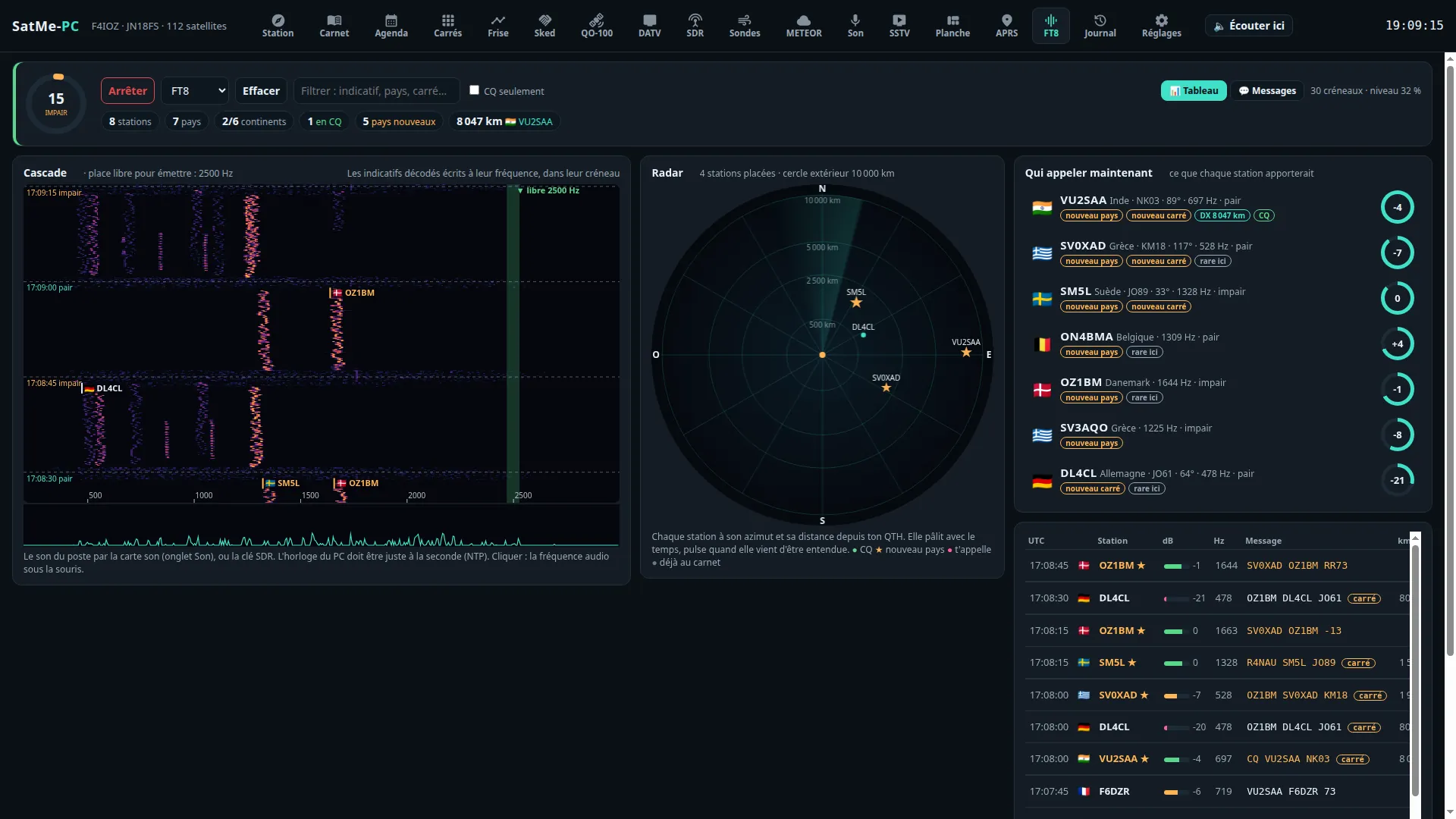
Where: workspace Modes (key 4) › FT8/FT4 (all on one page: the waterfall, decoded lines and « Qui appeler maintenant » on the left, the Émission FT8/FT4 card and the radar on the right). At the top: Écouter / Arrêter (listen / stop), FT8 or FT4, Effacer (clear), Filtrer (filter: callsign, country, locator…), CQ seulement (CQ only), 📊 Tableau (table) or 💬 Messages, and 👁 Stations guettées (watched stations: the callsigns to watch for, « K1ABC EA8/F4XYZ »). The sound: the rig's through the sound card (Son tab) or the SDR dongle; the PC's clock must be right to the second (NTP). On QO-100, the cockpit has its own FT8 decoder (see QO-100).
A tab made to see the band, not only to read it:
- The slot's ring: the 15 s as a circle, the countdown, cyan when the slot is even, orange when odd; beside it the clock read from the stations' DT.
- A waterfall that speaks: 46 s, the slots' edges and times. Each callsign decoded is written with its flag, at its frequency, in its slot. A free spot to transmit is found by itself (the quietest place between 500 and 2 500 Hz, away from the stations decoded; on QO-100, only in the digital segments).
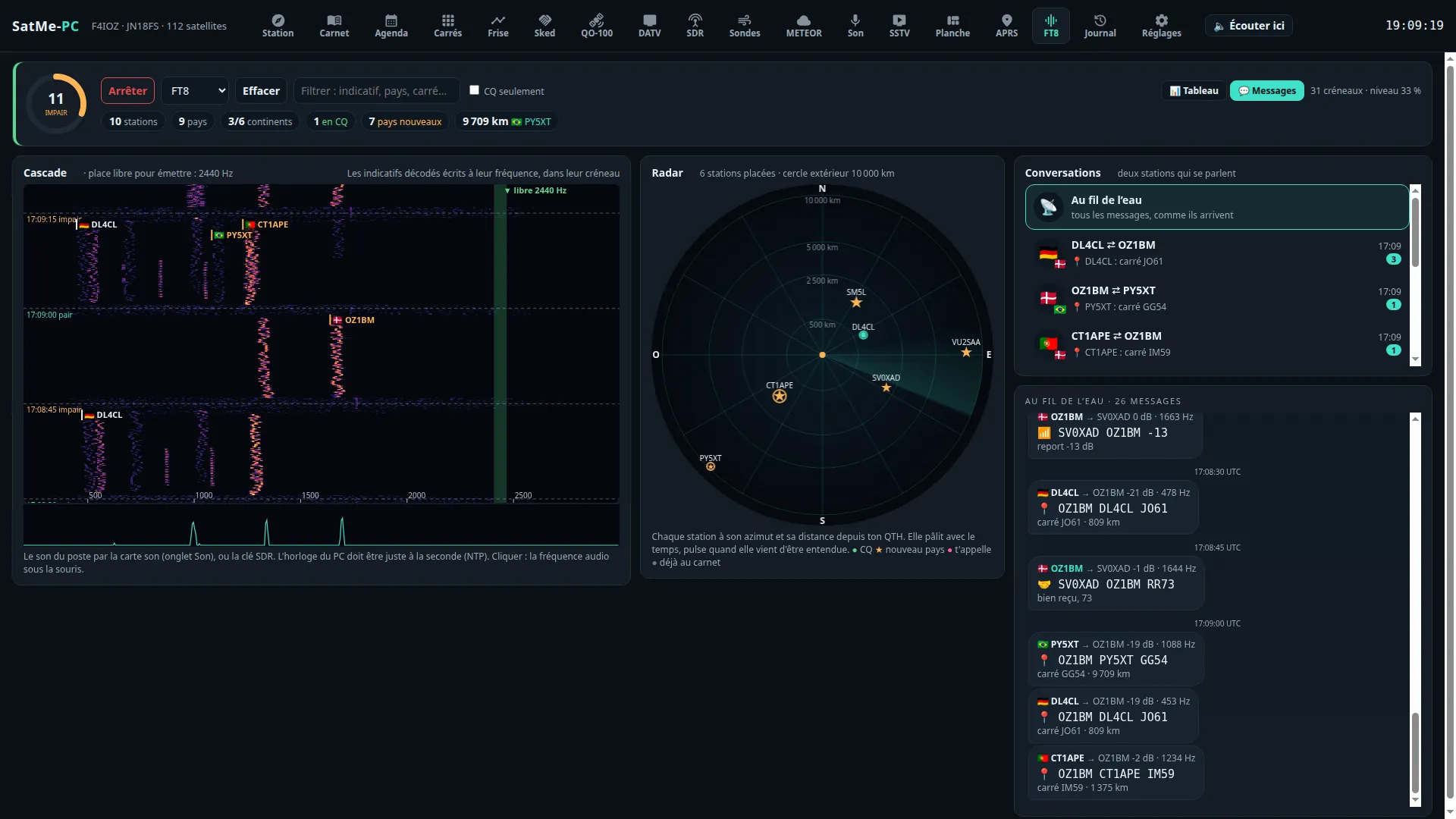
- The radar: each station is a dot at its bearing and distance from your QTH, fading with time and pulsing when just heard. Green for a CQ, ★ for a country new to your log, pink when it calls you.
- Who to call now: the stations of the last 5 minutes, ranked by what each would bring (new country, new locator, distance, strength, CQ, rarity); a click prepares the contact in the log.
- The same marks everywhere (list, messages, waterfall): calling me, watched, new country, new locator, already worked. Stations guettées: the callsigns to watch for. A banner when reception goes wrong (no sound, digital silence, nothing decoded for 40 slots).
- 💬 Messages, like a messaging app: the conversations between two stations (flags, last message, ✓ when the QSO is complete), each one as bubbles, or everything as it comes. Each message says what it is: 📣 call, 📍 locator, 📶 report, ✅ report received, 🤝 RR73 / 73.
The decoder, measured on a corpus of whole slots (weak stations down to −22 dB, overlaps, Doppler slopes, FT4): the satellite's known Doppler drift removed before decoding; each candidate read in its own narrow channel (start to 1/32 of a symbol, frequency to 1/16 of a tone); decoded signals subtracted and the remainder searched again; the residual drift searched, and that of an LNB on the move (up to ±15 Hz/s, see A drifting LNB); hashed callsigns recovered (<CALLSIGN> when known); during a QSO, a priori decoding of the other station's possible replies (marked ap). SatMe-PC digs deeper when the satellite is low or time is left in the slot. FT8 listening (on or not) and the FT8 / FT4 mode are kept from one restart to the next.
Reports show as sent: « R-12 » with its R, « -07 » on two digits; free text is decoded.
Transmitting FT8 / FT4 through the IC-9700 (Émission FT8/FT4 card: answer with a double-click, 📣 Appeler CQ, automatic sequence, USB-D, never unattended, a first test step by step): its own page, FT8 / FT4: receiving and transmitting.
On your site (web publishing, an optional module): the Passages FT8/FT4 sur le site card sends a journal pass with its messages, and the live FT8/FT4 part each slot once decoded — see FT8 / FT4 › On your site.
PSK Reporter (Réglages › Services en ligne, online services; off by default): the FT8 / FT4 stations heard sent every 5 minutes with their locator, the frequency and the satellite — only when the frequency is certain (rig on CAT).
Where: workspace Modes › APRS. The frames heard (through the sound card, the SDR dongle, or a KISS radio), the count of stations and of those relayed by the ISS, the map (Carte tab, APRS layer), and the 🏆 Trophées APRS (APRS trophies) — the phone's game: each station heard, each locator, each country, your frame come back through the ISS; records, badges, APRS contacts, latest celebrations.
- Decoding: Décoder l'APRS (AFSK 1200 bauds) in the Son tab (or the Son chip in the header strip), on the rig's sound card or the SDR dongle. Filtrer (callsign, message), par l'ISS seulement (through the ISS only).
- APRS radio over KISS (TH-D72, TM-D710, Mobilinkd…; fold-out Radio APRS en KISS): the port, the speed, Connecter / Déconnecter (connect / disconnect). Lever RTS/DTR à l'ouverture (raise RTS/DTR on opening) only if that TNC requires it — never on a rig's interface (it would go into transmit). Listening: l'ISS quand elle passe, sinon 144,800 (the ISS when it passes, else 144.800), l'ISS (145,825), au sol (144,800) (terrestrial), la fréquence de la radio, sans y toucher (the radio's frequency, untouched); Doppler de l'ISS (pas de 5 kHz) (ISS Doppler, 5 kHz steps). The radio decodes by itself; its frames arrive with the others; disconnected, it returns to how it was. On the TH-D72's cable: CAT or KISS, not both at once.
- Transmitting through the radio (only what is asked): Message (to a callsign, 67 characters, numéroté (accusé de réception), numbered, with acknowledgement), Ma position (my position; position approchée (à moins de 500 m), approximate position, within 500 m; SSID) or Statut (status); Chemin (path) selon l'écoute (according to listening), ISS (ARISS) or au sol (WIDE1-1,WIDE2-1); Émettre (transmit). When SatMe could not read the radio's frequency, tick La radio est sur 145,825 MHz (ISS) ou 144,800 MHz, en FM (the radio is on 145.825 MHz or 144.800 MHz, FM). Balise ISS (ISS beacon): my position once per pass, the ISS at 15° — only when SatMe has read the radio on 145.825; one frame every 20 s at most (the ISS digipeater is shared by a whole continent).
See also the phone's APRS guide.
Where: workspace Modes › Télémesure, sub-tabs Paquets, SSDV en BLU, Images SSDV, BPSK.
The Télémesure tab decodes what satellites send about themselves: FSK / GMSK packets from 1200 to 9600 bit/s, SSDV pictures, BPSK telemetry in the FUNcube format. Four sub-tabs: Paquets, SSDV en BLU, Images SSDV, BPSK. Everything is off by default; receive only. Frames received are kept on the PC (telemesure/); nothing goes to the internet without the Partager avec SatNOGS DB (share with SatNOGS DB) box.
The Paquets sub-tab decodes cubesats in FSK or GMSK from 1200 to 9600 bit/s, including the « G3RUH » 9600 bit/s format (1 + x¹² + x¹⁷ scrambler, NRZI, HDLC frames with CRC-16, mostly AX.25).
- Ticked (off by default), it takes the main SDR receiver's raw I/Q samples off QO-100 (not the sound): FM discriminator, residual frequency correction up to ±12 kHz around the followed Doppler, clock recovery, then two readings of the bits (with and without the scrambler).
- The rate comes from the followed satellite's SatNOGS DB transmitter (FSK, GFSK, GMSK, MSK and its speed) or is chosen by hand. AX.100 « mode 5 » frames (ASM + Golay) and satellite-specific protocols are not read.
- Each frame: the time, the AX.25 header and its text (or the bytes), the received and transmitted frequency (Doppler removed), the correction applied. Kept per pass in
telemesure/paquets/(one JSON line per frame, and a KISS file if ticked). - Essai (test): a made-up burst (telemetry and SSDV packets) goes through a separate decoder. The SDR receiver's test generator also has a « Paquets 9600 » signal: telemetry bursts and an SSDV picture, end to end.
- Partager avec SatNOGS DB (off by default): each frame received from a followed satellite is sent with the public SiDS protocol, with the station's callsign, UTC time and the position rounded to 0.1° (≈ 10 km). Frames from the test, the generator and replayed recordings are never sent.

SSDV has its own page: SSDV — where the packets come from for each satellite, the rig in USB-D and Autre fréquence…, the SSDV en BLU sub-tab (SO-127's two-tone FSK, Capturer les bits, Relire a WAV, Essai), the Images SSDV completed over several passes, the SSDV pictures in the SSTV tab, the auto-pilot's SSDV campaigns and the 🌐 to your site.
- SSDV en BLU (SSDV in USB): SO-127 (HADES-SA)'s SSDV, two-tone FSK (800 bit/s, 1600 Hz shift, or 200 bit/s, 1125 Hz) decoded from the USB audio — the rig's sound card (IC-9700 in USB-D) or the SDR receiver.
- Images SSDV: the pictures rebuilt as the packets come, from every decoder — Paquets, SSDV en BLU, IO-86's AFSK 1200 (through the sound card's APRS decoder) and the Geoscan satellites' JPEG chunks; completed over several passes (same callsign, same number, within 3 days), kept on disk, ⤓ PNG / JPEG, Abandonner, Importer des paquets….
The BPSK sub-tab decodes telemetry in the FUNcube format: AO-73 (FUNcube-1) and those reusing it, 1200 bit/s BPSK, the same coded frames as the QO-100 beacon (256 bytes every 5 s).
- Ticked (Décoder la télémesure 1200 bit/s, decode 1200 bit/s telemetry; off by default), it listens to the main SDR receiver off QO-100: tune it in SSB (USB) to the telemetry downlink (AO-73: 145.935 MHz), Doppler followed by SatMe; the carrier is searched across the audio band then held by a Costas loop.
- Each frame: satellite and type (whole orbit, high resolution, message), the real-time values read from AMSAT-UK's published downlink document and its equations (panel and battery voltages and currents, temperatures, radio, PA, antennas, software state), the message if any, or the raw bytes.
- Essai: a made-up signal goes through the same decoder (marked essai). Uploading to the FUNcube data warehouse is not done.
- QO-100 beacon: the middle beacon at 400 bit/s is decoded in the QO-100 cockpit (Balise sub-tab); a link leads there.

What the station hears in SSB or FM — the sound card, the SDR dongle's sound, or a DATV stream's — written out over by over: QO-100's SSB first. A Phonie → texte window in the SDR, QO-100 and Carnet tabs shows each over as a bubble: time, frequency (QO-100's downlink when on it), language, text (paler when the engine is less sure), and its translation when asked. Callsigns (written or spelled: « Sierra Papa five Alfa Bravo Charlie », « Fox quatre Italie Oscar Zoulou », in English, French, German, Spanish, Italian, Polish), locators (« Juliette Novembre un huit ») and reports (« cinq neuf », « five nine ») are coloured; a callsign's chip prepares the contact in the log, with the locator and report heard.
- Where: the Phonie → texte window of the SDR, QO-100 (Phonie decoder) and Carnet tabs: tick Phonie → texte; the language (langue trouvée seule, detected automatically, or forced), the source (clé SDR si elle joue, sinon carte son, the SDR dongle while it plays, else the sound card; carte son; clé SDR), Traduire en (translate into) and the language, ⤓ (the day's text), ✕ (clear the window). The engine is installed in Réglages › Phonie → texte.
- Off by default. Nothing listens and nothing starts until the window's box is ticked.
-
The engine is faster-whisper, in Python, as a separate process on this PC: during listening nothing leaves the PC. Réglages › Phonie → texte › Installer le moteur (install the engine) creates a Python environment in SatMe's folder (
stt/), installs faster-whisper from PyPI (about 150 MB; with an NVIDIA card, about 1.3 GB more for cuBLAS and cuDNN) and downloads the model chosen (large-v3 3.1 GB, turbo 1.6 GB, medium 1.5 GB, small 0.5 GB). Nothing is downloaded without that button. It needs Python 3.9 or newer (Debian/Ubuntu:python3-venv; Windows: python.org, « Add python.exe to PATH »). Another interpreter where faster-whisper is installed can also be given. - An NVIDIA card is used when it answers, else the processor (choose small or medium there). On an RTX 3060 with large-v3, 20 s of speech take about 1.3 s.
-
Translation, offline (Traduire en, French by default): each over translated on the PC with open OPUS-MT language pairs (CC BY 4.0), through English when there is no direct pair. Installer la traduction (install translation) fetches the languages ticked (Polish, German, English, Spanish, Italian, Dutch, Portuguese, Russian, Ukrainian, Czech…) into
stt/traduction. - The voice is cut between silences (1 to 25 s, the squelch respected); noise, carriers and the sentences an engine invents on noise (« Merci d'avoir regardé », thank you for watching…) are dropped. When the engine lags, the oldest over waiting is dropped, and the window says how late it is.
- Each day's text is kept in
phonie/YYYY-MM-DD.jsonl; ⤓ downloads it as text. -
🔊 Traduction parlée (spoken translation; off by default, receive only: the voice is never transmitted): each over's translation said by a synthetic voice, on the PC's speaker (the received sound lowered meanwhile), in the browser, or both; ⚙ opens its settings (voice, intonation, output, volume, foreign languages only). Two overs waiting at most, none longer than 30 s. Réglages › Phonie → texte › Installer la voix (install the voice) adds Piper (piper-tts, about 35 MB) to the engine and one voice per language (about 63 MB each,
stt/voix). Without Piper: eSpeak NG or speech-dispatcher, else the browser's voice. Intonation proche (close): on the over heard, the voice's pitch (100 times a second), its mean and range, the speed (syllables per second) and the loudness of each phrase; the synthetic voice takes about the same speed, its mean pitch is brought to the speaker's (8 semitones at most) and its phrase rises and falls are 70 % replaced by the ones heard (a degree-2 curve per phrase), by a pitch-synchronous pitch shift that keeps the length and the formants. Voix clonée (cloned voice; optional, about 1 GB: torch for the processor and the OpenVoice V2 tone colour converter, MIT licence): the speaker's timbre as well, about 2 s of computing per 10 s over.

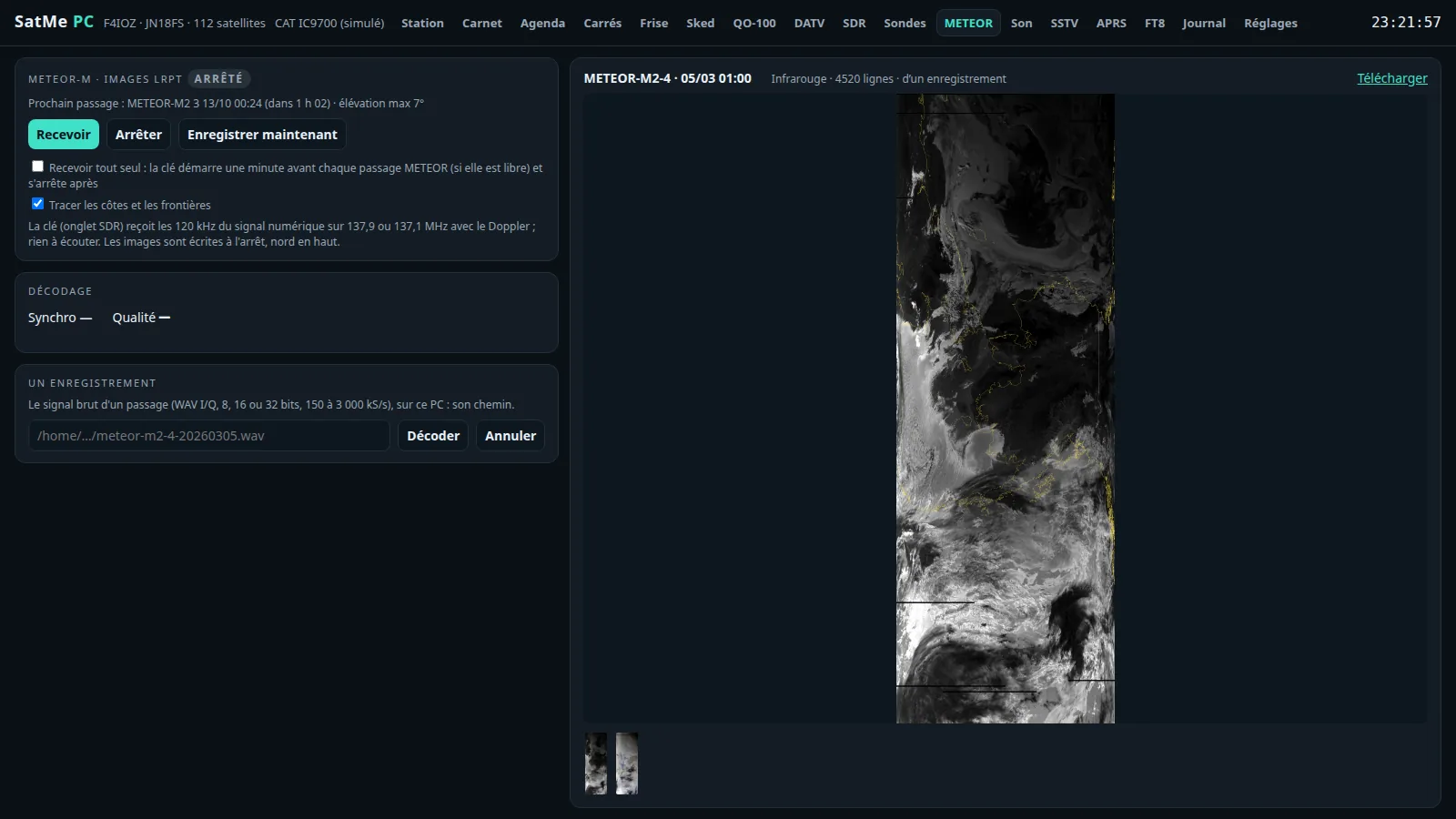
Where: workspace Ciel › METEOR. LRPT pictures from METEOR-M2-3 and M2-4 (137.9 or 137.1 MHz) with the SDR tab's dongle, Doppler followed; nothing to listen to. Recevoir / Arrêter / Enregistrer maintenant (receive / stop / save now: write what has been received without stopping); Recevoir tout seul … (receive by itself: every pass); Tracer les côtes et les frontières (draw coastlines and borders). The sync and decoding quality, the picture gallery (north up, written on stop). Un enregistrement (a recording): the path of a raw I/Q WAV of a pass (8, 16 or 32 bits, 150 to 3 000 kS/s) on this PC, Décoder. See also METEOR pictures.
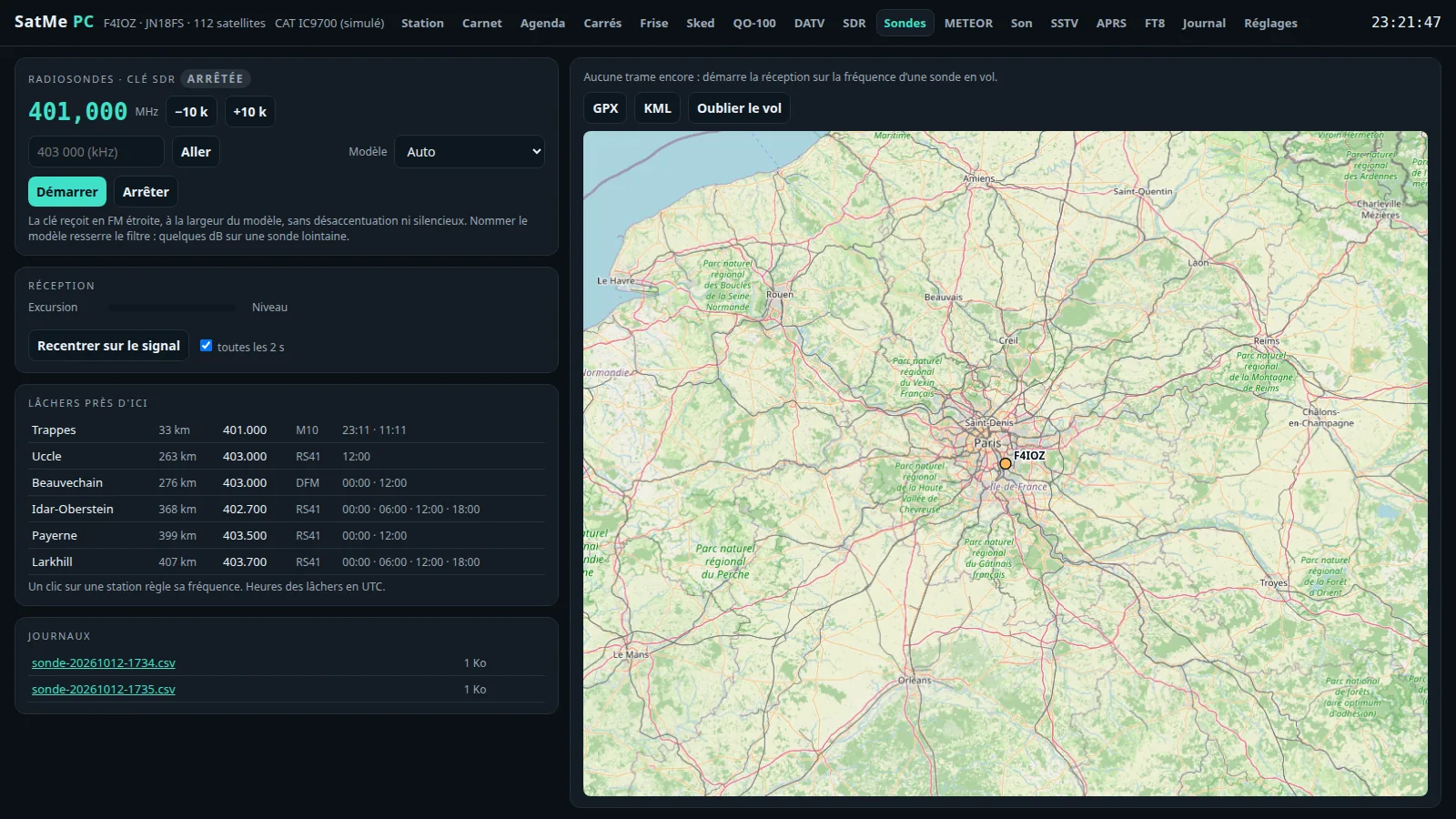
Where: workspace Ciel › Sondes (shown only if Réglages › Modules › Sondes is ticked). The dongle receives in narrow FM, at the model's bandwidth (naming it tightens the filter: a few dB on a distant sonde). The frequency (−10 k, +10 k, or in kHz then Aller), the Modèle (model), Démarrer / Arrêter (start / stop); Recentrer sur le signal (re-centre on the signal; toutes les 2 s, every 2 s); the lâchers près d'ici (launches near here; a click sets its frequency; times in UTC); the flight on a map, GPX, KML, Oublier le vol (forget the flight).