Repository navigation
SatMe PC Demo
← SatMe-PC guide · October 2026
A made-up SatMe-PC station that looks lived-in: to show SatMe-PC on a club stand, at a talk, on a VM you open from anywhere, or simply to look around before installing it at home. Nothing real is opened, nothing transmits.
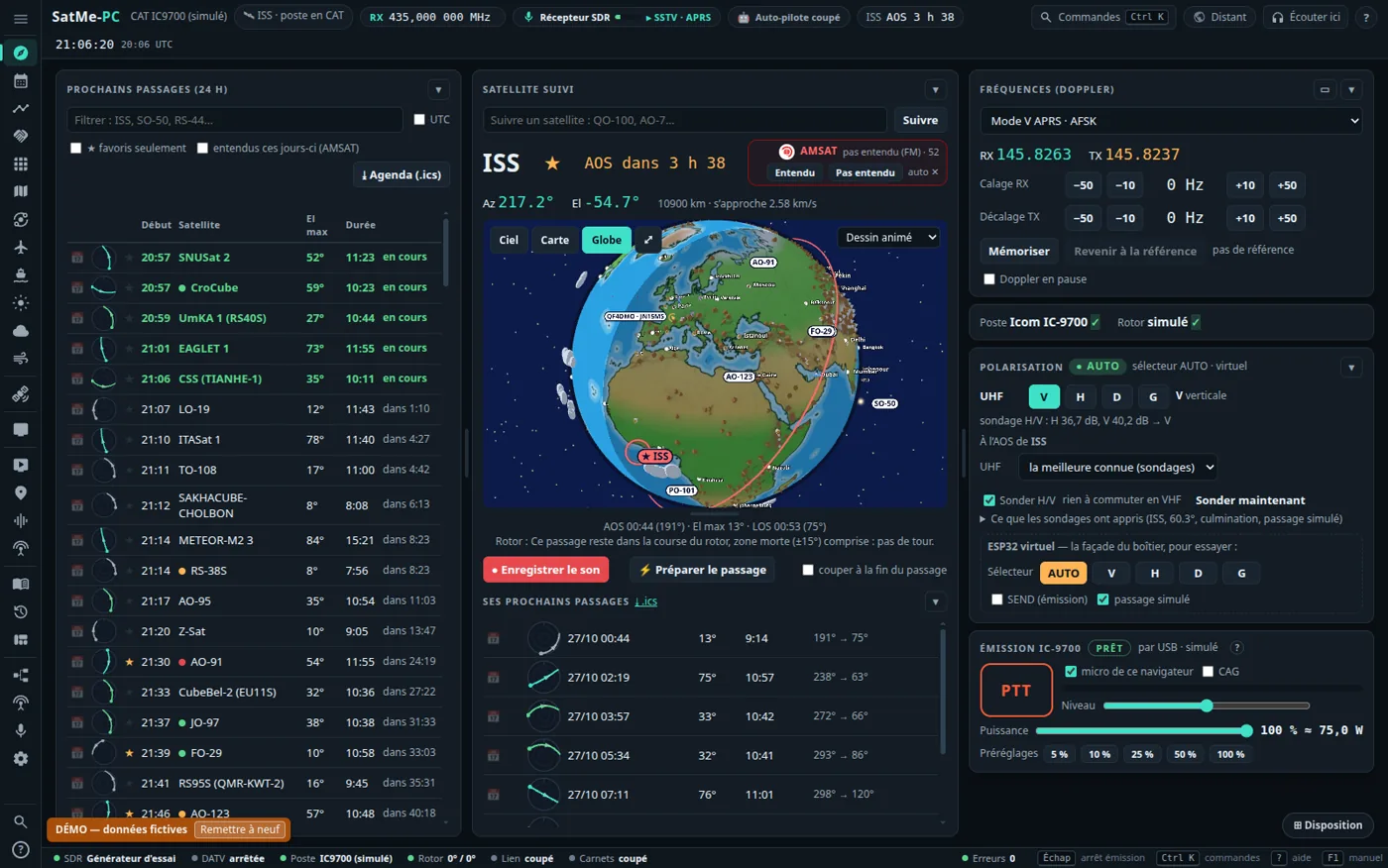
- A made-up station: callsign QF4DMO, in Clermont-Ferrand (JN15MS). Every callsign of the demonstration starts with Q, a series the ITU keeps for the Q code and gives to no country: none can be anybody's. Correspondents have a first name only.
- Data that look real: favourites (ISS, SO-50, AO-91, RS-44, AO-7, FO-29, QO-100, AO-123, PO-101), a log of about two hundred contacts over forty days, a journal of some twenty passes of the last ten days (most followed with the virtual rig and rotator: Doppler, S-meter), an SSTV campaign under way and its pictures (a series of twelve drawn by SatMe, nobody's photo), two SSDV pictures put together over two passes (one complete, one a few packets short), made-up FT4 decodes on RS-44's last pass (Journal › Options › Décodages FT4/FT8), the station's Montage.
- Always recent: the real passes of the days before, computed at the first start; passes, log and pictures are made again when older than two days (at start and every hour). The orbital elements are carried in the program: no Internet needed; with it, they are refreshed.
- Virtual hardware plugged in: a simulated IC-9700 (Doppler, PTT with nothing opened), a rotator that follows, the SDR receiver on its test generator (the QO-100 cockpit names its made-up signals), trial aircraft and ships, a virtual polarisation box, and as the sound card an SSTV test card: a picture of the series about every forty seconds, decoded live in the SSTV tab.
- A « DÉMO — données fictives » band on every page, with Remettre à neuf (make it new again).
- No serial port, no sound card (in or out), no SDR, MiniTiouner, SatMe-Node or IC-9700 over the network is opened.
- DATV, SSTV, the I/Q correction, APRS and QO-100 narrow band do not transmit.
- FT8 / FT4: transmitting is simulated (the audio made then dropped) and made-up stations (Q callsigns) call CQ and answer: the Émission FT8/FT4 card can be tried without a radio.
- Nothing is sent under the made-up callsign: no PSK Reporter, AMSAT report, online log, SatNOGS or chat.
- Its own folder (
~/.satme-demo, or--dossier), never~/.satme; a folder already holding other data is refused. - Open to the network (
--reseau), the page keeps its password: it cannot be removed.
With SatMe-PC installed (Linux, Windows):
satme --demo
then http://localhost:8090/. Your own station stays untouched. satme --demo-reset starts it new.
For a machine that only shows the demonstration, as a service that starts by itself.
The machine
- Proxmox (or another hypervisor): a VM with Debian 12 or Ubuntu 24.04, 2 vCPU, 2 GB of memory, a few GB of disk. Prefer a VM to an LXC container: the service closes itself off with systemd's sandboxing (no devices, read-only system), which an unprivileged container often refuses.
- Raspberry Pi: Raspberry Pi OS 64-bit (a 32-bit system works but is not advised). The demonstration needs about 400 MB of memory.
- x86_64 or arm64; only Java is needed (installed if missing). ffmpeg is optional, for the videos.
The archive — satme-demo.tar.gz holds the program, installe-demo.sh and short notes. Make it from the sources with ./gradlew :pc:demoTar (it lands in pc/build/distributions/), then copy it to the machine (scp satme-demo.tar.gz user@machine:).
The install
tar xzf satme-demo.tar.gz
cd satme-demo
./installe-demo.sh --sec          # dry run: says what it would do, changes nothing
sudo ./installe-demo.sh           # install or update, then start
The script installs Java 17+ when missing, the program into /opt/satme-demo, a satme-demo account without login and the satme-demo service (satme --demo --port 8090 --reseau, data in /var/lib/satme-demo, no device visible at all), opens the port in ufw or firewalld when one of them runs, then shows the address and the password:
==> Ready
  http://192.168.1.50:8090/
  http://machine.local:8090/
  password for other machines : ...
- From another machine (the stand's laptop, a tablet): the address above and that password. From the machine itself, no password. Change it in Réglages › Accès à distance, from the machine itself (or through an SSH tunnel).
-
Lost password:
sudo journalctl -u satme-demo | grep 'mot de passe'. -
Another port:
sudo ./installe-demo.sh --port 8095. -
The service's log:
sudo journalctl -u satme-demo -f. -
Update: run
sudo ./installe-demo.shagain from a newer archive. -
Uninstall:
sudo ./installe-demo.sh --desinstalle— the service, the program and the demo's data go; Java stays.
Keep it on your local network or behind a VPN: without HTTPS, the page and its password go in clear.
After a day on a stand, visitors have clicked everywhere. Remettre à neuf, in the DÉMO band, makes everything again (settings included; the remote access password is kept) and restarts SatMe-PC. Without the page:
sudo -u satme-demo touch /var/lib/satme-demo/demo/.satme-demo-reset && sudo systemctl restart satme-demo
- Open Orbites › ⛶ Tableau in the Vitrine look, your club's name, callsign, link (QR code) and a message in its settings: big cards turn by themselves — the next pass "come and listen!", a satellite and its photo, amateur radio in four lines. See Orbits, the Earth in 3D.
- The Journal has passes with SSTV pictures to replay and to make into a video; the SSTV tab decodes the test card live.
See also: Getting around · Install SatMe-PC · the demo's notes in the sources