Repository navigation
SatMe PC SSTV
← SatMe-PC guide · October 2026
Receiving SSTV (ISS, cubesats, QO-100), sorting the pictures by slide, scoring them, correcting them, making a QSL or the ARISS award pack from them; transmitting a picture; the test card. The sheet has its own page: SSTV sheet. Campaigns received by themselves: SSTV campaigns: the auto-pilot.
Where: workspace Modes (key 4) › SSTV. On the left, always in view: the live picture, the decoder's state, the reception quality, ● Enregistrer le son (record the sound) and a transmit shortcut (ÉMETTRE / ARRÊT). On the right, five sub-tabs: Réception, Émission, Mire, Images, Réglages.

Where: SSTV › Réception.
- Tick Décoder la SSTV en direct (decode SSTV live; also in the Son tab, or the Son chip in the header strip).
- Source: Auto : la clé SDR si elle joue, sinon la carte son (the SDR dongle while it plays, else the sound card), carte son (onglet Son), or Clé SDR. Without sound, the left column says so (« Pas de son », no sound) and offers the button that fixes it (« ▶ Démarrer le récepteur SDR », or the rig's sound card).
- Mode: Auto (VIS) — the VIS header gives the mode — or a forced mode (Robot 36, PD 120…). In a forced mode the header is no longer awaited; ⚡ Caler maintenant (lock now) starts the picture at once on the next sync pulse, ✕ Arrêter l'image (stop the picture) ends it (kept if it has enough lines) and listens again.
- The small spectrum shows the tones (1200 sync, 1500 black, 1900 VIS, 2300 white): the signal must fall between 1500 and 2300 Hz.
- Calage automatique … (automatic tuning; off by default): the tones' offset is measured on the header (read over ±1 kHz) and on the sync pulses, and the receiver — the SDR dongle, or the rig while the CAT loop drives it — is nudged by 20 Hz a second at most, up to ±2 kHz. ↺ Remettre à zéro (reset) restores the previous tuning and forgets the measurements.
The live picture is drawn at its true size from the first line (the lines to come dark, the arriving one marked). Every picture is kept from an eighth of its lines, with its own sound (sstv/<name>.png, .meta and .wav): it can be decoded again or corrected later. The live decoder no longer gets stuck on a wrong line length after a noisy stretch or a jump in the sound. The ISS's SSTV is on 437.550 MHz FM in Robot 36 since the 2026 series.
Beside the live picture (above the sub-tabs; under it on a phone), an inset recalls the satellite followed: its name, the 🤖 when an auto-pilot campaign takes the pass, the SSTV mode and downlink frequency when known, the Doppler-corrected receive frequency; the pass's sky as in Suivi (the arc, AOS, LOS, the highest point, the satellite now), a small globe (ground track, footprint, the station); AOS, TCA, LOS in local time and UTC, max elevation, azimuth and elevation now, range, time left — or the next pass. ▾ folds it, ✕ hides it (back from SSTV › Réglages › Affichage), both kept per browser. With no satellite followed: « Aucun satellite suivi » and a link to choose one.
Under the live picture, during reception (measured on the sound, without changing anything in the decoded picture):
- Son (sound): the level in dBFS and its peak; « ⚠ Le son sature : baisser le volume ou le gain » (sound saturating: lower the volume or the gain), « Son fort, près de saturer » (loud, close to saturating), « ⚠ Son trop faible : monter le volume » (too weak: raise the volume), « Aucun son » (no sound).
- Each line of the current picture as a small bar: light tint if its sync is clean, amber noisy, red lost.
- S/B ≈ N dB (3 kHz) (S/N), measured in the sync pulses (under 10 dB: « synchros noyées dans le bruit », syncs drowned in noise), and the count of clean syncs.
- note ≈ N: the score the picture will have in the gallery, estimated on its received lines (usually within 4 points); « dernière ≈ N » (last) after the picture.
Where: SSTV › Images. Two lists at the top: the satellite (tous les satellites, all satellites, or a single one) and the view: par diapo (by slide; the default) or par réception (by reception: all pictures, the most recent first). Planche SSTV › leads to the sheet. The SSDV pictures of the last three days are there too, under way or complete, with their packets received and missing and the passes that brought them (see SSDV).
An ARISS series sends its 12 slides in a loop for days: a week of passes gives dozens of copies. The par diapo view sorts them:
- One group per slide: « Diapo 7/12 (lue) · ISS · 5 réceptions · meilleure ★★★★☆ 87 » (slide 7/12, read · ISS · 5 receptions · best), the best copy first; a click on the header unfolds the group (« ▸ voir les 5 » / « ▾ replier », see the 5 / fold). The groups of the current series first, in slide order; the groups without a number (« Diapo ? ») after. The pictures are compared small, shared dark sky left aside, with any vertical offset (a picture started late is the bottom of the slide): the copies of the same slide end up together.
- The score from 0 to 100 on each thumbnail (badge at top left; yellow from 70, orange from 40 to 69, pink under 40): 100, minus the share of missing lines, minus 1.1 × the share of damaged lines (speckle from weak FM, green bands, streaks), minus 4 per sync slip (20 at most). Hovering gives the detail: « Note 87/100 · 2 % manquant · 5 % de lignes abîmées · lue 7/12 » (score · missing · damaged lines · read 7/12).
- The slide badge (at top right, also on the sheet and in the viewer): « 2/12 » read at the bottom of the slide (the « SLIDE n/12 » of ARISS slides, compared with the digits seen — no OCR; each series has its own way: series 34 white and bold, series 33 yellow and thin, often cut by the picture's bottom edge or moved up mid-picture when the picture began late — 31 pictures out of 34 numbered for 3 and 4 October 2026, an unreadable copy taking the number of its slide's other copies); « 2/12✎ » given by hand (amber stroke); « ≈2/12 » estimated from the series' schedule (grey, slanted).
- The series' number (« СЕРИЯ 33 ») is read too: a picture of another series no longer counts in a series' event (« ARISS SSTV Series 34 »).
- ✨ on a thumbnail: a corrected version exists (kept apart).
- ⧉ Fusionner (merge) in the header of a group of 2 copies or more; once done, « ⧉ fusion 96 » opens it.
⟳ Relancer l'analyse (run the analysis again) measures each picture again, reads the numbers again and rebuilds the groups; numbers and groups given by hand stay. Shift + click on that button forgets them too (after confirmation). Sorting updates by itself (« tri : N images à mesurer… », sorting: N pictures to measure). On the Planche page, chosen beside the button: only the pictures of the sheet's event (the default when it has one) or all the pictures.
At the top of the sub-tab, during a series announced in Activités à venir (upcoming activities) or an auto-pilot campaign (and three days after):
- The slides 1 to 12 as badges: green received (a click opens the best copy; « ≈ » if the number is estimated), red missing.
- The schedule: the slides go by in order, one every 36 s + 2 min (156 s announced); each numbered picture is a landmark, and the period is fitted on them (« Une diapo toutes les 158,99 s (± 0,03, ajustée ; annoncée 156 s) · 38 repères, écart moyen 7,1 s · boucle relancée 2 fois… · en ce moment : diapo 4 » — one slide every 158.99 s, fitted; 38 landmarks, mean deviation 7.1 s; loop restarted twice; right now: slide 4). A landmark far from the line (over 40 s) is a restart of the loop on board: the schedule starts again from there.
- Numbering a picture: choose the picture in the list (time, pass and its place in the pass), the number, Numéroter (number it) — that is the landmark when nothing is read. The number applies to the whole group.
- Manquent (missing): each missing slide and its next good passes (« 5 : aucun passage ne l'envoie en entier d'ici la fin », 5: no pass sends it whole before the end).
- The table of upcoming passes until the end of the series: for each, the slides expected — whole when they go by while the ISS is above 5° (or the minimum elevation in Réglages, if higher), in brackets those cut by AOS or LOS —, the missing ones in red, and the uncertainty (±) that grows with time.
It is an estimate: ARISS pauses, restarts the loop or changes the order without warning. A new numbered picture (read or by hand) brings the schedule up to date.
A click on a thumbnail (or a slide badge, or the live picture outside reception) opens the viewer: ‹ › or the ← → arrows go from one picture to the next (in a loop), Échap (Esc), Fermer (close) or a click beside it close it.

From top to bottom:
- The info line: « 1/120 · ISS · Robot 36 · 2026-10-24 02:12 UTC » (partial, decoded again, I/Q replay where relevant); ⤓ Enregistrer (save) downloads the version shown.
- The picture's sound (player), when it is kept; ⟳ Redécoder en nouvelle image (decode again as a new picture) plays it through the live decoder again and adds one more picture to the gallery (one more copy of the same slide, marked « redécodée ») — for a corrected version beside the received one, use ⟳ Version corrigée depuis l'enregistrement (below); 🎞 GIF (the picture arriving, in a loop, without sound) then ⤓ GIF; 🛰 Satellite… corrects the satellite written on the picture (a QO-100 picture received by the dongle carried the name of the satellite being followed); 🗑 Supprimer (delete; after a confirmation that names them: the picture, its sound, its GIF, its corrected version and its « à garder » mark, taken off too).
-
Note (score) and Diapo (slide): the slide number by hand (lue 7/12, ≈7/12 or — to go back to automatic; applies to the whole group) — the list counts the slides of the picture's series (1/12… for a series of 12, 1/36… for one of 36); Groupe (group): celui-ci (this one), à part (apart), avec Diapo n… (with slide n…; another group of the same satellite), or tri automatique (automatic sorting). These choices are kept in the picture's companion file (
slide=andgroup=lines). - 🪪 QSL, Voir la QSL, 🏅 Pack ARISS, ☆ À garder / ★ Gardée (see below).
- Correction: Brute (raw), Corrigée (corrected), Fusion (merge) (those that exist), Brute | Corrigée (or Brute | Fusion) side by side; ✨ Corriger (correct; then Corriger à nouveau, correct again), ⟳ Version corrigée depuis l'enregistrement (corrected version from the recording), ⧉ Fusionner les copies (N) (merge the copies; then Refaire la fusion, redo the merge).
The received picture is never modified: a processed version is a separate file (sstv/corrigees/<name>_corrigee.png, <group>_fusion.png, with a companion file: method, score before → after, copies used), always marked « Traitée » (processed), never filed with the receptions.
- ✨ Corriger: decoded again from the picture's kept sound when there is one (and if the result is better), otherwise its specks removed. ⟳ Version corrigée depuis l'enregistrement forces the sound: a corrected version apart, not one more picture in the gallery (that is the difference with ⟳ Redécoder en nouvelle image). Decoding again takes the whole picture at once: line length searched over all the syncs (drifting clock, slanted picture), each line realigned on its neighbours, the tuning read on the clean syncs, Robot 36's colour voted over the whole picture, the tone scale realigned (a weak signal no longer turns green), each pixel the median of its duration (no more speckle); a jump in the sound of more than ±25 ms is re-fitted on each side. Then the specks removed — on a weak picture (under about 18 dB), the colour smoothed wider (5×5, 7×7 under 12 dB), less colour grain; nothing is invented or sharpened.
- ⧉ Fusionner les copies: the copies of a slide, each decoded again from its sound when kept, aligned on the best one, then each pixel the weighted median of the copies. Mostly useful when no copy is clean.
- After a correction, the viewer switches by itself to Brute | Corrigée: dragging on the picture (or the slider) moves the split. The status line says what was done (« Traitée — Re-décodée depuis son enregistrement (horloge +x ppm, bruit y Hz), taches retirées · note 49 → 79 » — processed: decoded again from its recording, clock +x ppm, noise y Hz, specks removed, score 49 → 79). One correction at a time for the whole station.
- Pictures from before SatMe kept their sound: « Le son de cette image n'est pas gardé » (this picture's sound is not kept) — specks only.
Measured on series 34 (23–24 October 2026): mean score 91.6 → 95.8 over the 40 pictures whose sound is kept; pictures badly decoded live 24 → 91, 49 → 79; the weakest 17 → 44 (the text comes back, the photo stays noisy).
Re-décoder chaque image à la fin (decode each picture again at its end; on by default; on the PC in SSTV › Réglages, Décodage card; on the phone, "Decode each picture again at its end" in the SSTV options card of the SSTV screen): each picture received live, once kept with its sound, is decoded again from the whole of that sound and corrected as by ✨ Corriger, on its own, in the background (a low-priority thread, one picture at a time): the live decoder and the next picture never wait for it.
- The received picture is never modified; the corrected version is kept beside it (
corrigees/) only when it marks better, never instead of a version made by hand. The gallery, the Auto of the sheets and the journal, and Brute | Corrigée then take it. - On the phone it is skipped in battery saver.
A measurement, not a ranking: one station (F4IOZ, JN18), one mode (Robot 36), the ISS's series 34 of 23–24 October 2026 — 42 transmissions received (one picture each). Every decoder was given the same WAVs; their pictures were judged by the same rule: SatMe's mark (0–100, see above; a picture not found counts 0) and the distance to a reference (the gap to the fusion of the other copies of the same slide, averaged over the pictures where it can be measured; lower is closer).
| Decoder | Mean mark | Distance |
|---|---|---|
| SatMe, live (pictures kept on 23–24/10) | 82.8 | 13.2 |
| SatMe, live, new decoder | 84.4 | 12.2 |
| SatMe, live + decoded again at the end (best version kept) | 90.2 | 10.1 |
| OscarWatch 1.1.4 (40 pictures found out of 42) | 79.2 | 15.0 |
| QSSTV 9.5.8 (39 out of 42) | 85.5 | 17.0 |
On strong signals (≥ 23 dB, 30 pictures) all are within a few points (92.5 to 96.4); the gap comes from the weak pictures. The mark is SatMe's own: it counts what SatMe can measure (missing or damaged lines, slips) and may favour it; the distance does not depend on any decoder. Other stations, other modes and other settings of the other programs may give something else.
-
🪪 QSL downloads the picture with a strip below or overlaid at the bottom: callsign · locator (the picture's, else Réglages › Ma station), UTC date and time, satellite, frequency and mode, elevation at reception and the pass's maximum, series and slide n/12, and « reçu avec SatMe » (received with SatMe) if ticked. PNG, or JPEG if ticked (
<name>_QSL.png). Voir la QSL (see the QSL) opens it in a tab. A new file: the original is never touched. The layout is set in SSTV › Réglages, Options SSTV (below). When the station refuses (no file, picture not found…), the reason shows in the page (« Pas de fichier : … », no file) instead of an empty file; the same for the ARISS packs. -
☆ À garder (to keep): the picture and its pass's sound will never be deleted by retention (★ Gardée, kept;
sstv-gardes.txt). -
🏅 Pack ARISS: a zip
SatMe_ARISS_<callsign>_<date>.zipwithoriginal/(the pictures byte for byte),qsl/,LISEZMOI.txtandresume.html: callsign, locator, UTC date and time of each capture, satellite, frequency, mode, series, slide, the pass, the score, the equipment of the Montage plan that receives, and the submission steps. 🏅 Pack ARISS de la série (Options SSTV): the best copy of each slide, 12 pictures at most, never a processed version. Nothing is sent.
The ARISS SSTV award, as read on 24 October 2026 (check the page of the current series): receive at least one picture of the session (partial accepted if recognisable), submit it through the ARISS SSTV gallery form — original picture only, no added text (so not the QSL); png, jpg or gif, 800 kB and 800×800 at most — then request the award (ARISS SSTV events, SSTV award, PZK).
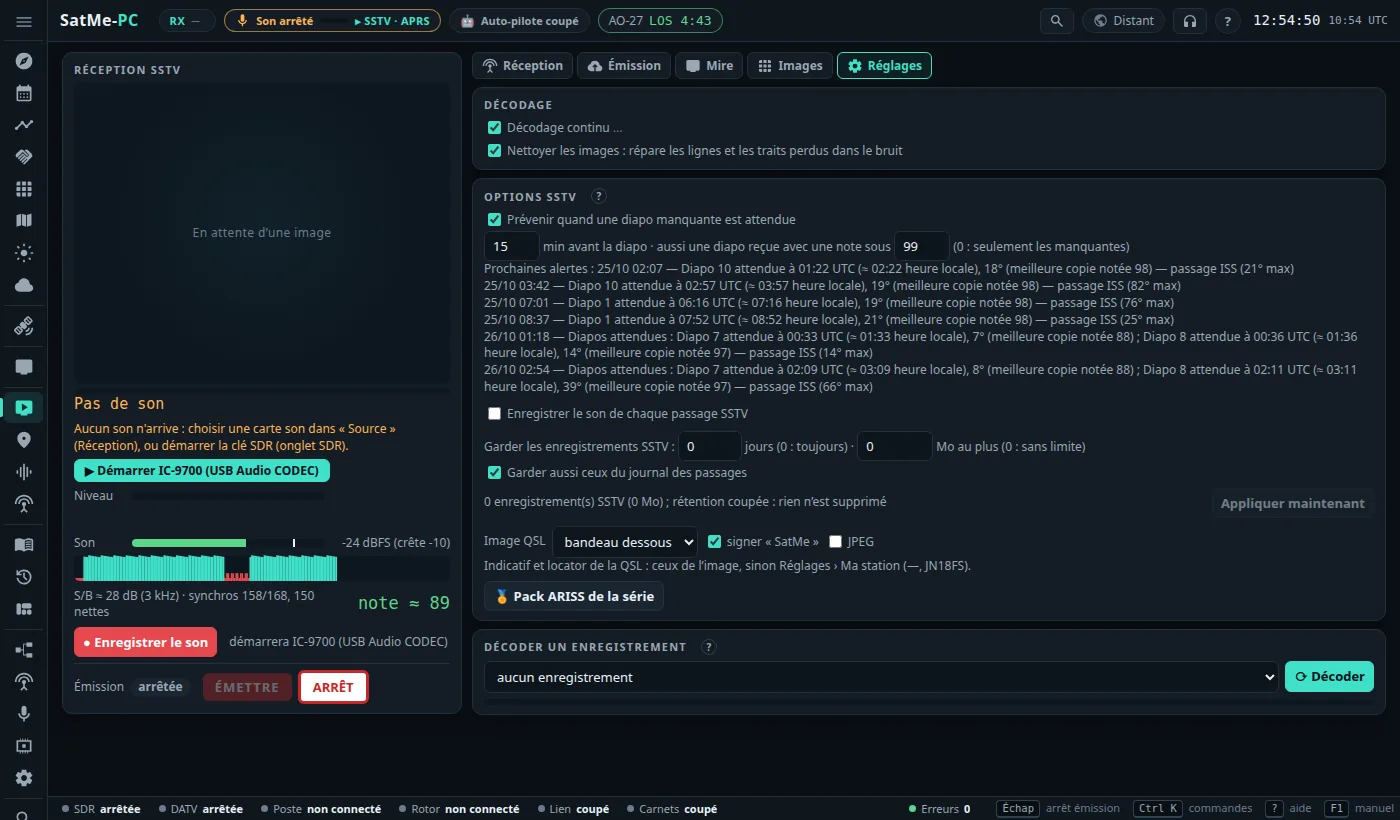
Where: SSTV › Réglages › Options SSTV card (all receive only; each change is saved at once).
- Prévenir quand une diapo manquante est attendue (warn when a missing slide is expected; ticked): N min avant la diapo (minutes before the slide; 15), also for a slide received with a score under N (60; 0: missing ones only). From the series' schedule, one alert per pass that sends a wanted slide whole: « Diapo 5 attendue à 04:32 UTC (≈ 06:32 heure locale), 49° — passage ISS (74° max) » (slide 5 expected at 04:32 UTC, ≈ 06:32 local time, 49° — ISS pass, 74° max). It comes with the activity alerts (bubble, Dernières alertes, and aloud when announcements speak); off if « Activités à venir » is. The Prochaines alertes (next alerts) are listed below. A pass whose estimate is too loose (over a third of a period) is never announced.
-
Enregistrer le son de chaque passage SSTV (record the sound of every SSTV pass; unticked): each pass of the series' satellite, when it is followed and SSTV decoded, from AOS to 30 s after LOS. Auto-pilot campaigns have their own « Enregistrer le son » box, ticked by default — hence the ISS WAVs in
enregistrements/. Each picture notes its recording (recording=) so it can be decoded again. -
Garder les enregistrements SSTV (keep SSTV recordings): N jours (days) and/or N Mo au plus (MB at most) — both 0 by default: nothing is ever deleted. Only SSTV pass recordings are candidates; never those of a picture used in a sheet or marked « à garder », never those less than a day old, nor (box Garder aussi ceux du journal des passages, also keep those of the pass journal, ticked) those the journal names. The summary says how many would be deleted; Appliquer maintenant (apply now) does it after confirmation (list of files). Once set, retention also runs by itself every hour. Each deletion is noted in
enregistrements/retention-sons.log. - Image QSL: bandeau dessous (strip below) or incrusté (overlaid); écrire « reçu avec SatMe » (write « received with SatMe » on the QSL); JPEG.
- 🏅 Pack ARISS de la série.
The other cards of the Réglages sub-tab:
- Décodage (decoding): Décodage continu … (continuous decoding: a picture starts on its sync pulses even without a header, the mode recognised from the line length); Nettoyer les images (clean the pictures: repairs lines and strokes lost in the noise); Re-décoder chaque image à la fin (version corrigée gardée si meilleure) (decode each picture again at its end, the corrected version kept if better), on by default (see above).
-
Décoder un enregistrement (decode a recording): choose a WAV on the PC (
enregistrements/), ⟳ Décoder (with the forced mode and continuous decoding chosen; Annuler, cancel, meanwhile): the pictures found take back the time of their reception and arrive in the gallery, marked « redécodée ». The phone's MP3s are decoded on the phone.
Where: SSTV › Émission (and ÉMETTRE / ARRÊT in the left column). With the ADALM-PLUTO or the bladeRF 2.0 (or through the transmitter of a SatMe-Node).
- Émetteur (transmitter): ADALM-PLUTO or bladeRF 2.0.
- Image: Mire SatMe + indicatif (SatMe test card + callsign), Planche SSTV (choose the sheet), or Fichier image (image file; Parcourir…, browse: the PC's folders read-only, or a file sent from this browser).
- Mode (all SSTV modes), × 1 to 3 sends, indicatif en CW à la fin (callsign in CW at the end). The callsign is written across the top of the picture.
- Modulation: FM étroite (narrow FM; ±5 or ±2.5 kHz, préaccentuation, pre-emphasis), BLU haute (USB), BLU basse (LSB); Fréquence (MHz); Gain TX (dB).
- ÉMETTRE, then confirm. Transmission stops by itself once the picture is sent; ARRÊT, Échap or the TX in the header strip stop it earlier.
Régler la réception (set the reception) puts the SDR tab's receiver on our own transmission (same frequency, NFM for FM, USB or LSB) to listen to it with another SDR.
The rules, in the code:
- a callsign (Réglages › Ma station); ÉMETTRE then a confirmation; never at start-up;
- the whole occupied band inside an amateur band (144–146, 430–440, 1240–1300, 2300–2450 MHz);
- the satellite sub-bands (145.8–146, 435–438, 1260–1270 MHz) only by ticking Vers un satellite (towards a satellite); never 145.800 MHz (ISS);
- QO-100's narrow band in USB only, inside its digital or mixed segment — never the emergency frequency or the beacons, and never louder than the beacon (closed loop when SatMe hears its own downlink);
- 15 min at most; stops when the page goes silent;
- Test sur charge (test into a load: any frequency, gain capped at −40 dB, output into a dummy load) and Essai en intérieur (indoor test: 23 cm or 13 cm outside the satellite sub-bands, −40 dB at most, 5 min; 1245 fills in the frequency) as for DATV.
Where: SSTV › Mire. A reference picture sent in SSTV to test a decoder without a satellite (this PC's, a phone's, or a whole radio chain). Nothing is transmitted: the sound goes to the chosen Sortie (output). The mode, Conditions (noise 20 to 8 dB, light or deep fading, dropouts, pass profile; presets ISS typique and Propre, clean), ▶ Jouer (play), ■ Stop, or ⤓ WAV. Never into the microphone input of a rig with VOX (it would go into transmit).