Repository navigation
SatMe PC Orbits
← SatMe-PC guide · October 2026
The Orbites tab (Ciel workspace, key 1): the Earth in 3D with your satellites going round on their orbits, the same flat on a map, a pass followed live, and a full-screen dashboard for the shack or a stand. The same globe is also in the Suivi tab (the Globe button) and in the pass journal.
All worked out in the browser, without the Internet: the positions (SGP4) from the station's orbital elements, the Earth, the relief, the cities and the landmarks bundled with SatMe-PC. Only the cards' photos come from the Internet, once (see Satellite cards).
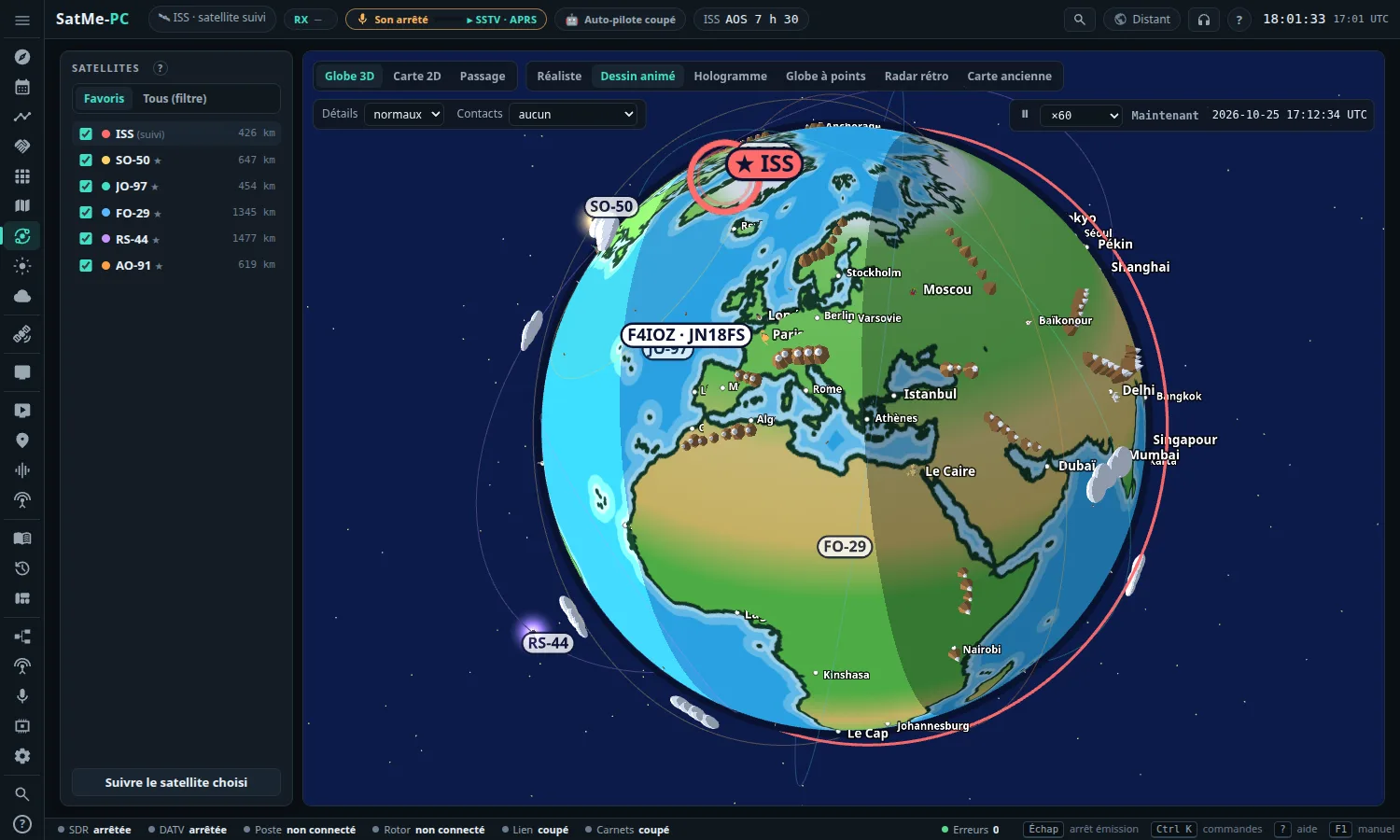
- On the left: the Satellites list. Favoris (by default: your ★ satellites) or Tous (filtre) (all, with a filter: type a name, ISS, RS-44, AO-…). Tick to show; a click on a name chooses it (the globe follows it, the Passage view shows its passes). Each line gives the distance, or the elevation and azimuth when the satellite is up. Suivre le satellite choisi (follow the chosen satellite) makes it the Suivi tab's satellite (Doppler, rotator). The list's help unfolds under a small ?, leaving room for the satellites.
- Under the list: the chosen satellite's card (see below).
- At the top: the view (Globe 3D, Carte 2D, Passage), ⛶ Tableau (dashboard), 📺 ISS en direct (ISS live), the look (six, see below), Détails (details), Villes (cities), Noms (names), Contacts, Monuments (landmarks), Taille (size), Types ▾, the Traces slider (tracks).
- On the right: the time. ⏸ (pause), the speed (×1 réel, real time, to ×1200), Maintenant (now: back to the present time), the time shown.
- Always at the present time: opening the tab (or the dashboard) is at ×1 real time — never paused, never on a replayed pass. Leaving the Passage view during a replay also comes back to the present.
- On the globe: drag to turn it, wheel to come closer or go back.
The ticked satellites go round on their orbits, with their footprint on the ground (the area they can be seen from) and a line to the station when they are up. The station is marked with your callsign and locator; the night is drawn.
The satellite chosen stands out: a ring turning round it, its name marked with a ★, a thick orbit, a clearer footprint. The others stay in the background.
Six looks: Réaliste (realistic), Dessin animé (cartoon, the default), Hologramme (hologram), Globe à points (dotted globe), Radar rétro (retro radar), Carte ancienne (old map). The choice is kept in this browser.


Under the list, Fiche · ISS (the chosen satellite's card; folds on its title): a real photo and things to tell — country, operator, launch, mission, orbit, a story —, its amateur frequencies and the start of its Wikipedia article. For about twenty well-known satellites: ISS, Chinese station, SO-50, AO-91, AO-27, RS-44, AO-7, FO-29, QO-100, IO-117, NOAA 15/18/19, Meteor-M, Hubble, AO-73, PO-101, JO-97.

- The photo comes from Wikimedia Commons, and only under a free licence (public domain, CC0, CC BY, CC BY-SA). Its author and licence are written under it.
- It is asked for once by SatMe-PC, then kept in the data folder (
fiches-sat). - Without the Internet, or without a free photo: the card keeps its facts, with a SatMe drawing.
- Untick Photo (at the top of the card): nothing more is asked.
The same card is a panel of the dashboard.
- Détails: simples (simple), normaux (normal), riches (rich). Cities on the globe and the map; the Earth's relief shaded and, on the cartoon, mountains set on the real summits (NOAA's ETOPO1 relief), boats sailing, and in riches, whales, forests and penguins. Come closer with the wheel to see them.
- Villes: toutes (all), only the capitales (capitals), or aucune (none). Noms: the city's nom (name), its country's drapeau (flag; capitals), or nom et drapeau (both).
- Contacts: the log's contacts that have a locator, as points (dots), points et indicatifs (dots and callsigns) or locators; aucun (none) by default.
-
Monuments (landmarks; nearly 250, drawn by family): aucun (none), the principaux (main ones, about sixty, the default) or tous (all, one to a few per country). The Eiffel Tower, the Statue of Liberty, the pyramids… have their own drawing; their names show when coming closer.
- Types ▾: the families to show — towers and lighthouses, bridges, castles and palaces, temples and churches, ancient sites, statues, natural wonders, modern architecture, space centres and observatories.
- Taille (size): petite, normale, grande, très grande (small to very big, readable from afar). On the globe as on the map, kept in this browser.
- Traces (tracks; a slider): the satellites' tracks from discreet (left: a thin line) to very marked (right: thicker, more opaque, outlined — dark on the cartoon, realistic and old-map looks, light on the dark ones). For the globe's orbits, the ground track seen from the satellite, the 2D map's tracks (ahead always vivid, behind paler), the pass's track in the sky, the Sked's globe and map (also in its Réglages du globe). Stronger than before by default; kept in this browser, shared with the Journal's globe.
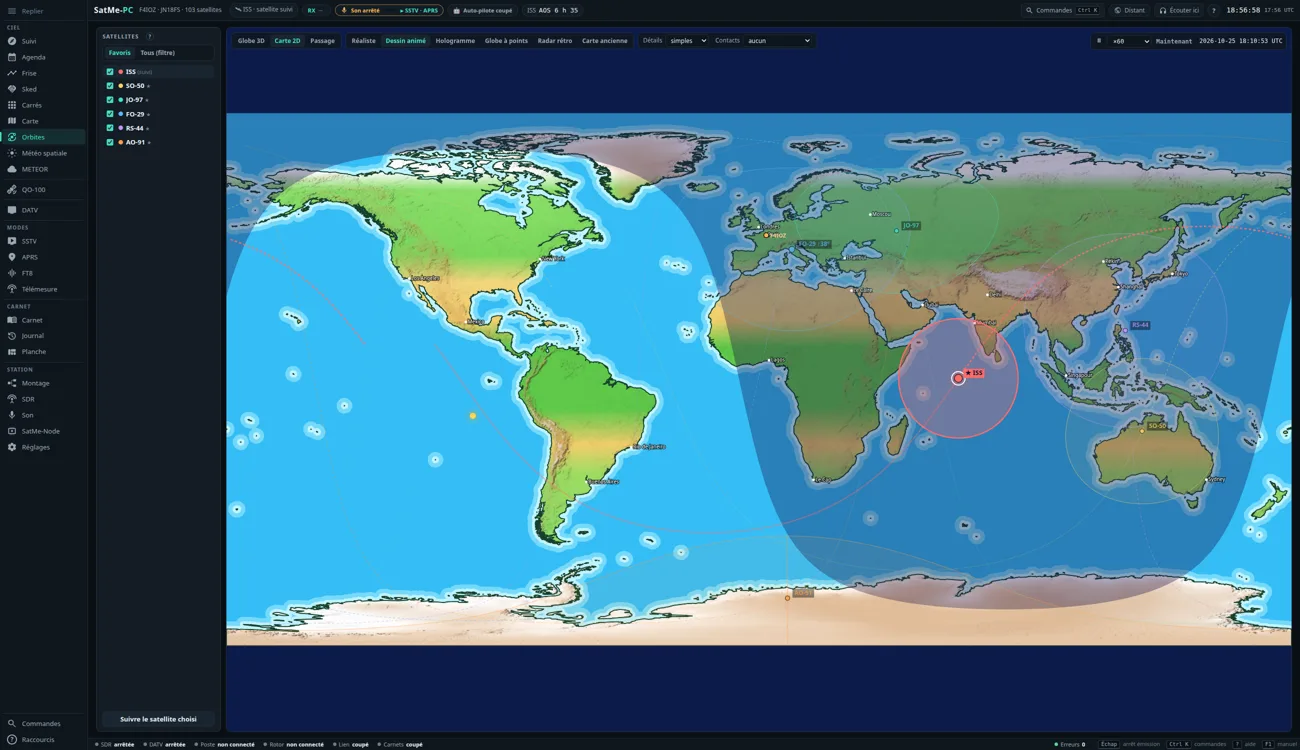
Carte 2D: the same satellites flat, their footprints, the ground track past and to come, day and night with the grey line (dawn and dusk), the landmarks. The same looks, details and contacts.
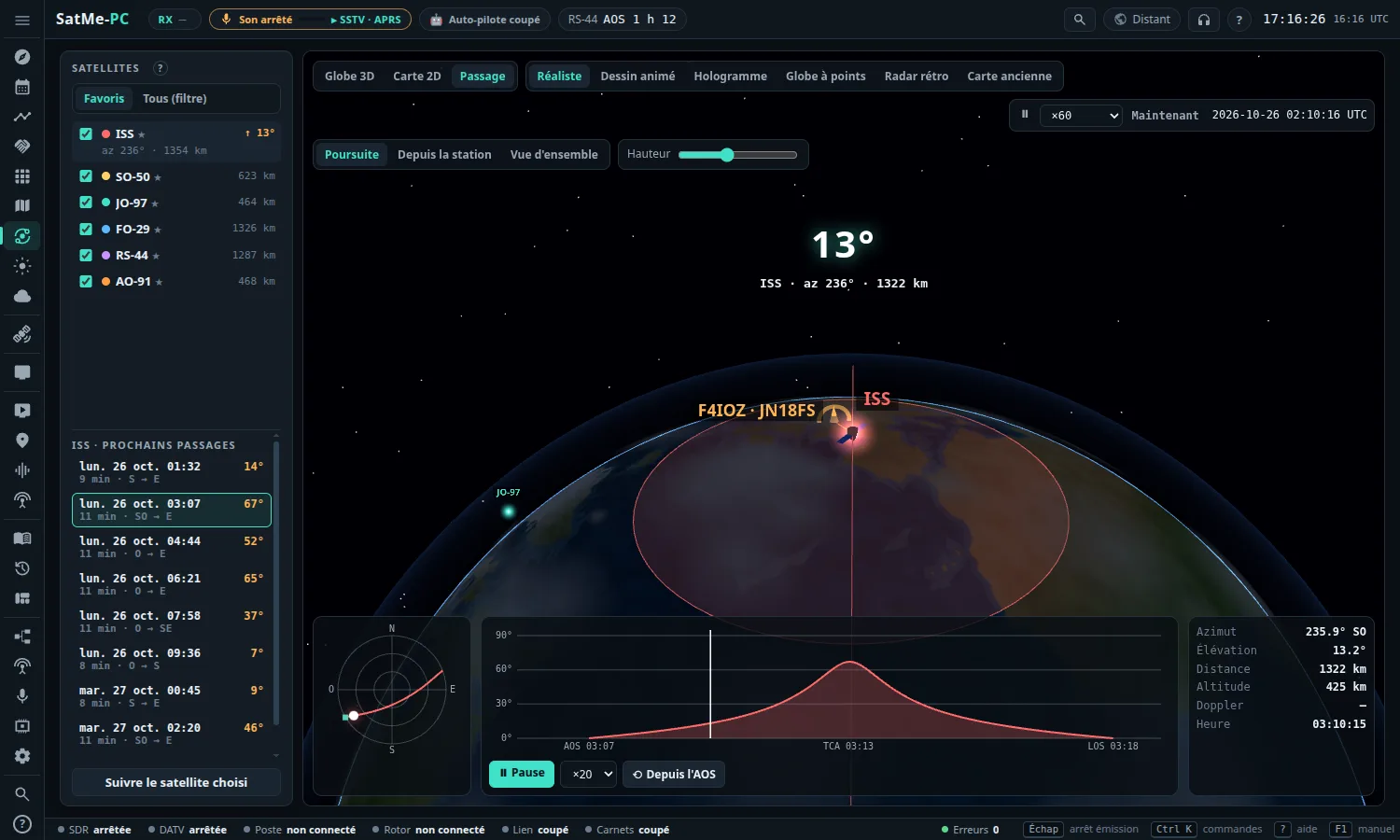
Passage: under the list, the chosen satellite's passes of the next 36 hours (day and time, duration, from which direction to which, max elevation).
- ● En direct (live, the default): the pass under way is followed in real time; otherwise the next one, with its countdown (« AOS dans 2 h 15 »). At the end, the following one comes by itself.
- ▶ Rejouer en accéléré (replay fast; or a click on another pass of the list): the pass animated fast (×10, ×20 by default, ×40, ×80); ⟲ Depuis l'AOS (from AOS) starts it again. ● En direct or Maintenant comes back to the present time.
- In the middle, large: the countdown to AOS, « AOS ! », the culmination, the elevation, then « LOS · 73 ! ».
- At the bottom: the station's sky with the track, the elevation profile (AOS, TCA, LOS), and the azimuth, elevation, distance, altitude, Doppler and time.
- Four cameras: Poursuite (chase, behind the satellite), Depuis la station (from the station), Vue d'ensemble (overview), Vue du satellite (seen from the satellite). Hauteur (height; or the wheel) takes the camera further away to see more of the Earth.
The Vue du satellite camera shows the Earth seen from above, straight below the satellite:
- its footprint (the radio horizon: the area that can hear it), your station — and a sked's other station, the log's contacts when shown —, the day / night line, its ground track (ahead vivid, behind pale, towards the top of the screen), the cities and landmarks chosen;
- beside it: the altitude, the footprint radius, day or night below it, and "your station: in view" or how many km from the edge (with its elevation);
- the camera moves back just enough to show the whole footprint; Hauteur or the wheel bring it nearer, down to the satellite itself. Drag to look elsewhere: it comes back by itself after a few seconds, or on a double-click.
The same camera is in the Sked's Réglages du globe and in the Journal's globe. In Vitrine, the globe goes there 30 s every 90 s.
📺 ISS en direct (top bar): a window with the live video from the International Space Station (NASA's public stream, through YouTube, muted; needs the Internet — without it a clear message, and the rest of the tab works as before). Under it, what SatMe works out: above which sea or near which country, latitude, longitude, altitude, speed, day or night below the ISS (night: a black picture, that is normal). A blue or grey screen, or a frozen picture, is NASA's loss of signal (between two relay satellites), not SatMe.
- 🌍 Voir sur le globe (see on the globe) chooses the ISS and switches to Passage › Vue du satellite: the real Earth and the globe's side by side.
- The window moves (its bar), grows (the corner), shrinks (▁: the video stops); it stays where it was left. On a phone it sits at the bottom.
- The source: automatic by default — SatMe-PC looks up today's live on NASA's channel (once an hour at most), else the channel's live, then the last known id; ↻ Autre source NASA (another NASA source) moves to the next one. ⚙: another source (a YouTube watch / live / youtu.be / embed link, a channel's live, an .mp4 video) and Rétablir la source NASA (back to the NASA source).
- On the dashboard: Informations ▾ › Vidéo de l'ISS en tuile dans un coin (the ISS video as a corner tile; per look, handy in Vitrine).
⛶ Tableau (dashboard; at the top): the globe, or the 2D map, full screen, like the radio amateurs' station clocks. The SatMe logo and name sit top left (bottom left in Classique radioamateur). Esc or ✕ Quitter (quit) to leave; the bar fades when the mouse is still.
Thème (look; at the top of the dashboard), each with its globe or map:
- Dessin animé (cartoon, the default): the globe turning slowly by itself (12 s after the last touch), round colourful panels.
- Classique radioamateur (classic ham): the flat map with the grey line, the Sun and the Moon; a band of dense panels above, the ticker on its own row below.
- Nuit (sobre) (night, plain): dark, big soft-red figures, for a dark room.
- Rétro: the old map and parchment cartouches.
- Pédagogique (teaching): for beginners, children or a club demo. Bubbles point at the satellite and its orbit, the area that can hear it, the day/night line, your station — one at a time: each stays a few seconds, fades, and the next one comes. A card changes every 15 s (AOS and LOS, inclination, altitude and speed, the Doppler effect…); a « Le savais-tu ? » (did you know?) every 12 s.
- Vitrine (stand, forum) (shop window): see below.
Informations ▾ picks, per look, the panels: the time UTC and local; the station with the next sunrise and sunset; the Sun and the Moon (height, the Moon's phase); the next passes; the chosen satellite (elevation, azimuth, range, altitude, Doppler); the satellites' photo and card (never cut off: a corner too full is made a little smaller, the photo shown whole, never cropped, the story under the photo; the card is left out only as a last resort); the ISS video as a corner tile; the space weather (Kp, flux, X-rays, solar wind, aurora); the scrolling ticker. The landmarks and their size, the photos, and in Pédagogique each explanation are set there too. The dashboard opens at the present time, ×1.
Moving the globe (every look): Informations ▾ › Le globe › Le déplacer (move it), then drag the globe on the screen (unticked: Shift + drag, or two fingers); the wheel (or the fingers' spread) changes its size; double-click or Remettre le globe à sa place (put the globe back). Kept per look; the Orbites tab is unchanged.
For a club fair, an open day, a club's stand: an animated poster, nothing to touch. The globe turns by itself beside the card (above it on a portrait screen), where big cards follow one another every 12 s:
- the next pass over the stand — « RS-44 passe au-dessus de nous à 15:29 (dans 12 min) » (RS-44 passes over us at 15:29, in 12 min; every other card, when a pass comes within 3 h); « venez écouter ! » (come and listen!) only when Réception sur le stand is ticked;
- a satellite to discover, with its photo and a story;
- « what is amateur radio? » in four lines;
- come and see us: the club, its callsign, a message, and its link as a QR code;
- a « Le savais-tu ? », the Earth live.
The time and the club at the top, the ticker at the bottom. The text shrinks to fit the card, never cut off. Every 90 s the globe spends 30 s seen from the satellite. The bar and the cursor vanish after a few seconds.

Setting it up:
- ⛶ Tableau, then Thème › Vitrine (stand, forum).
- Informations ▾ › Vitrine : le club: Nom du club (club name), Indicatif (callsign; empty: the station's), Lien (link: a site or page, it becomes the QR code), Message.
- Informations ▾ › Vitrine : l'encart (the card): its Taille (size: small, medium, large), its Côté (side: left, right), and Réception sur le stand when a receiver lets visitors hear the passes (the cards then invite them to come and listen).
- That's all: it is kept in this browser.
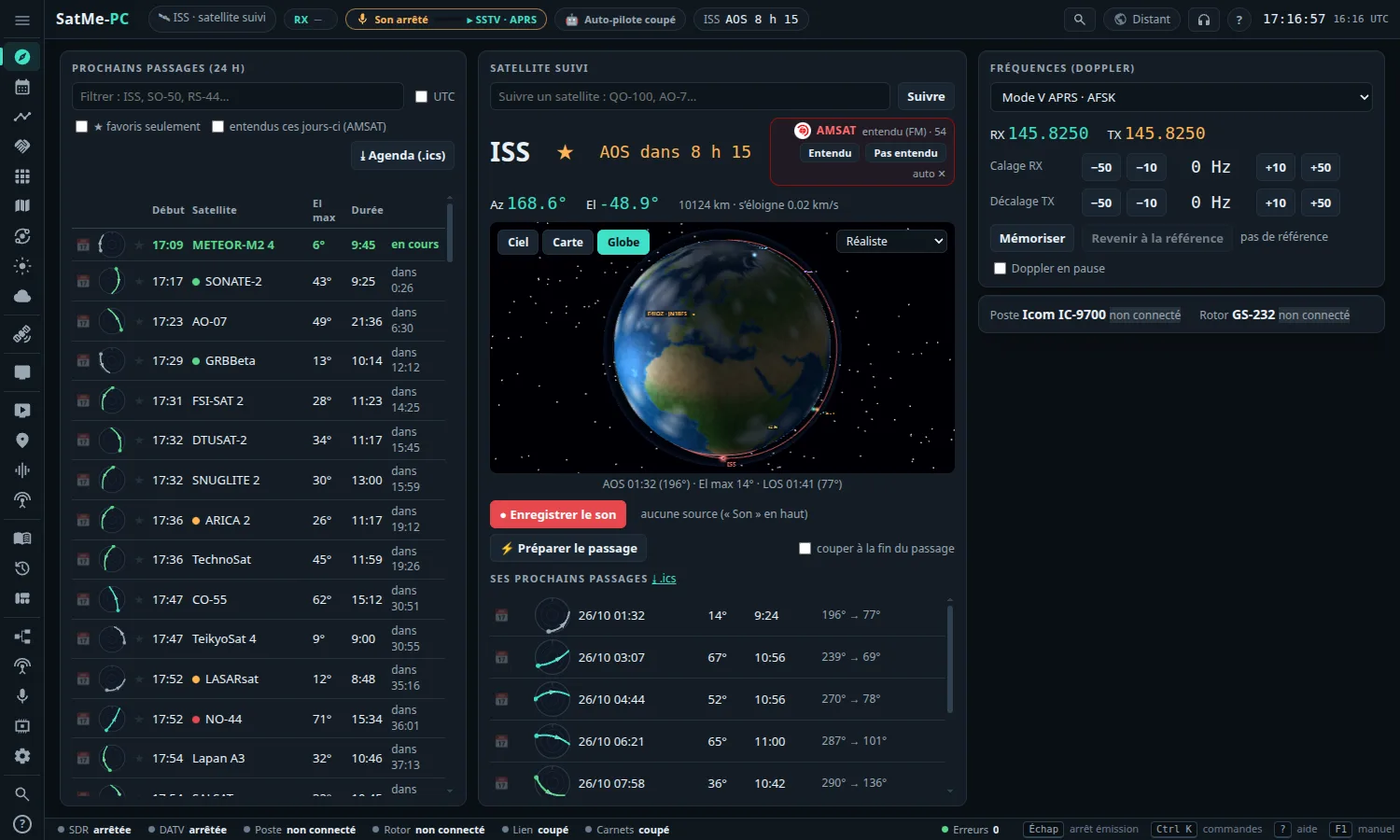
In Suivi, a Globe button beside Ciel (sky) and Carte (map): the satellite followed, its orbit and footprint, the favourites around. The list at the top right changes the look. Drag to turn, wheel to come closer.