Repository navigation
SatMe PC Logbook and Journal
← SatMe-PC guide · October 2026
The Carnet workspace (key 5): the logbook with the station live, the pass journal replayed with its sound (on the sky, the map or the globe; one pass or several in the same editor; video, GIF, sound, report), and the passes that came from the phone. The SSTV sheet has its own page: SSTV sheet.
Where: Carnet › Carnet (key N: the cursor on the callsign).
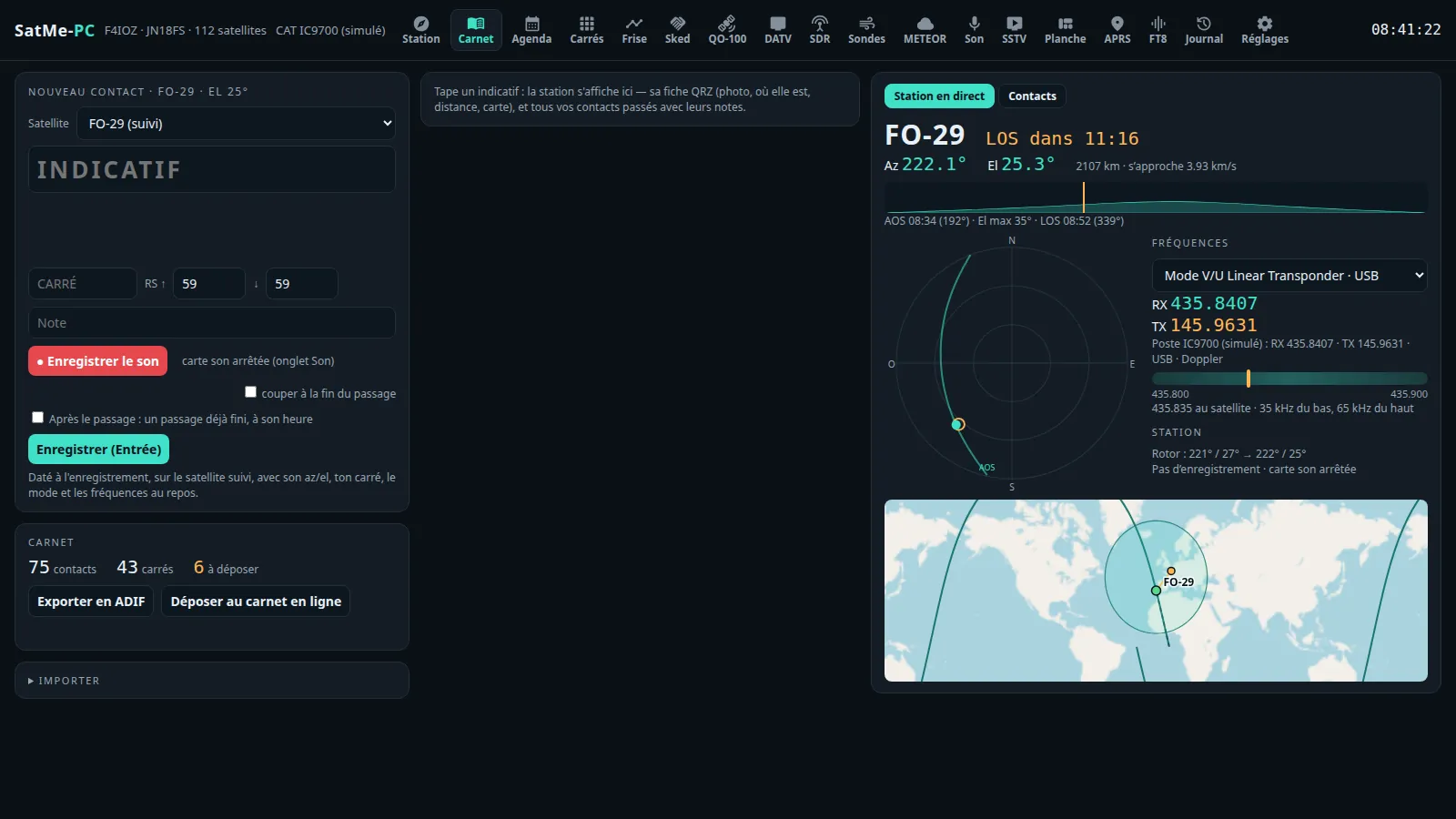
Nouveau contact card (new contact):
- INDICATIF (callsign): predicted from the log and QRZ (Tab goes from one prediction to the next). The station's record shows beside it.
- Locator, RS ↑ and ↓ (59 / 59 by default), Note.
- Enregistrer (Entrée) (save, Enter). The contact is timed at saving, with the satellite's azimuth and elevation, your locator, the mode and the frequencies.
- Which satellite: the Noté sur (logged on) line says it, and why. The contact is logged on the Satellite chosen in the list (for this contact), otherwise on the rig's (the followed satellite, Doppler by CAT), on QO-100 when Appliquer au poste (apply to the rig) is ticked in the QO-100 cockpit or when the contact is typed in the cockpit; auto goes back to the rule. An SDR receiver listening to QO-100 in the background does not change the log.
- After the pass: tick Après le passage : un passage déjà fini, à son heure (after the pass: a pass already over, at its time), choose the satellite, the mode, the pass and the time.
- ● Enregistrer le son and couper à la fin du passage, as in Suivi.
-
Compound callsigns (
EA3/M5JFS,DL1ABC/P,F/ON4ABC/P): the country is that of the operating prefix, with its flag. When QRZ does not have the compound form, the record is the operator's, identity only. A locator taken from a record belongs to the callsign as typed. - CW decoder (a card under the entry, off as long as Décodeur CW is not ticked): the tone found by itself (or 500 to 900 Hz), the speed and the Doppler followed; a decoded callsign goes into the entry with one click.
- Voice to text (a card under the entry): see Voice to text.
Three views on the right: Station en direct (station live), Contacts, 🏆 Records.
- Station en direct: the followed satellite, azimuth and elevation, range, AOS / LOS, the elevation profile and the sky, the transmitter and its frequencies, the rig (RX, TX, mode, Doppler), where you are in a linear transponder, the rotator, the recording, the SDR dongle. When you type a callsign: its record (QRZ photo, name, location, distance, map, QSL) and all your past contacts with their notes.
-
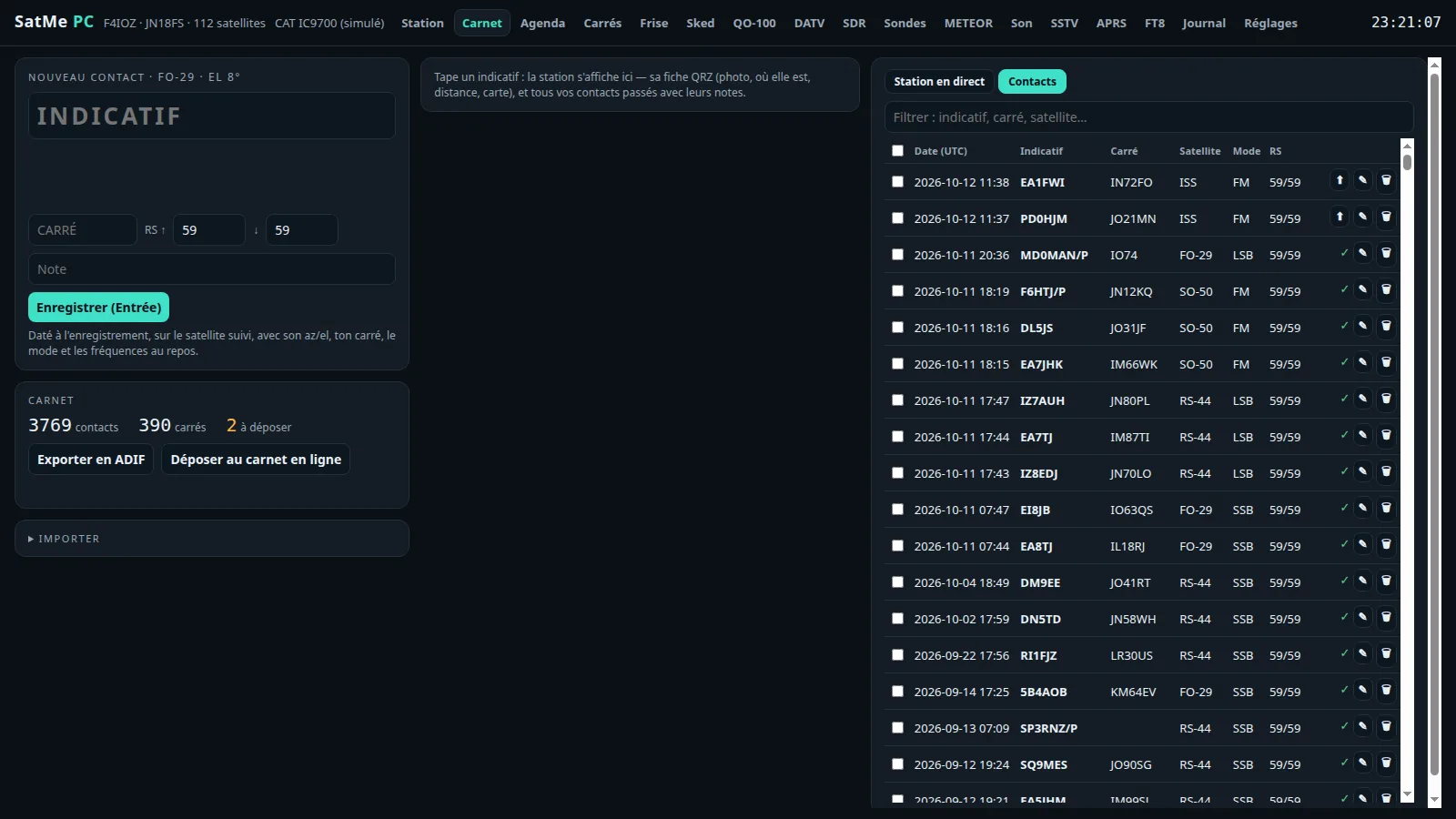
Contacts: Filtrer (filter: callsign, locator, satellite…), ⤓ ADIF, ⤓ Lot pour le téléphone (batch for the phone), and on each row:
- the upload state to the online log: ✓ uploaded, « ⏱ 25 s » (goes at the end of the countdown) and ⏸ (pause it), ▶ (resume; or refused, with the reason), ⬆ (upload by hand);
- ⌖: its pass on the sky and the rotator's path as it went, taken from the journal (cyan: the satellite, yellow: the moment of the contact);
- ✎: Modifier le contact (edit the contact) — callsign, locator, Satellite (the list, QO-100, a free name, « terrestre »), Date and UTC time (maintenant, now), mode, reports, name, QTH, note, QRZ; Enregistrer, Annuler, Supprimer (save, cancel, delete). Azimuth, elevation, frequencies and the log's order follow; a duplicate (same callsign, same satellite, 10 min) is reported. A contact already uploaded online is not corrected there: do it there too;
- 🗑: delete (those already uploaded online stay there).
- Tick several rows: ADIF, batch, or Supprimer in one go.
- 🏆 Records: the farthest contact of all, of each satellite, mode and country; the continents (WAC); the distances passed.
-
Exporter en ADIF (export as ADIF:
carnet.adi); Déposer au carnet en ligne (upload to the online log: the contacts not uploaded yet). - The online log (Wavelog / Cloudlog) is set in Réglages › Services en ligne: the address, the API key, Lire les profils (read the profiles: the station profile for the place you operate from, chosen or created), and Envoyer chaque nouveau contact au carnet en ligne (send each new contact to the online log) after a delay of your choice (30 s to 30 min), time to correct it or hold it back (⏸).
- Importer (import; folded under the log): Depuis le carnet en ligne (Wavelog)… (from the online log: tick the profiles, Importer les contacts satellite) or an ADIF file (Wavelog export, LoTW…); ces contacts sont déjà dans le carnet en ligne (these contacts are already in the online log) avoids uploading them again. Satellite contacts missing from the log come in with the satellite's position at their time; their passes are rebuilt in the Journal.
Where: Carnet › Importer › Depuis le téléphone (Wi-Fi)… (from the phone)

-
By QR code: the PC shows one (choose its address if it has several); on the phone, Settings → Share and listen → Share → Scan the PC's QR code. The phone opens its control desk and the PC connects to it by itself (same Wi-Fi). On Linux, open the page's port + 1 (
8091by default):sudo ufw allow from 192.168.1.0/24 to any port 8091 proto tcp. -
Or by hand: the address (
http://…/c/…/) and the code shown by the phone, Connecter. - The phone's passes are listed; the ticked ones (tout, all) arrive with their SSTV pictures, their recordings (as WAV, the spoken announcement removed) and their contacts (contacts déjà au carnet en ligne, contacts already in the online log, ticked by default): Importer la sélection (import the selection).
- A pass file (.zip) made on the phone (« Fichier du passage » in its journal) can also be given under SatMe sur le téléphone.
- The phone's settings (its
.jsonbackup): Réglages › Téléphone.
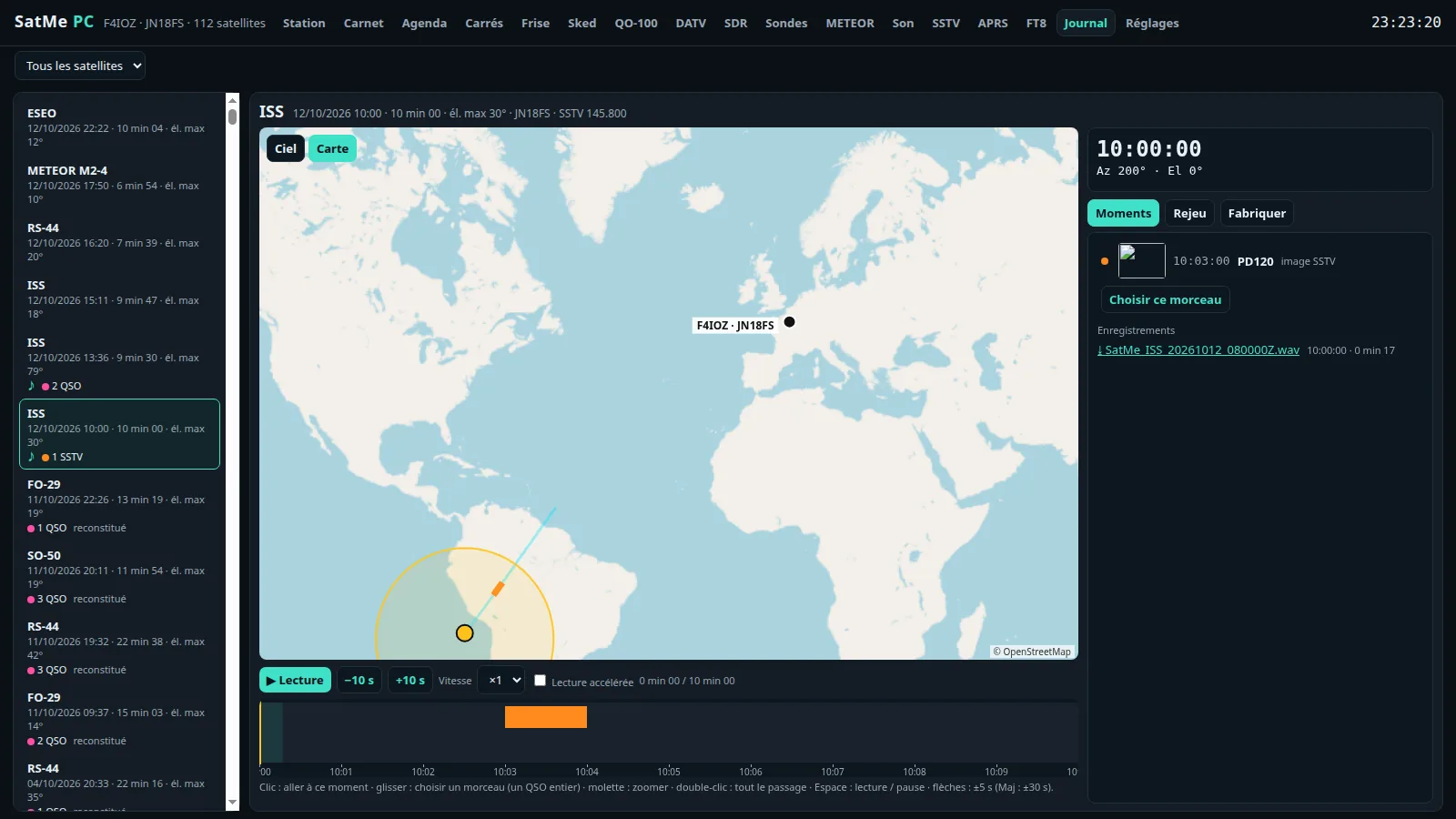
Where: Carnet › Journal (a separate page, http://localhost:8090/journal). Every pass followed by SatMe-PC is kept there: its track, its sound, its contacts, its SSTV pictures, its APRS frames, its S-meter.
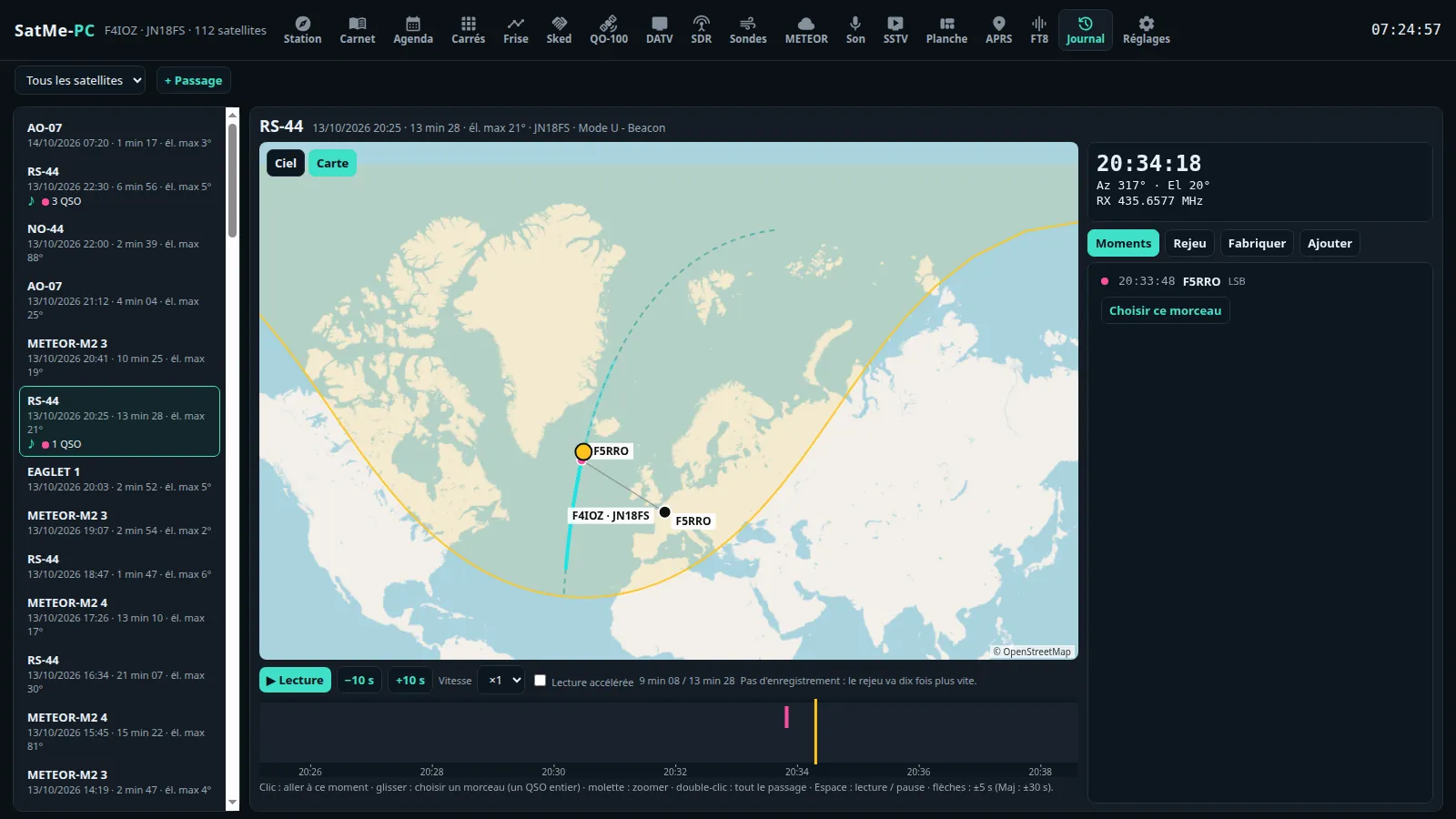
The list (on the left, the most recent first; Tous les satellites, all satellites, or a single one): each pass with its date, its duration, its max elevation, and what it holds — ♪ a recording, N QSO, N SSTV, N APRS, S-mètre, reconstitué (rebuilt). A click opens it. (The list is read when the page opens: reload it to see a pass that has just ended.)
The replay:
- Ciel | Carte: the pass on the sky (planned dashed, done in cyan, the SSTV pictures in orange), or on the map (planned track dashed, followed part solid, footprint, each contact on the track at its moment and at its locator; drag, wheel, double-click: the whole pass). The map loads the OpenStreetMap tiles (kept 30 days). Globe: the pass round the Earth, see The globe view.
- The moment (on the right): the time, Az / El, the RX frequency, the S-meter read over CAT (IC-9700, IC-9100, IC-910H, TS-2000), the SSTV picture coming in, the record of the station worked.
- ▶ Lecture / ⏸ Pause (play / pause), −10 s, +10 s, Vitesse (speed) ×1 / ×2 / ×4 (multiplies every pace; above ×1 nothing runs in real time). The replay follows the paces and the sound set in Options, on the video's own timeline (see One pass or several).
- The timeline under the replay: click = go to that moment, drag = choose a section, wheel = zoom, double-click = the whole pass; Space play / pause, ← → ±5 s (Shift: ±30 s).
- Rapport du passage (pass report; a link in the pass's header): see below.
- Supprimer (delete; in pink, in the pass's header): after confirmation (« Supprimer du journal le passage ISS · … ? Ses enregistrements, ses images SSTV et ses contacts du carnet restent. », delete the pass from the journal? Its recordings, SSTV pictures and log contacts stay), only the journal entry is removed; the recordings, the SSTV pictures and the log contacts stay where they are.
Four tabs on the right:
- Moments: each contact, APRS frame, SSTV picture, at its time (a click goes there); Choisir ce morceau (choose this section) takes the whole moment; then the Enregistrements (recordings, ⤓) and the pass's Journal Doppler / CAT (CSV).
- Options: before and after the pass, the paces (Hors passage, Pendant le passage, Image ou contact), the Son (sound) block (Avec le son de l'enregistrement, Son accéléré, Sauter les silences and its pace), the globe (zooms, camera, more satellites); see One pass or several. Afficher (show): the SSTV picture coming in, the station's record, the S-meter, the RX frequency, my callsign and my locator on the map. What you change here is kept in this browser; the rest follows the station's journal settings (which do not change): an option never touched takes the station's value, even if that changes later.
- Fabriquer (make; see below).
- Ajouter (add): a contact, at its time (callsign predicted and QRZ, locator, mode — auto (selon le passage) (according to the pass) —, RS, comment, the time of the paused replay; Ajouter or Enter: it goes to the log; if it is refused, the real reason is given — « Pas ajouté (il faut un indicatif). » (not added: a callsign is needed), « (satellite absent du catalogue actuel…) » (satellite not in the current catalogue), « (le carnet n'a pas pris ce contact) » (the log did not take this contact)); a sound (WAV or MP3, its start; 400 MB at most); pictures (PNG or JPEG, received at…, their mode).
+ Passage (at the top): a pass made from nothing — the Satellite, the Passage (those of the last 7 days, or autres heures…, other times: start and end by hand), Créer le passage (create the pass); then its recording, its pictures and its contacts in Ajouter. A pass is deleted from the journal with Supprimer in its header (see above).
When a pass (or a session) has FT4 / FT8 decodes, Options › Décodages FT4/FT8 shows them in a panel laid over the view: the messages received up to the replay's time — the slot's UTC time, dB, message, the country's flag; CQs in green, your callsign in red, the stations worked during the pass in pink.
- Drag it to place it, its corner (or the wheel) for its size, the text follows; Visibilité (visibility) 0 to 100 %; newest at the bottom (as in WSJT-X) or at the top.
- Kept with the pass (with each pass of a session), shown the same in the picture, the GIF and the video, in 16:9 as in 9:16 (the country written as a code there: FR, EA…).
-
Where they come from: what the FT8/FT4 tab decodes is noted as it goes (
ft8-journal/, with the followed satellite) and kept beside the pass when it ends (journal/<pass>.ft); for an earlier pass, the test bench's slots (ft8-tranches/, when their recording is on) count too. - Redécoder depuis l'enregistrement (decode again from the recording; FT8 or FT4): the pass's sound read again slot by slot with SatMe's decoder (no Doppler correction); what is found is added.
- In the demo, RS-44's last pass has made-up FT4 decodes.
An opened pass is a session of one pass; a session groups several. One editor for both: the same preview, the same tabs (Moments, Options, Fabriquer, Ajouter), the same settings, the same files.
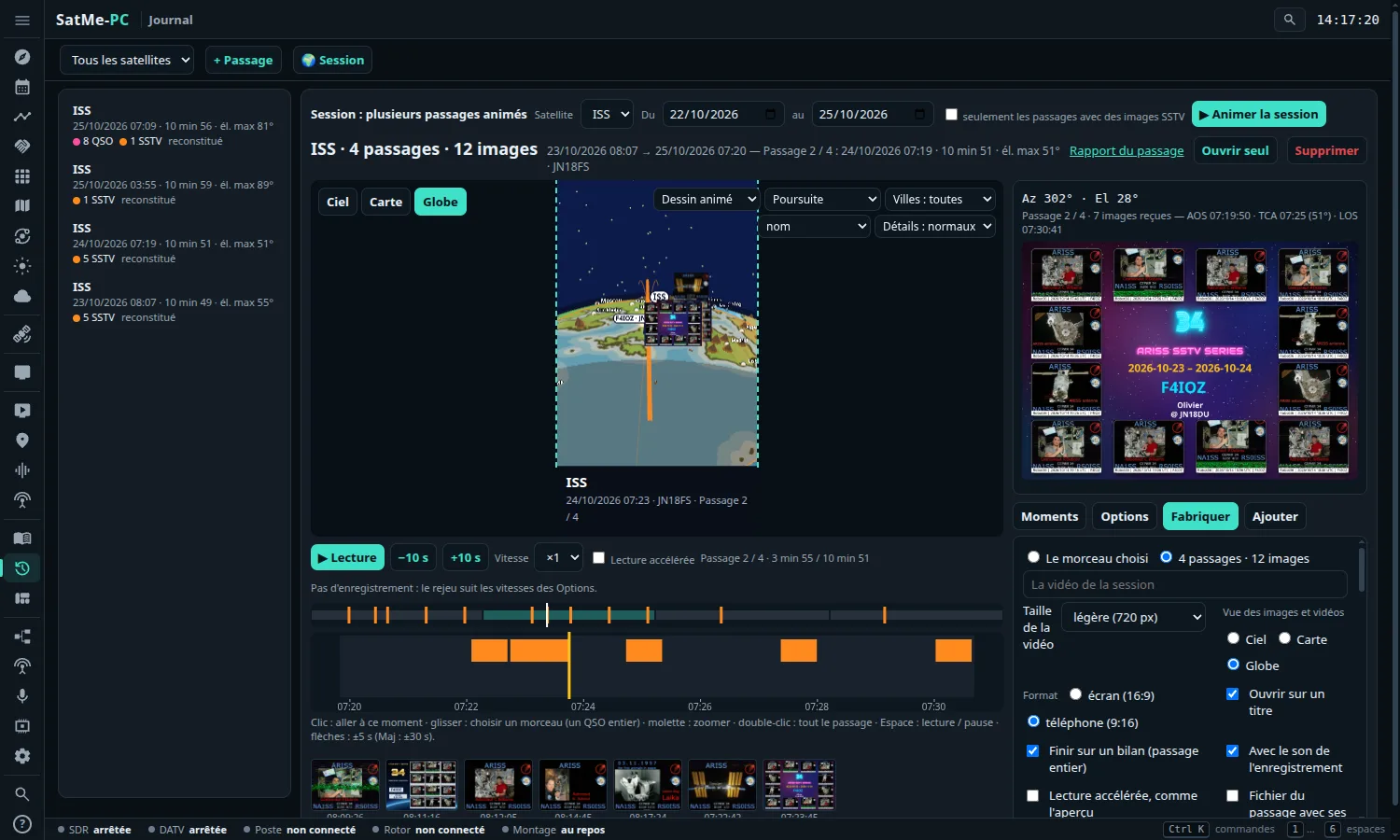
- 🌍 Plusieurs passages (several passes; at the top of a pass): the editor on its satellite's passes, from the day before to the day after.
- Ouvrir seul (open alone; at the top, when there are several): the pass shown, on its own.
- The sky and the map show the passes one after the other; the globe, all together. Above the timeline, a strip with all the passes end to end: a click goes there.
- The moment, the moments, the sound, the SSTV versions and the report's elements are the shown pass's.
- The preview is the file: the page plays at the video's speeds and shows what is ticked for it (RX, S-meter, the contact's record, opening card, next pass's card, mosaic).
Options (kept in this browser):
- Before and after the pass: Commencer avant l'AOS (start before the AOS) and Finir après le LOS (end after the LOS), 0 to 30 min, 30 s by default. With a few minutes, you see the satellite coming on the globe, then leaving. On the page as in the files.
-
Paces, named for where they apply:
- Hors passage (outside the pass): before the AOS and after the LOS — the margins, even for a single pass — and, in continuous time, between two passes. The pace climbs quickly there (×20 to ×1000 in about a hundred seconds): a few minutes of margin no longer make the video longer. Its slider is always shown.
- Pendant le passage (during the pass): from the AOS to the LOS. At ×1, real time with the normal sound; the slowing down stays gentle there, nothing is skipped.
- Image ou contact (picture or contact): slowed during an SSTV picture (seen being drawn) or a contact.
- Enchaînement: passes in a row with a pause, or continuous time (with a single pass, the page says it only matters with several).
-
Son (sound):
- Avec le son de l'enregistrement (with the recording's sound): where time runs in real time (×1), the recording is heard normally, on the page as in the video — never sped up nor slowed down.
- Son accéléré (jusqu'à ×4) (sped-up sound, ticked by default): from the AOS to the LOS, where the recording has something heard (with 2 s around it), the pass runs at ×4 at most and the sound is played sped up with its pitch kept; elsewhere the chosen paces apply, silent; in the margins Hors passage wins. Faster than ×4: no sound.
- Sauter les silences (skip the silences; formerly « Lecture accélérée »): what has no QSO, no picture and no sound heard runs at the Silences pace, silent; around a QSO, a picture or a sound heard, real time with the sound (without a recording, the Image ou contact pace) — never again a silent pass played at ×1. The margins keep Hors passage.
- On the timeline: hatched, the silences skipped; green line, real time with sound; light green, sped-up sound.
- Two zooms for the globe: Zoom hors passage (outside the pass, from afar) and Zoom passage (in the pass, near). The camera eases from one to the other before the AOS and after the LOS.
- Satellites en plus (more satellites): favourites going round the globe too, with leurs taches au sol (their footprints) as an option.
The video follows the preview exactly: the preview plays on the video's own timeline — paces, the « Vitesse » under the preview, margins, silences skipped and the globe's camera (Poursuite, Depuis la station, Vue du satellite, Vue d'ensemble) go into the file as they are. Fabriquer announces the video's length before making it (title and summary cards included, sped-up sound included). The settings already kept still apply.
Fabriquer (make):
- Format: écran (16:9) (screen) or téléphone (9:16) (phone), a phone's whole screen upright. The file's frame is drawn over the preview.
- The SSTV picture and the report's overlays are placed in the frame with the mouse or a finger: drag to move, the corner or the wheel for the size. The video, the GIF and the picture keep them in the same place, in both formats.
- Exports, of one pass or several: MP4 video with the contacts' sound (ffmpeg needed), animated GIF, picture of the moment (PNG), WAV sound (the passes' recordings end to end, a second between two), the passes' files (with several: one per pass, in a ZIP).
- The whole, or the stretch chosen on the timeline (in real time, with its sound).
- The closing summary: the video (and the preview, the same) ends on a summary card — the satellite (or the title given), the date and times, the station; the pass's or session's figures (passes, duration, max elevation, SSTV pictures, contacts, stations heard, locators, FT8/FT4 decodes, distances); the track in the sky; the pictures in a grid, thin-framed and captioned (time, mode, slide number). SSTV pictures stay near their own size: never enlarged more than 1.5× (no more blurred full-screen pictures), never stretched. Durée du bilan (summary length; 3 to 30 s, 7 s by default), counted in the announced length. In 16:9 as in 9:16.
Globe, beside Ciel (sky) and Carte (map): the pass replayed round the Earth, with the globe of the Orbites tab. The contacts light up at their time, with a line station → satellite → correspondent; the SSTV pictures received land beside the station.
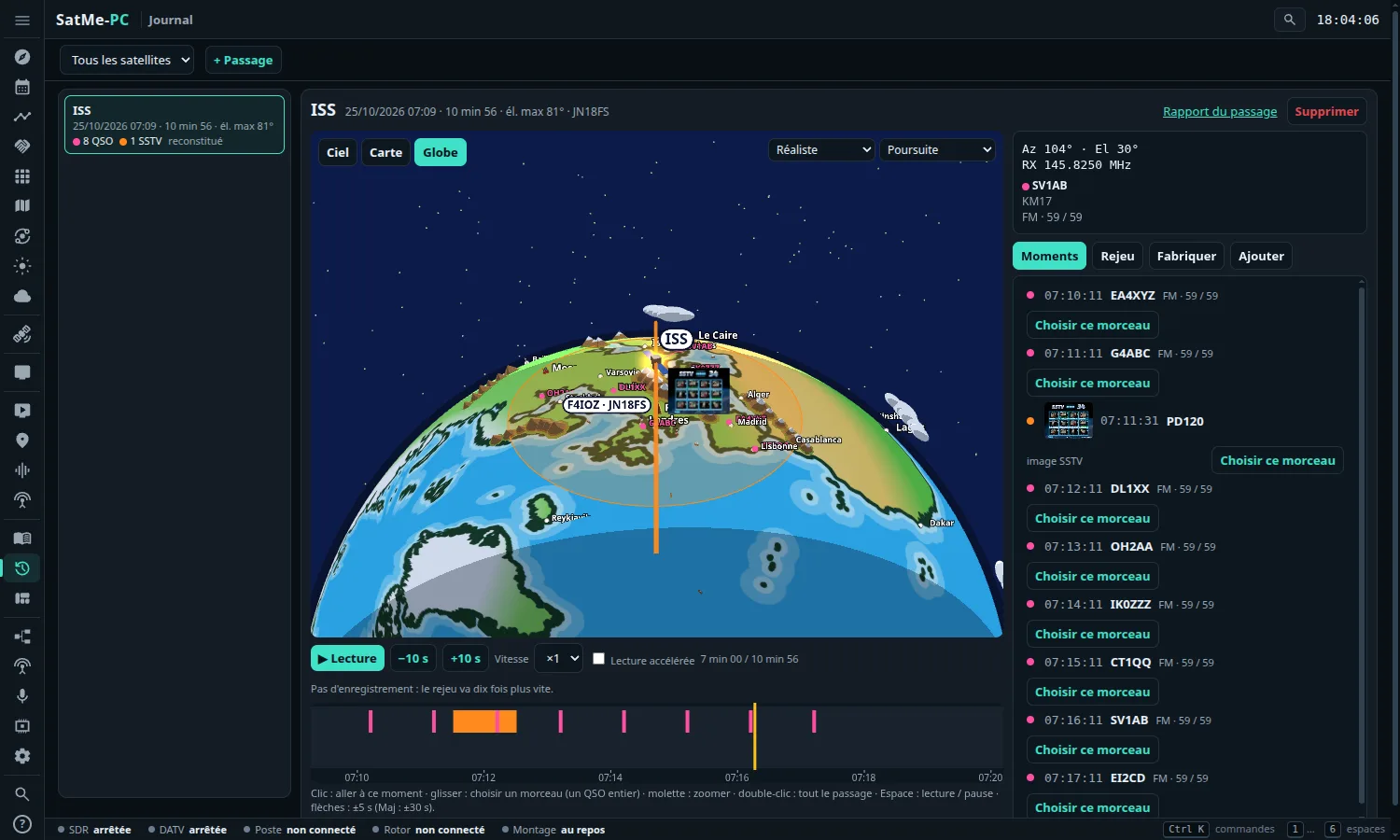
- At the top right, its choices: the look (the six of the Orbites tab), the camera (Vue d'ensemble, overview; Poursuite, chase; Depuis la station, from the station; Vue du satellite, the Earth seen straight below the satellite — see Orbites), Villes (cities: toutes, all; capitales, capitals; aucune, none), the city's nom (name), its country's drapeau (flag) or both, Détails (details: simples, normaux, riches).
- Drag moves the globe on the screen, to make room for the SSTV picture; double-click puts it back in the centre; the wheel sets the height. The video keeps it where it is.
🌍 Session (at the top, beside + Passage): the editor on all the passes of one satellite between two dates, animated one after another (all together on the globe, one after the other on the sky or the map), with the SSTV pictures arriving one by one.
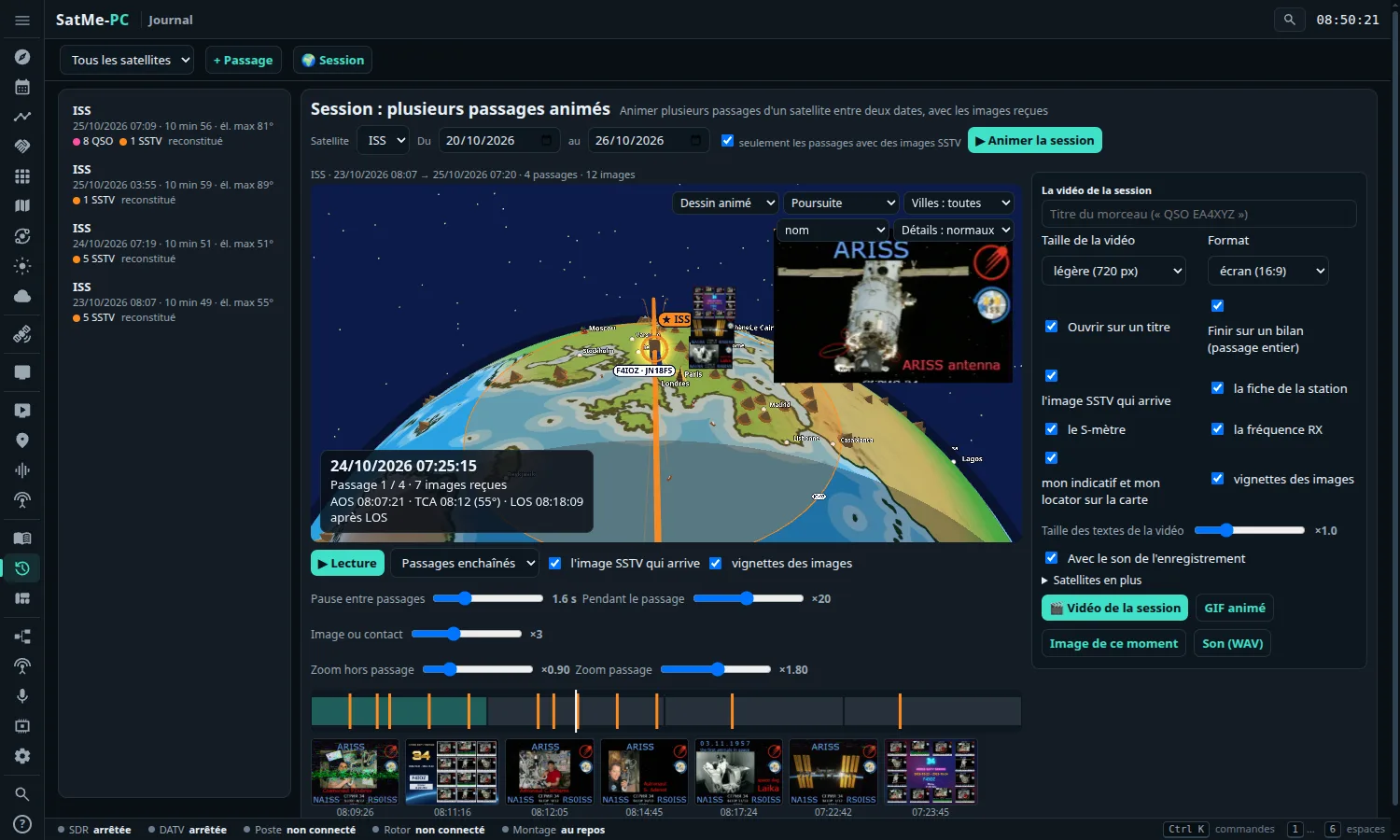
- Satellite, Du … au (from … to; by default the satellite's last week), seulement les passages avec des images SSTV (only the passes with SSTV pictures; ticked), ▶ Animer la session (play the session).
- The globe and its choices, as in the globe view. A caption gives the time, « Passage 2 / 4 · 5 images reçues » (pass 2 / 4 · 5 pictures received), the pass's AOS, TCA (max elevation) and LOS, and where we are: « AOS dans 0:20 » (AOS in 0:20), « AOS + 3:06 » (with Az / El), « après LOS » (after LOS).
-
▶ Lecture / ⏸ Pause (play / pause), and how it runs:
- Passages enchaînés (passes in a row): a pass, a short pause (the globe turns to the next one), the next pass;
- Temps continu (continuous time): time runs without stopping, faster between the passes.
- Three speeds, each with its slider: Hors passage (outside the passes: the margins and, in continuous time, between two passes; ×1000 by default, reached quickly), Pendant le passage (from the AOS to the LOS; ×20), Image ou contact (on a picture or a contact; ×3: it slows down on an SSTV picture coming in or a contact). It goes from one to the next smoothly, without a jolt. With passes in a row, Pause entre passages (pause between passes; 0.5 to 6 s, 1.6 s by default) takes the place of Hors passage.
- l'image SSTV qui arrive (the SSTV picture coming in): the picture large over the globe, away from the satellite, drawn as it is received. vignettes des images (thumbnails): the pictures received, small, under the timeline.
- The timeline: the passes end to end (the hours between them left out), the pictures in orange; a click goes to that moment of the session.
- Two zooms: Zoom hors passage (outside the passes, from afar, ×0.9 by default) and Zoom passage (in a pass, near, ×1.8). The camera comes near smoothly before the AOS and goes away after the LOS, at any speed; with passes in a row, it goes away during the pause and comes back. The wheel on the globe sets the zoom of the moment.
- Satellites en plus (more satellites; right column): tick favourites, they go round the globe too, quieter than the session's (a light and their name), with leurs taches au sol (their footprints) as an option. Their positions come from today's orbits.
From a pass: in Fabriquer › Éléments du rapport, when the pass has an SSTV event, ▶ Animer la session de l'événement (play the event's session) opens the session of its satellite and its days, and plays it.
The preview is the file: what you set on the page (globe style, cities, names, details, framing, margins, speeds, zooms, more satellites, SSTV picture, overlays, texts) is what the file shows.
The session's video (the Fabriquer tab): a title, the size, the format (screen 16:9 or phone 9:16), the same options as a pass's video (Ouvrir sur un titre, Finir sur un bilan, the SSTV picture, the station's record, the S-meter, the RX frequency, the callsign and locator, the thumbnails), Taille des textes de la vidéo (the video's text size), Avec le son de l'enregistrement (with the recording's sound), then the same files as a pass:
- 🎬 Vidéo de la session (MP4, ffmpeg needed);
- GIF animé: the session in fewer frames, looping;
- Image de ce moment: the moment shown, as a PNG;
- Son (WAV): the passes' recordings end to end;
- Fichier du passage (pass file): one per pass, in a ZIP.
With the sound: a contact heard (its pass has a recording) plays in real time, on the page as in the video, and the video has its sound; with Son accéléré, what is heard from the AOS to the LOS plays at ×4 at most, the sound sped up with its pitch kept; the rest is silent. The video: the opening card (the title, or the satellite and the dates, the passes and the pictures, the station), the passes one by one on the globe as it is framed, between two a card of the next pass (« Passage 3 / 9 · ven. 24 oct. 07:19 ») while the globe turns, and to finish the summary card (the session's figures, the pictures in a grid with the time each was received). The video follows the session's three speeds: fast outside the passes, slower in a pass, slowly on a picture (seen being drawn) or a recorded contact.
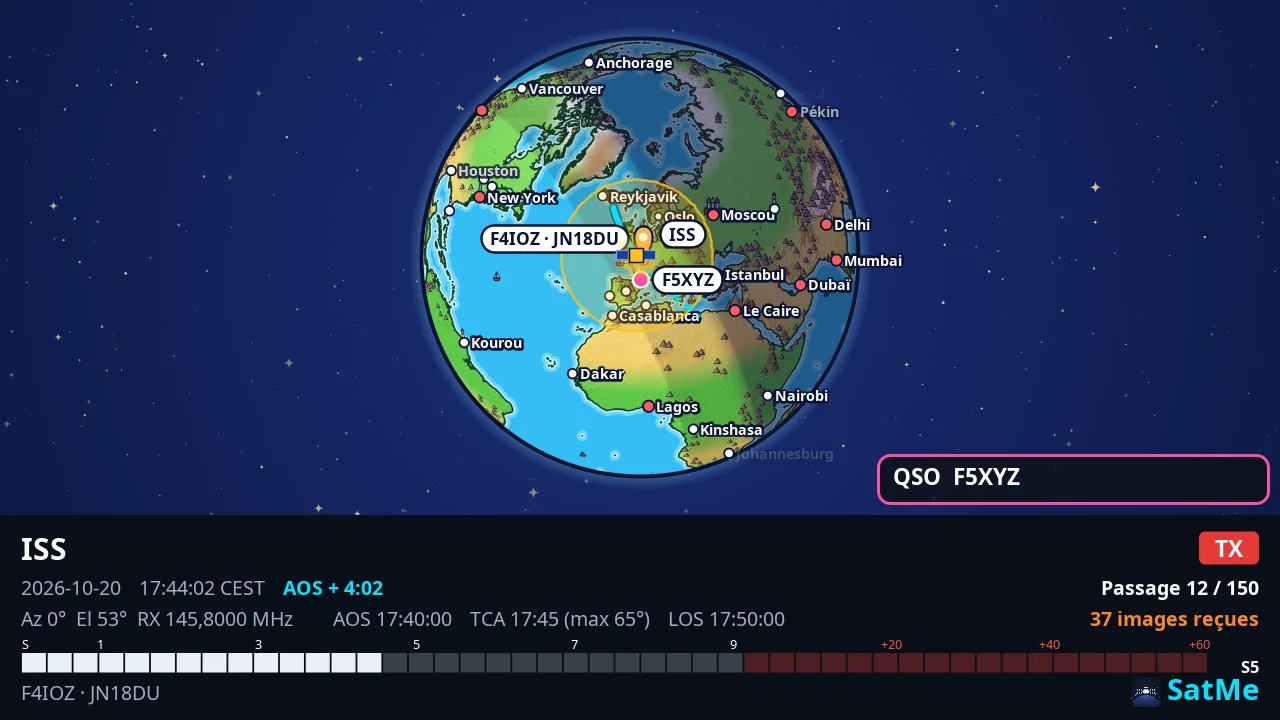

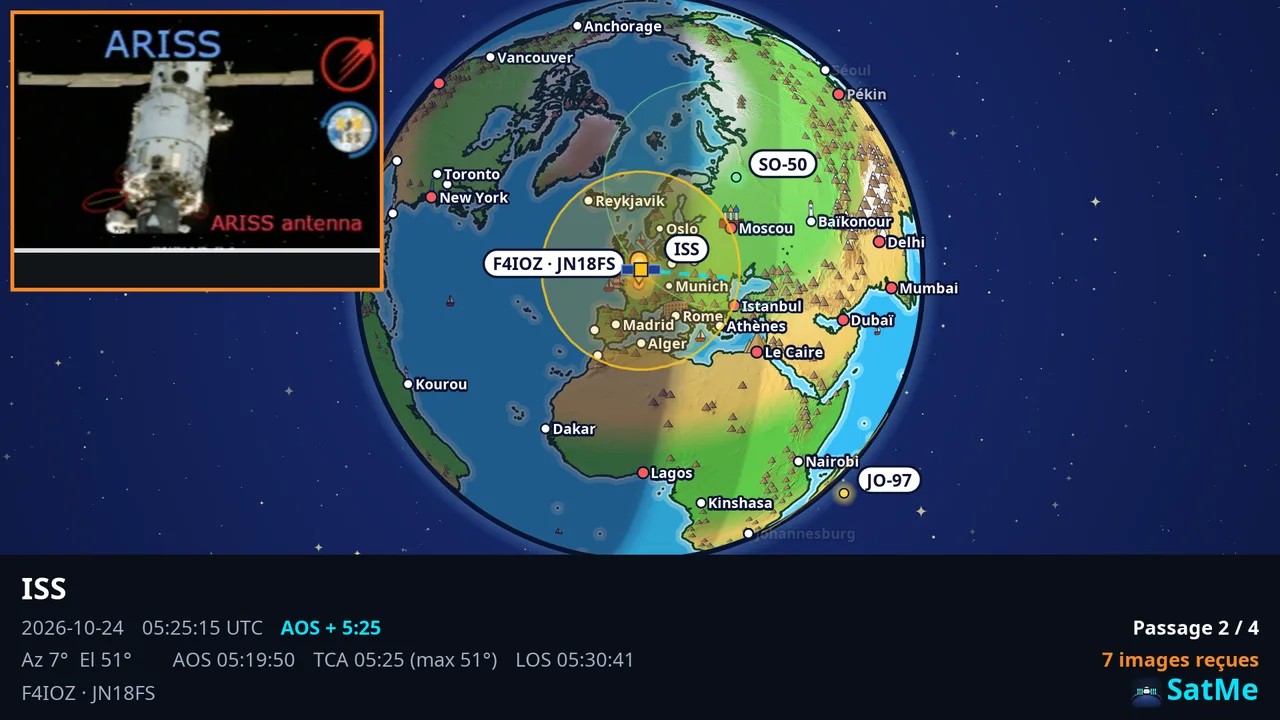

- Le morceau choisi (the chosen section: dragged on the timeline, or Choisir ce morceau; with a title: « QSO EA4XYZ ») or Le passage entier (the whole pass).
- Taille de la vidéo (video size: 480, 720 or 1080 px), Vue (view) Ciel, Carte or Globe, Format écran (16:9) (screen) or téléphone (9:16) (phone; the phone itself makes its files in 3:4). The file's frame is drawn on the replay: what is inside the frame is what the file shows, the caption at the bottom. In Globe, the picture, the GIF and the video show the globe where it is placed, with its choices.
- Options: Ouvrir sur un titre (open on a title), Finir sur un bilan (passage entier) (end on a summary, whole pass) and its Durée du bilan (summary length), Fichier du passage avec ses contacts (pass file with its contacts; ticked or not from the station's journal setting; unticked, the pass file goes without the contacts).
-
Son (WAV), Image de ce moment (picture of this moment), Vidéo, GIF animé or Fichier du passage (.zip) (with several passes: one per pass, in a ZIP); then ⤓ Télécharger (download; files
SatMe_<SAT>_<date>Z_<titre>.mp4… inexports/; the Image de ce moment carries the time of the moment shown and, without a title, ends in…_moment.png). The video needs ffmpeg; its length is announced before it is made. The sound and the paces are set in Options: Fabriquer keeps only the files.
The videos' caption: the Taille des textes de la vidéo (the video's text size) is set with a slider (×0.6 to ×2.5); it gives the pass's AOS, TCA and LOS and the time relative to it (« AOS + 4:02 »), in local time or UTC like the journal (the time setting of Réglages › Ma station).
In 16:9 the caption is a slim band under the view: about 19 % of the picture at normal text size, 28 % at most with the largest texts (it took nearly half before). Three columns: on the left the satellite, the date and time, the pointing (Az / El); in the middle AOS, RX, AOS · TCA · LOS and the S-meter; on the right the mark, the pass and the pictures received, the station. When room runs short, the least useful line goes first. The view (sky, map, globe) gets the room, and the Fabriquer preview shows exactly the same frame. In 9:16 the caption stays in rows under the view.


The video's SSTV picture, with the mouse: when l'image SSTV qui arrive (the SSTV picture coming in) is ticked, a dashed orange frame (« Image SSTV de la vidéo ») appears when hovering over the replay: drag it to move it, pull its corner (or use the wheel) for its size (4:3, from 15 to 90 % of the width). It is kept by the station and used as it is by the picture, the GIF and the video, in 16:9 as in 9:16. With a finger too, on a tablet. Auto puts it back in its original place: at the top, in the corner opposite the satellite.

In Fabriquer, under the buttons: what is chosen for the pass. It is kept with the pass and used by the picture, the GIF, the video and the replay.
Images SSTV du passage (the pass's SSTV pictures):
- Version par défaut du passage (the pass's default version): Brute (reçue) (raw, as received) at first (videos made before do not change), Auto (meilleure note) (best mark), Corrigée (corrected) or Fusion (fused).
- Then picture by picture: « comme le passage · … » (as the pass: the version that gives, with its mark), or a version of that picture that exists, each with its mark. A version chosen that has gone shows Auto, and says so: « absente : Auto montrée » (missing: Auto shown).
- Créer la fusion (make the fusion): when the slide has several copies and no fusion yet (made in the background, « Fusion en cours… »).
- Marquer corrigée/fusion (mark corrected/fused; unticked at first, as on the sheet): writes « corrigée » or « fusion » on the processed picture; without it, a clean picture.

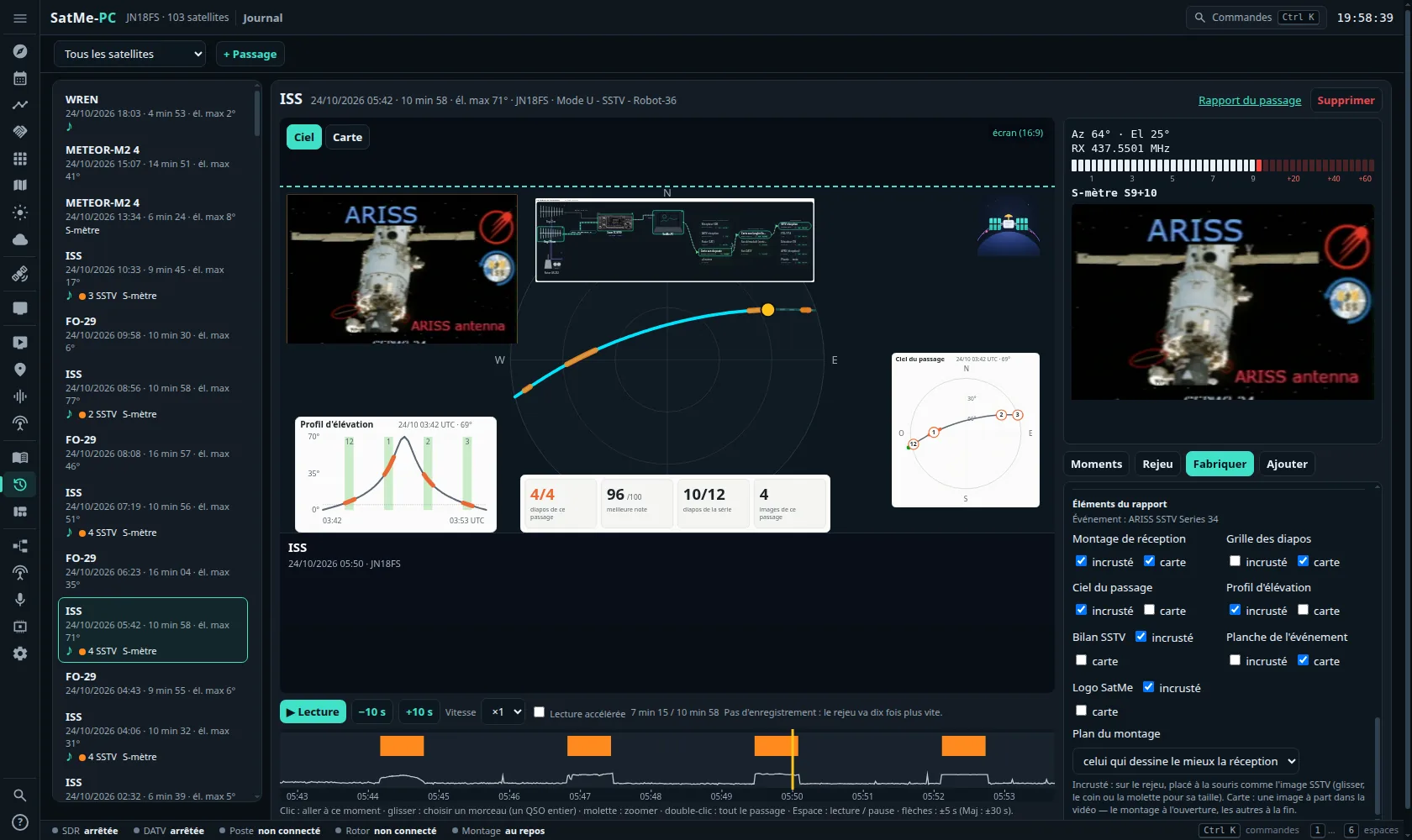
Éléments du rapport (report elements): the pieces of the report of the pass's SSTV event (the sheet's event, found the same way; its name is written: « Événement : … »):
- Montage de réception (receive montage): the plan that draws the pass's reception best, or the one chosen in Plan du montage (montage plan);
- Grille des diapos (slide grid): this pass's slides framed;
- Ciel du passage (pass sky plot): the pictures on the track;
- Profil d'élévation (elevation profile): the slides' slots;
- Bilan SSTV (SSTV figures): slides of this pass, best mark, slides of the series, pictures of this pass;
- Planche de l'événement (the event's sheet);
- Logo SatMe.
Each is ticked incrusté (overlay) and/or carte (card):
- incrusté: laid on the replay and placed with the mouse, as the video's SSTV picture: drag it, its corner or the wheel for its size, Auto to put it back in its own place. The picture, the GIF and the video take it at that place.
- carte: a frame of its own in the video and the GIF — the montage right after the opening title (4 s in the video), the others at the end (4 s each).
All are unticked at first. Without an SSTV event for the pass, the slide grid, the figures and the sheet are not offered; the sky and the profile then come from the pass's own track. An element with nothing to show says so (« rien à montrer pour ce passage »).

The Rapport du passage (pass report) shows its SSTV pictures in the version chosen too.
On the phone (Pass journal › Share): the pass's default version, Mark corrected/fused and the same elements, overlay and/or card — each at its own place, and the montage as the simple chain. Choosing picture by picture and placing with the mouse are done on the journal page served to the PC (in the phone's language); they stay with the pass.
Rapport du passage (in the open pass's header; a new tab): the pass's observation report, on one page.
- Passage (AOS, TCA, LOS and azimuths, max elevation, transponder), Station (the operator, the hardware as drawn in the Montage, the Kp index at the time), Qualité du passage (pass quality: rating Excellent, Bon, Moyen, Faible (excellent, good, fair, weak); time with signal, max S/N, decodes).
- Chronologie (timeline): the waterfall following the Doppler (taken from the pass's SigMF I/Q recording, or from the Journal détaillé (detailed log) — Réglages › Poste et rotor › Journal Doppler / CAT), the level, the elevation and the events.
- Décodé pendant le passage (decoded during the pass: SSTV, APRS, FT8 / FT4, CW, telemetry, voice), Contacts, Enregistrements et fichiers (recordings and files).
- HTML (a single file, pictures inside), ZIP (with the sounds, pictures, Doppler logs, waterfall), Partager (share: the HTML file, nothing is sent online), Imprimer (print).