Repository navigation
SatMe PC FT8 FT4
← SatMe-PC guide · October 2026
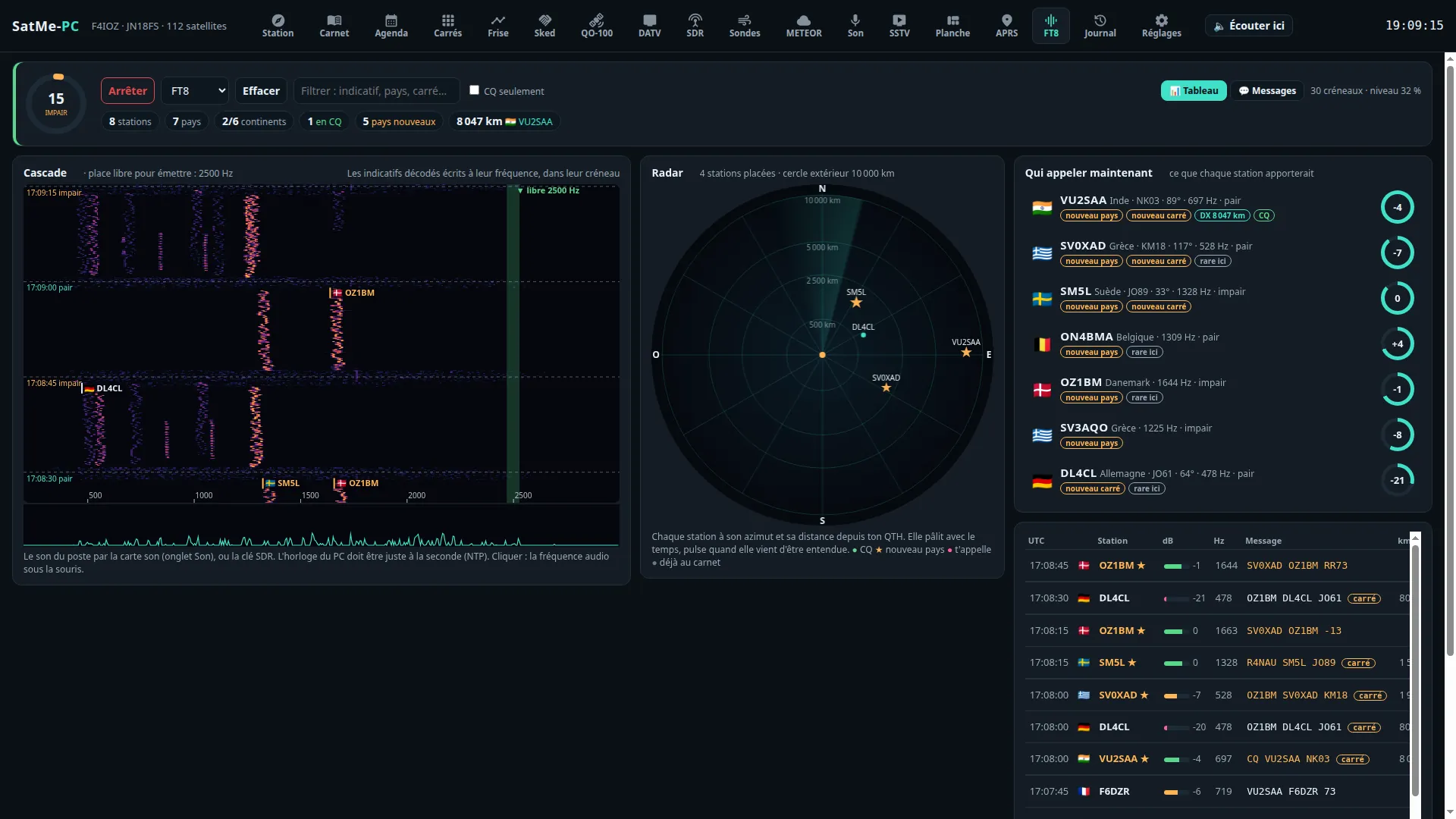
Where: workspace Modes (key 4) › FT8/FT4. Everything fits on one page, no scrolling (1920×1080, 1500×900, 1366×768): on the left the waterfall (its height follows the window), under it the decoded lines and « Qui appeler maintenant » (who to call now); on the right the Émission FT8/FT4 card and the radar. On a phone the cards stack. The other digital modes (APRS, telemetry, voice…): Digital modes.
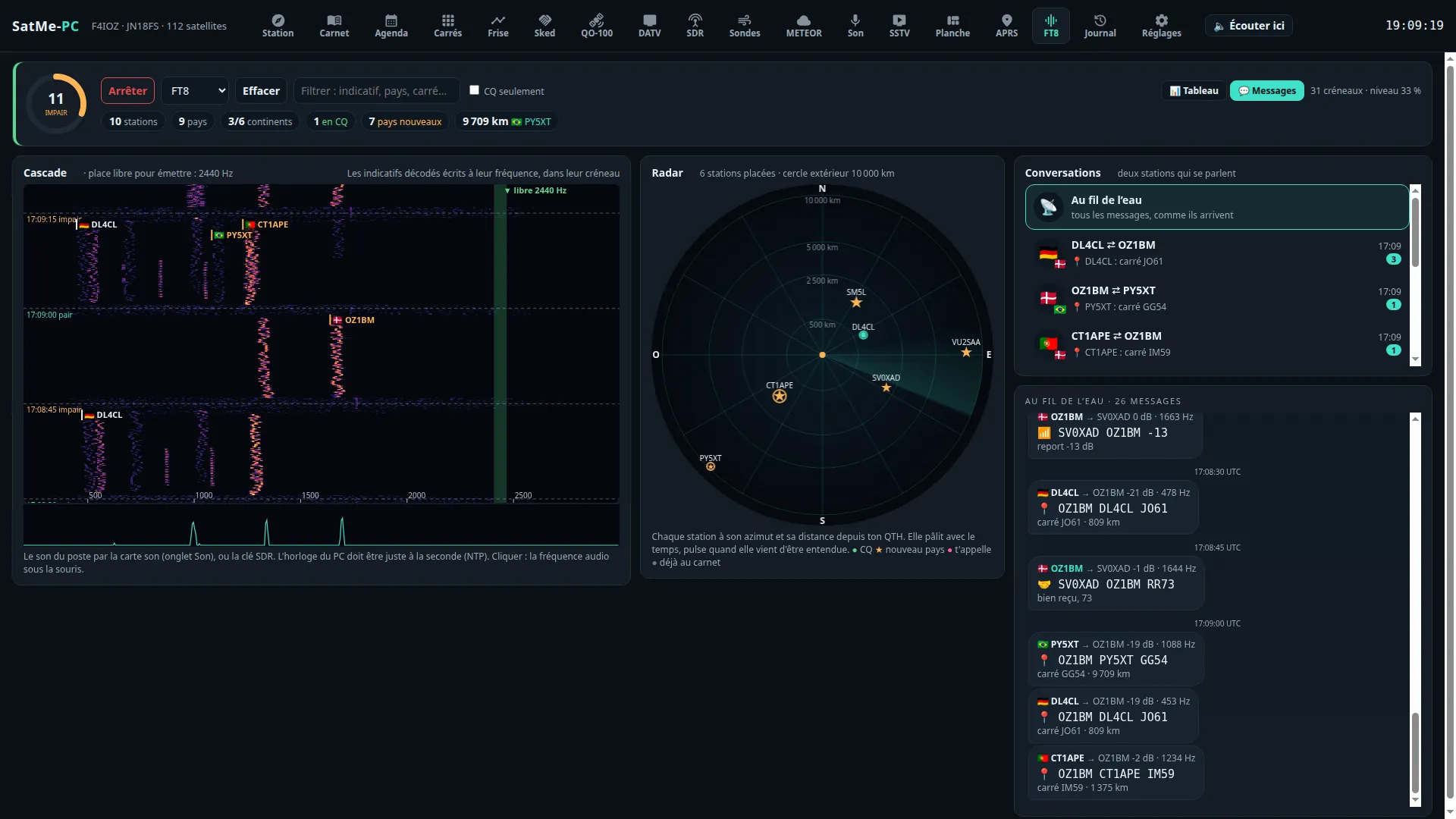
A tab made to see the band, not only to read it. At the top: Écouter / Arrêter (listen / stop), FT8 or FT4, Filtrer (filter), CQ seulement (CQ only), 💬 Messages, 👁 Stations guettées (watched stations). The sound: the rig's through the sound card (Son tab) or the SDR dongle. Reports show as sent: « R-12 » with its R, « -07 » on two digits; free text is decoded.
- The slot's ring: the 15 s as a circle, the countdown, cyan when the slot is even, orange when odd; beside it the clock read from the stations' DT.
- A waterfall that speaks: 46 s, the slots' edges and times. Each callsign decoded is written with its flag, at its frequency, in its slot. A free spot to send is found by itself (the quietest place between 500 and 2 500 Hz, away from the stations decoded; on QO-100, only in the digital segments).
- The radar: each station a dot at its bearing and distance from your QTH, fading with time, pulsing when just heard. Green for a CQ, ★ for a country new to your log, pink when it calls you.
- Who to call now: the stations of the last 5 minutes, ranked by what each would bring (new country, new locator, distance, strength, CQ, rarity); a click prepares the contact in the log.
- Marks the same everywhere (list, messages, waterfall): calls me, watched, new country, new locator, already worked. Stations guettées: the callsigns to watch for. One banner when the reception goes wrong (no sound, digital silence, nothing decoded for 40 slots).
- 💬 Messages, as a messenger: the conversations between two stations (flags, the last message, ✓ when the QSO is closed), each one as bubbles, or everything as it comes. Each message says what it is: 📣 call, 📍 locator, 📶 report, ✅ report received, 🤝 RR73 / 73.
The decoder, measured on a corpus of whole slots (weak stations down to −22 dB, overlaps, Doppler slopes, FT4): the satellite's known Doppler drift removed before decoding; each candidate read in its own narrow channel (start to 1/32 symbol, frequency to 1/16 tone); decoded signals subtracted and the rest searched again; residual drift searched, and that of a moving LNB (up to ±15 Hz/s, see A drifting LNB); hashed callsigns resolved (<CALL> when known); during a QSO, decoding by expectation of the partner's possible answers (marked ap). SatMe-PC goes deep when the satellite is low or there is time left in the slot. FT8 listening (on or off) and the FT8 / FT4 mode are kept across restarts.
PSK Reporter (Réglages, off by default): the FT8 / FT4 stations heard sent every 5 minutes with their locator, the frequency and the satellite — only when the frequency is sure (rig on CAT).
With web publishing ready (an optional module, off by default):
- The Passages FT8/FT4 sur le site card (FT8 / FT4 passes on the site) lists the journal's passes where messages were received; 🌐 sends a pass with its slots, the stations heard and their locators (type
ft8-passage, Sur clic by default; in Automatique, by itself at the end of each pass). - The FT8/FT4 line of the live part (En direct, unticked by default) sends each FT8 (15 s) or FT4 (7.5 s) slot once decoded: the satellite of the pass under way (or the band), each message with its audio frequency, report, text, the callsign and locator it gives, CQ or for you (60 at most), and a small strip of the waterfall to draw the spectrogram (type
direct-ft8).
Only messages heard on the air.
The tab's Émission FT8/FT4 card, on the right above the radar, sends FT8 and FT4 through the IC-9700 SatMe already keys (Settings › Transmit): its PTT over CAT, the audio to the rig's USB sound card or over the network link. Encoded in SatMe from the protocol description published in QEX (July–August 2020, public domain) — 77-bit message, CRC-14, LDPC (174, 91), 8-tone GFSK (FT8, BT = 2) or 4-tone (FT4, BT = 1) with ramps — and checked by running every message back through SatMe's own decoder.
-
Six messages as in WSJT-X: Tx1 (call with locator), Tx2 (report), Tx3 (R + report), Tx4 (RR73, or RRR), Tx5 (73), Tx6 (CQ). Made from your callsign and locator and the chosen station, editable (a text that cannot be encoded is flagged); clicking Tx picks the next one sent. Compound callsigns (
EA8/F4IOZ,PJ4/K1ABC), hashed callsigns<…>, and 13-character free text are supported. - Starting: double-click a decoded line (or the ↩ button) to answer that station, in the slot opposite to its own; or 📣 Appeler CQ, in the even or odd slot; Activer l'émission resumes sending the message chosen. The automatic sequence (on by default) then moves on by itself: report → R + report → RR73 → 73. A station calling you while nothing was started is shown, never answered by itself.
- TX frequency: marked in red on the waterfall; Shift + click in the waterfall moves it, ▼ place libre puts it on the clear spot found. When a QSO starts, SatMe moves it to a clear spot if a decoded station sits there — never onto the called station's frequency; « Garder la fréquence d'émission » keeps it still.
- End of the QSO: once RR73 or 73 is sent (or 73 received after your RR73), transmitting stops and the QSO terminé card offers the contact, prefilled (callsign, locator, reports sent and received, mode FT8 or FT4, satellite and SAT propagation mode for ADIF, or terrestrial): ✓ Noter le QSO writes it to the log; nothing is logged without that click.
- On a satellite (linear transponder, RS-44 for instance): the uplink follows the Doppler and the satellite's TX offset (« Aligner… ») as in voice; on an inverting transponder the uplink is LSB and the signal comes back on the downlink at the same audio offset above the dial (USB). The card says where it goes up and where it comes back; SatMe refuses when the signal would leave the uplink passband, when the chosen transmitter has no uplink (a beacon) or is not a linear transponder. On QO-100 the IC-9700's rules stay (never on a beacon, LEILA cuts).
-
Mode données (USB-D) (under the card's Réglages fold, with the audio level; on by default): while transmitting is armed (listening on), SatMe puts the IC-9700 in USB-D / LSB-D (FM-D on a band in FM): the rig then takes its TX audio from DATA MOD (MENU › SET › Connectors › MOD Input: USB, or LAN over the network), as WSJT-X does. In satellite mode both bands go to data (uplink and downlink, receive included, as WSJT-X does); out of satellite mode, the VFO in use. Only the data flag changes, never USB or LSB; the Doppler loop keeps it when it writes modes again (a new transponder, a mode put back). Nothing is switched during PTT: transmitting waits for the rig to be in USB-D, and the restore waits for the end of the message. When it stops (transmit disabled, QSO over, listening stopped, page closed, rig disconnected), each band gets its previous flag back — a USB-D set by hand stays USB-D. The card shows the mode read from the rig (« poste : USB-D ✓ »). CI-V commands: band selection (
07 D0/07 D1), then1A 06 01 01(data, filter 1) or1A 06 00 00;26is not used, the IC-9700 refuses it in satellite mode. Over USB and over the network alike. - Box unticked, or another rig (IC-9100, IC-910H, TS-2000, FT-817, IC-705: data mode not switched by SatMe, and SatMe keys only the IC-9700): the satellite loop owns the mode; set the rig so SSB takes the USB audio (IC-9700: DATA OFF MOD = USB, or MIC,USB), as for the page's microphone.
It is a condition attached to the names FT8 and FT4. In SatMe-PC a QSO only starts from your action (double-click, « Appeler CQ »); an attendance watchdog (3 min by default, 1 to 10) stops transmitting after that long without an action from you — CQ included, with the countdown shown; the page closed or unreachable for more than 15 s stops it too. ■ Arrêter l'émission is always there: on the card, in a band shown on every tab while transmitting is armed, in the header's TX light, and Esc.
SatMe checks: FT8/FT4 listening on (transmitting follows the decoder), the PC's clock read from the stations (refused beyond ±0.5 s in FT4, ±1 s in FT8), the rig connected and allowed (the rules of Settings › Transmit: time-out, power cap, transmitting over the network). The PTT is keyed 0.2 s before the audio and released once the audio is out; the start may slip up to 2 s (FT8) or 1.3 s (FT4) into the slot to wait for the previous slot's decode. PSK Reporter is unchanged.
satme --demo: nothing is ever transmitted — transmitting is simulated (the audio made then dropped) and made-up stations (Q callsigns) call CQ and answer, to try the page without a radio.
You stay at the screen throughout:
-
The clock: the PC synchronised (NTP:
timedatectlmust say System clock synchronized: yes); in the tab, the clock read from the stations stays within ±0.5 s. - The rig: the IC-9700 connected over CAT (USB or network); Réglages › Émission: the rig's sound card, a low maximum power (10 % for instance), the time-out. On the rig: MENU › SET › Connectors › MOD Input › DATA MOD = USB (or LAN over the network), VOX off.
- Listen first: FT8/FT4 tab, listening on at the frequency wanted (terrestrial, or QO-100 narrow band in the digital segment), stations being decoded.
- The Émission FT8/FT4 card, Réglages fold: Mode données (USB-D) ticked, the audio level (turn it down if the rig's ALC moves); the card must say « poste : USB-D ✓ » once transmitting is armed.
- A first message: ▼ place libre, then 📣 Appeler CQ; watch the rig's ALC and power, and on QO-100 your signal on the downlink, weaker than the beacon. ■ Arrêter l'émission (or Esc).
- A QSO: double-click a decoded CQ; the sequence moves on by itself while you stay there (the watchdog stops everything without an action from you); ✓ Noter le QSO at the end. Only then a linear satellite (RS-44 high in a pass), once aligned (Aligner…).
Transmit settings: The IC-9700 transmitting (time-out, maximum power, sound card, transmitting over the network) · aligning a transponder: Aligner….