Repository navigation
Rig control CAT
SatMe drives your transceiver over USB: it sends Doppler-corrected receive and transmit frequencies, the mode and the CTCSS tone, and tunes the rig before the satellite rises. Everything happens on the phone, through a USB-OTG adapter.


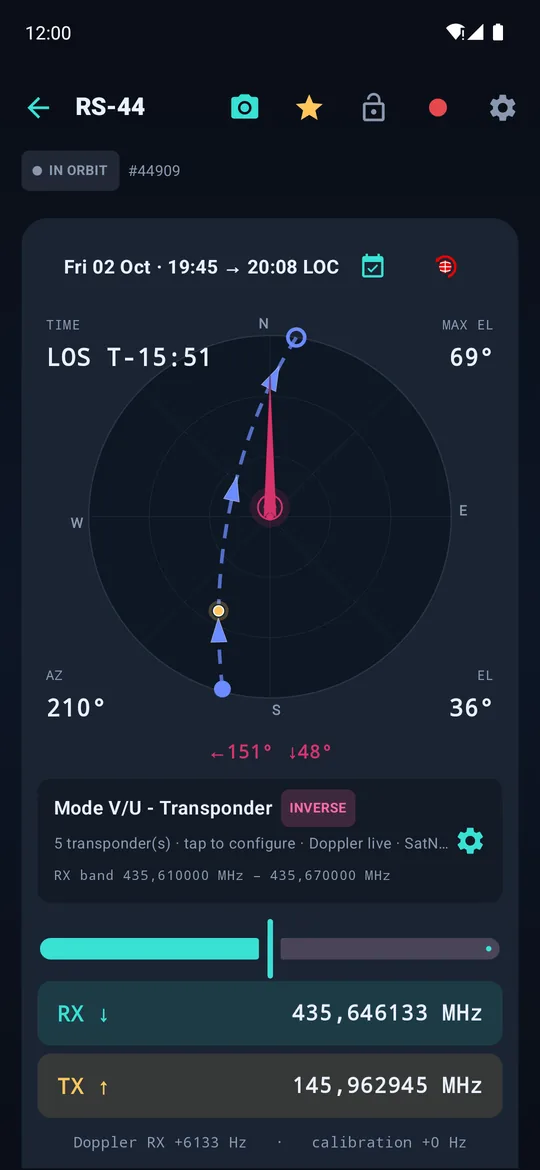
Left: choosing the radio. Middle: link and pass settings. Right: the pass page, with Doppler-corrected RX and TX.
| Choice in Settings › Rig (CAT) › Radio | What SatMe does | Status |
|---|---|---|
| Icom IC-9700 | Satellite mode, MAIN/SUB, Doppler on both VFOs, mode and CTCSS | Tried on the real rig |
| Icom IC-9100 | Same as the IC-9700: satellite mode, MAIN/SUB, Doppler, mode and CTCSS. CI-V address 7C, 19,200 baud | Bench-tested ² |
| Icom IC-910H | Same, with its own satellite-mode command. CI-V address 60, 19,200 baud, through a CI-V interface (CT-17 type) on a USB serial adapter | Bench-tested ² |
| Kenwood TS-2000 (SAT mode) | Downlink on VFO A, uplink on VFO B, Doppler on both, mode of each side and CTCSS | Tried on the real rig (FM, LSB/USB) — from 20.81 |
| Kenwood TH-D72 (FM, full duplex) | One cable, both bands: one receives the downlink, the other transmits the uplink | Bench-tested from a PC; not yet from the phone over OTG |
| Yaesu FT-817 / Icom IC-705 (one rig per side) | One rig receives, one transmits, each on its own cable | FT-817 pair tried; IC-705 ¹ |
| Same entry, receive side SDR dongle | One FT-817 or IC-705 transmits, an RTL-SDR dongle receives | FT-817 tried; IC-705 ¹ |
¹ Built and bench-tested with a simulated rig, not yet tried on a real IC-705. ² Built and bench-tested with a simulated rig, not yet tried on the real rig. Turn the rig's tracking (TRACK) on in satellite mode: as with the IC-9700, the rig moves the uplink itself while you turn the dial.
- Plug the rig's USB cable into a USB-OTG adapter on the phone (two rigs: a small USB hub on the adapter).
- In Settings › Rig (CAT), pick the Radio.
- Turn on Enable CAT control. Android asks for USB permission: accept.
- Connect, then Test link: SatMe reads the rig's frequency back.
- Open a satellite: the rig follows the Doppler on its own.
CAT also connects by itself when it is wanted: when the rig's cable is plugged in, when automatic SSTV is armed, and a minute before each pass armed (again if it dropped). Only a port whose rig answers is kept; at most one try every 45 s. CAT only reads and sets frequencies: nothing transmits.

- Take a powered hub, ideally with a USB-C PD input: it feeds the dongle and the interfaces, and it can charge the phone during the pass. An RTL-SDR dongle alone draws about 300 mA.
- The IC-9700 needs only one USB cable, which carries both CI-V and audio. The TS-2000 needs two: a CAT interface and a USB sound card on its audio output.
- Put the RTL-SDR dongle on a short USB extension, away from the hub and the phone: it picks up less noise at 137 MHz.
- Since the phone's port is taken by the hub, the PC control desk works over Wi-Fi.
- SatMe keeps RTS and DTR low on a rig's serial port. Another program on a PC may raise them when it opens the port, and on some interfaces that keys the transmitter.
-
CI-V address (hex):
A2by default. - USB baud: the rig's CI-V USB Baud Rate (19200 to 115200).
- Look for the right port: the IC-9700 shows two USB ports; SatMe tries the chosen one, then its neighbour, and remembers the one that answers.
- SatMe sets satellite mode, the modes of both legs and the CTCSS tone when it arms a transponder.


Choose what receives and what transmits; the card below gives each rig's line settings.
Under Yaesu FT-817 / Icom IC-705 (one rig per side):
- Receive (downlink): FT-817, IC-705 or SDR dongle.
- Transmit (uplink): FT-817 or IC-705.
That covers two FT-817, two IC-705, either mix, or one rig transmitting while the dongle receives.
| Rig | Line | Rate |
|---|---|---|
| FT-817 | 8N2 | menu #14 (4800 / 9600 / 38400), same on both rigs |
| IC-705 | CI-V 8N1, address A4
|
its CI-V USB Baud Rate; on "Auto", any rate works |
On the IC-705: Set › Connectors › CI-V › CI-V USB Port = "Link to [REMOTE]" or "Unlink", address A4, USB baud rate Auto.
Set up the rigs does everything in order: lists the adapters, asks for permissions, works out which rig receives and which transmits, then connects.
- A mixed pair is recognised by protocol: the cable answering in CI-V is the IC-705.
- Two rigs of the same make are recognised by band: the one tuned near the downlink receives.
- The assignment is remembered by the cable's serial number when it has one.
With the SDR dongle as the receive side, the waterfall picks the listening point and the transmitting rig follows it (inverted on an inverting transponder). See Extensions.
From 20.81. Tried with a RigExpert Tiny (CAT on its first port) and a USB sound card for the audio.
- On the rig: SAT mode on (SAT key), the downlink on the main side, the uplink on the sub side. SatMe says so if the rig is not in SAT mode.
- CAT speed (menu 56): SatMe tries 57600, then 9600, 38400, 19200, 4800 and 115200, and keeps the one that answers.
- SatMe tunes VFO A (downlink) and VFO B (uplink), reads them back, sets the mode of each side (FM, LSB/USB, CW) and the uplink CTCSS tone, and gives control back to the downlink each time. The RX knob is read back on linear transponders. The S-meter goes to the pass journal.
- SatMe never transmits through CAT, and keeps RTS and DTR low: on an interface such as the RigExpert they may key the rig. On a RigExpert, only the first port (CAT) is opened; the second (PTT/CW) is never written to.
- Keep an antenna or a dummy load on the rig while setting up: a wrongly wired interface can key it.

Transmit band, and both bands once connected.
- One USB cable, both bands: one receives, the other transmits, Doppler included.
- On the radio: both bands shown, full duplex on (menu), FM.
- Frequencies follow the band's step: the TH-D72 refuses anything off its 5 kHz grid, so Doppler moves in 5 kHz steps — fine for FM satellites.
- Transmit band (uplink): "transmit A, receive B" or the reverse.
- Once connected, the panel shows each band: step up or down, a frequency typed in, power (5 W, 0.5 W, 50 mW).
- The same cable also carries APRS KISS (APRS), but not both at once.
| Setting | Effect |
|---|---|
| Send even below horizon | The rig is tuned before AOS: it is ready as the satellite rises. Off, CAT waits until the satellite is up. |
| Doppler on receive | Once the delay has passed since the dial last moved, the phone also tunes the receiver to hold the chosen frequency. |
| Knob hand-back | Silence required after your last move before SatMe takes the receive VFO back. |
| Transmit realigned immediately | The uplink follows the RX dial without waiting. |
| TX knob = shift | Two-rig duplex: turning the transmit rig's VFO acts like the shift buttons. |
| CTCSS tone (FM) · Auto from transponder name | Detects "CTCSS 67.0" in the transponder name and applies the tone; or pick a tone by hand. |
Modes: FM transponders and the digital modes heard in FM (APRS AFSK, packet, SSTV…) set the rig to FM; a linear transponder uses USB down and LSB up when inverting, or CW.
On the pass page, RX offset and TX shift fine-tune each leg; the Doppler hold button ("DOPPLER ON HOLD") freezes all writes to the rig while tracking goes on.

The pass-start sequence replayed against a simulated rig.
Folded at the bottom of the CAT settings:
- Simulated rig: the chosen rig, in memory. The whole chain runs, nothing is transmitted.
- Frame log: the last 200 frames, decoded in plain words.
- Run the bench: replays the pass-start sequence. A simulated rig refuses what a real one refuses: a healthy sequence produces no refusal.
- Nothing happens? Check OTG is on, the USB permission was granted, and use Test link.
- Frequencies swapped on a two-rig station? Run Set up the rigs again with each rig on its band.
- If the frame log shows refusals, send them to F4IOZ: they say exactly what went wrong.
See also: Passes and tracking · QO-100 · APRS