Repository navigation
SatMe PC SDR
← SatMe-PC guide · October 2026
The station's receiver: RTL-SDR dongle, ADALM-PLUTO, bladeRF 2.0, the IC-9700's IF, a SatMe-Node's SDR, an I/Q file or the test generator. Spectrum, waterfall, memories, scanning, sound cleaning, I/Q, measurements. Reception only: the SDR tab never transmits.
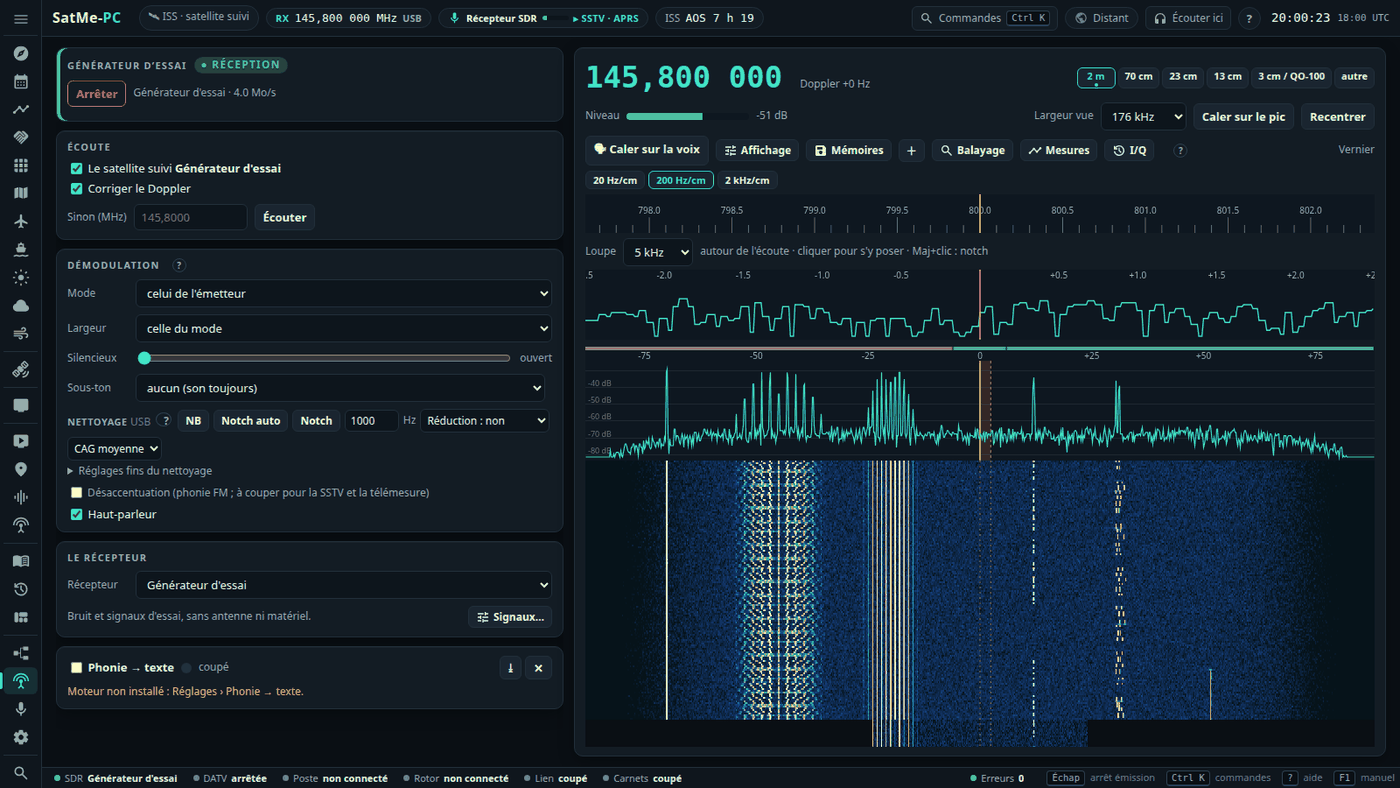
Where: Station workspace (key 6) › SDR.
Listening, step by step:
- La clé card (the dongle): the Récepteur (receiver) — Clé RTL-SDR (rtl_tcp), ADALM-PLUTO (réseau), bladeRF 2.0 (USB), IC-9700 FI (son du poste) (IC-9700 IF, the rig's sound), SDR du SatMe-Node (réseau), Fichier I/Q (relecture) (I/Q file, replay), Générateur d'essai (test generator) — and its link (collapsed Liaison rtl_tcp: host and port, Lancer rtl_tcp sur ce PC (start rtl_tcp on this PC), Alimenter l'antenne (bias-tee) (power the antenna); Liaison ADALM-PLUTO: 192.168.2.1, port 30431; bladeRF 2.0 (bladeRF-cli): Détecter (detect); SDR du SatMe-Node: the board and the stream's rate); Gain, CAG numérique (digital AGC), Erreur (error) in ppm (Appliquer, apply).
- Démarrer (start; at the top of the receiver card).
- Écoute (listening): Le satellite suivi (the followed satellite) and Corriger le Doppler (correct the Doppler), or Sinon (MHz) (otherwise) a frequency then Écouter (listen) (or Ctrl+K: « 145,8 »).
- Démodulation: Mode (celui de l'émetteur (the transmitter's), NFM, USB, LSB, AM), Largeur (width), Silencieux (squelch), Sous-ton (sub-tone); Désaccentuation (de-emphasis; switch it off for SSTV and telemetry); Haut-parleur (speaker). The sound also goes to the decoders (SSTV, APRS, FT8) and to the recording, instead of the sound card.
Above the spectrum: Largeur vue (width shown; 12 to 176 kHz), Caler sur le pic (snap to the peak), Recentrer (recentre), 🗣 Caler sur la voix (net on the voice), Affichage (display), Mémoires (memories), +, Balayage (scan), Mesures (measurements), I/Q, ⟲ crêtes (clear peaks); below, the Vernier and the Loupe (magnifier; 3 to 20 kHz around the listening frequency; Shift + click: notch).
The SDR tab: listening (the followed satellite, Doppler corrected, or a frequency), demodulation (NFM, USB, LSB, AM; width, squelch, de-emphasis), the spectrum and waterfall, the vernier and magnifier. On the spectrum a click tunes, the wheel zooms, dragging moves the view within the 176 kHz the receiver sees, the passband's edges can be pulled; on the waterfall the wheel tunes; on the keyboard ← → one step, ↑ ↓ ten steps. Reception only.
The satellite scale (between the spectrum and the waterfall): every known downlink in the view, where your station hears it now (Doppler and the satellite's manual correction included). Green: above the horizon; white: rising within 5 min; grey: below (its trace may still show). A linear transponder is a band whose edges follow the Doppler (blue when up). The followed transmitter is highlighted, favourites in bold; hovering gives name, mode, Doppler, elevation/azimuth, time to AOS or LOS. A click on a name follows that transmitter; inside a band it tunes there and keeps the place in the band as the Doppler moves it; elsewhere a plain fixed frequency. The orange rectangle is the passband: the wheel on it fine-tunes (Alt: ten times faster); elsewhere the wheel zooms, dragging pans, a pinch zooms on a phone. Ctrl + wheel or Ctrl + drag on a satellite sets its correction manuelle (kept for it, the same as the satellite panel's RX calibration). The demonstration (--demo) puts its test generator's signals on the satellites up in view.
Calibrer la clé SDR… (calibrate the dongle; beside the ppm error, or in the converter table): on a QO-100 beacon, a GSM base station's FCCH tone or a known frequency, SatMe finds the peak and gives the dongle's error in ppm, saved in one click, and behind an LNB its real oscillator. The details: Converters, transverters and calibration.
- CTCSS: in NFM the sub-tone heard (the 50 tones from 67.0 to 254.1 Hz) is read under the voice in less than a second and shown beside the level (« CTCSS 67,0 Hz », its deviation on hover). Sous-ton (Démodulation card, aucun (none) by default): the tone squelch — the sound (speaker, decoders, voice to text) passes only while that tone is heard. Reception only; the test generator can put one under its FM signal.
Mémoires (and + for the frequency listened to): named frequencies with their mode, width, CTCSS tone, a tag and a colour, kept in folders (one level of sub-folders).
- A click on a memory tunes the receiver there: within the view, by the offset; beyond it, the receiver goes there and stops following the satellite.
- Drag and drop between folders, rename, delete (memories move to the parent folder), sort, search, edit in the row; a memory can be locked out of the scan.
- On the spectrum, small flags: click to tune, right-click to edit. Filter by tag.
- Kept by SatMe-PC (
memoires-sdr.json); Exporter / Importer (export / import) as JSON, without doubles, from one PC to another. -
Band plan: a coloured strip at the top of the spectrum — IARU Region 1 for 2 m, 70 cm, 23 cm, 13 cm and 3 cm, and QO-100's. It can be replaced band by band with a
plan-bandes.jsonfile in SatMe-PC's folder (the default plan downloads from Affichage as a model). - Band stack: the band buttons (2 m, 70 cm, 23 cm, 13 cm, 3 cm / QO-100) keep the last three frequencies, modes and widths that stayed more than 5 s; pressing the band again steps through them.
Balayage (SDR tab), reception only:
- What is scanned: a folder's memories, a range channel by channel (step and mode to choose), or a range judged span by span on the wide spectrum.
- Stop on a level above the noise or on the squelch opening; resume when the signal drops, after a time, or by hand; a priority channel checked every N seconds; locked-out channels skipped; signals found kept as memories.
- The scan's steps are never written to the settings; at the stop the frequency is kept once, or the one before given back (revenir à la fréquence d'avant (go back to the previous frequency), and always when nothing was found). Refused while DATV, ADS-B, QO-100, a sonde or METEOR holds the receiver; a hand tuning stops it.


The Affichage button sets the spectrum and waterfall, kept in this browser (défaut goes back to the defaults):
- Average over 2 to 16 frames; peak hold (fixed or decaying 1, 3 or 10 dB/s) and minimum hold, cleared with ⟲;
- Levels: auto (the bottom on the noise, the top on the strongest signal), or a reference and a range (30 to 120 dB);
- Waterfall: seven palettes, contrast, brightness, black set on the noise, speed;
- Tuning: inertia wheel (a quick spin starts the tuning, which slows down), steps in SSB / CW (1 to 100 Hz) and FM / AM (100 Hz to 12.5 kHz);
- Markers: the band plan, the memory flags.
Under the demodulation (SDR tab and QO-100 cockpit), set for each mode (USB, LSB, NFM, AM) and kept; everything is off at first.
- NB (noise blanker): very short clicks (switching supplies, the LNB supply) found on the raw I/Q samples and blanked before any filter; threshold and width in Réglages fins du nettoyage (fine cleaning settings).
- Notch auto: up to three steady carriers whistling in the voice, notched out; in CW a note must hold 2 s before it is notched, so the keying gets through.
- Notch: a narrow notch at the audio frequency given; Shift + click on the spectrum or the magnifier puts it on a carrier.
- Noise reduction light, medium or strong: the hiss drops between words and under the voice (29 ms of delay, paused while the squelch is closed).
- Sound AGC in SSB and AM: slow, medium or fast.
The I/Q button keeps the receiver's raw samples (1.0584 MS/s: 127 MB a minute from an RTL dongle, 254 MB from the Pluto, the bladeRF or the generator), as SigMF (.sigmf-data and .sigmf-meta: frequency, date, satellite, mode).
- Remonter le temps (go back in time; off by default): the last 1 to 10 minutes always kept in a fixed-size file on disk; Garder les dernières minutes (keep the last minutes) turns them into a recording — a signal noticed too late is not lost.
- ● Enregistrer (record): 1 to 60 minutes at most.
-
Replay: the Fichier I/Q Récepteur takes the recording as the receiver; spectrum, demodulation and decoders (SSTV, CW, FT8, voice to text) work on it. Pause, position, speed ×1 / ×2 / ×4, loop, and tranches FT8 (FT8 slots: restart aligned on the 15 s slots). Raw files (
.cu8,.cs8,.cs16,.cf32) dropped in the folder replay too. - What is decoded from a recording is marked « relecture » (replay; dated from the recording), never taken for a real reception: no journal, no sheet, no PSK Reporter, no SatNOGS, no « nouvelle image » (new picture); APRS frames are counted, never kept, and no automatic pass recording starts.
The Générateur d'essai Récepteur: a fake receiver, with no antenna or hardware — noise (strong, medium, weak) and signals around the frequency listened to, each with its offset and SNR: carrier, keyed CW (text and speed to choose), SSB (synthetic voice), FM tone (with a CTCSS sub-tone if wanted), an FT8 call in the even slots, SSTV pictures in narrow FM, PSK31, RTTY, « Paquets 9600 » (9600 packets: telemetry and an SSDV picture). Écouter sets the mode and offset to hear it. Nothing is transmitted; SSTV pictures show without being kept, nothing goes to PSK Reporter.
The Mesures button (SDR and QO-100 tabs), reception only:
- Level over time: the channel listened to, a marker set a few kHz from the listening frequency (it follows the Doppler), the noise floor, or the QO-100 beacon over the noise; over 10 min, 1 h or 24 h, as CSV (mean, minimum, maximum, UTC).
- Sun noise (Y factor): aim at cold sky, Mesurer (measure), then at the Sun, Mesurer; the Sun / cold sky ratio against the expected one, worked out from the dish's diameter and efficiency, Tsys and the day's solar flux (SFU at 10.7 cm, typed by hand: nothing is fetched from the Internet). Balayer (sweep): a grid around the Sun by the rotator (rotctld or simulated), after confirmation, within its end stops; « Arrêter » (stop) stops the rotator.
- QO-100 beacon · 24 h: one point a minute while the beacon is followed — its level over the noise and the LNB's error; the drift from night to day.
The SDR tab's Récepteur chooses the receiver; everything works the same with each: Doppler, QO-100 (behind the LNB, IF around 739 MHz, or behind a converter), the cockpit, waterfall and panorama, the signal classifier, the sound for the decoders (FT8, SSTV, APRS, voice to text, LEILA), METEOR, radiosondes. Fine tuning as on the phone: the vernier (N Hz per cm, with momentum), the magnifier around the listened frequency, voice netting in SSB (Réglages › Accord fin). SSB and AM use a hang AGC.
| Hardware | Link | Receives | Transmits |
|---|---|---|---|
| RTL-SDR dongle | rtl_tcp, on this PC (started for you) or on the network | about 24 MHz – 1.7 GHz | — |
| ADALM-PLUTO | network (USB cable: 192.168.2.1, port 30431; or Wi-Fi / Ethernet) | 70 MHz – 6 GHz | DATV, SSTV |
| bladeRF 2.0 micro | USB 3, through bladeRF-cli (Linux) | 70 MHz – 6 GHz | DATV, SSTV |
| HackRF One | USB, through hackrf_transfer | — | DATV tests only (indoor, dummy load) |
| MiniTiouner | USB, through LongMynd (or a SatMe-Node) | DVB-S / S2 | — |
| IC-9700 IF | the rig's sound set to IF (network or USB sound card) | the 12 kHz IF, ±3.6 or ±7.5 kHz | — |
Nothing to install: SatMe talks to its IIO server directly. On its USB cable it answers at 192.168.2.1 (port 30431); on Wi-Fi or Ethernet give its address.
-
The receiver only receives. It sets the RX oscillator, the sample rate, the analog bandwidth and the gain, and nothing else: it never opens the transmitter, never writes its settings, never touches its USB drive or its
config.txt. Only the transmitter's code (DATV, SSTV) writes on the transmit side. - It runs at 2.1168 MS/s, brought down to the dongle's 1.0584 MS/s; its 12 bits are kept to the demodulator. About 8.5 MB/s on the cable.
- Gain: automatique is the AD936x's slow AGC; otherwise 0 to 71 dB. The status line shows the board and its firmware. Pulled out, or silent for three seconds: the reception stops and says why.
A Nuand bladeRF 2.0 (micro xA4…) on a USB 3 port, driven through the bladeRF-cli tool in interactive mode, the samples (SC16 Q11) going through a named pipe.
-
Installing (Linux):
sudo apt install bladerf(bladeRF-cli, libbladeRF and the udev rule). The FPGA loads by itself when the board opens, from~/.config/Nuand/bladeRF/hostedxA4.rbf(or/usr/share/Nuand/bladeRF/): put your model's.rbffile there. The package's udev rule gives access to the plugdev group:sudo usermod -aG plugdev $USER, log in again, unplug and plug back. Check withbladeRF-cli -p. -
Détecter (SDR tab or Émission card) runs
bladeRF-cli -e info -e version: read-only, it shows the model, serial number, FPGA and firmware; that serial is then used to open the board. bladeRF-cli's folder is set in the SDR tab (empty: the PATH). - Receiving: as the Pluto, 2.1168 MS/s brought down to 1.0584 MS/s, 12 bits kept; gain automatique (the AD9361's AGC) or 0 to 60 dB. Only RX1 commands; silent too long or unplugged, the reception stops and says why.
-
Transmitting: the Pluto's rules (the same AD9361), QO-100 included. The gain is an attenuation (bladeRF-cli gets 66 + gain), −50 dB by default, never above the maximum in Réglages, held at −40 dB into a load and indoors. Each setting is checked in bladeRF-cli's answer before
tx start; once the stream flows the gain is read back. Stop:tx stop, pipe closed,quit, then the tool ended. A bladeRF receiving does not transmit, and the other way round. - Windows: bladeRF-cli.exe cannot write into a named pipe: the bladeRF works only under Linux for now; the page says so.
The DATV Émission card's Émetteur also offers a HackRF One, to test a receiver — never to QO-100: its converter takes 8-bit samples, its harmonics and spurious outputs need a filter, and QO-100 needs a power amplifier. The HackRF sends only in the indoor test and the dummy load test.
SatMe drives it through hackrf_transfer, the samples on its standard input as signed 8-bit I/Q, at the Pluto's sample rates, with the narrowest baseband filter that lets the signal through:
hackrf_transfer [-d SERIAL] -t - -f FREQ_HZ -s RATE -b FILTER_HZ -x VGA -a 0 -p 0
-
Installation. Linux:
sudo apt install hackrf(it bringshackrf_transfer,hackrf_infoand the udev rules: unplug and replug the HackRF afterwards). Windows: the HackRF tools for Windows (hackrf_transfer.exe,hackrf_info.exe) and the HackRF's WinUSB driver; give their folder in Outils HackRF (HackRF tools) if they are not in the PATH. -
Detection, read-only. Détecter runs
hackrf_infoonly (it lists the boards, sends nothing). Nothing else runs until ÉMETTRE is confirmed. -
Low power only. The RF amplifier is always off (
-a 0on every command line; a line without it, or with any other option, is refused by the code), the antenna port's supply off (-p 0), the TX VGA gain 0 to 20 dB at most (the HackRF goes to 47). - Oscillateur décalé (offset oscillator; on by default): the LO is tuned beside the signal and the baseband shifted digitally, so the LO leakage falls outside the occupied band; indoors the LO and the image stay in the same amateur band.
- Stop: the tool's input closed first, then it is terminated, then killed. It stops when the tool dies, says the HackRF is missing or busy, stops taking samples for 3 s, at the end of the time allowed, when the page has been silent for 15 s, and when SatMe-PC closes.