Repository navigation
Style Sankey
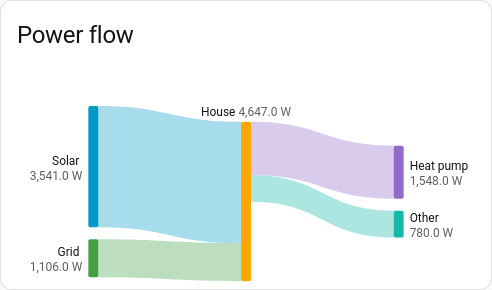
Power or energy flowing between named sources and loads, each band as wide as its flow: solar and the grid into the house, the house into the heat pump, the car and everything else. Each entity is one flow, from one node to another; the nodes are just names you give them.
Where power or energy goes right now: a home's sources and loads, a battery charging from solar, water from the mains to each tap.
type: custom:chartdeck-card
style: sankey
title: Power flow
entities:
  - entity: sensor.solar_power
    from: Solar
    to: House
  - entity: sensor.grid_import_power
    from: Grid
    to: House
  - entity: sensor.heat_pump_power
    from: House
    to: Heat pump
  - entity: sensor.other_power
    from: House
    to: Other
To use this style, set style: sankey (or pick Sankey (flow) under Parts of a total in the editor's Style section). Each entity's Flows from and Flows to are in its own options; the chart option is in the editor's Chart section.
- It draws the current values, so it moves as the power does. No history is loaded.
- Columns come from the flows: a node nothing flows into starts on the left, and each node sits one column after the furthest node that feeds it. A node that only receives stays in the column after its source, rather than being pushed to the far right.
- Node heights share one scale, set by the fullest column, and each column is centred. Bands leave and arrive in the order of the nodes at their other ends, so they cross as little as they can.
- Labels go outside the outer columns (at most 30 % of the width each, longer names cut short) and above middle nodes, moved apart where small nodes sit close together. Each node shows its total.
- Nothing flowing counts as nothing: an unavailable, negative or non-number reading is a flow of 0. A node keeps its column while its flows are at 0, but isn't drawn; when nothing at all flows, the card says "Nothing is flowing right now."
link_color: auto       # auto (default), source or target
entities:
  - entity: sensor.solar_power
    from: Solar        # the node this flow leaves
    to: House          # the node it arrives at
color: amber # this flow's colour, and its node's- Nodes take the series colours in order of first appearance.
-
link_color: autocolours a band by where it comes from, or by where it goes when it leaves a middle node ("House → Heat pump" takes the heat pump's colour).sourceandtargetalways colour by one end. - A flow's own
colorpaints its band and the node it is coloured by (the first such flow wins for a node). - Flows need both a
fromand a differentto. Entities without both are left out; with none at all the card says "Give each entity a "Flows from" and a "Flows to" in its options." - Flows can't go round in a loop (A → B → A): the card refuses the config with a message naming the loop.
Hovering or touching a band highlights it and shows "Solar → House" with its value. Tapping a band runs that entity's tap action (more-info by default).
In the editor: Colour flows by in the Chart section. Each entity has Flows from, Flows to and Flow colour.
Layout: one chart for the whole card. Every shared option is described on the Options page.
Previous: Climate · Next: Wind rose · All styles