Repository navigation
Style Wind Rose
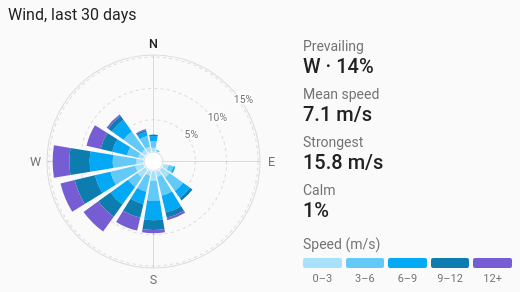
Where the wind came from, and how hard: one petal per compass direction, as long as the share of the time the wind blew from there, split into speed bands from light to strong. Beside it: the prevailing direction, the mean speed, the strongest reading and how often it was calm.
A weather station's wind vane and anemometer, or a weather integration's wind bearing and speed: siting a turbine or a washing line, knowing which side of the house takes the weather.
type: custom:chartdeck-card
style: wind_rose
title: Wind, last 30 days
entities:
  - sensor.wind_direction
  - sensor.wind_speed
To use this style, set style: wind_rose (or pick Wind rose under Distributions in the editor's Style section). The chart options are in the editor's Chart section, which also says which entity is the direction and which the speed.
- The first entity is the wind direction, in degrees (0 to 360) or compass points (N, SSW, "West").
- The second is the wind speed. Without one, the petals only show how often the wind came from each way.
- Readings are paired in time: a new stretch starts whenever either sensor changes, and runs until the next change, so a gusty spell that reports often doesn't count for more than a calm one. A gap in either drops that stretch.
-
The last 30 days (
period: {last: 30, unit: day}). Any part ofperiodyou set is merged over that. -
16 directions (
sectors: 16): N, NNE, NE… Sector N runs from 348.75° up to 11.25°. - Speed bands from the sensor's unit: in m/s 0–3, 3–6, 6–9, 9–12 and 12+; in km/h, mph and knots the bands start where Beaufort forces 3 to 6 do; in ft/s about the m/s bands. They are shades of the theme's primary colour, light to strong. Colour bands set on the speed entity or the card replace them.
- Calm below 0.5 m/s (or the same in km/h, mph or knots). A reading below calm counts towards calm, not a direction: a vane means little in still air, and many report 0° (north) then.
-
History (
source: history), which is exact.
sectors: 16        # 4, 8 or 16
calm: 0.5          # in the speed sensor's unit; blank for the default
source: history # or statistics-
source: statisticsreads each hour's average direction, which reaches further back. It is only right across north when the sensor records direction as an angle (state classmeasurement_angle); otherwise an hour swinging between NNW and NNE averages to south. The editor says so when statistics is picked. - Rings mark round shares (1, 2, 2.5 or 5 × 10ⁿ %), about three, the last at or just past the longest petal.
Hovering or touching a petal shows its direction and share of the time, and the share in each speed band.
In the editor: the period, calendar spans, previous and next buttons and source, then Directions, Calm below, the hover switch and Compact. Grouping is left out: it means nothing to a rose.
- A
whenon the direction or speed entity (or on the card) hides the time its condition didn't hold. A stretch hidden from either is left out of the rose, so the prevailing direction, mean speed, strongest reading and calm share use only the time kept: the wind while a window was open, say. -
Unit conversion applies to the speed: an m/s sensor with
unit: km/his drawn in km/h, and its default speed bands are the km/h ones. Band starts andcalmyou type are in the shown unit. Directions are never converted. - Transforms don't apply to a wind rose.
Layout: one chart for the whole card. Every shared option is described on the Options page.
Previous: Sankey · Next: 24-hour clock · All styles