Repository navigation
Style Day Clock
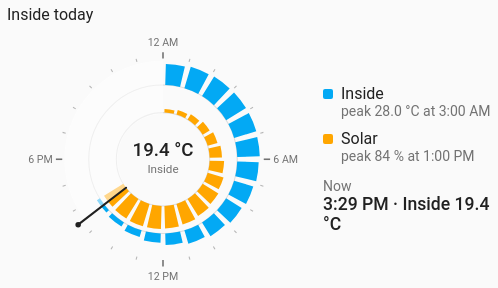
A day on a 24-hour dial, midnight at the top and noon at the bottom: each entity is a ring round it. An on/off entity's ring is filled wherever it was on (the heating, the lights, someone home); a number's ring is a bar for every hour (or half or quarter hour). A hand marks now, and the part of the day still to come is dimmed. Over several days it draws the average day.
When in the day things happen: heating and hot water runs, lights, presence, the car charging, solar and the house's use by the hour.
type: custom:chartdeck-card
style: day_clock
title: Heating today
entities:
  - entity: climate.lounge
    name: Heating
  - entity: binary_sensor.hallway_motion
    name: Hallway
  - entity: sensor.house_power
    name: Power
To use this style, set style: day_clock (or pick 24-hour clock under History charts in the editor's Style section). The chart options are in the editor's Chart section.
-
An entity is an on/off ring when it sets
active, or its domain is one of states (binary sensors, switches, lights, climate, covers, locks, people, device trackers, media players, vacuums and the like). Otherwise, an entity with a unit or a state class is a number ring. -
On/off rings are filled wherever the entity was active. Without an
activelist, these states count as on: on, open, opening, closing, home, playing, heating, cooling, drying, active, running, cleaning, detected. Unavailable and unknown are gaps, neither on nor off. -
A climate entity's ring reads its
hvac_action(heating, idle), not its mode, which would be "heat" all day. -
Number rings are bars, one per hour by default, each as long as its value against the ring's highest. A meter (
state_class: totalortotal_increasing) shows how much it rose in each hour; anything else its time-weighted average. - The clock follows the wall clock: on the day the clocks go forward the hour that is skipped is never filled, and an hour of heating across the change still draws as an hour.
- A state that was already on at midnight isn't counted as switching on at midnight.
-
Today (
days: 1), with the hand at now. - The middle shows the first on/off ring's time on today ("3 h 20", "Heating on"), or with no on/off ring the first number ring's total (for a meter) or current value.
- The legend gives each ring its time on and how many times it switched on, or its peak and when it was ("peak 2.4 kW at 6:00 PM"), or for a meter its total and busiest hour. Under it, Now says what the first ring is doing.
days: 1            # 1 to 31; more than 1 draws the average day
center: total      # total (default), now or none
bucket: 60         # minutes per bar on number rings: 15, 30 or 60
aggregate: mean    # left out (default): change for meters, else the average; or any of the usual
period:
  offset: 0        # days (or runs of `days`) back; 0 is today
  navigate: true   # previous and next buttons
entities:
  - entity: switch.hot_water
    active: [on, heating]   # states that count as on for this ring
color: amber-
days: 7draws the average day of the last 7: an on/off ring is shaded by how many of the days each minute was on, and the legend reads "on 5 of 7 days" and per-day totals. Number rings average each bar over the days. -
center: nowshows the time and what the first ring is doing now (today only);noneleaves the middle empty. - Per entity,
activetakes one state or a list, andcolorsets the ring colour.
Hovering or touching a ring's stretch or bar shows its time ("6:00 – 7:00 PM") and that ring's state or value.
In the editor: Days, Periods back, the previous and next buttons, In the middle, One bar for every, Combine with and the hover switch. Each entity has a Colour and Counts as on.
- A per-entity
transformworks on number rings: a running total or a rate of change, folded into the slots. A transformed entity is averaged in each slot unlessaggregateis set. On/off rings ignore it. - A
whenhides the time the condition didn't hold, so time on, switch-ons and each slot's value count only the time it did. - Unit conversion applies to number rings.
Layout: one chart for the whole card. Every shared option is described on the Options page.
Previous: Wind rose · Next: Trend · All styles