Repository navigation
Export Nodes SourceIOBoneRenameNode
Renames bones at export time, so the exported skeleton can use Source-style names while your Blender armature keeps its own.
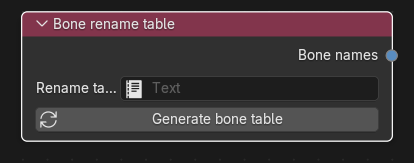
Category: Model settings. Node ID: SourceIOBoneRenameNode.
None.
| Socket | Type | Meaning |
|---|---|---|
| Bone names | Bone names socket | Link to Bone names on the Source 1 model output (single link). |
| Property | Meaning |
|---|---|
| Rename table | A Blender Text block. Required; the node reports an error when it is empty of assignment. Each line is Blender name = exported name. Blank lines and lines starting with # or // are ignored. |
| Generate bone table (button) | Fills the Text block (creating <node name> bones if none is set) with one name = name line for every bone of the rigs used by the connected model outputs, ready for you to edit the right-hand side. Existing renames are kept; entries for bones no longer found on the rigs are appended under "Not found on the connected rigs". Requires the node to be connected to a model output whose geometry has an armature. |
Example table:
# Blender bone name = exported bone name
Spine.001 = ValveBiped.Bip01_Spine1
Hand.L = ValveBiped.Bip01_L_Hand
The same table is applied to everything that names a bone:
- the exported skeleton and skin weights of the DMX/SMD meshes (and the direct-export skeleton);
- attachment and hitbox bone names written to the QC;
- bone names in the procedural-bones VRD (see Helper bone);
- bone names looked up and written in the SFM rig script (see SFM IK rig);
- the Import VRD operator, which matches VRD names through the table.
The preview manifest lists every rename whose names differ as Bone rename: <source> -> <target>. The rename is applied while exporting; it does not write $renamebone lines.
- Add a Bone rename table node and link Bone names to the model output.
- Make sure the output has a Geometry with an armature, then press Generate bone table.
- Edit the Text block's right-hand sides, then run Preview Source 1 export and check the
Bone rename:lines.
- A Blender bone can be listed only once; duplicates are an error. Exported names cannot be empty or contain quotes or line breaks.
- Lines with no
=or more than one=are rejected with the line number. - Bones not listed keep their Blender name.
- Names containing
.cannot be matched by studiomdl in procedural bones, so helper and control bones (and their parents) must be renamed to dot-free names if their Blender names contain dots. - The geometry caches used by Use export cache include the rename table, so editing it re-exports the meshes.
Back to Export Nodes.