Repository navigation
Export Nodes SourceIOPropBodygroupNode
Groups several mutually exclusive meshes into one $bodygroup block, so the model can switch between them in game or in a model viewer.
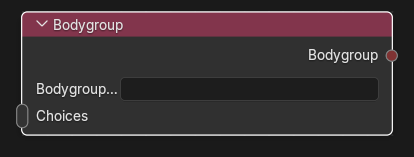
Category: Geometry. Node ID: SourceIOPropBodygroupNode.
| Socket | Type | Multi | Meaning |
|---|---|---|---|
| Choices | Object socket | yes | The selectable choices: Geometry nodes and/or Blank bodygroup choice nodes. The order of the links (top to bottom as drawn) is the order of the choices. At least one is required. |
| Socket | Type | Meaning |
|---|---|---|
| Bodygroup | Bodygroup socket | Link to Bodygroups on the Source 1 model output. |
| Property | Meaning |
|---|---|
| Bodygroup name | Name written in the QC ($bodygroup "name" { ... }). Required, single line, and unique among all bodygroup and model entry names. |
Resulting QC:
$bodygroup "headwear" {
    studio "hat.dmx"
    studio "helmet.dmx"
    blank
}
- Create a Geometry node for each variant (
hat,helmet), each with its own basename. - Add a Blank node if "nothing" should be selectable.
- Link the nodes to Choices; link Bodygroup to the model output's Bodygroups.
- Press Preview Source 1 export and check the
$bodygroupblock in the preview Text.
- Choices other than geometry or blank nodes are rejected ("wrong recipe type").
- A geometry that is used in a bodygroup is exported as its own mesh file; if a flex rule set targets its meshes and no
$modelentry uses it, the exporter writes a flex-only entry so that the bodygroup mesh carries the flex data too. - Bodygroup meshes can be LOD sources; the source of a LOD must belong to a model entry or a bodygroup.
- A bodygroup mesh does not drive vertex animations (they need a
$modelentry).
Back to Export Nodes.