Repository navigation
Export Nodes SourceIOTeethVMTNode
Builds a Teeth material (VMT) with base, detail and normal textures, surface flags, basic phong and UV transforms.
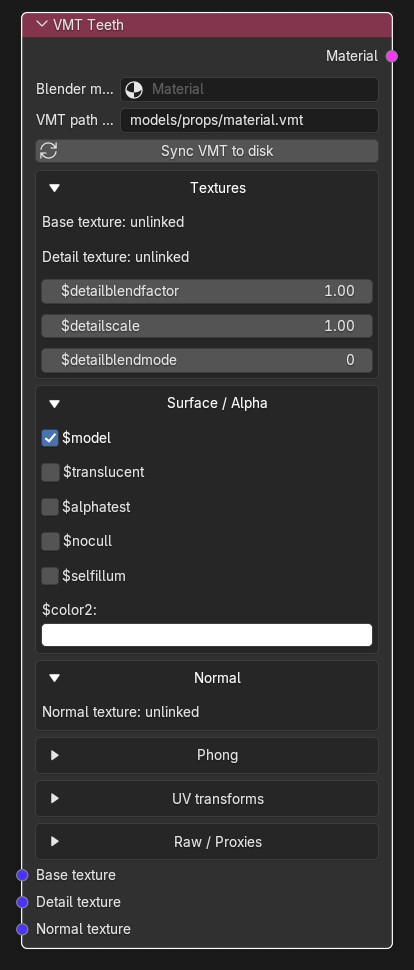
| Input | VMT parameter | Group | Purpose |
|---|---|---|---|
| Base texture | $basetexture |
Textures | Diffuse/albedo colour. Alpha is used by $translucent, $alphatest and, unless a mask is linked, by $selfillum. |
| Detail texture | $detail |
Textures | Secondary texture tiled over the base. Blended according to Detail blend mode, Detail blend factor and Detail scale. |
| Normal texture | $bumpmap |
Normal | Tangent-space normal map. Alpha can carry a specular/phong or envmap mask (see the PBR to Phong node). |
All inputs are VTF sockets (single link each, not multi-input) and are optional: an unconnected input simply omits its VMT parameter. Each one accepts the output of a VTF Output node. You can also drag a Texture socket straight onto one of these inputs; SourceIO then inserts a VTF Output node for you, named <vmt path without .vmt>_<suffix>.vtf (albedo for $basetexture, otherwise the parameter name without $) with Normal map (linear) enabled for $bumpmap/$normalmap. Any other link type is removed. At export, a linked input that does not resolve to a VTF recipe raises " must resolve to a VTF Output recipe".
| Output | Type | Description |
|---|---|---|
| Material | Material | The rendered VMT text plus every VTF it references. Connect it to the Materials multi-input of a Source 1 model output (many materials allowed), or to its Skin families input (SourceIO then inserts a Skin family node that lists this VMT's name). |
| Control | Meaning |
|---|---|
Blender material (mat) |
The Blender Material this VMT replaces. Required: the node raises "VMT requires a Blender Material binding" without it. Mesh slots that use this Blender Material are exported under this VMT's file name; a mesh slot whose Blender Material has no linked VMT node stops the export with "No linked VMT bound to ... slot". |
VMT path under materials (vmt_path) |
Output path of the .vmt, relative to the game's materials/ folder (default models/props/material.vmt). A leading materials/ and the .vmt extension are normalised; absolute paths, .., : and quotes are rejected. The file stem becomes the material name in the QC, and the folder is added to $cdmaterials automatically. |
| Sync VMT to disk (button) | Writes only this node's .vmt to the game root of every Source 1 model output the node feeds, without encoding textures (VTF paths are still referenced). Errors if the node is not connected to a model output. |
Each group below is a collapsible box in the node. Textures, Surface / Alpha, Normal and Shader-specific start expanded, the rest start collapsed. Collapsing a group also hides that group's unlinked texture inputs, so open the group to see and connect them; linked inputs always stay visible.
Shows the link state of the texture inputs plus the detail controls:
| Control | Meaning |
|---|---|
$detailblendfactor |
Detail blend factor (default 1). Written only when it is not 1. |
$detailscale |
Detail texture scale (default 1). Written only when it is not 1. |
$detailblendmode |
Integer detail blend mode (default 0, the engine default). Written only when it is not 0; the meaning of each mode is defined by the Source engine. |
| Control | Meaning |
|---|---|
$model |
Written as "$model" "1" when enabled (default on). Required for materials used on models. |
$translucent |
Written as 1 when enabled. Alpha-blended transparency from the base texture alpha, so the base VTF needs an alpha-capable format (DXT5, RGBA8888, ...). |
$alphatest |
Written as 1 when enabled; pixels are cut out by alpha. |
$alphatestreference |
Only shown while $alphatest is on (0-1, default 0.5). Alpha cut-off, written as $alphatestreference. |
$nocull |
Written as 1 when enabled: draw both faces of every polygon. |
$selfillum |
Written as 1 when enabled: the surface glows independent of lighting. Uses the Self-illumination mask if linked, otherwise the base alpha (engine behaviour). |
$color2 |
RGB tint (0-1). Written as $color2 [r g b] only when it differs from white. |
Shows the link state of the normal-related texture inputs; it has no value controls.
| Control | Meaning |
|---|---|
$phong |
Master switch, written as 1. The other controls of this group are only shown, and only written, while it is on. |
$phongboost |
Specular intensity multiplier (default 1). Written whenever $phong is on. |
$phongexponent |
Constant shininess exponent (default 5). Written whenever $phong is on. |
$phongtint |
RGB specular tint (default white). Written as $phongtint [r g b] only when it differs from white. |
One toggle per texture slot; when a toggle is on, scale, rotation and translation appear and the transform is written as center .5 .5 scale <sx> <sy> rotate <rotation> translate <tx> <ty> (the rotation value is written unchanged; VMT rotation is in degrees). Defaults: scale (1, 1), rotation 0, translation (0, 0).
| Toggle | Applies to |
|---|---|
$basetexturetransform |
Base texture |
$bumptransform |
Normal map |
$detailtexturetransform |
Detail texture |
| Control | Meaning |
|---|---|
Ordered raw VMT KV entries (raw_parameters) |
A Blender Text datablock whose content is KeyValues entries copied into the shader block verbatim and in order (duplicates and nested blocks are kept). Use it for any VMT parameter the node has no control for, e.g. "$surfaceprop" "metal". Parse errors abort the export; an entry that repeats a generated parameter (including a texture key of a linked input) is rejected as a conflict. |
Proxy KV entries (proxy_parameters) |
A Blender Text datablock holding entries for the Proxies block. Each entry must itself be a named KeyValues block (for example AnimatedTexture { ... }), otherwise the export fails with "Each Proxies entry must be a named KeyValues block". |
When a Source 1 model output builds the graph, this node produces one VMT: a "<shader>" block holding, in order, the texture parameters of linked inputs, then $model, $translucent, $alphatest, $nocull, $selfillum, $phong (those that are enabled), $alphatestreference, phong values, $envmap, $color2, the other typed parameters (detail, tint, UV transforms, shader-specific values), your raw entries and finally a Proxies block. The shader name is written in lower case. Parameters equal to their default are skipped so the file stays minimal. Every linked VTF is encoded by its VTF Output node and written to materials/<vtf path>.vtf next to the VMT under the model output's game root; two textures that map to the same path with different bytes, or two materials with the same VMT path and different text, abort the export.
Shader behaviour. Teeth is the Source character shader for teeth/mouth interiors. This node writes the shader name Teeth and exposes the texture, surface, phong and UV parameters; the shader-specific lighting parameters of the engine (for example the mouth-forward vector) are not modelled and must go through Raw / Proxies.
Texture and colour-space behaviour. No colour conversion by this node; VTF Outputs write pixels unchanged by default. The normal map should come from a VTF Output with Normal map (linear) ticked.
- Connect the teeth albedo to Base texture, optionally detail and normal textures.
- If you want specular highlights, open Phong, enable
$phongand tune boost/exponent. - Choose the Blender material of the teeth mesh and the VMT path, connect Material to the model output and export.
- Phong here is the basic set (
$phong,$phongboost,$phongexponent,$phongtint); there is no exponent texture, Fresnel or rim light on this node, and$phongexponentis always written when$phongis on. - The shader name is fixed to
Teeth. - Not every engine branch ships a
Teethshader.