Repository navigation
Export Nodes SourceIOPropLodNode
Replaces one mesh of the model with a lighter mesh at a given camera distance ($lod), or with a shadow-casting replacement ($shadowlod).
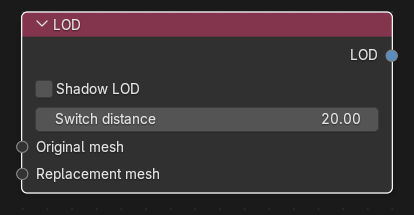
Category: Geometry. Node ID: SourceIOPropLodNode.
| Socket | Type | Multi | Meaning |
|---|---|---|---|
| Original mesh | Object socket | no | Geometry being replaced. Required. It must be the geometry of a Model entry or of a Bodygroup choice. |
| Replacement mesh | Object socket | no | The lower-detail geometry. Required. It uses the same armature as the original. |
Both sockets take Geometry nodes.
| Socket | Type | Meaning |
|---|---|---|
| LOD | LOD socket | Link to LODs on the Source 1 model output. |
| Property | Meaning |
|---|---|
| Shadow LOD | Make this a $shadowlod replacement instead of a distance level. |
| Switch distance | Distance for the $lod level (default 20, minimum 0). Hidden while Shadow LOD is on. |
Resulting QC:
$lod 20 {
    replacemodel "body.dmx" "body_lod1.dmx"
}
$shadowlod
{
    replacemodel "body.dmx" "body_shadow.dmx"
}
- Build
body(Geometry → Model entry → output) as usual. - Create a second Geometry node
body_lod1for the decimated mesh that uses the same armature. - Link
bodyto Original mesh andbody_lod1to Replacement mesh, set Switch distance to20, and link LOD to the output's LODs. - Add more LOD nodes with larger distances for further levels. Several LOD nodes with the same distance are written inside one
$lodblock.
- LOD levels are sorted by distance; shadow LODs are written after the distance levels. The link order only decides the order of replacements inside one level.
- A given source can be replaced only once per level (same distance, or once for the shadow level).
- The rig of the replacement must match the rig of the source ("LOD replacement rig must match its source geometry rig").
- A source that is not part of any model entry or bodygroup is rejected ("LOD source must belong to a model or bodygroup entry").
- LOD replacement geometry takes no flex shapes in direct export.
Back to Export Nodes.