Repository navigation
Export Nodes SourceIOTextureMathNode
Per-pixel arithmetic between two textures, two channels, or a texture/channel and a constant.
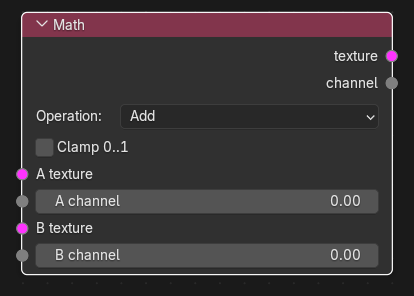
| Input | Type | Description |
|---|---|---|
| A texture | Texture | Operand A as RGB/RGBA texture. |
| A channel | Channel | Operand A as a single channel. |
| B texture | Texture | Operand B as a texture. |
| B channel | Channel | Operand B as a single channel. If neither B input is linked, the number shown on this socket (default 0.0) is used as a constant for every pixel. |
Each socket takes one link. For each operand link either the texture or the channel socket (the other one is hidden once one is linked). A is required: there is no constant for A.
| Output | Type | Description |
|---|---|---|
| texture | Texture | Result when at least one operand is a texture. |
| channel | Channel | Result when both operands are channels (or only A is a channel). The unused output is hidden. |
| Control | Meaning |
|---|---|
| Operation |
Add (default), Subtract (A - B), Multiply, Divide (A / max(B, 1e-6)), Power (max(A, 0) ^ B), Min, Max, Abs ( |
| Factor | Only for Lerp (0-1, default 0.5): result = A * (1 - factor) + B * factor. |
| Clamp 0..1 | Clamp the result (default off). |
- A and B are combined pixel by pixel; both must have the same width and height (otherwise output unavailable).
- A channel combined with a texture is applied to every component of the texture, including alpha. A constant B also hits RGB and alpha.
- RGB combined with RGBA: the RGB side receives an opaque alpha first, so the result has four channels.
- If A is a channel and the operation is
Abs,NegateorInvertwhile B is a texture, A is expanded to B's shape, so the output is a texture. - No colour conversion is performed: operations act on the stored numbers.
Texture operators are evaluated while the export graph is resolved (and by the Texture Preview node): upstream image sources are decoded to float arrays, the operator runs on whole images, and the result is passed on without being written anywhere. If an operator cannot produce a result (a required input is unlinked, sizes differ, wrong data type) the export stops with ": output is unavailable".
-
Multiply AO into albedo: albedo Texture -> A texture, AO Channel (from Split Channels) -> B channel,
Multiply-> VTF Output. -
Tint a texture by a constant: albedo -> A texture, type 0.8 on B channel,
Multiply. -
Invert a mask: mask Channel -> A channel,
Invert. -
Blend two masks:
Lerpwith Factor 0.5.
- Unlinked A inputs make the node produce nothing.
- Multiplying a texture by a constant also darkens its alpha; use Combine Channels if alpha must be preserved.
- Results may leave 0-1 unless Clamp 0..1 is on (the VTF Output clamps at export).