Repository navigation
Export Nodes SourceIOPropIdleNode
Defines the model's single $sequence (usually idle). Source models need at least one sequence; this node controls its name, frame rate and the mesh it is built from.
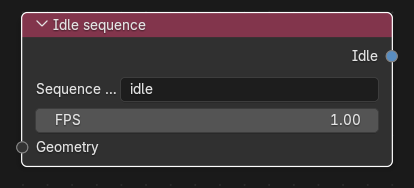
Category: Model settings. Node ID: SourceIOPropIdleNode.
| Socket | Type | Multi | Meaning |
|---|---|---|---|
| Geometry | Object socket | no | Optional Geometry node whose exported mesh file is used as the sequence's reference. When not linked, the geometry of the first entry in Models is used. |
| Socket | Type | Meaning |
|---|---|---|
| Idle | Idle socket | Link to Idle on the Source 1 model output (single link). |
| Property | Meaning |
|---|---|
| Sequence name | Name of the $sequence (default idle). Required, single line. |
| FPS | Frames per second written after fps (default 1, minimum 0.001). |
Resulting QC:
$sequence "idle" "crate_ref.dmx" fps 1
- Add an Idle sequence node; keep Sequence name
idleand FPS1. - Optionally link a Geometry node when the reference mesh for the sequence should differ from the first
$modelmesh. - Link Idle to the output's Idle socket.
You can omit the node: with Simple idle sequence enabled on the model output, a default idle sequence at 1 fps using the first model entry's geometry is written automatically.
- A linked Idle node always wins over the output's Simple idle sequence option. If no node is linked and the option is off, the QC has no idle sequence.
- The linked geometry is exported as a mesh file of its own if no other node uses it.
- Vertex animation clips that are marked
sequenceon a Geometry node become additional$sequencelines; their names must differ from the idle sequence name (case-insensitive). - Direct export builds the same sequence from the captured geometry.
Back to Export Nodes.